EF Core Project: SQL Server and Testcontainers
On this page
Learning Objective
Replace the in-memory store with an EF Core and SQL Server implementation, apply migrations and a least-privilege runtime login, enforce ownership in every query, and test against a real SQL Server in a container instead of an in-memory fake.
Concept Explanation
This project takes the Notes API from Day 20 and gives it a real database, using everything from Phase 4. You will add a data layer with a NoteEntity mapped to a table, a rowversion concurrency token, and an OwnerId column that is finally used: every query will filter by the owner, so one user can never read or change another user's notes. The public interface of the API barely changes, which is the payoff of having hidden storage behind INoteStore and separated DTOs from entities in earlier phases. Most of the work is in the data layer, the migration, and the tests.
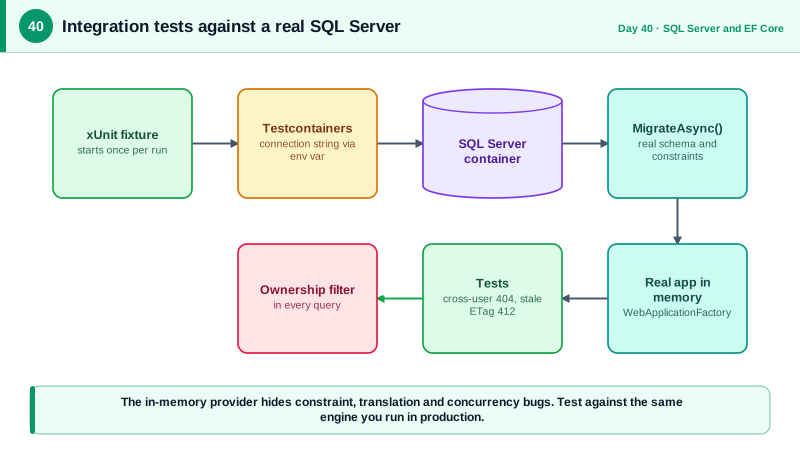
Testing deserves the most care, because database code is where in-memory fakes mislead. The EF Core in-memory provider does not enforce constraints, does not run transactions, does not translate LINQ to SQL, and behaves differently around concurrency, so tests can pass against it while the same code fails against SQL Server. Microsoft's own documentation discourages using it to test relational behavior. Testcontainers solves this by starting a real SQL Server in a Docker container for the test run, throwing it away afterward. The tests then exercise real constraints, real SQL translation, real rowversion behavior, and real concurrency, at the cost of a few seconds of startup that a shared fixture pays once.
Wire the pieces in a specific order. First, the entity, its configuration, and the DbContext, with migrations kept in the data project. Second, a service or store implementation that receives the current user's identity, which comes from the authenticated principal once Phase 5 lands and from a stub until then, and applies it to every query. Third, a test fixture that starts the container, applies migrations, sets the connection string through an environment variable so the application picks it up when it builds its configuration, and creates the WebApplicationFactory. Finally, write tests that would have caught real bugs: ownership isolation, optimistic concurrency conflicts, constraint violations, and no N+1 queries on the list endpoint.
Do not forget operational settings. The connection string lives in user secrets locally and in the environment elsewhere. The runtime login has only data permissions, while migrations run with a separate, more privileged one, as Day 34 described. A docker compose file gives every developer the same local database with one command. These small pieces are what make the project repeatable by a teammate or a build server, which is the real definition of done.
| Piece | Choice | Reason |
|---|---|---|
| Storage | EF Core with SQL Server | Real constraints, transactions and concurrency |
| Ownership | OwnerId on every note, filter in every query | Prevents cross-user access at the data layer |
| Concurrency | Rowversion mapped as ETag | Detect lost updates, return 412 |
| Test database | Testcontainers MsSql | Real engine, disposable, same in CI |
| Runtime account | Limited data-only login | Injection or leak cannot alter the schema |
| Local setup | docker compose | One command for every developer |
Worked Example: The Data Layer, the Fixture and the Tests
The code shows the store, the compose file, the test fixture, and three tests that cover ownership, concurrency, and query count.
public sealed class SqlNoteStore(AppDb db) : INoteStore
{
    public async Task<Page<NoteEntity>> ListAsync(string ownerId, string? cursor, int size, CancellationToken ct)
    {
        size = Math.Clamp(size, 1, 100);
        var query = db.Notes.AsNoTracking().Where(n => n.OwnerId == ownerId);     // ownership in the query
        // ... keyset paging from Day 24 ...
        return await Paging.ToPageAsync(query, cursor, size, ct);
    }

    public Task<NoteEntity?> FindAsync(string ownerId, Guid id, CancellationToken ct) =>
        db.Notes.FirstOrDefaultAsync(n => n.Id == id && n.OwnerId == ownerId, ct);   // not found for other users' notes

    public async Task<NoteEntity> AddAsync(string ownerId, string title, string? body, CancellationToken ct)
    {
        var note = new NoteEntity { Id = Guid.CreateVersion7(), OwnerId = ownerId, Title = title, Body = body };
        db.Notes.Add(note);
        await db.SaveChangesAsync(ct);
        return note;
    }
}# docker-compose.yml: the same database for every developer
services:
sql:
image: mcr.microsoft.com/mssql/server:2022-latest
environment:
ACCEPT_EULA: "Y"
MSSQL_SA_PASSWORD: ${SQL_DEV_PASSWORD:?set SQL_DEV_PASSWORD in your shell or .env (not committed)}
ports:
- "127.0.0.1:1433:1433"
volumes:
- sqldata:/var/opt/mssql
volumes:
sqldata:// Test fixture: one real SQL Server per test run, shared by all tests in the collection.
public sealed class SqlServerFixture : IAsyncLifetime
{
private readonly MsSqlContainer _sql = new MsSqlBuilder("mcr.microsoft.com/mssql/server:2022-latest").Build(); // Testcontainers.MsSql package
public WebApplicationFactory<Program> Factory { get; private set; } = null!;
public async Task InitializeAsync()
{
await _sql.StartAsync();
// Environment variables are read when the app builds its configuration.
Environment.SetEnvironmentVariable("ConnectionStrings__Default", _sql.GetConnectionString());
Factory = new WebApplicationFactory<Program>();
using var scope = Factory.Services.CreateScope();
await scope.ServiceProvider.GetRequiredService<AppDb>().Database.MigrateAsync();
}
public async Task DisposeAsync()
{
await Factory.DisposeAsync();
await _sql.DisposeAsync();
}
}
[CollectionDefinition("sql")] public class SqlCollection : ICollectionFixture<SqlServerFixture>;
[Collection("sql")]
public class NotesPersistenceTests(SqlServerFixture fx)
{
private HttpClient ClientFor(string user)
{
var c = fx.Factory.CreateClient();
c.DefaultRequestHeaders.Add("X-Test-User", user); // read by a test-only auth handler registered in the factory; never ship it
return c;
}
[Fact]
public async Task Users_cannot_read_each_others_notes()
{
var alice = ClientFor("alice"); var bob = ClientFor("bob");
var created = await alice.PostAsJsonAsync("/api/notes", new { title = "private" });
var location = created.Headers.Location!;
Assert.Equal(HttpStatusCode.OK, (await alice.GetAsync(location)).StatusCode);
Assert.Equal(HttpStatusCode.NotFound, (await bob.GetAsync(location)).StatusCode); // 404, not 403
}
[Fact]
public async Task Stale_etag_returns_412()
{
var client = ClientFor("carol");
var created = await client.PostAsJsonAsync("/api/notes", new { title = "v1" });
var first = await client.GetAsync(created.Headers.Location!);
var etag = first.Headers.ETag!.ToString();
var ok = await Put(client, created.Headers.Location!, etag, "v2");
Assert.Equal(HttpStatusCode.OK, ok.StatusCode);
var stale = await Put(client, created.Headers.Location!, etag, "v3"); // same, now outdated, ETag
Assert.Equal(HttpStatusCode.PreconditionFailed, stale.StatusCode);
}
[Fact]
public async Task Title_longer_than_the_column_is_rejected_by_validation_not_the_database()
{
var response = await ClientFor("dave").PostAsJsonAsync("/api/notes", new { title = new string('x', 201) });
Assert.Equal(HttpStatusCode.BadRequest, response.StatusCode); // API layer catches it first
}
private static Task<HttpResponseMessage> Put(HttpClient c, Uri uri, string etag, string title)
{
var req = new HttpRequestMessage(HttpMethod.Put, uri) { Content = JsonContent.Create(new { title }) };
req.Headers.TryAddWithoutValidation("If-Match", etag);
return c.SendAsync(req);
}
}Extend the suite with a test that creates fifty notes and asserts the list endpoint issues a constant number of SQL commands, using a command interceptor to count them, and a test that proves a note cannot be created with a null title even if validation is bypassed, because the column is NOT NULL. Together these prove the data layer behaves under the real engine's rules.
Real-World Examples
- Testcontainers began as a Java library in 2015 that starts throwaway Docker containers for integration tests, and has since spread to .NET, Go, Node.js, Python, and other languages. It has become a common way to test against real databases, message brokers, and caches with the same containers used in production environments.
- The EF Core documentation includes a testing guidance page that explains why the in-memory provider is not a substitute for a real database: it lacks relational behaviors such as constraints, transactions, and SQL translation, so tests can succeed while production code fails. The guidance recommends testing against the same database system used in production, which containers make practical.
Review Questions & Answers
Filtering by owner inside the query means a note belonging to someone else simply does not exist from the caller's point of view. Returning 404 avoids confirming that the identifier is valid, which would help an attacker enumerate records. The ownership check is part of the data access, so it cannot be forgotten by an individual endpoint.
It exercises the real engine: constraints reject invalid rows, LINQ is translated to actual SQL and can fail to translate, transactions and isolation behave as in production, and rowversion tokens detect conflicts. The in-memory provider implements none of that faithfully, so it can hide bugs that only appear against SQL Server.
Happy-path tests pass even when security and concurrency protections are absent, so they cannot detect regressions in exactly the areas where failures are most damaging. Tests that assert another user gets 404 and a stale version gets 412 pin down those protections, so removing an ownership filter or a concurrency token immediately turns the build red.
The application reads configuration when it builds its host, and environment variables are one of the sources it loads by default, so a value set before the factory is created is picked up reliably. Overriding configuration later inside the factory can happen after services have already read the old value, which leads to tests unexpectedly connecting to the wrong database.