React Forms: Show ASP.NET Core ProblemDetails Errors
On this page
Learning Objective
Build accessible forms with React Hook Form and a Zod resolver, share validation rules with the server, map ASP.NET Core validation problem responses onto individual fields, prevent duplicate submissions, and handle sensitive inputs safely.
Concept Explanation
A form is where the frontend and backend contracts meet users. The client's job is fast, friendly feedback; the server's job is the authoritative decision. Both should agree on the rules, so a user is not told a value is fine only to have the server reject it. The practical way to keep them aligned is to derive client rules from the same source as server rules: the OpenAPI document exposes constraints such as maxLength and required, and Zod schemas can be generated from it or hand-written to match the DataAnnotations. When they still disagree, and eventually they will, the server response must be displayable, which is what this lesson sets up.
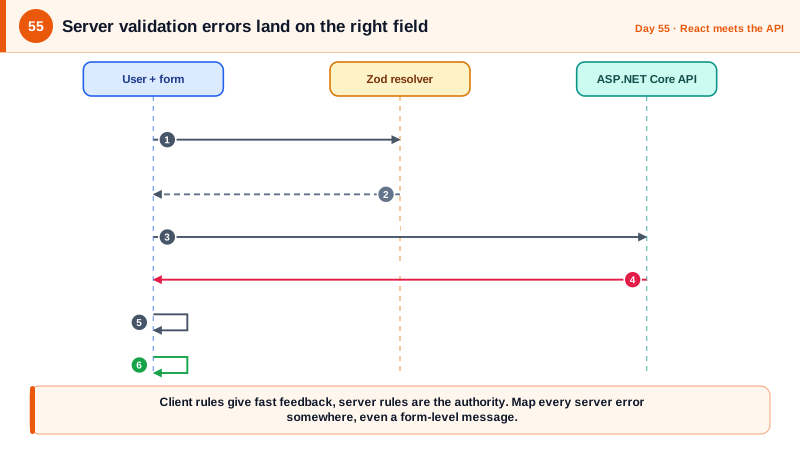
React Hook Form manages form state with uncontrolled inputs for performance, and its Zod resolver runs your schema on submit or on change and delivers errors keyed by field name. That gives you instant client validation for free. The other half is server-side validation failures. ASP.NET Core returns them as a 400 with a ValidationProblemDetails body whose errors property maps each field to a list of messages. Your submit handler catches that response, and for each entry calls setError on the matching field, so the message appears beside the input exactly as a client error would. A small wrinkle: depending on framework version and configuration, error keys may arrive in PascalCase, such as Title, while your form fields are camelCase, so normalize the key before matching, and route unmatched keys to a form-level message rather than dropping them.
Submissions need protection against both accidents and abuse. Disable the submit button while the request is in flight and ignore re-entry, because double clicks create duplicates. For operations that must not repeat, such as payments or orders, also send an idempotency key as Day 22 described, so a retry after a timeout is safe. Avoid leaking information through validation messages themselves: a sign-up form that says this email is already registered enables account enumeration, which is why sensitive flows respond generically and continue by email. On the client side, never log form values, especially passwords and tokens, to the console or an error tracker, and set the right autocomplete attributes so browsers and password managers work correctly.
Accessibility is part of correctness here, not a bonus. Error text must be actual text near the field, associated with the input through aria-describedby, and the invalid state exposed with aria-invalid. On a failed submit, move focus to the first invalid field or to an error summary so keyboard and screen reader users know something happened. This matches the accessibility standard requirement that errors be identified and described in text. A form that is accessible also tends to be more robust for automated testing, since tests can locate fields and messages by their labels instead of by fragile selectors.
| Concern | Technique | Why |
|---|---|---|
| Client validation | Zod schema with the RHF resolver | Instant feedback, one source of truth |
| Server errors | Map ProblemDetails errors to setError per field | Same presentation as client errors |
| Key mismatch | Normalize PascalCase to camelCase | ASP.NET may send keys in either style |
| Duplicate submits | Disable while pending, idempotency key for critical actions | Prevent double creation |
| Sensitive fields | Correct autocomplete, no logging of values | Password managers work, no leakage |
| Accessibility | Labels, aria-invalid, aria-describedby, focus on error | Errors identified and reachable by everyone |
Worked Example: A Note Form That Shows Both Client and Server Errors
The component defines the schema, submits through TanStack Query, and maps server errors to fields. A helper does the key normalization, and the server side is shown briefly for context.
// src/features/notes/NoteForm.tsx
const FormSchema = z.object({
  title: z.string().trim().min(1, 'A title is required').max(200, 'Titles are limited to 200 characters'),
  body: z.string().max(10_000, 'Notes are limited to 10,000 characters').optional(),
});
type FormValues = z.infer<typeof FormSchema>;

const camel = (s: string) => s.charAt(0).toLowerCase() + s.slice(1);

function applyServerErrors(err: unknown, setError: UseFormSetError<FormValues>) {
  if (!(err instanceof ApiError) || err.status !== 400 || !err.problem.errors) {
    setError('root', { message: 'Something went wrong. Please try again.' });        // never show raw server text for 500s
    return;
  }
  for (const [key, messages] of Object.entries(err.problem.errors)) {
    const field = camel(key) as keyof FormValues;
    if (field in FormSchema.shape) setError(field, { type: 'server', message: messages[0] });
    else setError('root', { message: messages[0] });                                  // unmatched keys still surface somewhere
  }
}

export function NoteForm({ onDone }: { onDone: (note: Note) => void }) {
  const { register, handleSubmit, setError, formState: { errors, isSubmitting } } = useForm<FormValues>({
    resolver: zodResolver(FormSchema),
    shouldFocusError: true,                                                            // moves focus to the first invalid field
  });
  const create = useCreateNote();

  const submit = handleSubmit(async (values) => {
    try {
      onDone(await create.mutateAsync(values));
    } catch (err) {
      applyServerErrors(err, setError);
    }
  });

  return (
    <form onSubmit={submit} noValidate>
      {errors.root && <p role="alert">{errors.root.message}</p>}

      <label htmlFor="title">Title</label>
      <input id="title" autoComplete="off" aria-invalid={!!errors.title}
             aria-describedby={errors.title ? 'title-error' : undefined} {...register('title')} />
      {errors.title && <p id="title-error" role="alert">{errors.title.message}</p>}

      <label htmlFor="body">Body</label>
      <textarea id="body" aria-invalid={!!errors.body}
                aria-describedby={errors.body ? 'body-error' : undefined} {...register('body')} />
      {errors.body && <p id="body-error" role="alert">{errors.body.message}</p>}

      <button type="submit" disabled={isSubmitting}>Save note</button>       {/* re-entry blocked while pending */}
    </form>
  );
}// Server: the authoritative rules. The client schema mirrors these limits.
public record CreateNoteRequest(
[property: Required(ErrorMessage = "A title is required"), StringLength(200)] string Title,
[property: StringLength(10_000)] string? Body);
// An invalid request returns 400:
// { "type": "...", "title": "One or more validation errors occurred.", "status": 400,
// "errors": { "Title": ["A title is required"] }, "traceId": "00-..." }// A test that proves server errors land on the right field.
it('shows a server validation message next to the title field', async () => {
server.use(http.post('/api/notes', () =>
HttpResponse.json({ status: 400, errors: { Title: ['That title is not allowed'] } }, { status: 400 })));
render(<NoteForm onDone={vi.fn()} />);
await userEvent.type(screen.getByLabelText('Title'), 'Forbidden');
await userEvent.click(screen.getByRole('button', { name: 'Save note' }));
expect(await screen.findByText('That title is not allowed')).toBeVisible();
expect(screen.getByLabelText('Title')).toHaveAttribute('aria-invalid', 'true');
});The test uses the mock service worker from Phase 8 to simulate the response. Notice that the test locates the field by its label, which works only because the form is accessible, a useful side effect of doing it properly.
Real-World Examples
- The Web Content Accessibility Guidelines include success criterion 3.3.1, Error Identification, which requires that an error be identified and described to the user in text when an input error is detected. Forms that only change a border color, or that do not associate messages with inputs, fail this criterion for screen reader users, which is why errors need real text and aria associations.
- The UK government's GOV.UK Design System documents an error summary pattern: on failed submission, focus moves to a summary at the top of the page listing every problem with links to the fields, and each field also shows its own message. The pattern, derived from extensive usability testing, is widely copied because it makes multi-field server errors manageable for everyone.
Review Questions & Answers
The two sets of rules can disagree, the server may enforce rules the client cannot know, such as uniqueness or business constraints, and the server is the authority. When the server rejects a submission, the user needs to see why beside the relevant field. Without mapping those errors, users would see a generic failure and be unable to fix the problem.
The keys can arrive in PascalCase, such as Title, while form fields are camelCase, so a direct lookup fails and the message is lost. Normalizing the first character, and sending unmatched keys to a form-level message, ensures every error reaches the user instead of being silently dropped.
It prevents accidental double submissions from double clicks that would create duplicate records. It is not enough for critical operations such as payments, because network retries, multiple tabs, and scripted clients can still repeat a request. Those need a server-enforced idempotency key so the effect happens once regardless of repetition.
The error is real text near the field, linked to the input with aria-describedby, the input is marked with aria-invalid, and focus moves to the first invalid field or an error summary after a failed submit. That way the error is announced, discoverable, and reachable by keyboard, instead of communicated only by color.