SQL Server Indexes and Execution Plans
On this page
Learning Objective
Explain how clustered and nonclustered indexes work, read an execution plan to distinguish seeks from scans, design composite and covering indexes, write sargable predicates, and use SQL Server's tools to find slow queries without over-indexing.
Concept Explanation
An index is a sorted structure that lets the database find rows without reading the whole table, the same way the index at the back of a book beats scanning every page. In SQL Server the table itself is usually stored as a clustered index: the rows are physically ordered by the clustering key, typically the primary key, so there is only one per table. Nonclustered indexes are separate structures containing the indexed columns in sorted order plus a pointer to the row. A query that can use an index performs a seek, jumping straight to the matching range. A query that cannot performs a scan, reading everything. On a table of a million rows, the difference is milliseconds versus seconds, and under concurrent load it decides whether the service stays up.
Designing a useful index starts from the queries you actually run. For a composite index the order of columns matters: put equality predicates first and range or sort columns after, so the index can be seeked and already sorted for the ORDER BY. An index on ProjectId and Status serves queries filtering by project, or by project and status, but not by status alone. A covering index includes extra columns with INCLUDE so the query gets everything from the index without a key lookup, the extra step of fetching the full row from the clustered index for each match, which is expensive at scale. Selectivity matters too: an index on a column with two values, such as a bit, rarely helps unless combined with other columns or filtered.
Many slow queries fail to use an index because of how the predicate is written. A predicate is sargable, meaning it can use a seek, when the indexed column stands alone on one side of the comparison. Wrapping the column in a function, as in WHERE YEAR of CreatedAt equals 2026 or WHERE LOWER of Email equals a value, or comparing with a different data type that forces implicit conversion, makes SQL Server compute the expression for every row and scan. The fix is to rewrite the condition as a range on the bare column, such as CreatedAt greater than or equal to a start date and less than an end date, and to make sure parameter types match column types, for example nvarchar parameters against nvarchar columns.
Measure before and after. The actual execution plan, available in SSMS or the VS Code SQL tooling, shows the operators used, the estimated versus actual rows, and warnings for missing indexes or implicit conversions. SET STATISTICS IO ON reports logical reads per table, a stable measure of work. Query Store, introduced in SQL Server 2016, records query text, plans, and runtime statistics over time, so you can find the top consumers and spot regressions after a deployment. Treat the missing index suggestions in plans as hints, not orders, because indexes are not free: each one costs storage and slows every INSERT, UPDATE, and DELETE that touches its columns. For a public API this is also a security matter, since an unindexed query reachable by anyone is a cheap way to overload the database, which is another reason to bound page sizes and filters.
| Element | What it is | Guidance |
|---|---|---|
| Clustered index | Table rows ordered by the key | One per table, keep the key narrow and increasing |
| Nonclustered index | Separate sorted structure with row pointers | Create for frequent filters and joins |
| Seek versus scan | Jump to a range versus read everything | Aim for seeks on selective predicates |
| Composite index order | Equality columns first, then range or sort | Column order determines which queries benefit |
| Covering index with INCLUDE | Contains all needed columns | Avoids expensive key lookups |
| Sargable predicate | Bare column compared to a value | No functions or implicit conversions on the column |
Worked Example: A Slow Query, Its Plan and the Fix
The query below scans because of a function on the column. The corrected version can seek, and a covering index removes the key lookups. The commands show how to measure.
-- Measure work done, not just time.
SET STATISTICS IO ON;

-- SLOW: a function on the column forces a scan of every row.
SELECT Id, Title
FROM dbo.Tasks
WHERE YEAR(CreatedAt) = 2026 AND MONTH(CreatedAt) = 9;
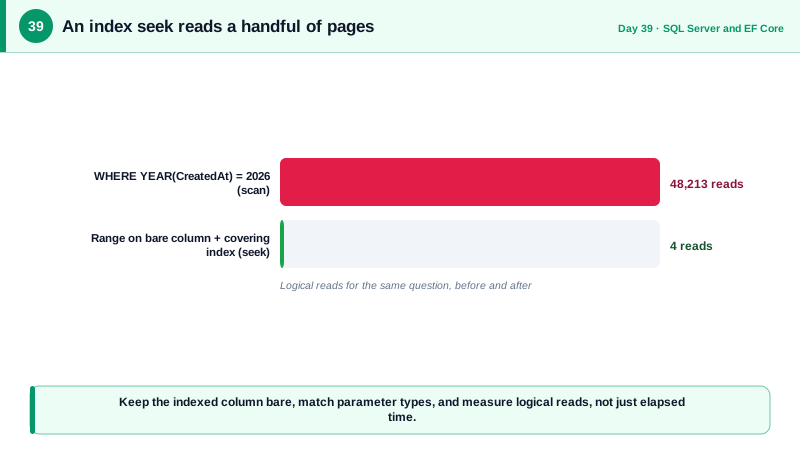
-- Table 'Tasks'. Scan count 1, logical reads 48213

-- SARGABLE: a half-open range on the bare column can use an index seek.
SELECT Id, Title
FROM dbo.Tasks
WHERE CreatedAt >= '2026-09-01' AND CreatedAt < '2026-10-01';

-- Index for the project board query: equality first, sort column next, include what is shown.
CREATE INDEX IX_Tasks_Project_Created
ON dbo.Tasks (ProjectId, CreatedAt DESC)
INCLUDE (Title, Status);

-- Now this is a seek, already sorted, with no key lookups:
SELECT TOP (25) Id, Title, Status
FROM dbo.Tasks
WHERE ProjectId = @projectId
ORDER BY CreatedAt DESC;
-- Table 'Tasks'. Scan count 1, logical reads 4

-- A wrong-type parameter forces an implicit conversion and can defeat the index:
-- WHERE Email = @email where @email is NVARCHAR(4000) and Email is VARCHAR(256) (check the plan warnings)-- Find the most expensive queries with Query Store (enable once per database).
ALTER DATABASE Notes SET QUERY_STORE = ON;
SELECT TOP 10
q.query_id, qt.query_sql_text,
SUM(rs.count_executions) AS executions,
SUM(rs.avg_duration * rs.count_executions)/1000 AS total_ms
FROM sys.query_store_query q
JOIN sys.query_store_query_text qt ON qt.query_text_id = q.query_text_id
JOIN sys.query_store_plan p ON p.query_id = q.query_id
JOIN sys.query_store_runtime_stats rs ON rs.plan_id = p.plan_id
GROUP BY q.query_id, qt.query_sql_text
ORDER BY total_ms DESC;// The same lesson in EF Core: the first predicate is not sargable, the second is.
var slow = db.Tasks.Where(t => t.CreatedAt.Year == 2026 && t.CreatedAt.Month == 9); // EF may translate to YEAR(), a scan
var start = new DateTimeOffset(2026, 9, 1, 0, 0, 0, TimeSpan.Zero);
var fast = db.Tasks.Where(t => t.CreatedAt >= start && t.CreatedAt < start.AddMonths(1)); // range on the bare columnThe drop from tens of thousands of logical reads to a handful is the kind of result to look for. Also drop indexes that Query Store and usage statistics show are never used, since each carries write cost.
Real-World Examples
- Markus Winand's free book and site Use The Index, Luke has taught SQL indexing to a generation of developers, and its core rules are exactly those in this lesson: keep the indexed column free of functions, put equality columns before range columns in composite indexes, and inspect plans instead of guessing. It applies to SQL Server as it does to other databases.
- Microsoft introduced Query Store in SQL Server 2016 after years of teams struggling to diagnose plan regressions after upgrades and deployments. It records plans and runtime metrics over time and can force a previous good plan, giving operators an evidence trail similar to what application performance monitoring provides for code.
Review Questions & Answers
The function is applied to the column for every row, so SQL Server cannot use the sorted order of an index on CreatedAt and must compute the expression across the whole table. Rewriting the condition as a range on the bare column, greater than or equal to the start and less than the end, lets the engine seek directly to the matching range.
When a nonclustered index finds matching rows but the query needs columns not stored in it, SQL Server must go to the clustered index for each match to fetch them, and that per-row lookup becomes costly for many rows. Adding those columns to the index with INCLUDE makes it covering, so the query is answered from the index alone.
The index is sorted by the first column, then the second within it, and so on, so it can only be seeked efficiently using a leftmost prefix. An index on ProjectId then CreatedAt supports filtering by project and sorting by date, but not filtering by date alone. Put equality-filtered columns first and range or ordering columns after.
Each index consumes storage and must be updated on every insert, update, and delete that touches its columns, so many indexes slow writes and increase locking and maintenance work. They also give the optimizer more choices. Indexes should be created for real, measured query patterns and removed when usage statistics show they are never used.