ASP.NET Core API Versioning Without Breaking React
On this page
Learning Objective
Distinguish breaking from non-breaking changes, choose a versioning scheme, implement versioned endpoints with Asp.Versioning, and manage deprecation and retirement, including the unique problem that old cached React bundles keep calling your API after you deploy.
Concept Explanation
Once an API has clients you do not control, its contract is a promise. Changes fall into two kinds. Non-breaking changes are additive: a new endpoint, a new optional field in a response, a new optional query parameter. Existing clients keep working. Breaking changes remove or rename a field, change a type, make an optional input required, change the meaning of a value, or tighten validation so previously valid requests fail. Clients built against the old contract then fail. The first discipline of evolution is to prefer additive changes and to write clients as tolerant readers that ignore fields they do not recognize, which React code does naturally when it destructures only what it needs.
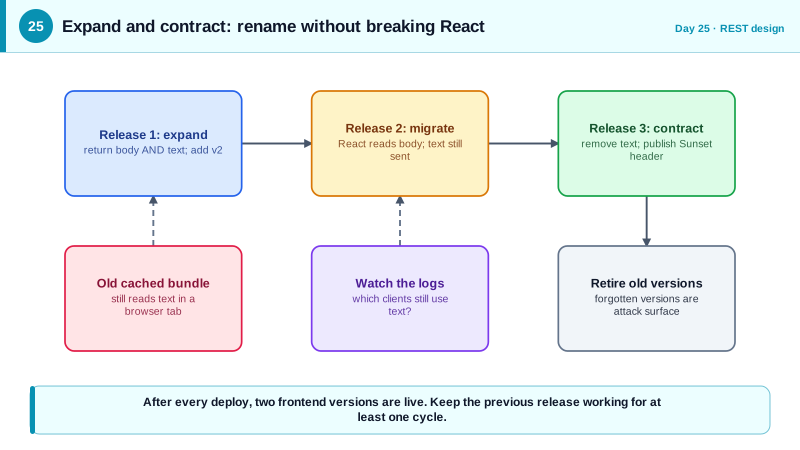
Web frontends have a twist that mobile and server clients share only partially. When you deploy a new version of the API and a new React bundle together, users who already have the site open, or who have a cached bundle or service worker, continue running the old JavaScript against the new API for hours or days. So even in a single-team, single-repo product, you have two versions in production at once. The rule follows: the API must remain compatible with the previous frontend release for at least one deployment cycle, and breaking changes need a multi-step rollout, adding the new form, moving clients across, then removing the old form.
When a breaking change is unavoidable, you introduce a new version. There are three common places to put it. A URL segment, such as /api/v2/notes, is the most visible and easiest to route, cache, and test in a browser. A header, such as a custom version header, keeps URLs clean but is harder to see and debug. A media type parameter follows the purist model but is the most awkward for tooling. URL versioning is the pragmatic default for most product APIs, and the Asp.Versioning.Http package supports all three, plus per-version OpenAPI documents and deprecation metadata.
Versions have a lifecycle, and the security part of it is retirement. Announce deprecation with response headers, in particular Sunset, defined in RFC 8594, which carries the date after which the endpoint will stop working, and by tracking who still calls old versions in your logs. Then actually turn them off. Old versions are a well-known source of vulnerabilities, because they are maintained less, may lack newer authorization checks and validation, and are forgotten. OWASP lists improper inventory management, including old API versions left running, as one of the top API risks, so retirement is a security task, not just housekeeping.
| Change | Breaking? | Safe way to do it |
|---|---|---|
| Add an optional response field | No | Just add it |
| Add a new endpoint | No | Just add it |
| Remove or rename a response field | Yes | Add the new field, deprecate the old, remove later |
| Change a field's type | Yes | New field or new version |
| Make an optional request field required | Yes | New version, or accept and default |
| Tighten validation | Potentially | Announce, monitor rejects, roll out gradually |
Worked Example: URL Versions, a Sunset Header and an Expand and Contract Rename
The registration sets up two versions and a deprecation for v1. The DTO section shows a field rename done over two releases without breaking the running React clients.
// dotnet add package Asp.Versioning.Http
builder.Services.AddApiVersioning(o =>
{
    o.DefaultApiVersion = new ApiVersion(1, 0);
    o.AssumeDefaultVersionWhenUnspecified = false;        // require clients to say which version
    o.ReportApiVersions = true;                           // adds api-supported-versions headers
    o.ApiVersionReader = new UrlSegmentApiVersionReader();
}).AddApiExplorer(o => o.GroupNameFormat = "'v'VVV");

var versions = app.NewApiVersionSet()
    .HasDeprecatedApiVersion(new ApiVersion(1, 0))
    .HasApiVersion(new ApiVersion(2, 0))
    .Build();

var api = app.MapGroup("/api/v{version:apiVersion}").WithApiVersionSet(versions);

api.MapGet("/notes/{id:int}", (int id) => /* v1 shape */ Results.Ok(new { id, text = "..." }))
   .MapToApiVersion(1, 0)
   .AddEndpointFilter(async (ctx, next) =>
   {
       ctx.HttpContext.Response.Headers["Sunset"] = "Wed, 31 Dec 2026 23:59:59 GMT";
       ctx.HttpContext.Response.Headers["Link"] = "</api/v2/notes>; rel=\"successor-version\"";
       return await next(ctx);
   });

api.MapGet("/notes/{id:int}", (int id) => /* v2 shape */ Results.Ok(new { id, title = "...", body = "..." }))
.MapToApiVersion(2, 0);// Expand and contract: renaming "text" to "body" without breaking cached React bundles.
// Release 1 (expand): return BOTH fields. Old clients read text, new clients read body.
public record NoteDtoV1(int Id, string Title, string Body, string Text); // Text mirrors Body
// Release 2: ship the React change that reads body only. Wait until logs show old bundles are gone.
// Release 3 (contract): remove the deprecated field.
public record NoteDto(int Id, string Title, string Body);The React side helps by treating unknown fields as harmless and by checking for the new field first with a fallback to the old one during the overlap. Monitoring how many requests still use the old shape, for instance through a custom log property, tells you when the contract step is safe.
Real-World Examples
- Stripe pins each account to the API version that was current when it first made a request, with dates as version names such as 2020-08-27, and lets developers upgrade deliberately or test a new version per request using a header. Backward-incompatible changes only ever ship in a new dated version, which is why integrations written years ago still work.
- GitHub introduced calendar-based REST API versions selected with an X-GitHub-Api-Version header, with 2022-11-28 as the first, and documents that breaking changes will only be released in new versions with advance notice and support for older versions for at least 24 months. It is a concrete example of a published deprecation policy that gives client developers a predictable timeline.
Review Questions & Answers
Clients read the field by name, so a client expecting the old name receives undefined or fails when the new response omits it. The safe path is to return both names for a period, migrate clients to the new one, and only then remove the old. Additive steps let old and new clients coexist during the transition.
After a deploy, users who already loaded the app keep running the previous JavaScript, and cached bundles or service workers can persist that for days. Those clients call the new API with the old contract expectations. The API therefore needs to support the previous frontend release until it has effectively disappeared from traffic.
It tells clients the date after which a resource is expected to stop responding, in a machine-readable form defined by RFC 8594. Tooling and monitoring can surface it before the deadline, and it makes the retirement schedule explicit in every response instead of relying on emails that get missed.
Old versions are rarely updated, so they may lack newer authorization checks, input validation, and rate limits, and they are often absent from documentation and monitoring. Attackers look specifically for them because they are the weakest path to the same data. Retiring versions on schedule removes that hidden attack surface.