Advanced EF Core: Bulk Operations, Locking, Deadlocks
On this page
Learning Objective
Use JSON columns, set-based updates and compiled queries where they fit, understand locking, snapshot isolation and deadlocks well enough to diagnose them, handle parameter sniffing with Query Store, and apply SQL Server security features such as row-level security and Always Encrypted appropriately.
Concept Explanation
Beyond the basics of Days 33 to 39, EF Core and SQL Server have features that solve specific problems well. JSON columns let an owned type or collection be stored as JSON in a single column, useful for a bag of flexible attributes that you read together and rarely filter on, while EF Core can still translate queries into JSON functions. Use them for genuinely document-shaped data, not to avoid designing tables. Set-based operations, ExecuteUpdate and ExecuteDelete, run a single UPDATE or DELETE on the server without loading entities, which is much faster for bulk changes and, as Day 112 showed, is the right tool for atomic conditional updates. For large imports, SqlBulkCopy or a table-valued parameter moves thousands of rows in one round trip. Compiled queries and split queries are tuning tools you apply after measuring.
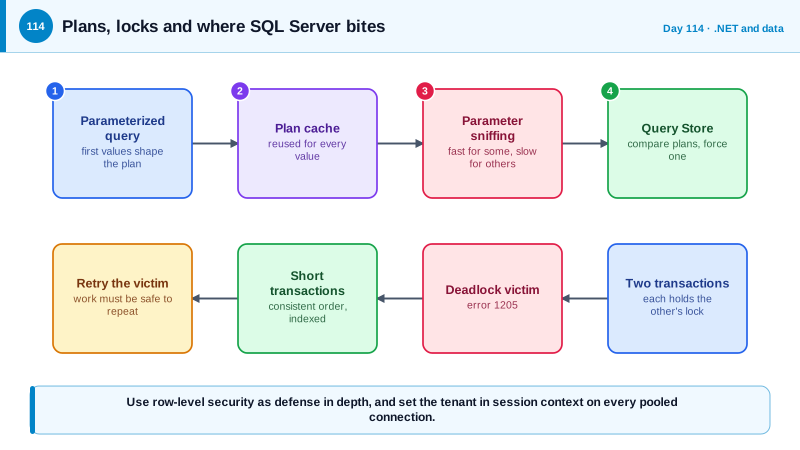
Locking and isolation explain most surprising concurrency behavior. In the default READ COMMITTED mode, readers take shared locks and writers take exclusive locks, so reads can block behind writes. With read committed snapshot isolation, readers see a consistent committed version using row versioning and do not block writers, which is why Azure SQL Database enables it by default and why many SQL Server installations turn it on. A deadlock occurs when two transactions each hold a lock the other needs, and SQL Server chooses one as the victim, failing it with error 1205. Deadlocks are not always a bug to eliminate entirely, but they must be handled: keep transactions short, access tables in a consistent order, ensure the queries have the right indexes so they lock fewer rows, and retry the victim. EF Core's SqlServerRetryingExecutionStrategy treats deadlock errors as transient and retries, which requires that the work you wrap in a transaction be safe to run again.
Query performance problems in production often involve parameter sniffing. SQL Server compiles a plan for a parameterized query using the parameter values of the first execution and reuses it, so a plan that suits a rare customer with a few rows can be disastrous for a large customer with millions. Query Store records queries, plans, and their runtime statistics, lets you see when a plan changed and performance regressed, and can force a previous good plan while you fix the root cause. Recognize the symptom: the same query is fast for some parameters and slow for others, or performance changes after a restart or statistics update. The usual remedies are better indexes, statistics maintenance, query rewrites, or targeted hints.
SQL Server also offers security features that complement application checks. Row-level security applies a predicate function so the database itself filters rows per user or tenant, which gives defense in depth for the multi-tenancy of Day 68, if you set the session context for the tenant on each connection and are careful about connection pooling. Always Encrypted keeps chosen columns encrypted so the database engine never sees the plaintext keys, protecting against a compromised database administrator or backup at the cost of query capabilities. Dynamic data masking only obscures values in query results for some users and is not a security boundary, since users can infer masked data with crafted queries. Ledger tables provide tamper-evident history for records that must be provable. Choose features by the threat they address, and remember they add operational complexity.
| Need | Feature | Caution |
|---|---|---|
| Flexible attributes read together | JSON columns with EF Core mapping | Do not use it to avoid modeling data you filter on |
| Bulk change without loading rows | ExecuteUpdate and ExecuteDelete | Bypass the change tracker, interceptors and entity events |
| Readers blocked by writers | Read committed snapshot isolation | Row versions use tempdb or the version store |
| Deadlock victim, error 1205 | Short transactions, consistent order, retry | Retried work must be safe to repeat |
| Plan regressions | Query Store, forced plans | A forced plan hides the root cause |
| Database-enforced tenant filter | Row-level security | Session context must be set on each pooled connection |
Worked Example: A JSON Column, a Set-Based Update, a Deadlock Retry and Row-Level Security
The C# shows EF configuration and safe retries. The T-SQL shows a row-level security policy.
// A JSON column for flexible, read-together attributes.
public sealed class Project
{
    public int Id { get; set; }
    public required string Name { get; set; }
    public ProjectSettings Settings { get; set; } = new();
}
public sealed class ProjectSettings
{
    public string Color { get; set; } = "blue";
    public List<string> Labels { get; set; } = new();
}
modelBuilder.Entity<Project>().OwnsOne(p => p.Settings, b => b.ToJson());

// Set-based work: one statement, no entities loaded.
await db.Tasks.Where(t => t.ProjectId == projectId && t.State == TaskState.Done && t.CompletedAt < cutoff)
    .ExecuteDeleteAsync(ct);

// Compiled query for a very hot path, after measuring.
private static readonly Func<AppDb, int, CancellationToken, Task<TaskDto?>> GetTask =
    EF.CompileAsyncQuery((AppDb db, int id, CancellationToken ct) =>
        db.Tasks.AsNoTracking().Where(t => t.Id == id).Select(t => new TaskDto(t.Id, t.Title)).FirstOrDefault());

// Retries for transient errors including deadlock victims (1205). The work inside must be safe to repeat.
builder.Services.AddDbContext<AppDb>(o => o.UseSqlServer(cs, sql => sql.EnableRetryOnFailure(maxRetryCount: 4)));

await db.Database.CreateExecutionStrategy().ExecuteAsync(async () =>
{
    await using var tx = await db.Database.BeginTransactionAsync(ct);
    // a short transaction, touching tables in the same order everywhere: Projects, then Tasks, then Audit
    await tx.CommitAsync(ct);
});-- Turn on row versioning so readers do not block writers (already the default in Azure SQL Database).
ALTER DATABASE AppDb SET READ_COMMITTED_SNAPSHOT ON;
-- Row-level security: the database itself filters by tenant, as defense in depth behind the API's own checks.
CREATE FUNCTION Security.fn_TenantFilter(@TenantId int)
RETURNS TABLE WITH SCHEMABINDING AS
RETURN SELECT 1 AS allowed
WHERE @TenantId = CAST(SESSION_CONTEXT(N'TenantId') AS int);
CREATE SECURITY POLICY Security.TenantPolicy
ADD FILTER PREDICATE Security.fn_TenantFilter(TenantId) ON dbo.Projects,
ADD BLOCK PREDICATE Security.fn_TenantFilter(TenantId) ON dbo.Projects AFTER INSERT
WITH (STATE = ON);
-- Query Store: find regressions and, as a stop-gap, force the previous good plan.
ALTER DATABASE AppDb SET QUERY_STORE = ON;
-- EXEC sp_query_store_force_plan @query_id = 42, @plan_id = 7; -- then fix the root cause and unforce// The tenant is set on the connection for every request, and reset when the connection returns to the pool.
public sealed class TenantConnectionInterceptor(ITenantContext tenant) : DbConnectionInterceptor
{
public override async Task ConnectionOpenedAsync(DbConnection conn, ConnectionEndEventData e, CancellationToken ct = default)
{
await using var cmd = conn.CreateCommand();
cmd.CommandText = "EXEC sp_set_session_context @key = N'TenantId', @value = @t;";
var p = cmd.CreateParameter(); p.ParameterName = "@t"; p.Value = tenant.TenantId; cmd.Parameters.Add(p);
await cmd.ExecuteNonQueryAsync(ct);
}
}The interceptor is the part that people forget: with connection pooling, a connection that keeps a previous request's session context would apply the wrong tenant, so the value must be set on every open, and the policy should fail closed when the context is missing.
Real-World Examples
- Microsoft made read committed snapshot isolation the default for Azure SQL Database, reflecting that blocking between readers and writers was among the most common causes of production slowness in on-premises SQL Server. Teams moving to the cloud service often see blocking problems disappear without changing code, while learning that long transactions still cause other issues.
- Parameter sniffing is one of the most widely documented SQL Server performance issues, which is why Microsoft added Query Store in SQL Server 2016 and later introduced intelligent query processing features that adapt plans. Operations teams commonly diagnose a sudden regression by comparing the plan before and after in Query Store.
Review Questions & Answers
A deadlock is two transactions each waiting for a lock the other holds, and SQL Server ends one as the victim with error 1205. The application should keep transactions short, touch tables in a consistent order, ensure queries are indexed, and retry the victim with logic that is safe to repeat.
Readers see the last committed version of a row from the version store instead of waiting for a writer's lock, so reads do not block writes and writes do not block reads. The cost is extra version storage and the need to account for reading slightly older committed data.
SQL Server builds and caches a plan based on the first parameter values it sees, and that plan can be bad for other values. It appears as a query that is fast for some parameters and slow for others, and Query Store shows the plans and lets you compare and force a good one while you fix the cause.
It only changes what appears in query results for certain users, and those users can often infer the real values with filters and other crafted queries. Real protection needs permissions, row-level security, or encryption of the data.