PWA and Offline-First Apps Without Leaking Data
On this page
Learning Objective
Explain how service workers, the Cache API and IndexedDB enable offline behavior, choose caching strategies per request type, queue offline writes safely with idempotency and conflict handling, and prevent cached data from outliving a session or leaking to another user.
Concept Explanation
A progressive web app is a web application that adds a manifest, which lets it be installed with an icon and its own window, and a service worker, which is a script that sits between the page and the network. The service worker can intercept requests, answer them from a cache, and keep working when the connection drops, and it enables features such as background sync and push notifications. It requires HTTPS, runs on its own thread, and controls the pages within its scope. The tooling most teams use is Workbox, which provides tested caching strategies and precaching of the build output, and the Vite PWA plugin, which wires it to the build.
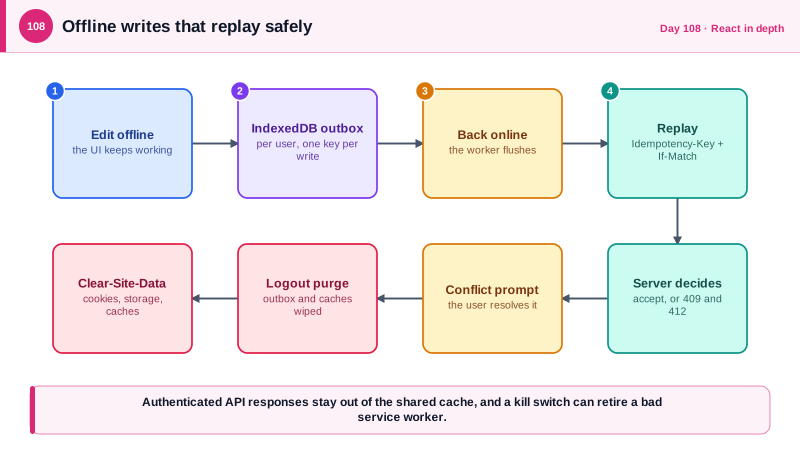
The design question is what to cache and how. Static assets with hashed file names can be precached and served from the cache first, which makes repeat loads instant. Navigation requests can use a network-first strategy with a cached shell as fallback. Data requests need more care: stale-while-revalidate serves cached data immediately and refreshes it in the background, which suits lists that can be slightly old, while data that must be current, such as balances or permissions, should always go to the network. For offline writes, the application stores intended changes in IndexedDB as a queue and replays them when the connection returns. Each queued request needs an idempotency key so a retry never duplicates the action, and the server needs a way to detect conflicts, which is why the ETag and If-Match mechanism from Day 26 matters: a replayed edit against a changed record should return a conflict for the user to resolve, not silently overwrite.
Offline features create security responsibilities that a purely online application does not have. A service worker or cache that stores authenticated API responses keeps that data on the device after logout, and the next person to use a shared computer could read it. So authenticated API traffic should generally bypass the shared cache or store data per user in IndexedDB that is deleted on logout, and the server can instruct the browser to clear site data on logout with the Clear-Site-Data response header. IndexedDB and the Cache API are not encrypted by the application, so decide consciously what may be stored on a lost or stolen device and keep sensitive fields out of it. Tokens follow the BFF rule from Day 46: the browser holds only a cookie, and the service worker must never store or log a token.
The service worker is also a persistent attack surface. If an attacker gets script running on your origin through cross-site scripting, they can register a malicious service worker, which then survives after the original vulnerability is fixed and can intercept every request. Hardening means a strict CSP, serving the worker only from your own origin, and having a kill switch: a way to ship a replacement worker that unregisters itself and clears caches, together with short cache lifetimes on the worker file itself. Also plan updates, since users may keep an old worker and old cached code for a long time, and the API must tolerate older clients.
| Request type | Strategy | Reason |
|---|---|---|
| Hashed static assets | Precache, cache first | The file name changes when the content does |
| HTML navigation | Network first, cached shell fallback | Users get new versions when online |
| Cacheable lists | Stale while revalidate, keyed per user | Fast display, background refresh |
| Sensitive or authoritative data | Network only | Must be current, must not persist on the device |
| Offline writes | IndexedDB queue with idempotency keys | Safe replay, no duplicates |
| Logout | Clear caches, IndexedDB and send Clear-Site-Data | Nothing outlives the session |
Worked Example: A Workbox Service Worker, an Offline Queue and a Logout Purge
The service worker precaches the build, applies strategies per route, and never caches authenticated API traffic in the shared cache. The queue stores writes with idempotency keys, and the server clears site data on logout.
// sw.ts (Workbox, built by the Vite PWA plugin)
import { precacheAndRoute, cleanupOutdatedCaches } from 'workbox-precaching';
import { registerRoute, NavigationRoute } from 'workbox-routing';
import { NetworkOnly, StaleWhileRevalidate } from 'workbox-strategies';

precacheAndRoute(self.__WB_MANIFEST);                        // hashed build assets
cleanupOutdatedCaches();

// Authenticated API traffic is never stored in the shared cache. The app keeps per-user data in IndexedDB itself.
registerRoute(({ url }) => url.pathname.startsWith('/api/'), new NetworkOnly());

// Public, non-personal images can use stale-while-revalidate.
registerRoute(({ request, url }) => request.destination === 'image' && url.pathname.startsWith('/public-img/'),
  new StaleWhileRevalidate({ cacheName: 'public-images' }));

// Kill switch: shipping this worker version unregisters everything.
self.addEventListener('message', async (e) => {
  if (e.data === 'KILL') { await self.registration.unregister(); (await caches.keys()).forEach((k) => caches.delete(k)); }
});// offlineQueue.ts: writes made offline wait in IndexedDB, keyed to the signed-in user.
import { openDB } from 'idb';
const dbp = openDB('app', 1, { upgrade(db) { db.createObjectStore('outbox', { keyPath: 'id' }); } });
export async function enqueue(userId: string, req: { url: string; method: string; body?: unknown; etag?: string }) {
const item = { id: crypto.randomUUID(), userId, ...req, createdAt: Date.now() }; // id doubles as the Idempotency-Key
await (await dbp).put('outbox', item);
return item;
}
export async function flush(currentUserId: string) {
const db = await dbp;
for (const item of await db.getAll('outbox')) {
if (item.userId !== currentUserId) { await db.delete('outbox', item.id); continue; } // never replay another user's writes
const res = await fetch(item.url, {
method: item.method, credentials: 'include',
headers: { 'Content-Type': 'application/json', 'X-CSRF': '1', 'Idempotency-Key': item.id, ...(item.etag ? { 'If-Match': item.etag } : {}) },
body: item.body ? JSON.stringify(item.body) : undefined,
});
if (res.ok) await db.delete('outbox', item.id);
else if (res.status === 409 || res.status === 412) { await db.delete('outbox', item.id); notifyConflict(item); } // the user resolves it
else if (res.status >= 500 || res.status === 429) break; // stop, retry later with backoff
else { await db.delete('outbox', item.id); notifyDropped(item, res.status); } // other 4xx will never succeed
}
}// The BFF logout endpoint tells the browser to delete cookies, storage and caches for this origin.
app.MapPost("/bff/logout", async (HttpContext ctx) =>
{
await ctx.SignOutAsync();
ctx.Response.Headers["Clear-Site-Data"] = "\"cache\", \"cookies\", \"storage\"";
return Results.NoContent();
}).RequireAuthorization();On the client, logout also deletes the IndexedDB database and clears the query cache. Then a shared computer holds no copy of the previous user's data, and a queued write can never be replayed under a different account.
Real-World Examples
- Twitter Lite, launched as a progressive web app in 2017, was presented by Google and Twitter as a case study of large gains in engagement on slow mobile networks from a much smaller install size and offline-capable caching. It is a common example of why teams invest in service workers for markets with unreliable connectivity.
- The Clear-Site-Data response header was created specifically so that a site can wipe cookies, storage, and caches when a user logs out, because clearing them from page script could not reach caches held by service workers. Security guidance recommends using it on logout for applications that store sensitive data on the device.
Review Questions & Answers
The cached responses remain on the device after logout, so the next person using a shared machine could read them, and a cache without per-user separation could even serve one user's data to another. Authenticated data should bypass the shared cache or be stored per user and deleted on logout.
Each queued request carries an idempotency key, so a retry after a timeout does not repeat the action, and an ETag sent with If-Match lets the server reject an edit made against an outdated version. The user is then shown the conflict instead of losing newer changes.
It persists in the browser after the cross-site scripting hole that installed it is fixed, and it can intercept and change every request in its scope. A strict CSP, serving the worker only from your origin, and an ability to ship a self-unregistering replacement limit the damage.
It instructs the browser to delete cookies, storage, and caches for the origin, including caches that page script cannot easily reach. That ensures a logged-out device holds no leftover session data.