ASP.NET Core Request Pipeline: Kestrel and Middleware
On this page
Learning Objective
Trace an HTTP request from the network through Kestrel and the middleware pipeline to an endpoint and back, explain why the order of middleware is a correctness and security decision, and compare the pipeline with Express middleware and Angular HTTP interceptors.
Concept Explanation
ASP.NET Core applications are served by Kestrel, a fast cross-platform web server that ships inside the framework. When you run dotnet run, your process is the web server: it opens a socket, parses HTTP, and hands each request to your code. In production Kestrel commonly sits behind a reverse proxy or load balancer such as Azure Front Door, nginx, or a cloud application gateway that terminates TLS, absorbs slow clients, and filters traffic. Kestrel has sensible limits built in, such as a maximum request body size of about 28.6 megabytes by default, header size limits, and timeouts. You should know these exist, because tuning them is part of defending against oversized and slow requests.
Once Kestrel has parsed a request, it flows through the middleware pipeline. Each piece of middleware is a function that receives the HttpContext and a next delegate. It can do work before calling next, which passes control to the next component, and work after next returns, on the way back out. It can also short-circuit by not calling next at all and writing a response itself, which is how authentication rejects an anonymous request or the static file handler serves a file. If you have used Express, this is app.use with a next callback. If you have used Angular, an HTTP interceptor is the same onion model on the client: each interceptor wraps the next one, and the response travels back through them in reverse.
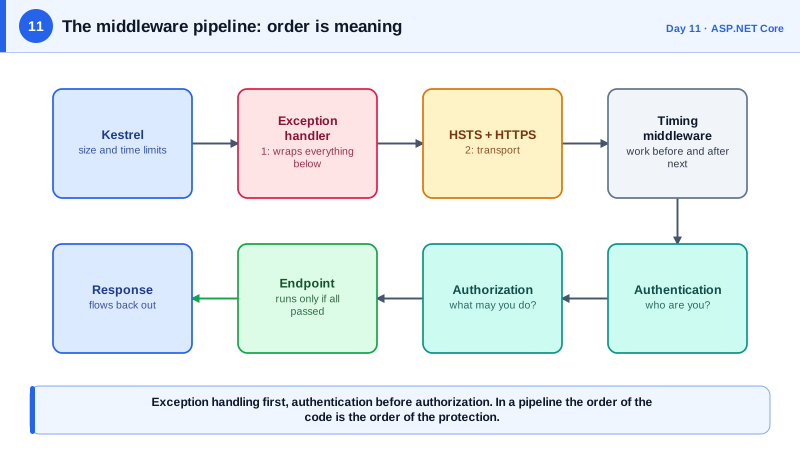
The consequence that trips up newcomers is that order is meaning. Middleware executes in the order you register it, so exception handling must come first to catch everything after it, routing must come before the components that need to know which endpoint was chosen, and authentication must come before authorization, which must come before the endpoint runs. Placing authorization after the endpoint executes means the endpoint has already run, and the check accomplishes nothing. Many real vulnerabilities in web applications are not missing features but misordered ones, such as CORS or authentication middleware registered in the wrong place so that it never applies to some routes.
Endpoint routing splits the work into two steps. Routing middleware looks at the URL and picks a matching endpoint, and only later does the endpoint middleware actually execute it. Between them you can inspect which endpoint was selected and apply policies, for example requiring authorization or a rate limit for that specific endpoint. This is why attributes and metadata on an endpoint can drive behavior in middleware that runs earlier. Finally, when the app sits behind a proxy, it sees the proxy's address rather than the client's, so you enable the forwarded headers middleware with an explicit list of trusted proxies. If you trust these headers from anyone, a client can spoof its own IP address.
| Concept | Express | ASP.NET Core | Angular |
|---|---|---|---|
| Pipeline unit | app.use((req, res, next) => ...) | app.Use(async (ctx, next) => ...) | HttpInterceptorFn(req, next) |
| Short-circuit | Send response without calling next | Write response without calling next | Return an observable without calling next |
| Order matters | Yes | Yes | Yes, providers array order |
| Sees the response on the way back | After next() in async code | Code after await next() | Operators on the returned observable |
| Server | Node http module | Kestrel | Not applicable, runs in the browser |
| Built-in features | Few, add packages | Auth, CORS, routing, static files, rate limiting | Not applicable |
Worked Example: A Correctly Ordered Pipeline with a Timing Middleware
The Program.cs below registers the usual middleware in a safe order and adds a small custom middleware that measures elapsed time and adds a response header. Comments explain why each position matters.
var builder = WebApplication.CreateBuilder(args);

builder.WebHost.ConfigureKestrel(o =>
{
    o.AddServerHeader = false;                       // do not advertise the server software
    o.Limits.MaxRequestBodySize = 1_000_000;         // 1 MB default for an API that takes JSON
    o.Limits.RequestHeadersTimeout = TimeSpan.FromSeconds(15);
});

builder.Services.AddProblemDetails();               // lets UseExceptionHandler() write safe error bodies
builder.Services.AddAuthentication().AddJwtBearer();
builder.Services.AddAuthorization();

var app = builder.Build();

// 1. First, so it wraps everything below and can convert failures to safe responses.
app.UseExceptionHandler();

// 2. In production tell browsers to use HTTPS only, then redirect stray HTTP.
if (!app.Environment.IsDevelopment()) app.UseHsts();
app.UseHttpsRedirection();

// 3. Our own middleware: work before next, then work after it returns.
app.Use(async (context, next) =>
{
    var started = Stopwatch.GetTimestamp();
    await next(context);                             // everything below runs inside this call
    var ms = Stopwatch.GetElapsedTime(started).TotalMilliseconds;
    context.Response.Headers["X-Elapsed-Ms"] = ((int)ms).ToString();
});

// 4. Authentication establishes WHO. Authorization decides WHAT they may do.
app.UseAuthentication();
app.UseAuthorization();

// 5. Endpoints run last, only for requests that survived the checks above.
app.MapGet("/health", () => Results.Ok("ok")).AllowAnonymous();
app.MapGet("/me", (ClaimsPrincipal user) => user.Identity?.Name).RequireAuthorization();

app.Run();
One caution about the timing middleware: setting a response header after next returns only works if the response has not started streaming. Real timing middleware uses the OnStarting callback for that reason, a useful reminder that the way back out of the pipeline has its own rules.
Real-World Examples
- Microsoft's documentation states that Kestrel can be used as an edge server, but recommends a reverse proxy for additional configuration, defense, and features such as load balancing. Deployments on Azure App Service, Container Apps, and behind Azure Front Door follow that guidance, and each of those forwards the client address in headers that the application must be configured to trust deliberately.
- ASP.NET Core has consistently ranked among the fastest mainstream frameworks in the independent TechEmpower Web Framework Benchmarks, largely thanks to Kestrel and the low-allocation design of the pipeline. Raw speed matters less than correctness for most APIs, but it is reassuring that the framework will not be the bottleneck before your database is.
Review Questions & Answers
Authorization makes decisions based on the identity of the caller, and that identity is only established by the authentication middleware, which validates the credential and populates the user. If authorization ran first, it would see an anonymous user for every request and deny or misapply policies. Order also determines what the endpoint sees, so both must run before endpoints execute.
Short-circuiting means the middleware writes a response and does not call next, so later components never run. Authentication or authorization failing and returning 401 or 403 is one example, and the static file handler returning a file directly is another. It is how the pipeline avoids doing expensive work for requests that can already be answered or rejected.
Enable the forwarded headers middleware so the app reads the original client address from the X-Forwarded-For header. The risk is trusting that header from arbitrary callers: unless you restrict it to known proxy addresses or networks, any client can send a fake value and spoof its address, defeating IP-based rate limiting, auditing, and allowlists.
The exception handler works by wrapping the rest of the pipeline in a try and catch, so it can only catch failures from components registered after it. Placing it first means an error thrown by any later middleware or endpoint is converted to a controlled response. Registering it last would leave earlier components unprotected and could let raw errors reach the client.