React and TypeScript with Vite and a .NET Backend
On this page
Learning Objective
Create a React and TypeScript project with Vite, connect it to an ASP.NET Core API through a development proxy instead of loose CORS, manage environment variables without leaking secrets into the bundle, and adopt project settings that keep the dependency supply chain and production build safe.
Concept Explanation
Vite is the standard build tool for a new React application: it starts in milliseconds using native ES modules during development and produces an optimized bundle with Rollup for production. Create React App, once the default, was officially deprecated in early 2025, so new projects begin with Vite or a full framework. The React TypeScript template gives you a project with strict compiler options that catch mistakes in the same spirit as C#'s nullable checks. Keep strict mode on, and add ESLint so unsafe patterns, such as a stray dangerouslySetInnerHTML, are flagged automatically.
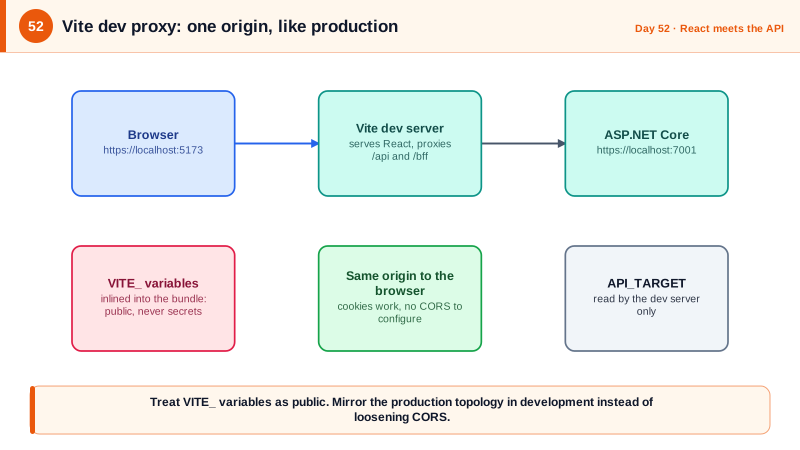
During development the React app runs on one port and the API on another, which the browser treats as different origins. The quick fix of enabling permissive CORS on the API is a poor habit, because it teaches you to configure the API for a topology that production will not use, and carelessly permissive settings tend to survive into deployment. The better approach is the Vite dev server proxy: the browser only talks to the Vite origin, and Vite forwards paths beginning with /api or /bff to the ASP.NET Core process. From the browser's view everything is same-origin, cookies work as first-party, and this matches the production topology of a BFF or a reverse proxy in front of both. You will need CORS only if you deliberately deploy the two as separate sites.
Environment variables in Vite come with a rule that surprises server-side developers. Only variables prefixed with VITE_ are exposed to client code, and they are inlined into the bundle as plain text, visible to anyone who opens the built files. That is by design and it means nothing secret can ever go in them: API base URLs, feature flags, and public identifiers such as an OIDC client ID for a public client are fine, while keys, tokens, and passwords are never acceptable. Anything that must stay secret belongs on the server, behind your BFF or API. Keep a committed .env.example listing the variables, and keep real .env files out of version control.
Supply chain hygiene matters because a typical React project pulls in hundreds of transitive packages, each of which runs with full access during install and inside your bundle at runtime. Commit the lockfile and install with npm ci in pipelines so builds are reproducible, review new dependencies, run npm audit in CI, and consider disabling install scripts for packages that do not need them. Turn off source maps in production builds unless you upload them privately to an error tracker, since public source maps hand attackers a readable copy of your code and comments. And when the build is done, the output is static files that ASP.NET Core can serve directly or that a CDN or Azure Static Web Apps can host, as Phase 9 shows.
| Topic | Guidance | Reason |
|---|---|---|
| Build tool | Vite with the React TypeScript template | Fast, maintained, replaces deprecated Create React App |
| TypeScript | Strict mode on, no implicit any | Catch errors early, same discipline as nullable C# |
| Dev to API connection | Vite proxy for /api and /bff | Same-origin in the browser, no permissive CORS |
| Environment variables | Only VITE_ prefixed, and never secrets | They are embedded in the public bundle |
| Dependencies | Lockfile committed, npm ci, npm audit | Reproducible builds and known vulnerability checks |
| Production build | No public source maps, hashed filenames | Avoid disclosing source, enable long-term caching |
Worked Example: Project Setup, Proxy, Environment and Local HTTPS
The commands scaffold the project. The configuration files wire the proxy and strictness, and the .NET side trusts a local development certificate and enables CORS only in development if needed.
npm create vite@latest web -- --template react-ts
cd web
npm install
npm install @tanstack/react-query zod react-hook-form @hookform/resolvers
npm install -D openapi-typescript eslint eslint-plugin-security vitest @testing-library/react

# Trust the ASP.NET Core development certificate so https://localhost works
dotnet dev-certs https --trust// vite.config.ts
import { defineConfig, loadEnv } from 'vite';
import react from '@vitejs/plugin-react';
export default defineConfig(({ mode }) => {
const env = loadEnv(mode, process.cwd(), '');
const apiTarget = env.API_TARGET ?? 'https://localhost:7001'; // no VITE_ prefix: stays out of the bundle
return {
plugins: [react()],
server: {
port: 5173,
proxy: {
'/api': { target: apiTarget, changeOrigin: false, secure: false }, // secure:false only for the local dev cert
'/bff': { target: apiTarget, changeOrigin: false, secure: false },
},
},
build: {
sourcemap: false, // do not publish readable source; upload maps to your error tracker instead
target: 'es2022',
},
};
});// tsconfig.json (excerpt): strict, like nullable reference types in C#
{
"compilerOptions": {
"strict": true,
"noUncheckedIndexedAccess": true,
"noImplicitOverride": true,
"exactOptionalPropertyTypes": true,
"noFallthroughCasesInSwitch": true
}
}# .env.example (committed). Real .env files are in .gitignore.
API_TARGET=https://localhost:7001 # used only by the dev server, never reaches the bundle
VITE_APP_NAME=Task Board # public: baked into the bundle
VITE_OIDC_CLIENT_ID= # public client id only. NEVER put secrets in a VITE_ variable// src/api/env.ts: validate public configuration at startup, like ValidateOnStart in .NET.
import { z } from 'zod';
const schema = z.object({ VITE_APP_NAME: z.string().min(1) });
export const env = schema.parse(import.meta.env);# CI (excerpt): reproducible install and dependency checks
- run: npm ci --ignore-scripts
- run: npm audit --audit-level=high
- run: npm run lint && npx tsc --noEmit && npm test -- --run && npm run buildWith this in place, the browser sends fetch requests to /api/notes on the Vite origin, and Vite forwards them to ASP.NET Core. No CORS headers are needed, and the same paths work in production when the BFF or reverse proxy serves both.
Real-World Examples
- In November 2018, the widely used npm package event-stream was found to contain a malicious dependency, flatmap-stream, added after a maintainer handed the project to a new contributor. The payload targeted a specific cryptocurrency wallet application and sat in the dependency tree for weeks, a well-known illustration of how transitive dependencies expand your attack surface.
- In September 2025, attackers phished a well-known npm maintainer and published malicious versions of extremely popular packages such as chalk and debug, aiming to intercept cryptocurrency transactions in browsers. The incident showed that even the most widely used utility libraries can be compromised, and that lockfiles, delayed adoption of brand-new versions, and build-time scanning are practical defenses.
Review Questions & Answers
The proxy makes the browser see a single origin, matching the production topology with a BFF or reverse proxy, so cookies and same-origin behavior are tested the way they will run. Permissive CORS trains you to depend on cross-origin behavior you will not have in production and risks leaving broad settings enabled when the API is deployed.
Vite inlines every VITE_ variable into the client bundle as plain text, so anyone who loads the site can read it in the JavaScript or the network. A secret in the frontend is not a secret. The key must stay on the server, and the browser should call a backend endpoint that uses the key on the user's behalf.
npm ci installs exactly the versions recorded in the lockfile and fails if the lockfile and package.json disagree, making builds reproducible and preventing silent upgrades to a newly published, possibly compromised, version. npm install may update the lockfile and resolve newer versions, which defeats reproducibility.
Source maps let anyone reconstruct your original readable source, including comments, structure, and hidden endpoints, making it easier to find vulnerabilities and understand business logic. Keeping maps out of the public build, and uploading them privately to an error-tracking service for stack trace decoding, keeps debuggability without disclosure.