Monorepos, Shared Packages and Micro-Frontends
On this page
Learning Objective
Organize a React and .NET codebase as a monorepo with shared packages, run only the affected builds in CI, decide honestly whether micro-frontends are worth their cost, and protect the dependency chain against confusion and compromised packages.
Concept Explanation
As a product grows you often end up with more than one front end, such as a customer app, an admin app, and a marketing site, plus shared code: the generated API client, the Zod schemas, the design system, and the configuration for linting and TypeScript. A monorepo keeps them in one repository so a change to the shared package and its consumers can be made and tested in one pull request, versions cannot drift apart, and tooling can be shared. For JavaScript the common building blocks are pnpm workspaces, which link local packages, and a task runner such as Turborepo or Nx, which builds packages in dependency order, caches results, and can run only what a change affects. The .NET side has its own equivalent: a solution with several projects, Directory.Build.props for shared settings, and central package management to keep NuGet versions consistent.
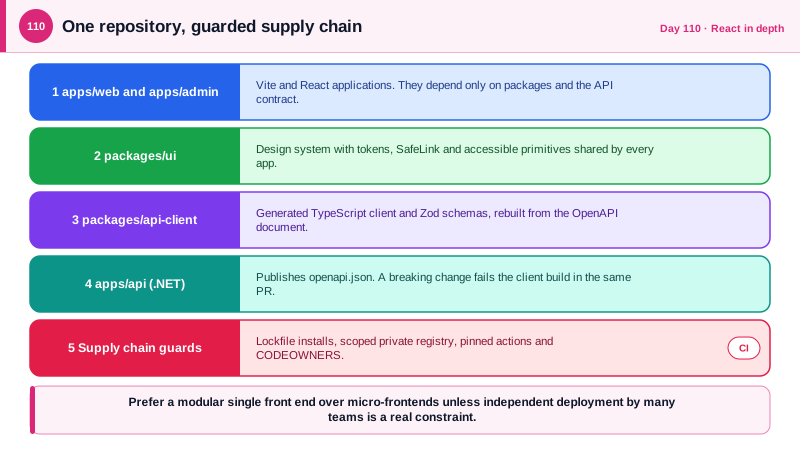
A useful layout puts deployable applications in one folder and shared libraries in another, for example apps for the web client, the admin client and the API, and packages for the API client, the UI library, and configuration. Order matters in the pipeline: generate the TypeScript client from the OpenAPI document first, as in Day 30, then build packages, then applications, and cache each step keyed on its inputs. In CI, use path filters and the task runner's affected mode, so a documentation change does not rebuild the world, while remembering that a change to a shared package must rebuild every consumer. Set code ownership with a CODEOWNERS file so that changes to sensitive areas, such as authentication code and pipeline definitions, need review from the right people.
Micro-frontends split a large front end into independently deployed pieces owned by different teams, composed in the browser, often with Webpack Module Federation, or with iframes or web components. They solve an organizational problem, many teams blocked by one release train, and they come with technical costs: duplicated dependencies, inconsistent user experience, complex routing and state sharing, and harder testing. For most products with one team or a few, a well-structured modular front end in a monorepo gets most of the benefit without those costs. Consider micro-frontends only when independent deployment by autonomous teams is a real, painful constraint.
The security angle is significant. All micro-frontends composed on one origin share the same JavaScript context, so a vulnerability or a malicious dependency in any one of them can read the whole page, including what the others display, and loading a remote module at runtime from another team's URL is a live supply chain link that must be pinned and integrity checked. Iframes with the sandbox attribute give real isolation at the price of integration effort. Monorepos concentrate risk in a similar way: one compromised package or one over-permissive pipeline reaches everything, so enforce lockfiles, use a private registry with scoped packages to avoid dependency confusion, pin CI actions, and give pipelines the least privilege, as on Day 83.
| Approach | Best when | Main costs and risks |
|---|---|---|
| Single app, modular folders | One team, one release cadence | Needs discipline to keep module boundaries |
| Monorepo with shared packages | Several apps sharing client, schemas and UI | Tooling setup, CI must run only affected work |
| Separate repos per app | Truly independent products and teams | Version drift, duplicated fixes, harder shared changes |
| Micro-frontends (Module Federation) | Many autonomous teams blocked by one release train | Duplicate dependencies, UX drift, shared-origin blast radius |
| Iframe or sandbox composition | Untrusted or third-party embedded content | Integration and communication complexity |
| Private scoped registry | Internal shared packages | Must block public packages with the same name |
Worked Example: A Workspace Layout, Affected Builds and Supply Chain Guards
The files show a pnpm and Turborepo workspace, an affected CI job, and settings that guard the dependency chain.
repo/
  apps/
    web/            (customer app, Vite + React)
    admin/          (admin app, Vite + React)
    api/            (ASP.NET Core solution: src/, tests/)
  packages/
    api-client/     (generated TypeScript client + Zod schemas, from the OpenAPI document)
    ui/             (design system: tokens, SafeLink, dialogs)
    config/         (shared tsconfig and lint rules)
  Directory.Build.props        (shared .NET settings: nullable, analyzers, warnings as errors)
  Directory.Packages.props     (central NuGet package versions)
  pnpm-workspace.yaml
  turbo.json
CODEOWNERS// turbo.json: tasks run in dependency order, results are cached by input hash.
{
"$schema": "https://turbo.build/schema.json",
"tasks": {
"generate": { "inputs": ["../api/openapi.json"], "outputs": ["src/generated/**"] },
"build": { "dependsOn": ["^build", "generate"], "outputs": ["dist/**"] },
"test": { "dependsOn": ["build"] },
"lint": {}
}
}# .github/workflows/web.yml: only affected packages are built and tested.
name: web
on:
pull_request:
paths: ['apps/web/**', 'apps/admin/**', 'packages/**', 'pnpm-lock.yaml', 'turbo.json']
permissions:
contents: read
jobs:
build:
runs-on: ubuntu-latest
steps:
- uses: actions/checkout@<full-commit-sha>
with: { fetch-depth: 0 }
- uses: pnpm/action-setup@<full-commit-sha>
- run: pnpm install --frozen-lockfile # the lockfile decides, CI never resolves new versions
- run: pnpm turbo run lint test build --filter="...[origin/main]" # this change and everything that depends on it# .npmrc: internal packages come only from the private registry, so a public package cannot shadow them.
@acme:registry=https://pkgs.example.com/npm/
# Fail installs whose lockfile does not match, and refuse unexpected install scripts where the tool supports it.# CODEOWNERS: sensitive areas need the right reviewers.
/apps/api/src/Auth/ @acme/security
/.github/workflows/ @acme/platform
/packages/ui/src/SafeLink* @acme/securityThe version of the generated client is part of the repository, so a breaking API change fails the front-end build in the same pull request that makes it, which is the main productivity benefit of a monorepo for a full-stack team.
Real-World Examples
- In 2021 the researcher Alex Birsan demonstrated dependency confusion by publishing public packages with the same names as internal packages used by major companies, and his packages were installed inside builds at several large technology companies. The lesson is to scope internal packages to a namespace on a private registry and to configure the package manager so those names never resolve to the public registry.
- Google described in a 2016 paper that most of its source code lives in a single repository, with roughly two billion lines at that time, supported by custom tooling for builds, code search and large-scale changes. It is the best-known example of a monorepo, and a reminder that the approach depends on investing in tooling and ownership rules, not only in putting code in one place.
Review Questions & Answers
A breaking API change and the client change that adapts to it land in one pull request, and CI fails if they disagree. There is no window where a deployed front end and API have incompatible contracts.
They add duplicated dependencies, inconsistent user experience, complex routing and shared state, and harder end-to-end testing, in exchange for independent deployment. If a few developers share one release process, a modular app achieves clarity without those costs.
They all run in the same JavaScript context, so a vulnerability or malicious dependency in any one of them can read and change the whole page, and a remotely loaded module is a runtime supply chain link. Iframes with sandboxing provide stronger isolation when the content is less trusted.
It is an attack where a public package is published with the same name as an internal one, and the package manager installs the public version. Using scoped names on a private registry, configuring the package manager to resolve those scopes only there, and committing lockfiles prevent it.