Zero-Downtime EF Core Database Migrations
On this page
Learning Objective
Design schema changes so that old and new application versions run correctly against the same database during a rolling deployment, apply the expand and contract pattern to renames and constraints, avoid long locks on large tables, and run migrations safely from the pipeline with backups, timeouts and tested rollbacks.
Concept Explanation
A deployment is not instantaneous. During a rolling update, a swap, or a canary release, instances of the old version and the new version serve traffic at the same time, both connected to the same database. Anything the new version needs from the schema must exist before it starts, and anything the old version still uses must not be removed until it has gone. That gives the fundamental rule of zero-downtime migrations: every schema change must be compatible with both the version running now and the version about to run, and, for safe rollback, with the previous version too. A migration that renames a column breaks whichever version does not know the new name, and that is a guaranteed outage window.
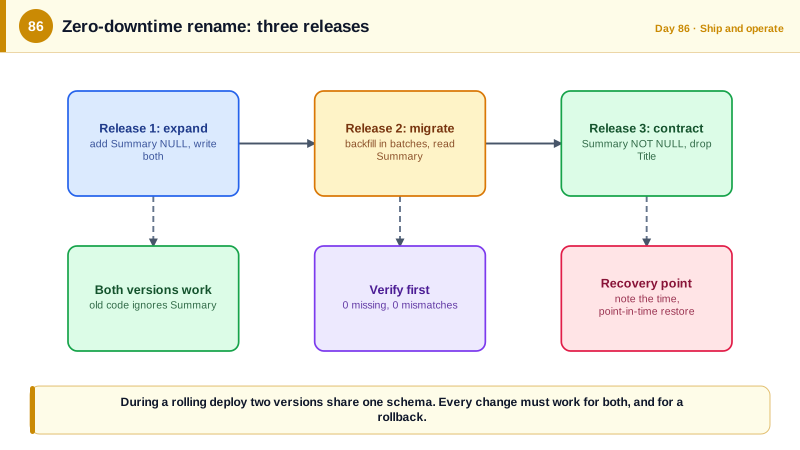
The expand and contract pattern turns risky changes into a sequence of safe ones. In the expand phase you add new structures without removing old ones: a new column, a new table, a new index. In the migrate phase, code writes to both old and new, existing data is backfilled, and reads switch to the new structure. In the contract phase, after no running version uses the old structure, you remove it. Stripe described this style of dual writing and gradual cutover in its 2017 article on online migrations at scale. Renaming Title to Summary, for example, becomes three releases: add Summary and write both, backfill and switch reads, then drop Title. It feels slow, but each release is safe and reversible, which is exactly what you want against production data.
Some operations need special handling on large tables. Adding a NOT NULL column with a default is fast in modern SQL Server, but changing a column's type or adding a constraint on existing data can rewrite or scan the entire table while holding a schema modification lock that blocks every query. Add the column as nullable first, backfill in small batches so that lock escalation and transaction log growth stay bounded, then add the constraint in a way that validates without a long lock. Create indexes with the ONLINE option where the edition supports it, which Azure SQL Database does, and the RESUMABLE option for big ones. Set a LOCK_TIMEOUT on migration sessions so a migration that cannot get its lock fails fast instead of queuing behind a long-running query and blocking everything behind it.
Operate migrations as a controlled pipeline step, not a side effect of startup. Run them before the application rollout, from a migration bundle or idempotent script, under the privileged identity of Day 34, with a manual approval for production. Take a recovery point first: Azure SQL Database provides point-in-time restore, and for a risky change you can note the exact time or create a copy. Test each migration against a database with production-like size and shape, since the timing on an empty database tells you nothing. Verify afterwards with queries that check the row counts and constraints. Finally, never test migrations by copying production personal data into lower environments without masking it; use synthetic data or dynamic data masking and access controls, since a staging database with real customer data and weaker protection is a common source of breaches.
| Change | Safe approach | Danger if done directly |
|---|---|---|
| Add a nullable column | Just add it | None |
| Rename a column | Add new, dual write, backfill, switch reads, drop old | Old or new version breaks instantly |
| Add NOT NULL with data | Add nullable, backfill in batches, then enforce | Long lock, full table scan |
| Change a column type | New column, copy, switch, drop | Table rewrite, blocked queries |
| Add an index on a big table | ONLINE and RESUMABLE options | Blocks writes during the build |
| Drop a column or table | Only after no version uses it | Breaks running instances and rollback |
Worked Example: Renaming Title to Summary Across Three Releases, with Batched Backfill
The listings show each release's migration and the code that goes with it, then the pipeline step that applies them safely.
// RELEASE 1 (expand): add the new column, nullable. Old code ignores it; new code writes both.
public partial class AddTaskSummary : Migration
{
    protected override void Up(MigrationBuilder mb) =>
        mb.AddColumn<string>(name: "Summary", table: "Tasks", type: "nvarchar(200)", nullable: true);
    protected override void Down(MigrationBuilder mb) => mb.DropColumn(name: "Summary", table: "Tasks");
}

// Application code in release 1: writes both, reads the old one. Old instances still work.
task.Title = value;
task.Summary = value;-- RELEASE 2 (migrate): backfill existing rows in small batches so locks and log growth stay bounded.
SET LOCK_TIMEOUT 5000; -- fail fast instead of queuing behind other work
DECLARE @batch INT = 5000, @rows INT = 1;
WHILE @rows > 0
BEGIN
UPDATE TOP (@batch) dbo.Tasks SET Summary = Title WHERE Summary IS NULL;
SET @rows = @@ROWCOUNT;
WAITFOR DELAY '00:00:00.200'; -- give other transactions room
END;
-- Verify before switching reads: nothing left to copy, and the values match.
SELECT COUNT(*) AS MissingSummaries FROM dbo.Tasks WHERE Summary IS NULL; -- expect 0
SELECT COUNT(*) AS Mismatches FROM dbo.Tasks WHERE Summary <> Title; -- expect 0// RELEASE 2 application code: reads the new column, still writes both (rollback to release 1 stays safe).
var text = task.Summary;
task.Title = value; task.Summary = value;
// RELEASE 3 (contract): after release 2 has run everywhere and no older instance or job remains.
public partial class MakeSummaryRequiredAndDropTitle : Migration
{
protected override void Up(MigrationBuilder mb)
{
mb.AlterColumn<string>(name: "Summary", table: "Tasks", type: "nvarchar(200)", nullable: false, defaultValue: "");
mb.DropColumn(name: "Title", table: "Tasks");
}
// Down re-adds Title and copies from Summary, so a rollback of the schema is possible.
protected override void Down(MigrationBuilder mb)
{
mb.AddColumn<string>(name: "Title", table: "Tasks", type: "nvarchar(200)", nullable: true);
mb.Sql("UPDATE Tasks SET Title = Summary");
}
}-- Large index builds without blocking writers (Azure SQL Database and Enterprise edition).
CREATE INDEX IX_Tasks_Assignee ON dbo.Tasks (AssigneeId) INCLUDE (Status)
WITH (ONLINE = ON, RESUMABLE = ON, MAX_DURATION = 60 MINUTES);# Pipeline: migrate BEFORE the application rollout, under the privileged identity, with approval and a recovery point.
migrate-production:
needs: [deploy-staging-verified]
environment: production # required reviewers configured on this environment
permissions: { id-token: write, contents: read }
steps:
- uses: azure/login@v2 # the migrator identity: db_owner on this database only
with: { client-id: '${{ vars.MIGRATOR_CLIENT_ID }}', tenant-id: '${{ vars.AZURE_TENANT_ID }}', subscription-id: '${{ vars.AZURE_SUBSCRIPTION_ID }}' }
- run: echo "RESTORE_POINT=$(date -u +%Y-%m-%dT%H:%M:%SZ)" >> $GITHUB_ENV # note the time for point-in-time restore
- run: ./efbundle --connection "$MIGRATION_CONNECTION" --timeout 1800 # the bundle built in CI, same artifact as staging
- run: sqlcmd -S "$SQL_SERVER" -d TaskBoard -G -i verify-migration.sql # counts, constraints, no invalid rowsBefore contracting, search the code base, the background jobs, the reports, and any external tools for references to the old column. Dropping a structure is the one step that cannot be undone by redeploying an older version, so it deserves the extra check.
Real-World Examples
- Stripe's 2017 engineering article Online migrations at scale described a four-step pattern used to move data models without downtime: dual write to the old and new stores, change reads to the new one, change writes to the new one only, and remove the old data. The approach let them migrate billions of records while the API stayed live, and it is the same expand, migrate, contract rhythm used here for a single column.
- GitHub released gh-ost in 2016, an online schema migration tool for MySQL that avoids triggers by reading the binary log, created because altering huge tables with the standard approaches caused replication lag and locks. Its existence illustrates how central safe schema change is to running a large service, and why tools and disciplined patterns exist for it.
Review Questions & Answers
While the rollout is in progress, some instances run the old code expecting the old name and others run the new code expecting the new name, but the database has only one. Whichever version does not match fails on every query touching the column. Expand and contract avoids the conflict by keeping both names valid until the old version is gone.
A single update over millions of rows holds locks for a long time, can escalate to a table lock that blocks other queries, and generates a huge transaction log. Small batches keep each transaction short and bounded, and a lock timeout makes the migration fail quickly instead of queuing behind a long query and stalling the application.
Dropping is destructive and cannot be reversed by redeploying code, and any instance, background job, report, or rollback target that still references the column will break. Waiting until the previous releases have fully gone ensures nothing depends on it, and searching for remaining references first prevents surprises.
Staging typically has weaker access controls, logging, and monitoring than production, so real customer data becomes easier to leak, and it may be subject to privacy laws the environment does not satisfy. Using synthetic data, or masked copies with restricted access, gives realistic volume and shape without exposing personal information.