ASP.NET Core Configuration and the Options Pattern
On this page
Learning Objective
Layer configuration from files, environment variables and user secrets, bind it to validated strongly typed options classes, and explain precisely why secrets must never live in source control and how .NET keeps them out of it.
Concept Explanation
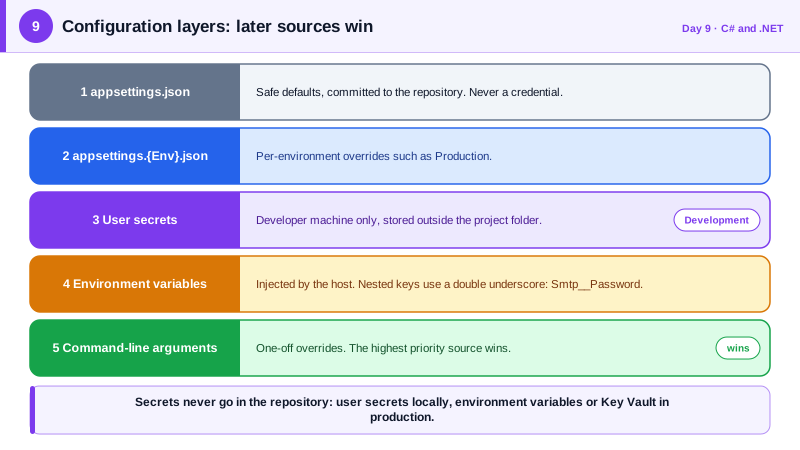
Every application needs settings that change between machines: connection strings, service URLs, feature toggles, token lifetimes. In Node.js you probably read process.env directly or use a dotenv file. In .NET, configuration is a first-class layered system. The default host loads appsettings.json, then an environment-specific file such as appsettings.Production.json, then user secrets in development, then environment variables, then command-line arguments. Later sources override earlier ones, so a value in the environment beats one in a file. You read it through IConfiguration, and nested JSON keys are addressed with a colon, for example Smtp:Host, which in an environment variable is written with double underscores, Smtp__Host.
Reading raw strings from IConfiguration all over the codebase is fragile, so .NET encourages the options pattern. You define a plain class for a group of related settings, bind a configuration section to it, and inject it as IOptions of T. Now the settings are strongly typed, discoverable, and testable, and a typo becomes a compile error instead of a null at runtime. More importantly, you can validate the options when the application starts. Adding ValidateDataAnnotations and ValidateOnStart makes the process refuse to boot with a missing host or an out-of-range port, so a misconfiguration fails immediately and loudly instead of surfacing later as a confusing production incident.
Secrets deserve special treatment because they are the keys to everything else: database passwords, signing keys, API tokens, and client secrets. The absolute rule is that they never go in source control, including private repositories, because repository access is widely shared, history is permanent, and copies leak into build logs and laptops. In development, the user secrets tool stores them in a file in your user profile, outside the project folder, so they cannot be committed by accident. In production, they come from environment variables or, better, from a managed secret store such as Azure Key Vault accessed with a managed identity, which you will set up in Phase 9, so that no human ever handles the value.
Two more habits complete the picture. Treat configuration files that are committed as public documents: they may hold non-sensitive defaults but never credentials. And prefer the least powerful credential that works, scoped to one purpose and easy to rotate. A frontend developer knows that anything shipped to the browser is public, so a secret in a React bundle is not a secret. The server side has the mirror-image rule: anything committed to a repository should be assumed to be readable by many people for a long time.
| Source | Typical use | Loaded order (later wins) |
|---|---|---|
| appsettings.json | Safe defaults, non-secret settings | 1 |
| appsettings.{Environment}.json | Per-environment overrides | 2 |
| User secrets | Developer machine secrets, never committed | 3 (Development only) |
| Environment variables | Production settings and secrets injected by the host | 4 |
| Command-line arguments | One-off overrides | 5 |
| Azure Key Vault | Managed secrets in production | Added explicitly |
Worked Example: Validated Options with a Secret Kept Out of the Repo
The commands set a development secret outside the repository. The options class declares its rules, the registration validates it when the app starts, and a service reads the strongly typed values. The committed appsettings.json contains no password.
dotnet user-secrets init --project TaskTracker.Api
dotnet user-secrets set "Smtp:Password" "s3cr3t-dev-only" --project TaskTracker.Api
# Stored in your user profile, not in the repo.
# In production the same key arrives as an environment variable: Smtp__Password// appsettings.json (committed): no secrets here
{
"Smtp": {
"Host": "smtp.example.com",
"Port": 587,
"User": "notifications@example.com"
}
}using System.ComponentModel.DataAnnotations;
public sealed class SmtpOptions
{
public const string SectionName = "Smtp";
[Required] public string Host { get; set; } = "";
[Range(1, 65535)] public int Port { get; set; } = 587;
[Required] public string User { get; set; } = "";
[Required] public string Password { get; set; } = ""; // comes from secrets or environment
}
// Program.cs
builder.Services.AddOptions<SmtpOptions>()
.Bind(builder.Configuration.GetSection(SmtpOptions.SectionName))
.ValidateDataAnnotations()
.ValidateOnStart(); // the app refuses to start if a rule fails
public sealed class MailSender(IOptions<SmtpOptions> options)
{
private readonly SmtpOptions _smtp = options.Value;
public string Describe() => $"{_smtp.User}@{_smtp.Host}:{_smtp.Port}"; // never log the password
}If the Password is absent in an environment, the application fails at startup with a message naming the missing setting, which is far better than starting successfully and failing on the first email. Note also that Describe deliberately omits the password; a logged secret is a leaked secret.
Real-World Examples
- The 2016 breach of Uber, which exposed data on about 57 million riders and drivers, began when attackers found AWS access credentials in a private GitHub repository used by Uber engineers and used them to reach a storage bucket. The company later settled with regulators, and the incident is routinely cited as the reason never to put credentials in source control, even private source control.
- GitGuardian publishes an annual State of Secrets Sprawl report that counts millions of newly exposed credentials in public GitHub commits each year, and reports that a large share stay valid long after exposure. Automated scanners find leaked keys within minutes of a push, which is why the safe response to a committed secret is always to revoke and rotate it, not to delete the commit.
Review Questions & Answers
The same build is deployed to many environments, and each needs different values, so the runtime environment must be able to supply or override settings without editing files in the artifact. Environment variables are the standard way hosts and containers inject those values, including secrets. Layering with a predictable order lets you keep safe defaults in the file and override only what differs.
It moves detection of bad configuration from the first time the setting is used to the moment the application starts. A missing connection string or invalid port then stops the deployment immediately, before traffic is routed to it, instead of causing errors for users later. Failing fast is far cheaper and safer than discovering a misconfiguration in production.
No. The password remains in the repository history and in every clone, fork, and build cache made before the deletion, and automated scanners routinely search history. The credential must be treated as compromised, revoked or rotated at the source, and replaced with a new value stored in a secret store. Removing it from the current file only stops new exposure.
Everything shipped to the browser can be read by the user, through the developer tools or by downloading the JavaScript files, so any value inside is public. Real secrets must stay on the server, and the browser should only receive credentials designed to be public or scoped narrowly, such as short-lived tokens issued to that user. This is why the API, not the client, holds keys for third-party services.