ASP.NET Core Logging with ILogger
On this page
Learning Objective
Write structured log messages with message templates and log levels, use scopes and source-generated logging effectively, and identify the categories of data that must never appear in logs, including how untrusted input can forge log entries.
Concept Explanation
Logging on a server is your only window into what happened when nobody was watching. Where a frontend developer might rely on console.log and the browser's developer tools, a production service needs logs that can be searched, filtered, and correlated across thousands of requests. ASP.NET Core provides ILogger of T through dependency injection, with providers that send output to the console, files, Azure Monitor, or a structured logging platform such as Seq or Elasticsearch. The unit of logging is not a string but a message template with named placeholders, and this difference is the most important idea in the lesson.
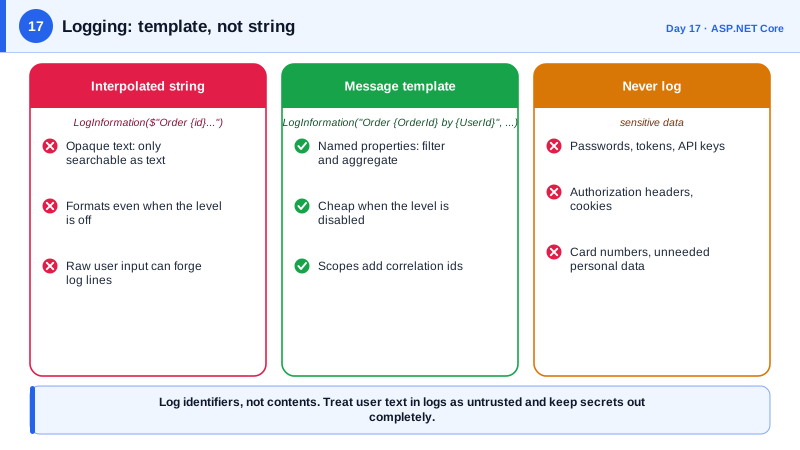
Consider the difference between writing the message Order 42 placed by user 7 with string interpolation and writing it with a template such as Order {OrderId} placed by user {UserId} plus arguments. Interpolation produces a finished string, so a log platform can only search for text. The template keeps OrderId and UserId as separate properties, so you can filter for every event with OrderId equal to 42 or count orders per user. Templates are also cheaper when the level is disabled, because formatting is skipped. For hot paths, the LoggerMessage attribute generates optimized logging code at compile time, and analyzers will flag interpolated strings in log calls for you.
Log levels express severity: Trace and Debug for developer detail, Information for normal significant events, Warning for unexpected but recoverable situations, Error for failures of an operation, and Critical for failures of the whole application. Configure the minimum level per environment and per namespace in appsettings, so production runs at Information or Warning while a particular component can be raised to Debug temporarily. Scopes let you attach properties such as a correlation identifier or tenant to every message written inside a block, which becomes essential once a single user action spans several services.
The security half of logging is deciding what does not belong. Never log passwords, tokens, API keys, session identifiers, full payment card numbers, or authorization headers, and treat personal data such as emails, addresses, and health information with care, because logs are copied to more systems and retained by more people than the database ever is. Log identifiers rather than contents wherever possible. Also treat any user-supplied value as hostile: if you concatenate raw input into a text log, an attacker can include a newline and a fake entry to forge or hide events. Structured logging largely defuses this, since values are stored as properties, but sanitizing and length-limiting values from untrusted sources is still wise, and .NET has redaction libraries for classified data.
| Level | Use for | Example |
|---|---|---|
| Debug | Developer diagnostics, off in production | Query parameters after parsing |
| Information | Normal significant events | Order placed, user signed in |
| Warning | Unexpected but handled | Retrying a downstream call |
| Error | An operation failed | Payment provider returned an error |
| Critical | The app cannot continue | Cannot connect to the database at startup |
| Never log | Secrets and sensitive data | Passwords, tokens, card numbers |
Worked Example: Templates, Scopes, Source Generation and Safe Fields
The first block contrasts a poor log statement with a good one. The second shows a scope and a source-generated logger. The third shows minimum-level configuration and what to avoid.
public sealed class CheckoutService(ILogger<CheckoutService> logger)
{
    public async Task PlaceAsync(Order order, string userId)
    {
        // Poor: builds a string, loses structure, and logs a value the user controls verbatim.
        logger.LogInformation($"Order {order.Id} placed by {order.CustomerEmail} note: {order.Note}");

        // Better: structured properties, identifiers instead of personal data.
        logger.LogInformation("Order {OrderId} placed by user {UserId} with {ItemCount} items",
            order.Id, userId, order.Items.Count);

        // Never: logger.LogDebug("Auth header {Header}", request.Headers.Authorization);
        // Never: logger.LogInformation("Login {User} {Password}", email, password);

        using (logger.BeginScope(new Dictionary<string, object> { ["OrderId"] = order.Id }))
        {
            await ChargeAsync(order);        // every log line inside carries OrderId
        }
    }

    private async Task ChargeAsync(Order order)
    {
        Log.ChargeStarted(logger, order.Id, order.Total);
        await Task.Delay(10);
    }
}

// Source-generated: no boxing, message template checked at compile time.
internal static partial class Log
{
    [LoggerMessage(EventId = 1001, Level = LogLevel.Information,
        Message = "Charging order {OrderId} for {Total}")]
    public static partial void ChargeStarted(ILogger logger, int orderId, decimal total);
}{
"Logging": {
"LogLevel": {
"Default": "Information",
"Microsoft.AspNetCore": "Warning",
"Microsoft.EntityFrameworkCore.Database.Command": "Warning"
}
}
}The last entry matters more than it looks: at Information level, Entity Framework can log SQL statements, and with sensitive data logging enabled it would include parameter values. Keep that setting off outside local debugging, since query parameters frequently contain exactly the personal data you meant to keep out of logs.
Real-World Examples
- In May 2018 Twitter disclosed that a bug had caused user passwords to be written in plain text to an internal log before hashing completed, and advised all of its more than 300 million users to change their passwords as a precaution, while stating it had found no sign of misuse. The incident is the standard example of why sensitive values must be excluded from logs at the point of writing, not cleaned up afterward.
- The Log4Shell vulnerability, CVE-2021-44228, disclosed in December 2021 in the Java logging library Log4j, allowed remote code execution simply by getting an attacker-controlled string, such as a header value, into a log message that the library then evaluated. It showed that logging code sits directly in the path of untrusted input and must be treated as an attack surface, which is why structured properties and dependency updates matter.
Review Questions & Answers
A template keeps each value as a named property, so the logging platform can filter, group, and count by those properties instead of searching text. It is also cheaper when the level is disabled, because the string is never built, and analyzers can verify the placeholders match the arguments. Interpolation produces an opaque string and throws away all of that structure.
Passwords, tokens, keys, session identifiers, authorization headers, and full card numbers, plus unnecessary personal data. Logs are copied into many systems, retained by many teams, sent to third-party vendors, and often have looser access controls and weaker encryption than the primary database. A secret written to a log is effectively published to everyone who can read any of those systems.
If input containing a newline is concatenated into a plain text log line, the attacker can append text that looks like a separate, legitimate entry, hiding their activity or framing someone else. With structured logging the value is stored as a property of a single event, so line breaks inside it cannot create new events. Limiting length and sanitizing values from untrusted sources adds another layer.
A scope attaches properties, such as an order identifier or correlation identifier, to every log message written within a block, without passing them into each call. It is useful when a single operation spans many methods or services and you need to find every related message. Combined with a trace identifier, it turns scattered lines into one story.