Disaster Recovery: RPO, RTO and Game Days
On this page
Learning Objective
Set recovery objectives, choose a disaster recovery strategy from backup and restore to active-active, configure SQL Server backups and failover groups on Azure, protect backups from deletion and ransomware, and prove the plan works through restore tests and game days.
Concept Explanation
A backup is a copy of data, and disaster recovery is the ability to restore service. The difference is often discovered too late. Two numbers frame every plan. The recovery point objective, or RPO, is how much data loss the business can tolerate, measured as time: an RPO of five minutes means recent transactions from at most five minutes back may be lost. The recovery time objective, or RTO, is how long the service may be unavailable before it must be restored. These are business decisions with cost attached, since a lower RPO and RTO require more infrastructure, so ask what an hour of downtime or of lost data actually costs, and tier your systems, giving the checkout service a tighter objective than an internal report generator.
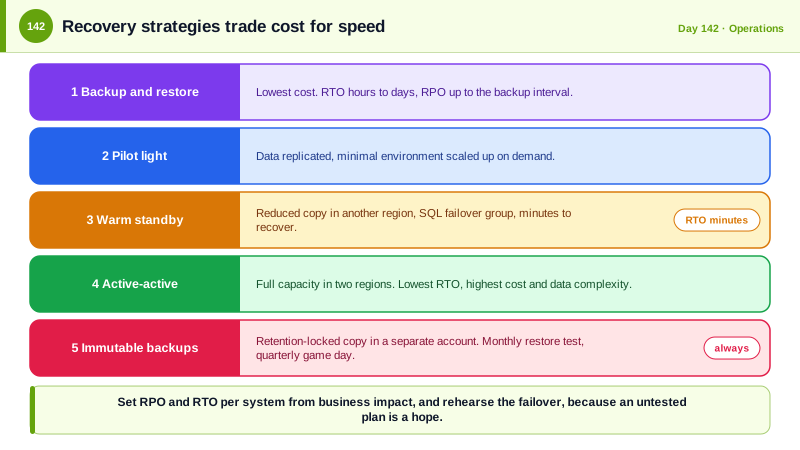
Strategies form a ladder of cost and speed. With backup and restore you keep backups, ideally in another region, and rebuild after a disaster, cheap with an RTO of hours. A pilot light keeps a minimal environment with data replicated and scales it up on demand. A warm standby runs a reduced copy that is ready to take traffic, and active-active runs full capacity in more than one region, with the lowest RTO and the highest cost and complexity, especially for data consistency, which returns to the trade-offs of Day 123. For Azure SQL Database, point-in-time restore covers accidental damage within a retention period, long-term retention keeps periodic backups for years, and geo-replication or a failover group replicates to a secondary region and lets you fail over with an endpoint that stays the same. Zone redundancy protects against the loss of a data center within a region. Storage accounts can use geo-redundant replication, and Key Vault provides soft delete and purge protection, which matter because a deleted key means data that can never be decrypted.
Infrastructure as code from Day 88 is the other half. If the environment can be recreated from Bicep and the pipeline, a region loss is a deployment and a data restore, not a manual reconstruction. Plan the dependencies you forget: DNS and its time to live, certificates, secrets and keys in the recovery region, identity provider availability, third-party services, and the container registry the deployment pulls images from. The plan must also survive the failure of the control plane, since during a regional outage the portal and management APIs of that region may not be available.
Backups are attacked, too. Ransomware operators delete or encrypt backups before demanding payment, and a mistaken command or a compromised administrator can destroy them as effectively. Keep at least one copy that cannot be modified or deleted, using immutable storage with retention locks, in a separate subscription or account with separate credentials, and encrypt backups with keys that are also protected and recoverable. The disaster recovery environment must meet the same security standard as production, with the same network rules, logging, and access controls, because attackers know it is often neglected. Finally, an untested plan is a hope. Restore from backup on a schedule into a scratch environment and verify the data, rehearse the failover, and hold game days where the team executes the runbook under realistic conditions, timing each step and updating the plan with what was learned.
| Strategy | RTO and RPO | Cost and complexity |
|---|---|---|
| Backup and restore | Hours to days, RPO up to the backup interval | Lowest, remember to test restores |
| Pilot light | Tens of minutes to hours | Low, minimal running environment with replicated data |
| Warm standby | Minutes | Moderate, a reduced copy always running |
| Active-active | Seconds to minutes, near-zero RPO | Highest, needs multi-region data design |
| Immutable, isolated backups | Protects against deletion and ransomware | Small extra cost, large risk reduction |
| Regular restore tests and game days | Proves the numbers are real | Requires time each quarter |
Worked Example: A Failover Group, Immutable Backups and a Restore Test
The Bicep defines geo-replication and protection. The scripts restore into a scratch database and verify, and the runbook records the objectives.
// Azure SQL: primary in one region, secondary in another, with a failover group so the application endpoint stays the same.
resource primary 'Microsoft.Sql/servers@2023-08-01-preview' existing = { name: 'sql-taskboard-weu' }
resource secondary 'Microsoft.Sql/servers@2023-08-01-preview' existing = { name: 'sql-taskboard-neu' }

resource fog 'Microsoft.Sql/servers/failoverGroups@2023-08-01-preview' = {
  parent: primary
  name: 'fog-taskboard'
  properties: {
    partnerServers: [ { id: secondary.id } ]
    databases: [ resourceId('Microsoft.Sql/servers/databases', primary.name, 'taskboard') ]
    readWriteEndpoint: { failoverPolicy: 'Automatic', failoverWithDataLossGracePeriodMinutes: 60 }
  }
}
// The application connects to fog-taskboard.database.windows.net, which follows the current primary.

// Backups that cannot be silently deleted: immutable storage with a time-based retention lock, in a separate subscription.
resource backups 'Microsoft.Storage/storageAccounts/blobServices/containers@2023-01-01' = {
  name: '${storage.name}/default/sql-exports'
  properties: {
    immutableStorageWithVersioning: { enabled: true }
  }
}
// Key Vault: soft delete is on by default, purge protection prevents permanent deletion during the retention period.
resource kv 'Microsoft.KeyVault/vaults@2023-07-01' = {
  name: 'kv-taskboard'
  location: location
  properties: { tenantId: tenant().tenantId, sku: { family: 'A', name: 'standard' }, enablePurgeProtection: true, enableSoftDelete: true, softDeleteRetentionInDays: 90, enableRbacAuthorization: true }
}# Monthly restore test: restore last night's state into a scratch database, verify it, record the time it took, then delete it.
start=$(date +%s)
az sql db restore --resource-group rg-dr-test --server sql-scratch --name taskboard-restore-test \
--source-database taskboard --source-server sql-taskboard-weu --source-resource-group rg-prod \
--time "$(date -u -d '-6 hours' +%Y-%m-%dT%H:%M:%SZ)"
# Verification: row counts and a checksum of a critical table must match expectations recorded at backup time.
sqlcmd -S sql-scratch.database.windows.net -d taskboard-restore-test -G -Q \
"SELECT (SELECT COUNT(*) FROM dbo.Tasks) AS Tasks, (SELECT COUNT(*) FROM dbo.Projects) AS Projects, CHECKSUM_AGG(CHECKSUM(Id, Title)) AS TaskChecksum FROM dbo.Tasks;"
echo "Restore and verification took $(( $(date +%s) - start )) seconds" # compare with the RTO
az sql db delete --resource-group rg-dr-test --server sql-scratch --name taskboard-restore-test --yes# DR plan: Task Board (reviewed quarterly, last game day 2026-06-12)
| Tier | Component | RPO | RTO | Strategy |
|------|----------------------|----------|----------|---------------------------------|
| 1 | Tasks API, SQL | 5 min | 30 min | Failover group, warm standby |
| 2 | Reports, search index | 24 h | 8 h | Rebuild from SQL and IaC |
| 3 | Internal tools | 24 h | 48 h | Backup and restore |
Failover decision: incident commander decides. Automatic failover only after the 60 minute grace period.
Steps: 1) declare the incident and freeze deployments 2) check the replication lag and accept the data loss window
3) fail over the group 4) verify the health endpoints and Front Door origin 5) confirm secrets, keys and certificates in the region
6) communicate to customers 7) after recovery, rebuild replication and hold the postmortem
Access: recovery uses break-glass accounts from the vault, logged and reviewed afterward.The dates and durations in the restore test are the evidence. If a quarterly test shows a restore taking three hours and your RTO says thirty minutes, the plan has a gap that no diagram would have revealed.
Real-World Examples
- On 31 January 2017 a GitLab engineer accidentally deleted the production database directory while trying to fix replication, and the team then discovered that several of their backup mechanisms had not been working, leaving them to restore from a six hour old snapshot and lose about six hours of data. They live streamed the recovery and published a candid postmortem, and it is the standard illustration that untested backups are not backups.
- In March 2021 a fire destroyed one of OVHcloud's data centers in Strasbourg and damaged others, and customers who kept backups only in the same site lost data permanently, while those with copies in other locations recovered. It made the case for geographic separation of backups and for testing the assumption that a provider's redundancy covers you.
Review Questions & Answers
RPO is the maximum acceptable amount of data loss measured in time, and RTO is the maximum acceptable time to restore service. Together they decide how much redundancy and replication a system needs.
An attacker with administrator access, or a mistaken command, can delete or encrypt backups in the same account, which is a common step in ransomware attacks. An immutable copy with a retention lock and separate credentials cannot be changed by that access.
Backup jobs can appear successful while producing unusable data, and restore time depends on real volumes and steps. Actually restoring and verifying data shows both correctness and how long recovery takes compared with the RTO.
It contains a copy of your data and often gets fewer controls, which makes it an easier target. Attackers, and mistakes during an emergency, can bypass protections that exist only in the primary environment.