EF Core Relationships and the N+1 Problem
On this page
Learning Objective
Configure one-to-many and many-to-many relationships in EF Core, choose among eager, explicit and projected loading, recognize and fix the N+1 query problem and the cartesian explosion, and apply authorization filters that survive joins and includes.
Concept Explanation
Relationships in EF Core are expressed with navigation properties: a Project has a list of Tasks, and each Task has a Project reference plus a ProjectId foreign key property. The framework maps these to foreign keys and joins. One-to-many is the common case, and many-to-many is now supported directly through skip navigations, where EF Core creates the join table for you, although when the relationship carries its own data, such as a member's role, you should model the join entity explicitly. Delete behavior deserves conscious choice: cascade deletes children automatically, restrict blocks deleting a parent that still has children, and set null clears the reference. Cascade is convenient but can remove far more data than intended in a single statement.
The key question when reading related data is when it loads. Eager loading with Include fetches related rows in the same query, using a join. Explicit loading loads a relationship on demand with a separate call. Lazy loading loads relationships automatically the first time a navigation property is touched, through proxies, and it is disabled by default in EF Core for good reason: it makes the number of database queries invisible in the code. Reading task.Project.Name inside a loop looks like plain property access but sends one query per iteration.
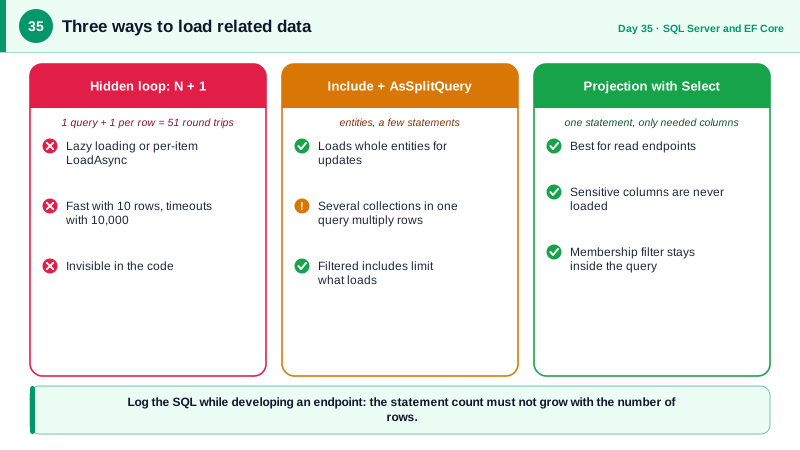
That hidden repetition is the N+1 problem. Code loads a list of N parents with one query, then accesses a related collection or reference on each, causing N additional queries. With ten test records it is instant; with ten thousand in production it is ten thousand round trips and a request that times out. The fixes are to load the related data up front with Include, or, better for read endpoints, to project into a DTO with Select so EF generates one query fetching exactly the needed columns. Facebook's DataLoader, created for GraphQL servers in 2015, exists to solve precisely this class of problem by batching, and the lesson carries over: fetch related data in bulk.
Include has its own trap. Including several collections in one query produces a join whose result set multiplies: a project with 50 tasks and 200 comments returns rows for every combination, the cartesian explosion, transferring far more data than exists. EF Core lets you call AsSplitQuery to issue separate queries per collection, trading a little consistency for far smaller results, and filtered includes to restrict which children load. Above all, security must survive the shape of the query. If a caller may only see tasks in projects they belong to, that condition must be applied to the base query and to the included data, and global query filters can enforce such rules such as soft delete or tenant scoping consistently for every query.
| Loading style | How | Trade-off |
|---|---|---|
| Eager (Include) | Related data joined into the query | One query, but large results with many collections |
| Split query | AsSplitQuery with Include | Avoids cartesian explosion, several round trips |
| Explicit | Entry().Collection().LoadAsync() | Precise control, more code |
| Lazy | Proxies load on first access | Disabled by default, hides N+1 queries |
| Projection | Select into a DTO | Best for reads: one query, only needed columns |
| Global query filter | HasQueryFilter on the entity | Applies tenant or soft delete rules everywhere |
Worked Example: An N+1, Two Fixes and an Enforced Filter
The first snippet shows the N+1 pattern. The second fixes it with projection, and the third shows the include variants. The last block enforces a filter on every query. Enable SQL logging locally and count the statements to see the difference.
// N+1: one query for projects, then one more per project for its tasks.
var projects = await db.Projects.ToListAsync(ct);
foreach (var p in projects)
{
    // With lazy loading, or a per-item explicit load, this is a hidden query each time.
    await db.Entry(p).Collection(x => x.Tasks).LoadAsync(ct);
    Console.WriteLine($"{p.Name}: {p.Tasks.Count} tasks");
}

// Fix 1, best for reads: project to a DTO. One query, only the columns you need, including the count.
var summaries = await db.Projects
    .Where(p => p.Members.Any(m => m.UserId == currentUserId))           // authorization in the query
    .Select(p => new ProjectSummary(p.Id, p.Name, p.Tasks.Count(t => t.Status != TaskState.Done)))
    .ToListAsync(ct);
// SELECT p.Id, p.Name, (SELECT COUNT(*) FROM Tasks t WHERE t.ProjectId = p.Id AND t.Status <> 3) ...

// Fix 2: eager loading when you truly need the entities.
var withTasks = await db.Projects
    .Include(p => p.Tasks.Where(t => t.Status != TaskState.Done))        // filtered include
    .AsSplitQuery()                                                       // avoid cartesian explosion
    .Where(p => p.Members.Any(m => m.UserId == currentUserId))
.ToListAsync(ct);// A global query filter makes soft delete and tenant rules impossible to forget.
public class AppDb(DbContextOptions<AppDb> options, ICurrentTenant tenant) : DbContext(options)
{
protected override void OnModelCreating(ModelBuilder mb)
{
mb.Entity<Project>().HasQueryFilter(p => !p.IsDeleted && p.TenantId == tenant.Id);
mb.Entity<TaskItem>().HasQueryFilter(t => !t.IsDeleted && t.Project.TenantId == tenant.Id);
}
}
// In a rare admin scenario you must opt out explicitly, which makes the exception visible in review:
var all = await db.Projects.IgnoreQueryFilters().ToListAsync(ct);
// Log SQL locally to count statements per request:
// optionsBuilder.LogTo(Console.WriteLine, LogLevel.Information).EnableSensitiveDataLogging(); // dev onlyA useful habit: while developing an endpoint, run it once with SQL logging on and check that the number of statements does not grow with the number of rows. An integration test can assert this too, by counting commands with a logging interceptor.
Real-World Examples
- Facebook engineers, including Lee Byron, created DataLoader alongside the GraphQL stack and open sourced it in 2015 specifically to batch and cache repeated data fetches, which otherwise produce N+1 queries when each field resolver loads its own data. It became a standard pattern in GraphQL servers and shows that the N+1 problem is universal across languages and layers.
- Microsoft's EF Core performance documentation lists loading unneeded columns and related data, and issuing per-row queries in loops, among the most common causes of slow data access, and recommends projection and split queries. Global query filters are documented as the supported way to apply multi-tenancy and soft delete consistently, so no individual query can forget the rule.
Review Questions & Answers
One query loads N parent rows and then an additional query runs for each parent to load related data, producing N+1 round trips. With a handful of development records the total time is tiny, but with thousands of production rows it becomes thousands of sequential queries, so the endpoint slows dramatically. The code looks innocent because the extra queries hide behind property access or a loop.
A projection generates one query that selects only the columns the response needs, including computed values like counts, so no unneeded data crosses the wire or is materialized and tracked. It also prevents sensitive columns from being loaded at all. Include loads entire entities and can multiply rows when several collections are included.
When one query joins several child collections, the result contains a row for every combination of children, so the row count multiplies and duplicates parent data. Split queries run a separate query for each collection and stitch results together, transferring far less data at the cost of extra round trips and a weaker snapshot guarantee.
They append a predicate to every query for an entity, so tenant scoping or IsDeleted checks cannot be forgotten in individual queries. The limitation is that they only cover queries through the DbContext; raw SQL, bulk operations, and code that calls IgnoreQueryFilters bypass them, so those paths need explicit checks and review.