ASP.NET Core File Uploads and Streaming
On this page
Learning Objective
Accept file uploads safely by validating size, type and content, storing files outside the web root under generated names, stream large downloads and results instead of buffering them, and use direct-to-storage uploads so large files never pass through your API.
Concept Explanation
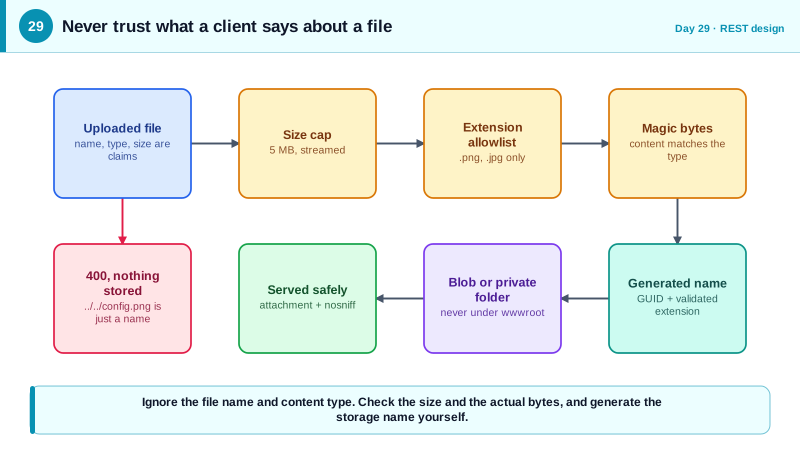
File handling is where APIs meet the messiest input. A JSON body is structured and parsed by a well-tested library; an uploaded file is arbitrary bytes chosen by the caller, accompanied by claims about its name and type that are simply strings. Every one of those claims is untrusted. The file name may contain path separators intended to escape your upload directory. The content type header is whatever the client wrote. The extension may not match the content. The size may be enormous. Safe file handling means ignoring what the client says about the file and checking what the file actually is.
The defensive checklist has a consistent shape. Limit size at Kestrel and again in code while reading. Allow only expected types using an allowlist of extensions, then verify the content matches by checking the leading bytes, called magic numbers, for example the PNG signature, rather than trusting the content type header. Never use the client-supplied name for storage: generate your own name, such as a GUID, and keep the original only as metadata after sanitizing it with Path.GetFileName. Store uploads outside any directory that the web server serves, or in object storage, so an uploaded script can never be executed or fetched by URL. Scan for malware where the data is shared with others. And when serving files back, send Content-Disposition attachment and X-Content-Type-Options nosniff, so a file that pretends to be an image cannot be interpreted as HTML by the browser.
Memory is the other concern. A naive endpoint reads the whole file into a byte array, so ten simultaneous 100-megabyte uploads consume a gigabyte. Streaming processes data in chunks: the request stream is copied straight to storage, and downloads write from a stream to the response without holding the whole file. ASP.NET Core supports streaming files with Results.Stream and Results.File, range requests for resumable downloads, and streaming large JSON collections with IAsyncEnumerable, which writes each element as it becomes available. The general principle is that anything whose size is controlled by the caller or by data growth must be streamed or paged, never buffered.
The most scalable design removes the API from the data path altogether. Instead of accepting the file, the API authenticates the user and authorizes the upload, then issues a short-lived, narrowly scoped upload URL to object storage, such as an Azure Blob Storage shared access signature limited to one blob name, write permission only, and a few minutes of validity. The React app uploads directly to storage, then tells the API it is done, and the API verifies and records the file. This keeps large transfers off your servers, but the security work remains: constrain the token tightly, validate after upload, and never let the client choose the storage path.
| Risk | Attack | Defense |
|---|---|---|
| Path traversal | File named ../../app/config | Generate names, apply Path.GetFileName |
| Executable upload | Script saved where the server can run it | Store outside web root or in object storage |
| Type spoofing | HTML file sent as image/png | Verify magic bytes, serve with nosniff and attachment |
| Resource exhaustion | Huge or many concurrent uploads | Size limits, streaming, rate limits |
| Malware distribution | Infected file shared with other users | Malware scanning before availability |
| Archive bombs | Small zip that expands enormously | Limit entries, size, and depth, and validate paths on extraction |
Worked Example: A Validated Streaming Upload and a Direct Upload Token
The first endpoint accepts a small image, checks the size, extension, and signature, stores it under a generated name outside the web root, and never uses the client's file name for the path. The second issues a scoped upload URL. A last snippet shows the React side.
public static class UploadEndpoints
{
    private static readonly Dictionary<string, byte[]> Signatures = new()
    {
        [".png"] = [0x89, 0x50, 0x4E, 0x47],
        [".jpg"] = [0xFF, 0xD8, 0xFF],
    };
    private const long MaxBytes = 5 * 1024 * 1024;

    public static void Map(IEndpointRouteBuilder app, string storageRoot)
    {
        app.MapPost("/api/avatars", async (IFormFile file, ClaimsPrincipal user, CancellationToken ct) =>
        {
            if (file.Length is 0 or > MaxBytes)
                return Results.Problem("File must be between 1 byte and 5 MB.", statusCode: 400);

            var ext = Path.GetExtension(file.FileName).ToLowerInvariant();     // name is only a hint
            if (!Signatures.TryGetValue(ext, out var magic))
                return Results.Problem("Only PNG and JPEG images are allowed.", statusCode: 400);

            await using var stream = file.OpenReadStream();
            var header = new byte[magic.Length];
            if (await stream.ReadAsync(header, ct) != magic.Length || !header.SequenceEqual(magic))
                return Results.Problem("File content does not match its type.", statusCode: 400);
            stream.Position = 0;

            var storedName = $"{Guid.NewGuid():N}{ext}";                       // our name, never theirs
            var path = Path.Combine(storageRoot, storedName);                  // storageRoot is outside wwwroot
            await using (var target = File.Create(path))
                await stream.CopyToAsync(target, ct);                          // streamed, not buffered

            return Results.Created($"/api/avatars/{storedName}", new { name = storedName });
        }).RequireAuthorization().DisableAntiforgery();
        // Cookie-authenticated form uploads need CSRF protection (Day 48); token-authenticated ones do not.

        app.MapGet("/api/avatars/{name}", (string name) =>
        {
            var safe = Path.GetFileName(name);                                 // strips any directory parts
            var path = Path.Combine(storageRoot, safe);
            return File.Exists(path)
                ? Results.File(path, "application/octet-stream", enableRangeProcessing: true)
                : Results.NotFound();
        });
    }
}// Direct-to-storage: the API issues a tightly scoped, short-lived write-only URL.
app.MapPost("/api/uploads/token", (UploadRequest req, ClaimsPrincipal user, BlobContainerClient container) =>
{
var blobName = $"{user.GetUserId()}/{Guid.NewGuid():N}"; // server picks the path
var sas = new BlobSasBuilder(BlobContainerSasPermissions.Create | BlobContainerSasPermissions.Write,
DateTimeOffset.UtcNow.AddMinutes(5))
{ BlobContainerName = container.Name, BlobName = blobName };
var uri = container.GetBlobClient(blobName).GenerateSasUri(sas);
return Results.Ok(new { uploadUrl = uri, blobName });
}).RequireAuthorization();// React: multipart upload. Do NOT set Content-Type yourself; the browser adds the boundary.
async function uploadAvatar(file: File, token: string) {
const form = new FormData();
form.append('file', file);
const res = await fetch('/api/avatars', { method: 'POST', body: form, headers: { Authorization: `Bearer ${token}` } });
if (!res.ok) throw new Error((await res.json()).title);
return res.json();
}A mismatch between the extension and the actual signature is rejected, so an HTML file renamed to png fails at the byte check rather than being stored. And because the storage name is generated, a file named with traversal characters cannot escape the directory.
Real-World Examples
- ImageTragick, disclosed in May 2016 as CVE-2016-3714, was a set of vulnerabilities in the ImageMagick image processing library where a crafted image file could execute commands on the server that processed it. Any application accepting user images and passing them to the library was exposed, which is why uploaded files are treated as hostile input even when they look like harmless pictures, and why processing should run in a sandbox.
- Snyk's 2018 Zip Slip research showed that archive extraction code in many libraries across languages did not validate entry paths, so an archive containing entries named with parent directory segments could write files anywhere on disk during extraction. It affected thousands of projects and shows how path traversal reaches systems through the contents of files, not only through their names.
Review Questions & Answers
The header is supplied by the client and can say anything, so an attacker can label an HTML or executable file as image/png. The reliable check is to inspect the file's actual leading bytes, its magic number, and ideally to re-encode images with a trusted library. Combined with serving files as attachments with nosniff, it prevents type confusion.
If the code combines a directory with the client's file name, a name like ../../config lets the caller write outside the intended folder, possibly overwriting application files. Generating the stored name yourself, as a GUID plus a validated extension, removes any client influence over the path. Applying Path.GetFileName to any name used in lookups strips directory parts as a second layer.
Buffering a whole file in memory means memory use scales with file size times concurrent requests, so a few large transfers can exhaust the server. Streaming moves data in small chunks between the request, the response, and storage, keeping memory use roughly constant per request regardless of file size.
It grants only the needed permission, such as create or write on one specific blob name chosen by the server, expires within minutes, and cannot list, read, or delete anything else. The API also authorizes the user before issuing it and validates the uploaded object afterward, since storage will accept whatever bytes are sent within the token's limits.