EF Core Tutorial: DbContext and Change Tracker
On this page
Learning Objective
Set up Entity Framework Core with SQL Server, map entities using conventions and the Fluent API, understand how the change tracker and SaveChanges implement a unit of work, and configure the connection safely with resilience and least privilege.
Concept Explanation
Entity Framework Core is Microsoft's object-relational mapper. You describe your data as C# classes, and EF Core translates LINQ queries into SQL, materializes result rows into objects, and turns modifications of those objects into INSERT, UPDATE, and DELETE statements. If you have used Prisma or TypeORM in the JavaScript world, the role is the same, but EF Core is deeply integrated with LINQ and the .NET type system. It does not remove the need to understand SQL. It saves you from writing repetitive mapping code, and you must still know what SQL it generates, which Day 36 practices.
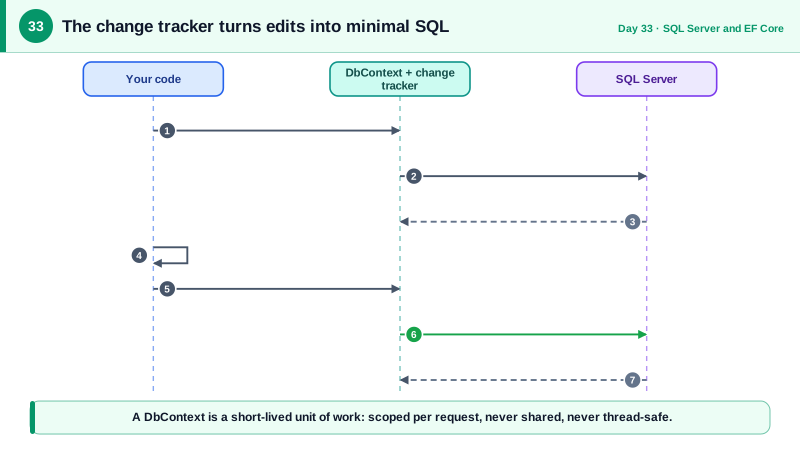
The central class is the DbContext. Each DbSet property on it represents a table you can query. A DbContext is a unit of work: it tracks the entities it has loaded or attached, remembers their original values, and when you call SaveChangesAsync it compares current values to originals and sends the minimal set of changes inside a single transaction. This is why the context has a short, per-request lifetime and is registered as a scoped service, as Day 15 explained, and why it is not thread-safe. Long-lived contexts accumulate tracked objects, grow stale, and eventually misbehave.
Mapping works by convention first: a class becomes a table, a property named Id becomes the key, and string properties become nvarchar max unless configured. Conventions rarely suffice for production, so you configure the model with the Fluent API, ideally in one IEntityTypeConfiguration class per entity to keep the DbContext tidy. There you set maximum lengths, required properties, precision, indexes, relationships, delete behavior, and concurrency tokens. Configuration must match the SQL you designed on Day 31. Setting explicit maximum lengths matters for security and performance as well as correctness, since it bounds stored data and lets the database enforce what the API validates.
Configuration and connection details affect security. Read the connection string from configuration, keep the password in user secrets or a secret store, or better, use passwordless authentication with a managed identity in Azure, which Phase 9 covers. Turn on EnableRetryOnFailure so transient network errors are retried, and use EnableSensitiveDataLogging only in local debugging, because it writes parameter values, and therefore personal data, into logs. Finally, connect as a login with only the required permissions, such as reading and writing the application tables, rather than owning the database, so a compromised API cannot drop tables.
| Concept | Role | Key point |
|---|---|---|
| DbContext | Unit of work and gateway to tables | Short-lived, scoped, not thread-safe |
| DbSet of T | Queryable table | LINQ becomes SQL |
| Change tracker | Remembers loaded entities and originals | Detects modifications automatically |
| SaveChangesAsync | Flushes changes in one transaction | One call, minimal UPDATE statements |
| Fluent API configuration | Precise mapping, lengths, indexes | One configuration class per entity |
| Connection resilience | EnableRetryOnFailure | Handles transient errors |
Worked Example: Entities, Configuration and a Tracked Update
The code defines two entities, configures them, registers the context, and shows a query and an update where EF Core works out the SQL from tracked changes. The commented SQL is what it sends.
public class Project
{
    public Guid Id { get; set; }
    public string Name { get; set; } = "";
    public Guid OwnerId { get; set; }
    public byte[] RowVer { get; set; } = [];
    public List<TaskItem> Tasks { get; set; } = [];
}

public class TaskItem
{
    public Guid Id { get; set; }
    public Guid ProjectId { get; set; }
    public Project Project { get; set; } = null!;
    public string Title { get; set; } = "";
    public TaskState Status { get; set; }
    public decimal? Estimate { get; set; }
    public DateTimeOffset CreatedAt { get; set; }
    public byte[] RowVer { get; set; } = [];
}

public enum TaskState : byte { Todo = 0, InProgress = 1, Review = 2, Done = 3 }

public class ProjectConfiguration : IEntityTypeConfiguration<Project>
{
    public void Configure(EntityTypeBuilder<Project> b)
    {
        b.ToTable("Projects");
        b.HasKey(p => p.Id);
        b.Property(p => p.Name).HasMaxLength(120).IsRequired();
        b.Property(p => p.RowVer).IsRowVersion();                   // concurrency token
        b.HasMany(p => p.Tasks).WithOne(t => t.Project).HasForeignKey(t => t.ProjectId)
         .OnDelete(DeleteBehavior.Cascade);
    }
}

public class TaskItemConfiguration : IEntityTypeConfiguration<TaskItem>
{
    public void Configure(EntityTypeBuilder<TaskItem> b)
    {
        b.ToTable("Tasks");
        b.Property(t => t.Title).HasMaxLength(200).IsRequired();
        b.Property(t => t.Estimate).HasPrecision(9, 2);
        b.Property(t => t.RowVer).IsRowVersion();
        b.HasIndex(t => new { t.ProjectId, t.Status });
    }
}

public class AppDb(DbContextOptions<AppDb> options) : DbContext(options)
{
    public DbSet<Project> Projects => Set<Project>();
    public DbSet<TaskItem> Tasks => Set<TaskItem>();

    protected override void OnModelCreating(ModelBuilder mb) =>
        mb.ApplyConfigurationsFromAssembly(typeof(AppDb).Assembly);
}

// Program.cs
builder.Services.AddDbContext<AppDb>(o => o.UseSqlServer(
    builder.Configuration.GetConnectionString("Default"),
    sql => sql.EnableRetryOnFailure(maxRetryCount: 3))
.EnableSensitiveDataLogging(builder.Environment.IsDevelopment())); // never outside development// Query and tracked update: EF works out the SQL from what changed.
var task = await db.Tasks.FirstAsync(t => t.Id == taskId, ct);
task.Status = TaskState.Done; // change tracker notices this single property
await db.SaveChangesAsync(ct);
// UPDATE Tasks SET Status = @p0 WHERE Id = @p1 AND RowVer = @p2; (only the changed column)Note how the update sends only the changed column and includes the row version in the WHERE clause. That is the concurrency check from Day 26 done by the database layer, which Day 37 examines closely.
Real-World Examples
- Entity Framework Core 1.0 shipped in June 2016 as a ground-up rewrite of the older Entity Framework 6 to be cross-platform and modular, and it has since become the default data access library for new .NET applications. Microsoft's own reference application, eShop, uses EF Core for its services, and the framework's design as a unit of work with a change tracker underlies typical ASP.NET Core data access.
- Sensitive data logging is a documented EF Core feature that includes parameter values in log output and exception messages, and Microsoft's documentation warns that it can expose personal data and must not be left on in production. It is a small setting with a large privacy consequence, and a common finding in log reviews.
Review Questions & Answers
It tracks every entity it loads, so a long-lived context accumulates state, memory, and stale data, and it is not thread-safe, so concurrent use corrupts its internal tracking and throws errors. A scoped, per-request lifetime gives each unit of work a fresh, isolated context that is disposed when the request ends.
It compares each tracked entity's current property values with the original values recorded at load time, determines which entities were added, modified, or deleted, and generates only the necessary INSERT, UPDATE, and DELETE statements, executed together in one transaction. If any statement fails, the whole batch is rolled back.
Without a configured length, string properties map to nvarchar max, which removes a natural limit and can hurt indexing and performance. Matching the database column to the validation rule gives defense in depth: even if a bug skips validation, the database rejects oversized values instead of storing unbounded data.
It writes actual parameter values, such as emails and identifiers, into log messages and exceptions, so personal or secret data can end up in logs that many people and systems can read. It is acceptable only on a local development machine while debugging a specific problem, and should never be enabled in shared or production environments.