C# async/await: Task vs JavaScript Promise
On this page
Learning Objective
Map Promises and async functions onto Task and async methods in C#, explain how the .NET thread pool differs from a single-threaded event loop, avoid the blocking anti-patterns that cause thread starvation, and use CancellationToken to stop work when a caller goes away.
Concept Explanation
The syntax is deliberately familiar. An async method in C# returns Task or Task of T, which plays the role of a Promise, and the await keyword suspends the method until the operation completes and then resumes with the result. Task.WhenAll is Promise.all, Task.WhenAny is Promise.race, and Task.Delay is a setTimeout you can await. Exceptions thrown inside an awaited task surface at the await, just as a rejected promise throws at an await in JavaScript. If you can read async TypeScript, you can read async C#, and the migration is mostly a matter of renaming.
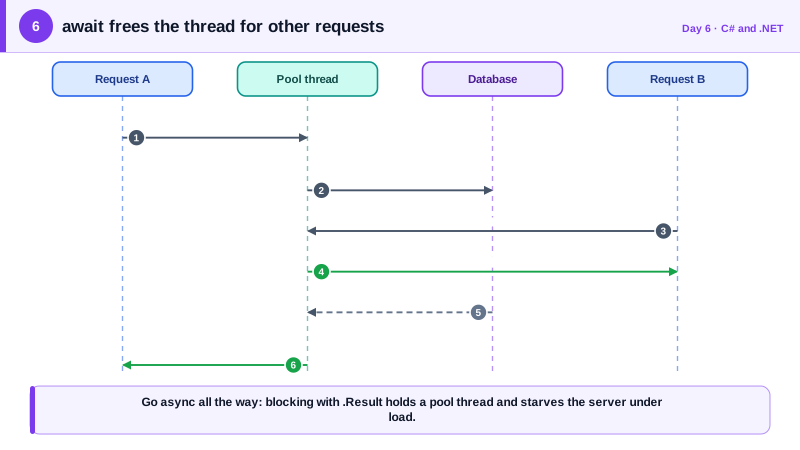
The runtime model underneath is completely different, and this is where frontend intuition can mislead you. JavaScript runs your code on one thread with an event loop, so nothing ever runs in parallel and a long synchronous loop freezes everything. .NET runs on a pool of worker threads, and a web server handles many requests at once on different threads. When a method awaits an operation such as a database call, the thread is released back to the pool and picks up other work, then a possibly different thread continues the method afterward. This is why async matters so much on servers: it lets a small number of threads serve thousands of concurrent requests that are mostly waiting on input and output.
That model makes one mistake in particular very costly. Calling .Result or .Wait() on a task blocks the current thread until it finishes, and under load many blocked threads exhaust the pool, so new requests queue up even though the CPU is idle. This is called thread pool starvation, and it makes a healthy service look frozen. The rule is async all the way: if a method awaits, its caller awaits, up through the endpoint handler. Two further rules keep you out of trouble. Never write async void except for event handlers, because exceptions in it cannot be observed and can crash the process. And prefer returning the task from very thin wrapper methods only when you do not need to catch anything.
Cancellation is the feature JavaScript developers most often lack. A CancellationToken is passed down the call chain, and ASP.NET Core triggers it automatically when the client disconnects or the request times out. Every well-behaved library method accepts one. Honoring it means a request that nobody is waiting for stops consuming database connections, CPU, and memory. That is a resilience and security property as well: an attacker who opens many expensive requests and drops them should not leave your server finishing all of that work. You can also create a token that cancels itself after a deadline, which is how you enforce timeouts on calls to other systems.
| Concept | JavaScript or TypeScript | C# |
|---|---|---|
| Async result | Promise of T | Task of T |
| Wait for a result | await promise | await task |
| Run concurrently, wait for all | Promise.all([a, b]) | await Task.WhenAll(a, b) |
| Concurrency model | One thread, event loop | Thread pool, many threads |
| Cancel work | AbortController and AbortSignal | CancellationTokenSource and CancellationToken |
| Never do this on a server | Block the event loop with sync loops | Call .Result or .Wait() on a task |
Worked Example: Concurrent Calls, a Deadline and Client Disconnects
The service below fetches two independent resources concurrently, applies a five second deadline, and honors the caller's cancellation. The endpoint receives a token that ASP.NET Core cancels if the browser navigates away. A last snippet shows the blocking pattern to avoid.
public sealed class OrderSummaryService(HttpClient http)
{
    public async Task<Summary> GetAsync(int orderId, CancellationToken ct)
    {
        // Link the caller's token with our own deadline.
        using var cts = CancellationTokenSource.CreateLinkedTokenSource(ct);
        cts.CancelAfter(TimeSpan.FromSeconds(5));

        // Start both calls now, then wait for both: the equivalent of Promise.all.
        var itemsTask = http.GetFromJsonAsync<List<Item>>($"orders/{orderId}/items", cts.Token);
        var shippingTask = http.GetFromJsonAsync<Shipping>($"orders/{orderId}/shipping", cts.Token);
        await Task.WhenAll(itemsTask, shippingTask);

        var items = (await itemsTask) ?? [];
        var shipping = await shippingTask;
        return new Summary(items, shipping);
    }
}

// ASP.NET Core supplies the token and cancels it if the client disconnects.
app.MapGet("/orders/{id:int}/summary",
    async (int id, OrderSummaryService svc, CancellationToken ct) =>
        Results.Ok(await svc.GetAsync(id, ct)));

// Anti-pattern: blocks a pool thread and can starve the server under load.
// var summary = svc.GetAsync(id, ct).Result;
If the browser cancels the request, the token trips, the HTTP calls stop, and the exception that propagates is an OperationCanceledException, which ASP.NET Core treats as a normal client abort rather than a server error. In Angular terms this is what unsubscribing from an observable, or an AbortSignal on fetch, achieves, except that here it reaches all the way into the database call.
Real-World Examples
- C# 5.0, released with Visual Studio 2012, introduced the async and await keywords, and JavaScript adopted the same syntax in ECMAScript 2017. The model was designed in C# first, which is why the two feel so alike on the surface even though the execution machinery differs.
- Microsoft's official ASP.NET Core performance guidance lists blocking on asynchronous code, through Task.Wait or Task.Result, among the most common causes of thread pool starvation, and recommends making the entire call path asynchronous. Diagnosing starvation in production usually shows many threads all waiting on tasks while CPU usage stays low.
Review Questions & Answers
It blocks the calling thread until the task finishes, so that thread does nothing while it waits. With one user, this is invisible. Under concurrent load, many requests block many threads, the pool runs out of free threads and injects new ones slowly, and the server stops responding even though the CPU is mostly idle. Awaiting instead frees the thread for other requests during the wait.
It lets the work actually stop. Without it, a request abandoned by the browser keeps running its database queries and downstream calls to completion, consuming resources for a result nobody will read. A server that cannot cancel abandoned work is easier to overload, because a client can start many expensive operations and disconnect, leaving the server to finish all of them.
An exception inside an awaited task is rethrown at the await point, so try and catch around the await works exactly as it does around an awaited promise. In an async void method there is no task to carry the exception back to a caller, so it is raised on the synchronization context or thread pool and can terminate the process. That is why async void is reserved for event handlers.
Awaiting sequentially takes about 400 milliseconds because the second call does not start until the first finishes. Starting both tasks before awaiting, then awaiting them together with WhenAll, overlaps the waiting and takes about 200 milliseconds. The trade-off is more simultaneous load on the downstream service, so unbounded fan-out over a large list should be limited.