REST Resource and URL Design for a Real Product
On this page
Learning Objective
Turn the screens and workflows of a real product into a consistent set of REST resources and URLs, decide when an action deserves its own endpoint, choose identifiers that do not invite abuse, and keep sensitive data out of URLs.
Concept Explanation
REST, described in Roy Fielding's 2000 doctoral dissertation, organizes an API around resources: things your product talks about, such as projects, tasks, comments, and users. Each resource has an address, a URL, and clients act on it with the standard HTTP methods. This is a different mental model from the remote procedure calls a frontend developer might design first, such as getProjectTasks or markTaskDone. A resource-oriented API is easier to cache, document, and secure, because every operation has the same predictable shape: a method applied to a noun.
The practical rules are few. Use plural nouns for collections, so /projects is the collection and /projects/42 is one member. Nest a resource under its parent when it cannot exist without it, so /projects/42/tasks lists the tasks in a project, but stop at about two levels; deeply nested routes such as /orgs/1/projects/2/tasks/3/comments/4 are painful to build and to read, and once a task has its own globally unique id you can address it directly as /tasks/3. Keep URLs lowercase, use hyphens for readability, and avoid verbs and file extensions in paths. Use query strings for optional refinement such as filtering, sorting, and paging, and path segments for identity.
Some operations do not fit a plain create, read, update, or delete on a noun: canceling an order, archiving a project, resending an invitation. Two approaches are common. Model the state change as an update of the resource, using PATCH with the new status, when the change is really just a field. Or model the action as a sub-resource with a POST, such as POST /orders/17/cancellation or POST /invitations/9/resend, when it triggers business logic with side effects. Pragmatic APIs allow the second form as an explicit, documented exception. What they avoid is a sprawl of verb-named routes that reinvent RPC without its tooling.
Identifiers and URLs also have security implications. Sequential integers are compact but let anyone guess the next record, which turns any missing authorization check into a data harvest; GUIDs or prefixed random identifiers make guessing impractical, but they are not a substitute for authorization, because an identifier that leaks is still an identifier that works. And never place secrets or personal data in a URL, whether in the path or query string: URLs are written to server access logs, proxy logs, browser history, and Referer headers sent to other sites. Tokens, emails, and national identifiers belong in the request body or a header.
| Design question | Recommended approach | Example |
|---|---|---|
| Collection vs member | Plural noun, id for one item | /projects and /projects/42 |
| Child resources | Nest one or two levels, then address directly | /projects/42/tasks and /tasks/7 |
| Filtering and sorting | Query string | /tasks?status=open&sort=dueDate |
| State change with logic | Sub-resource with POST | POST /orders/17/cancellation |
| Identifier type | GUID or prefixed random id for public resources | /invoices/inv_9f3c2a |
| Sensitive values | Never in the URL | Send tokens in headers, emails in bodies |
Worked Example: A Route Map for a Task Board Product
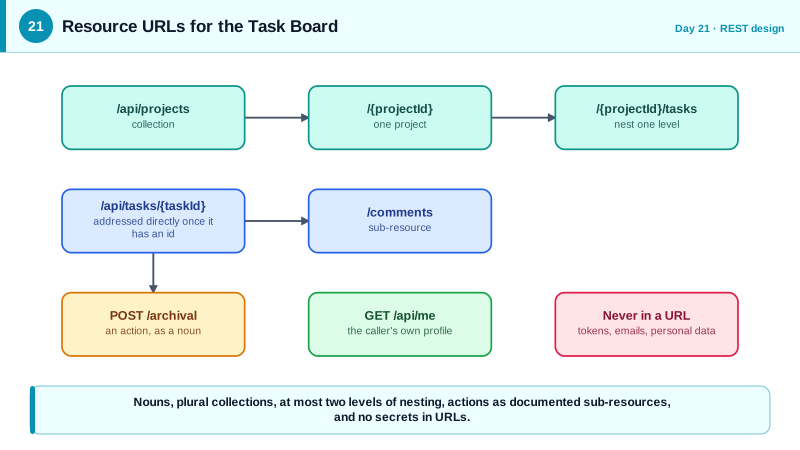
Suppose the React application has a project list, a board of tasks per project, a task detail drawer with comments, and a user profile. The routes below cover those screens. The C# shows how the map translates directly into grouped endpoints, with the exceptional action modeled as a sub-resource.
GET    /api/projects                     list projects the caller can see
POST   /api/projects                     create a project
GET    /api/projects/{projectId}         project details
PATCH  /api/projects/{projectId}         update name or description
DELETE /api/projects/{projectId}         delete a project

GET    /api/projects/{projectId}/tasks   tasks on a board (filter, sort, page)
POST   /api/projects/{projectId}/tasks   create a task in a project
GET    /api/tasks/{taskId}               one task, addressed directly
PATCH  /api/tasks/{taskId}               update title, status, assignee
POST   /api/tasks/{taskId}/archival      archive: an action with side effects

GET    /api/tasks/{taskId}/comments      comments on a task
POST   /api/tasks/{taskId}/comments      add a comment

GET /api/me the signed-in user's own profilepublic static class TaskBoardEndpoints
{
public static void Map(IEndpointRouteBuilder app)
{
var projects = app.MapGroup("/api/projects").WithTags("Projects");
projects.MapGet("/", ListProjects);
projects.MapPost("/", CreateProject);
projects.MapGet("/{projectId:guid}", GetProject);
// Child collection nested one level under its parent.
projects.MapGet("/{projectId:guid}/tasks", ListTasks);
projects.MapPost("/{projectId:guid}/tasks", CreateTask);
// Once a task has its own id, address it directly instead of nesting deeper.
var tasks = app.MapGroup("/api/tasks").WithTags("Tasks");
tasks.MapGet("/{taskId:guid}", GetTask);
tasks.MapPatch("/{taskId:guid}", UpdateTask);
tasks.MapPost("/{taskId:guid}/archival", ArchiveTask); // deliberate, documented action
tasks.MapGet("/{taskId:guid}/comments", ListComments);
tasks.MapPost("/{taskId:guid}/comments", AddComment);
}
// Handlers omitted: each must authorize access to the specific project or task (Phase 5).
}Two decisions here are worth naming. Identifiers are GUIDs, which makes blind enumeration impractical, while every handler still has to check membership of the project. And archival is a POST to a noun, archival, so it appears in documentation and logs as its own resource rather than as a vague verb hidden in a query string.
Real-World Examples
- Stripe's API is a well-known example of consistent resource modeling: plural collections such as /v1/customers and /v1/charges, and resource identifiers with a readable type prefix such as cus_ and ch_, so an identifier pasted into a log or a support ticket tells you immediately what kind of object it is. The same consistency lets its client libraries and documentation be generated with little special-casing.
- GitHub's REST API nests only where the parent is part of the identity, for instance /repos/{owner}/{repo}/issues, and then exposes global identifiers where they exist. It also removed support for passing access tokens in query parameters in 2020, precisely because URLs end up in access logs and browser history, and requires credentials to be sent in the Authorization header.
Review Questions & Answers
The first uses a noun for the resource being created, the cancellation, and the right method for an operation with side effects, so it fits caching rules, documentation, and tooling. The second uses a verb in the path and a GET for a state change, which violates the safety of GET, invites prefetching and link crawlers to trigger it, and is easy to forge from another site.
Clients must know and supply every ancestor identifier to reach a leaf, routes become long and brittle, and handlers must validate each level in the chain. Once a child has a globally unique identifier, addressing it directly at the top level is simpler, and the handler can still verify the caller's access to the relevant parent through the data.
No. They make guessing impractical, which raises the cost of blind enumeration, but an identifier can leak through logs, screenshots, shared links, or referrer headers, and anyone who obtains it can use it if the server does not check permissions. Authorization on every request is required regardless of the identifier type; random ids are only defense in depth.
URLs are recorded in server and proxy logs, stored in browser history, included in the Referer header when the user follows a link, and often pasted into chat or tickets. Anything placed in them therefore spreads to many systems and people. Bodies and headers are not logged by default in the same way, so sensitive values belong there.