Serilog Structured Logging and Correlation IDs
On this page
Learning Objective
Configure Serilog for structured, correlated logging in ASP.NET Core, enrich events with trace and correlation identifiers, mask sensitive properties centrally, log requests without recording bodies, and design log levels and retention so logs are useful during an incident without becoming a privacy liability.
Concept Explanation
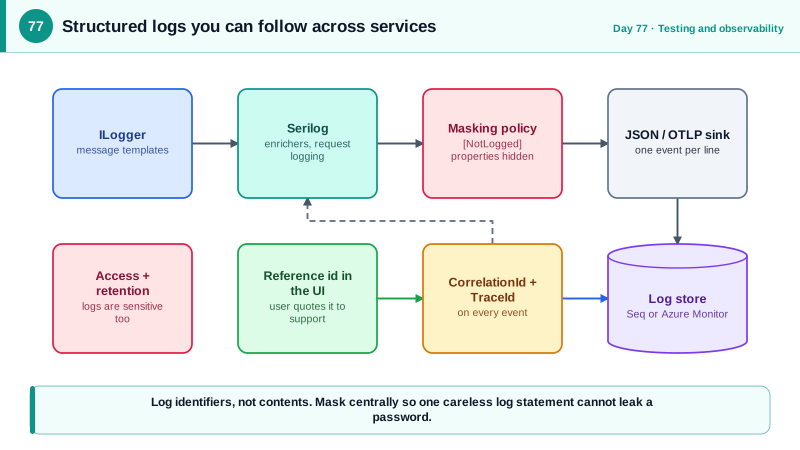
Day 17 introduced structured logging with message templates. A production system needs more: a place where logs from every instance and service are collected, searchable by properties, correlated across services, and protected. Serilog, created by Nicholas Blumhardt in 2013, is the most widely used structured logging library in .NET. It plugs into the standard ILogger abstraction, so your application code does not change, while adding sinks that send events to the console as JSON, to Seq, to files, to Azure Monitor, or to an OpenTelemetry collector, and enrichers that stamp every event with context such as the machine, the environment, and the current request's identifiers.
The most useful enrichment is correlation. When one user action passes through the React app, the BFF, the API, a queue, and a background job, you need to find every log line it produced. Two identifiers make that possible. The correlation identifier from Day 19 is generated or accepted at the edge and pushed into the logging context for the life of the request. The trace and span identifiers from the current Activity, the .NET representation of an OpenTelemetry span, are added automatically and link logs to the distributed traces of Day 78. With both on every event, an error report from a user that includes the reference identifier from Day 57 leads directly to the complete story in the logs, across every service.
Request logging deserves restraint. Serilog's request logging middleware writes one summary event per request, with the method, path, status code, and elapsed time, in place of the many noisy framework events, which you can turn down to Warning. Do not log request or response bodies by default. Bodies hold passwords, tokens, and personal data, they are large, and once they are in logs they are copied to systems with looser controls than your database. When you truly need to see a body to debug an issue, do it temporarily, for a specific route and a limited time, with masking. Log the route template, not the raw URL with query string, since query strings can contain identifiers and tokens, and add identifiers of the actor and tenant as properties so investigations can filter by them.
Protecting sensitive data in logs should not depend on every developer remembering. Configure it centrally. Use destructuring policies to control how objects are logged, so that a type with sensitive members is logged in a masked form or has those members excluded, and mark properties with an attribute that the policy honors. Add a scrubbing step for known patterns, such as bearer tokens or card-like numbers, as a last line of defense. Set log levels per namespace in configuration so production runs at Information with noisy categories at Warning, and be aware of cost: log volume is money and a source of noise, so log events that have a reader and an action attached. Finally, treat log access as sensitive: restrict who can query production logs, set retention that matches policy and privacy law, and remember that logs are also a target, since they reveal system structure and sometimes secrets.
| Element | Purpose | Note |
|---|---|---|
| Serilog with ILogger | Structured events, many sinks | Application code keeps using ILogger |
| Enrichers | Stamp context on every event | Environment, machine, trace and span ids |
| Correlation id in LogContext | Find all events for one request | Validated at the edge, Day 19 |
| Request logging middleware | One summary event per request | Route template, status, duration |
| Destructuring and masking policies | Central control of sensitive members | Do not rely on developers remembering |
| Levels, retention, access control | Usefulness without liability | Restrict who can read production logs |
Worked Example: Configuration, Enrichment, Masking and an Investigation Query
The setup configures Serilog with correlation and trace enrichment and a masking policy. The controller-level code logs identifiers instead of contents, and a query shows how to follow one request.
// dotnet add package Serilog.AspNetCore Serilog.Sinks.Console Serilog.Sinks.OpenTelemetry Serilog.Enrichers.Span
var builder = WebApplication.CreateBuilder(args);

builder.Host.UseSerilog((ctx, services, cfg) => cfg
    .ReadFrom.Configuration(ctx.Configuration)                          // levels and sinks live in appsettings
    .ReadFrom.Services(services)
    .Enrich.FromLogContext()                                            // picks up properties pushed per request
    .Enrich.WithSpan()                                                  // adds TraceId and SpanId from Activity.Current
    .Enrich.WithProperty("Service", "taskboard-api")
    .Enrich.WithProperty("Environment", ctx.HostingEnvironment.EnvironmentName)
    .Destructure.With<SensitiveDataPolicy>()                            // central masking
    .WriteTo.Console(new RenderedCompactJsonFormatter())                // one JSON object per line, easy for collectors
    .WriteTo.OpenTelemetry(o => { o.Endpoint = ctx.Configuration["Otel:Endpoint"]; o.Protocol = OtlpProtocol.Grpc; }));

var app = builder.Build();

app.UseMiddleware<RequestHardeningMiddleware>();                         // Day 19: pushes CorrelationId into LogContext
app.UseSerilogRequestLogging(o =>
{
    o.MessageTemplate = "HTTP {RequestMethod} {RequestPath} responded {StatusCode} in {Elapsed:0.0} ms";
    o.GetLevel = (http, elapsed, ex) => ex != null || http.Response.StatusCode >= 500 ? LogEventLevel.Error
        : http.Response.StatusCode >= 400 ? LogEventLevel.Warning : LogEventLevel.Information;
    o.EnrichDiagnosticContext = (diag, http) =>
    {
        diag.Set("Route", http.GetEndpoint()?.DisplayName);              // route template, not the raw URL with query string
        diag.Set("UserId", http.User.FindFirstValue("sub"));             // identifiers, not names or emails
        diag.Set("TenantId", http.User.FindFirstValue("tid"));
        diag.Set("Ip", http.Connection.RemoteIpAddress?.ToString());
    };
});{
"Serilog": {
"MinimumLevel": {
"Default": "Information",
"Override": {
"Microsoft.AspNetCore": "Warning",
"Microsoft.EntityFrameworkCore.Database.Command": "Warning",
"System.Net.Http.HttpClient": "Warning"
}
}
}
}// Central masking: sensitive members never reach a sink, whatever a developer logs with {@Object}.
[AttributeUsage(AttributeTargets.Property)] public sealed class NotLoggedAttribute : Attribute;
public sealed class SensitiveDataPolicy : IDestructuringPolicy
{
public bool TryDestructure(object value, ILogEventPropertyValueFactory factory, out LogEventPropertyValue? result)
{
var props = value.GetType().GetProperties();
if (!props.Any(p => p.GetCustomAttribute<NotLoggedAttribute>() is not null)) { result = null; return false; }
result = new StructureValue(props.Select(p => new LogEventProperty(p.Name,
p.GetCustomAttribute<NotLoggedAttribute>() is not null
? new ScalarValue("***")
: factory.CreatePropertyValue(p.GetValue(value), destructureObjects: true))));
return true;
}
}
public sealed record RegisterRequest(string Email, [property: NotLogged] string Password, [property: NotLogged] string? MfaCode);
// Usage: the password is masked even though the whole object is logged.
log.LogInformation("Registering {@Request}", request); // -> {"Email":"a@b.com","Password":"***","MfaCode":"***"}# Investigation: a user reports "Reference: 7f3a9c" after an error. Find everything that happened.
# Seq or a similar store:
CorrelationId = '7f3a9c' or TraceId = '4bf92f3577b34da6a3ce929d0e0e4736'
# Azure Log Analytics (KQL), across the API, the BFF and background jobs:
union AppTraces, AppRequests, AppExceptions
| where TimeGenerated > ago(1h)
| where tostring(Properties.CorrelationId) == "7f3a9c" or OperationId == "4bf92f3577b34da6a3ce929d0e0e4736"
| project TimeGenerated, AppRoleName, SeverityLevel, Message, tostring(Properties.UserId)
| order by TimeGenerated ascAdd a test that logs a request object with sensitive members into an in-memory sink and asserts that the password never appears in any captured event, and an integration test that a request with a hostile correlation header results in a clean identifier in the logs.
Real-World Examples
- In March 2019, security journalist Brian Krebs reported that Facebook had stored the passwords of hundreds of millions of users in plain text in internal logs, searchable by thousands of employees, and Facebook confirmed the issue. There was no evidence of external abuse, but the incident shows how easily a logging call can capture credentials and how far logs are shared inside a company.
- Serilog, first released by Nicholas Blumhardt in 2013, popularized structured logging in the .NET world by treating log events as data with properties rather than formatted strings, and its sink ecosystem includes Seq, Elasticsearch, Azure Monitor, and OpenTelemetry. Its design informed the message template approach that Microsoft's own logging abstractions later adopted.
Review Questions & Answers
The correlation identifier is created at your edge and ties together your own components, while the trace and span identifiers come from OpenTelemetry and link logs to distributed traces, including calls into services that do not know your correlation scheme. Having both lets an investigator start from whichever identifier they have, a user's reference or a trace in the tracing tool.
Bodies contain passwords, tokens, and personal data, and they are large. Logging them copies sensitive information into systems with wider access and longer retention than the database, creating a privacy and security liability. Log identifiers and summaries instead, and enable body logging only briefly, for a specific route, with masking.
It controls how objects are turned into log properties in one central place, masking or excluding members marked as sensitive whenever the object is logged with the at-sign operator. Developers do not have to remember to omit fields at every call site, so a new log statement that passes a whole object cannot leak the password.
The raw URL includes concrete identifiers and query strings, which can contain tokens, personal data, or search terms, and produces high-cardinality values that are hard to group. The route template, such as the pattern with a placeholder for the id, is stable, groups requests meaningfully, and avoids recording sensitive parameters.