Deploy React and .NET to Azure with a CI/CD Pipeline
On this page
Learning Objective
Assemble the whole delivery path, infrastructure as code, a CI pipeline, container build and scan, migration, staged deployment with verification, approval, promotion and rollback, and verify the running system against a security, observability and reliability checklist before calling it shipped.
Concept Explanation
Everything in this phase now comes together in one path from a pull request to production. The goal is a pipeline that any team member can trigger by merging, that deploys the same artifact through staging to production, and that can be undone in a minute. The artifact principle is central: build the container image once, scan it, and promote that exact image through environments, changing only configuration, never rebuilding for production. Rebuilding for each environment means production runs something no one tested. The same applies to the database migration bundle, built once in CI and applied to staging, then to production.
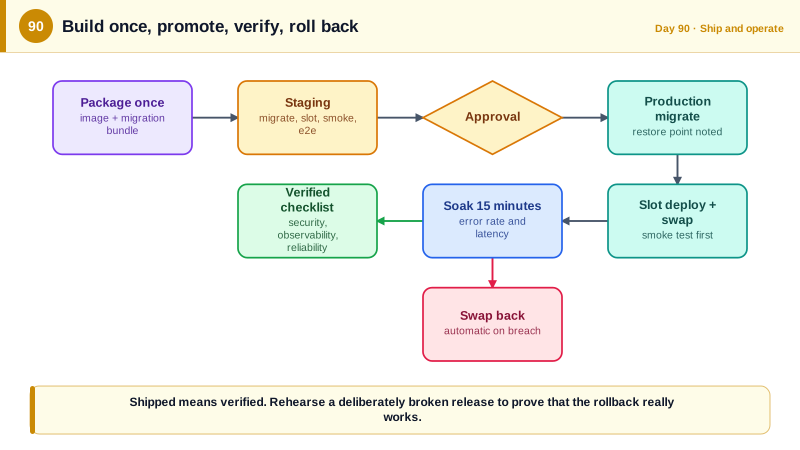
The sequence has clear stages. On every push to main, CI builds and tests, produces the image, scans it, and attests its provenance. The infrastructure workflow runs what-if for changes to the templates and applies them to staging automatically and to production after approval. Then the application deployment applies the migration bundle to staging, deploys the new image to the staging slot, and runs the smoke tests and the short end-to-end suite against it. A required reviewer approves the production environment. Production applies the migration, deploys to its own staging slot, verifies, swaps, watches the metrics for a soak period, and either finishes or swaps back. Every step uses OIDC federation and least-privilege identities, and every step leaves an auditable record.
Being shipped means more than the site loading. Before declaring victory, verify it against a checklist that mirrors the course. Security: the WAF is in prevention mode, the origin accepts only Front Door, the database has no public access, secrets come from Key Vault, the application runs as a non-root user with a managed identity, and the security headers and cookie flags are as designed. Observability: traces, logs, and metrics arrive, the dashboards show the RED signals, and alerts are wired to a person with a runbook. Reliability: at least two instances in different zones, health checks separate liveness from readiness, autoscale has a ceiling, backups and point-in-time restore have been tested, and a rollback has been rehearsed. Operations: cost alerts exist, resource locks protect the database, and someone owns the on-call rotation.
Measure the delivery process itself. The DORA research program, described in the book Accelerate and the annual State of DevOps reports, found that four measures distinguish high-performing teams: deployment frequency, lead time for changes, change failure rate, and time to restore service. They reflect the same properties this pipeline aims for, small frequent safe releases and fast recovery. Microsoft's Azure Well-Architected Framework organizes review of a workload into five pillars, reliability, security, cost optimization, operational excellence, and performance efficiency, and the checklist here maps onto them. Treat the first production deployment as the start of operating the system, not the end.
| Stage | What runs | Gate |
|---|---|---|
| Build and verify | Restore, build, unit, integration, contract, security scans | All required checks green |
| Package | Build image once, scan, attest, push to the registry | No high findings with fixes |
| Infrastructure | Bicep what-if, apply to staging, approved apply to production | Reviewed what-if output |
| Staging deploy | Migration bundle, new image to a slot, smoke and end-to-end tests | Tests pass on the slot |
| Production approval | Required reviewer on the environment | Human decision with the evidence |
| Production release | Migrate, deploy to slot, verify, swap, soak, or swap back | Health and SLO metrics stay within limits |
Worked Example: The Release Workflow, Smoke Tests, Rollback and the Verification Checklist
The workflow promotes a single image and migration bundle through staging and production. The scripts and checklist support verification and recovery.
# .github/workflows/release.yml
name: release
on:
  workflow_run: { workflows: [ci], types: [completed], branches: [main] }

permissions: { contents: read }

jobs:
  package:
    if: github.event.workflow_run.conclusion == 'success'
    runs-on: ubuntu-latest
    permissions: { contents: read, id-token: write, attestations: write, packages: write }
    outputs: { image: '${{ steps.meta.outputs.image }}' }
    steps:
      - uses: actions/checkout@11bd71901bbe5b1630ceea73d27597364c9af683
      - uses: azure/login@v2
        with: { client-id: '${{ vars.ACR_PUSH_CLIENT_ID }}', tenant-id: '${{ vars.AZURE_TENANT_ID }}', subscription-id: '${{ vars.AZURE_SUBSCRIPTION_ID }}' }
      - id: meta
        run: echo "image=${{ vars.ACR_NAME }}.azurecr.io/taskboard:${{ github.sha }}" >> "$GITHUB_OUTPUT"
      - run: az acr build -r ${{ vars.ACR_NAME }} -t taskboard:${{ github.sha }} .                # built once, in the registry
      - run: dotnet tool restore && dotnet ef migrations bundle --self-contained -r linux-x64 -o efbundle
      - uses: actions/upload-artifact@v4
        with: { name: efbundle, path: efbundle }                                                     # the same bundle for both environments

  staging:
    needs: package
    runs-on: ubuntu-latest
    environment: staging
    permissions: { id-token: write, contents: read }
    steps:
      - uses: azure/login@v2
        with: { client-id: '${{ vars.DEPLOY_CLIENT_ID }}', tenant-id: '${{ vars.AZURE_TENANT_ID }}', subscription-id: '${{ vars.AZURE_SUBSCRIPTION_ID }}' }
      - uses: actions/download-artifact@v4
        with: { name: efbundle }
      - run: chmod +x efbundle && ./efbundle --connection "${{ vars.STAGING_MIGRATION_CONNECTION }}"     # no password: Authentication=Active Directory Default uses the federated login
      - run: az webapp config container set -g rg-taskboard-staging -n taskboard-stg --slot canary --container-image-name ${{ needs.package.outputs.image }}
      - run: ./scripts/smoke.sh "https://taskboard-stg-canary.azurewebsites.net"
      - run: npx playwright test --project=chromium
        env: { E2E_BASE_URL: 'https://taskboard-stg-canary.azurewebsites.net', E2E_USER: '${{ secrets.E2E_USER }}', E2E_PASSWORD: '${{ secrets.E2E_PASSWORD }}' }
      - run: az webapp deployment slot swap -g rg-taskboard-staging -n taskboard-stg --slot canary --target-slot production

  production:
    needs: [package, staging]
    runs-on: ubuntu-latest
    environment: production                       # required reviewers: the approval gate
    concurrency: production-release               # never two production releases at once
    permissions: { id-token: write, contents: read }
    steps:
      - uses: azure/login@v2
        with: { client-id: '${{ vars.DEPLOY_CLIENT_ID }}', tenant-id: '${{ vars.AZURE_TENANT_ID }}', subscription-id: '${{ vars.AZURE_SUBSCRIPTION_ID }}' }
      - uses: actions/download-artifact@v4
        with: { name: efbundle }
      - run: chmod +x efbundle && echo "RESTORE_POINT=$(date -u +%FT%TZ)" >> "$GITHUB_ENV" && ./efbundle --connection "${{ vars.PROD_MIGRATION_CONNECTION }}"
      - run: az webapp config container set -g rg-taskboard-prod -n taskboard-prod --slot canary --container-image-name ${{ needs.package.outputs.image }}
      - run: ./scripts/smoke.sh "https://taskboard-prod-canary.azurewebsites.net"
      - run: az webapp deployment slot swap -g rg-taskboard-prod -n taskboard-prod --slot canary --target-slot production
      - run: ./scripts/soak.sh 15                   # watch error rate and latency for 15 minutes; exit non-zero on breach
      - if: failure()
        run: |
          az webapp deployment slot swap -g rg-taskboard-prod -n taskboard-prod --slot canary --target-slot production   # rollback: swap back
echo "::error::Release rolled back. Migration restore point: $RESTORE_POINT"#!/usr/bin/env bash
# scripts/smoke.sh: fast, read-only checks that the deployment is alive and correctly configured.
set -euo pipefail
URL="$1"
curl -fsS "$URL/health/live" | grep -q ok
curl -fsS "$URL/health/ready" | grep -q Healthy
headers=$(curl -fsSI "$URL/")
echo "$headers" | grep -qi '^strict-transport-security:'
echo "$headers" | grep -qi '^content-security-policy:'
echo "$headers" | grep -qi '^x-content-type-options: nosniff'
! echo "$headers" | grep -qi '^server:' # no server banner
test "$(curl -s -o /dev/null -w '%{http_code}' "$URL/api/projects")" = "401" # anonymous requests are refused
test "$(curl -s -o /dev/null -w '%{http_code}' "$URL/openapi/v1.json")" = "404" # docs are not exposed in production
echo "smoke ok"Shipped means verified. Sign off each item with evidence (a link, a screenshot, or a command output).
SECURITY
[ ] Front Door WAF is in Prevention mode; the origin rejects traffic that did not come through Front Door
[ ] Azure SQL has public network access disabled; the app connects with its managed identity (no password)
[ ] No secrets in app settings, images, or the repository; Key Vault has soft delete, purge protection, audit logs
[ ] Container runs as non-root with a read-only filesystem; the image scan shows no fixable high findings
[ ] HSTS, CSP, nosniff, and cookie flags (__Host-, HttpOnly, Secure, SameSite) verified from the outside
[ ] The Day 74 security suite and the OWASP API Top 10 review (Day 50) pass against production settings
OBSERVABILITY
[ ] Traces, metrics, and logs arrive with correlation ids; the RED dashboard exists for each service
[ ] Alerts on error-budget burn and security events route to on-call, each linking a runbook
[ ] A support reference id shown in the UI leads to the full log and trace story within a minute
RELIABILITY AND OPERATIONS
[ ] At least two instances across availability zones; readiness and liveness are separate; autoscale has a maximum
[ ] Point-in-time restore has been tested by restoring to a scratch database; the rollback (slot swap) was rehearsed
[ ] Resource lock on the production database; cost budget alert configured; owner and on-call rotation named
[ ] The release process's DORA numbers are recorded as a baseline: deployment frequency, lead time, change failure rate, time to restoreRun the release twice: once as a real change, and once with a deliberately broken change, such as an endpoint that returns 500, to prove the smoke test, soak check, and rollback actually stop a bad release. A rollback path that has never been exercised is a hope, not a control.
Real-World Examples
- The DORA research program, led by Nicole Forsgren, Jez Humble, and Gene Kim and reported in the 2018 book Accelerate, used survey data from thousands of organizations to show that software delivery performance, measured by deployment frequency, lead time, change failure rate, and time to restore, predicts organizational performance. Elite performers deploy far more often and recover faster, which supports investing in small, automated, reversible releases.
- The Azure Well-Architected Framework, Microsoft's guidance for evaluating workloads, groups review questions into five pillars: reliability, security, cost optimization, operational excellence, and performance efficiency. Its assessment questions cover the same ground as the checklist above, and using it as a periodic review keeps a system aligned with good practice as it evolves.
Review Questions & Answers
A rebuild can differ from what was tested, through different dependency resolution, base image updates, or build environment changes, so production would run an artifact nobody validated. Promoting the identical image, with only configuration changing between environments, guarantees that what passed testing is exactly what is released.
Some failures only appear under real traffic and over time, such as slow memory growth, edge-case errors, or elevated latency. Watching the error rate and latency against thresholds for a period after the swap detects those problems while the previous version is still available to swap back to, keeping recovery to a single command.
It proves that the smoke tests, soak checks, and rollback mechanism actually work. A safety mechanism that has never been triggered may be misconfigured, and discovering that during a real incident is costly. A rehearsal converts the rollback path from an assumption into something verified.
Deployment frequency and lead time for changes measure how quickly you deliver value, while change failure rate and time to restore service measure stability and recovery. Together they show whether releases are small, safe, and reversible, and tracking them reveals whether investments in automation and testing are actually improving delivery.