Azure Service Bus vs Event Hubs vs Kafka
On this page
Learning Objective
Distinguish message queues from event logs, choose between Azure Service Bus, Event Hubs and Kafka for a workload, use partition keys for ordering, build idempotent consumers with correct settlement and dead-lettering, and secure brokers with identity and least privilege.
Concept Explanation
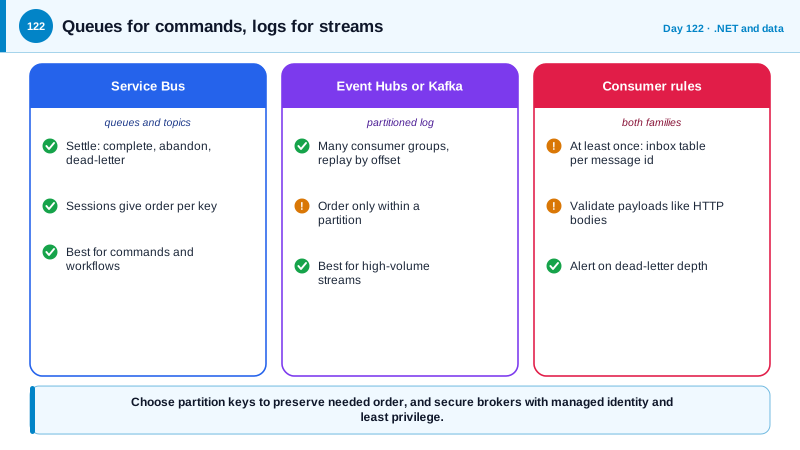
Day 66 introduced messaging with the outbox pattern. There are two families of brokers, and choosing the wrong one is a common mistake. A message queue, such as Azure Service Bus, delivers each message to one consumer, which then settles it: complete it when done, abandon it to retry, or dead-letter it when it cannot succeed. It offers features for business workflows such as topics with subscriptions and filters, sessions for ordered processing per key, scheduled delivery, duplicate detection, and transactions. It is the natural choice for commands and tasks, like send this invoice, where each message should be processed once by someone.
An event log, such as Azure Event Hubs or Apache Kafka, works differently. It is an append-only, partitioned log that retains events for a period regardless of whether they were read. Consumers track their own position, called an offset, so many independent consumer groups can read the same events, and any of them can replay from an earlier point. That suits high-throughput streams: telemetry, click streams, change feeds, and integration events that several systems want. Kafka was created at LinkedIn and open-sourced in 2011, and Event Hubs offers a Kafka-compatible endpoint, so many Kafka clients work against it. Operating Kafka yourself is a real commitment, which is why managed offerings are usual.
Ordering and delivery guarantees are the details that decide correctness. Order is guaranteed only within a partition, so choose a partition key that groups the events that must stay in order, such as an order id, and accept that events for different keys have no order relative to each other. Delivery is at least once in practice, since the possibility of a crash between processing and acknowledging means the same message may arrive twice. Claims of exactly-once apply within a specific system and do not extend to your side effects, such as sending an email. So consumers must be idempotent: record processed message ids in an inbox table, in the same transaction as the effect, and skip duplicates. Handle poison messages, ones that fail every time, by limiting retries and moving them to a dead-letter queue with an alert, so one bad message does not block a queue, and plan how the dead-letter contents are inspected and replayed.
Security applies to every message path. Prefer Microsoft Entra authentication with managed identity over shared access signatures and connection strings, and disable local key-based authentication where possible. Grant each service only the rights it needs: send on one topic, listen on one subscription. Messages often carry personal data, so minimize payloads, encrypt sensitive fields, remember that a retained log is a place where deleted data survives, and set retention deliberately. Validate messages at the consumer as you would an HTTP body, because anything that can publish can send malformed or malicious content, and version schemas carefully, using a schema registry or contract tests, so producers cannot break consumers.
| Aspect | Service Bus | Event Hubs or Kafka |
|---|---|---|
| Model | Queue and topic, message settled by a consumer | Partitioned append-only log, consumers track offsets |
| Best for | Commands, tasks, business workflows | High-volume events, telemetry, streaming |
| Ordering | Sessions per key | Per partition |
| Replay | Not by design | Yes, within retention |
| Multiple readers | Subscriptions with filters | Consumer groups, each reads everything |
| Failure handling | Dead-letter queue, delivery count | Consumer decides, often a dead-letter topic |
Worked Example: A Settled Consumer with an Inbox, and a Keyed Producer
The first block processes Service Bus messages idempotently. The second sends events with a partition key, and the last shows a checkpointed consumer.
// Service Bus consumer: process, record, settle. Idempotent because the inbox insert shares the transaction with the effect.
var processor = client.CreateProcessor("invoices", "billing", new ServiceBusProcessorOptions
{
    MaxConcurrentCalls = 8,
    AutoCompleteMessages = false,                          // settle explicitly
    MaxAutoLockRenewalDuration = TimeSpan.FromMinutes(5),
});

processor.ProcessMessageAsync += async args =>
{
    var msg = args.Message;
    if (msg.DeliveryCount > 5) { await args.DeadLetterMessageAsync(msg, "TooManyAttempts", "Exceeded retry budget"); return; }

    InvoiceRequested payload;
    try { payload = InvoiceRequestedSchema.Parse(msg.Body.ToString()); }        // validate like an HTTP body
    catch (ValidationException ex) { await args.DeadLetterMessageAsync(msg, "InvalidPayload", ex.Message); return; }   // retrying will not fix it

    await using var scope = scopes.CreateAsyncScope();
    var db = scope.ServiceProvider.GetRequiredService<AppDb>();
    await using var tx = await db.Database.BeginTransactionAsync(args.CancellationToken);

    if (await db.Inbox.AnyAsync(i => i.MessageId == msg.MessageId, args.CancellationToken)) { await args.CompleteMessageAsync(msg); return; }   // already done

    db.Inbox.Add(new InboxRecord(msg.MessageId, DateTimeOffset.UtcNow));
    db.Invoices.Add(Invoice.From(payload));
    await db.SaveChangesAsync(args.CancellationToken);
    await tx.CommitAsync(args.CancellationToken);
    await args.CompleteMessageAsync(msg);                                        // a crash before this line means redelivery, which the inbox absorbs
};
processor.ProcessErrorAsync += args => { log.LogError(args.Exception, "Service Bus error in {Source}", args.ErrorSource); return Task.CompletedTask; };
await processor.StartProcessingAsync();// Event Hubs producer: the partition key keeps one order's events in order.
await using var producer = new EventHubProducerClient(ns, "order-events", new DefaultAzureCredential());
using var batch = await producer.CreateBatchAsync(new CreateBatchOptions { PartitionKey = order.Id.ToString() });
batch.TryAdd(new EventData(BinaryData.FromObjectAsJson(new { type = "OrderShipped", orderId = order.Id, at = DateTimeOffset.UtcNow })));
await producer.SendAsync(batch);
// A consumer checkpoints only after the work is done, so a crash replays from the last checkpoint (at least once).
processor.ProcessEventAsync += async args =>
{
await HandleAsync(args.Data, args.CancellationToken); // idempotent, as above
await args.UpdateCheckpointAsync(args.CancellationToken);
};// Least privilege: the billing service may only receive from its subscription. Local (key) authentication is disabled.
resource sb 'Microsoft.ServiceBus/namespaces@2024-01-01' = { name: sbName, location: location, sku: { name: 'Standard' }
properties: { disableLocalAuth: true } }
resource receiverRole 'Microsoft.Authorization/roleAssignments@2022-04-01' = {
scope: subscriptionResource
name: guid(subscriptionResource.id, billingIdentity.properties.principalId, 'receiver')
properties: { principalId: billingIdentity.properties.principalId, principalType: 'ServicePrincipal'
roleDefinitionId: subscriptionResourceId('Microsoft.Authorization/roleDefinitions', '4f6d3b9b-027b-4f4c-9142-0e5a2a2247e3') } // Azure Service Bus Data Receiver
}Alert on the dead-letter queue depth, and build a small tool for support engineers to inspect, fix and resubmit dead-lettered messages. An unmonitored dead-letter queue is a place where business events quietly disappear.
Real-World Examples
- Jay Kreps, one of Kafka's creators at LinkedIn, wrote the 2013 essay The Log: What every software engineer should know about real-time data's unifying abstraction, which explained why an ordered, replayable log is a natural backbone for integrating systems. The essay is the standard introduction to why event logs became a core piece of data architecture.
- Many production incidents involving queues trace back to a single poison message that is retried forever and blocks or floods a consumer. The standard defense is a delivery count limit with a dead-letter queue, which Service Bus provides natively, together with alerts so a person looks at what accumulates there.
Review Questions & Answers
A queue delivers each message to one consumer that settles it, while a log retains events in partitions and lets many consumer groups read them independently and replay from an earlier offset. Queues suit tasks and commands, and logs suit streams and integration events.
Ordering is guaranteed only within a partition, so events that must stay in order, such as those for one order, need the same key. Events with different keys may be processed in any relative order.
A consumer can crash after doing the work and before acknowledging it, so the broker delivers the message again. The guarantee covers the broker, not your side effects, so recording processed ids in the same transaction as the effect prevents duplicates.
It holds messages that cannot be processed after a limited number of attempts, so a poison message does not block the queue or retry forever. It must be monitored so that someone investigates and replays or discards them.