ASP.NET Core Rate Limiting and Request Size Limits
On this page
Learning Objective
Apply the built-in ASP.NET Core rate limiter with fixed window, sliding window, token bucket and concurrency algorithms, partition limits per user, choose stricter policies for authentication endpoints, enforce request size limits, and understand what application-level limits do and do not defend against.
Concept Explanation
An API without limits is a shared resource with no fair-use rules. A single buggy React component that polls in a tight loop, a scraper harvesting every record, or an attacker guessing passwords can consume all the capacity and starve legitimate users. Rate limiting caps how many requests a caller may make in a period, and returns 429 Too Many Requests with a Retry-After header when they exceed it. It serves three goals at once: fairness among users, protection of expensive operations and downstream systems, and resistance to abuse such as brute-force login attempts and credential stuffing.
ASP.NET Core includes a rate limiting middleware with four algorithms. A fixed window counts requests in discrete intervals, simple but allowing a burst at the boundary of two windows. A sliding window smooths that by dividing the interval into segments. A token bucket lets a caller spend tokens that refill at a steady rate, which allows short bursts while enforcing an average, and suits interactive applications well. A concurrency limiter restricts the number of simultaneous in-flight requests instead of the rate, ideal for expensive endpoints such as report generation. The key design decision is the partition: limit per authenticated user where possible, per client IP address for anonymous traffic, and per API key for machine clients, so one caller's abuse does not consume everyone's quota.
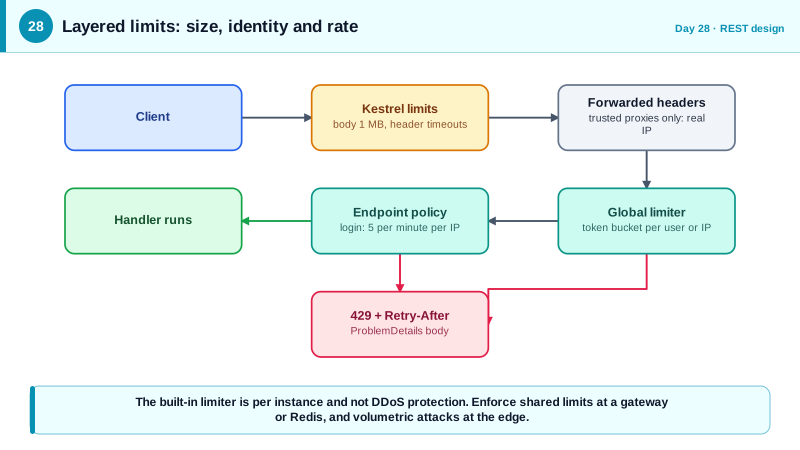
Different endpoints deserve different policies. Login, password reset, and token issuance endpoints should be limited far more tightly, for example five attempts per minute per account and IP, because they are the targets of guessing attacks. Search and export endpoints, which are expensive, might use a concurrency limit. Cheap reads can be generous. Remember that when your application runs behind a proxy, the client address comes from the forwarded headers configured on Day 11, and if that is wrong, every user appears to share one IP address and everyone gets limited together, or worse, an attacker rotates a spoofed header to escape the limit.
Size limits belong beside rate limits, because a request can be expensive without being frequent. Kestrel enforces a maximum body size, which you set as low as your API allows, and you can raise it for particular upload endpoints only. Also bound what happens after parsing: JSON nesting depth, the number of items in arrays, and string lengths, since deeply nested or enormous payloads consume memory and CPU in the parser and in your code. The built-in limiter runs per application instance, so with several instances the effective limit multiplies. For a global limit you need shared state in Redis or enforcement at a gateway. And it is not a defense against a real distributed denial of service attack, which must be absorbed at the network edge by a service designed for it.
| Algorithm | Behavior | Good for |
|---|---|---|
| Fixed window | N requests per interval, resets at boundaries | Simple quotas, coarse limits |
| Sliding window | Smoother count across segments | Avoiding boundary bursts |
| Token bucket | Steady refill, allows short bursts | Interactive APIs |
| Concurrency | Max simultaneous requests | Expensive operations |
| Per-user partition | Key on authenticated identity | Fair quotas between users |
| Per-IP partition | Key on client address | Anonymous and login endpoints |
Worked Example: Policies per Endpoint and Hard Size Limits
The configuration sets a global per-user token bucket, a strict policy for login partitioned by IP, a concurrency limit for exports, a proper 429 response, and size limits on the body and the JSON structure.
builder.Services.AddRateLimiter(o =>
{
    o.RejectionStatusCode = StatusCodes.Status429TooManyRequests;
    o.OnRejected = async (ctx, ct) =>
    {
        if (ctx.Lease.TryGetMetadata(MetadataName.RetryAfter, out var retryAfter))
            ctx.HttpContext.Response.Headers.RetryAfter = ((int)retryAfter.TotalSeconds).ToString();
        await ctx.HttpContext.Response.WriteAsJsonAsync(
            new ProblemDetails { Status = 429, Title = "Too many requests" }, ct);
    };

    // Default for everything: token bucket per signed-in user, or per IP if anonymous.
    o.GlobalLimiter = PartitionedRateLimiter.Create<HttpContext, string>(ctx =>
    {
        var key = ctx.User.FindFirstValue(ClaimTypes.NameIdentifier)
                  ?? ctx.Connection.RemoteIpAddress?.ToString() ?? "unknown";
        return RateLimitPartition.GetTokenBucketLimiter(key, _ => new TokenBucketRateLimiterOptions
        {
            TokenLimit = 60, TokensPerPeriod = 30, ReplenishmentPeriod = TimeSpan.FromSeconds(10),
            QueueLimit = 0, AutoReplenishment = true
        });
    });

    // Strict: login attempts, keyed by IP address.
    o.AddPolicy("login", ctx => RateLimitPartition.GetFixedWindowLimiter(
        ctx.Connection.RemoteIpAddress?.ToString() ?? "unknown",
        _ => new FixedWindowRateLimiterOptions { PermitLimit = 5, Window = TimeSpan.FromMinutes(1), QueueLimit = 0 }));

    // Expensive: at most 2 concurrent exports per user.
    o.AddPolicy("export", ctx => RateLimitPartition.GetConcurrencyLimiter(
        ctx.User.FindFirstValue(ClaimTypes.NameIdentifier) ?? "anon",
        _ => new ConcurrencyLimiterOptions { PermitLimit = 2, QueueLimit = 0 }));
});

builder.WebHost.ConfigureKestrel(k => k.Limits.MaxRequestBodySize = 1_000_000);   // 1 MB everywhere by default

builder.Services.ConfigureHttpJsonOptions(j =>
    j.SerializerOptions.MaxDepth = 16);                                          // default is 64

var app = builder.Build();
app.UseForwardedHeaders();                                                       // configured with KnownProxies
app.UseRateLimiter();

app.MapPost("/auth/login", Login).RequireRateLimiting("login").AllowAnonymous();
app.MapGet("/api/reports/export", Export).RequireRateLimiting("export");
app.MapPost("/api/uploads", Upload).WithMetadata(new RequestSizeLimitAttribute(20_000_000));  // one endpoint raised
Notice that the limiter is registered after forwarded headers so the client IP is correct, and that only the upload endpoint gets a larger body allowance. Bounding the JSON depth guards against payloads engineered to consume parser resources.
Real-World Examples
- The GitHub REST API documents its limits explicitly: unauthenticated requests are limited to 60 per hour per IP address, and authenticated requests with a personal access token to 5,000 per hour, with headers such as X-RateLimit-Remaining and X-RateLimit-Reset on every response. Publishing the limits and returning them in headers lets client developers throttle themselves before being rejected.
- In October 2023 Cloudflare and Google reported mitigating record HTTP/2 Rapid Reset attacks, with Cloudflare observing more than 201 million requests per second, by abusing stream cancellation in the protocol. Application-level limiters cannot absorb traffic of that scale, which is why they complement rather than replace network-edge protection from a CDN or DDoS service.
Review Questions & Answers
A fixed window allows a burst at the boundary where two windows meet and forces uniform pacing inside a window. A token bucket lets a user spend accumulated tokens for a short burst, such as loading a dashboard that makes several calls, while still enforcing an average rate through steady refill. It matches real interactive usage better.
Login is the target of password guessing and credential stuffing, where an attacker tries many combinations against many accounts. A tight limit per IP and per account makes such attacks slow and expensive, and gives monitoring a clear signal. Reads by legitimate users are frequent and cheap, so they can be far more generous.
Every request appears to come from the load balancer's address, so all users share one quota and are throttled together, or the limit becomes meaningless. Configuring the forwarded headers middleware with trusted proxies gives the real client address, but must restrict trust or attackers can spoof the header to evade limits.
Each instance keeps its own counters, so a caller who spreads requests across instances can exceed the intended global limit by roughly the number of instances. Enforcing one shared limit requires a shared store such as Redis or a gateway that sits in front of all instances. Per-instance limiting still protects each process from overload.