Preventing SQL Injection in EF Core and .NET
On this page
Learning Objective
Explain how SQL injection works, recognize the unsafe patterns in ADO.NET, EF Core raw SQL and dynamic queries, apply parameterization and allowlists correctly, limit damage with least-privilege database accounts, and test for injection.
Concept Explanation
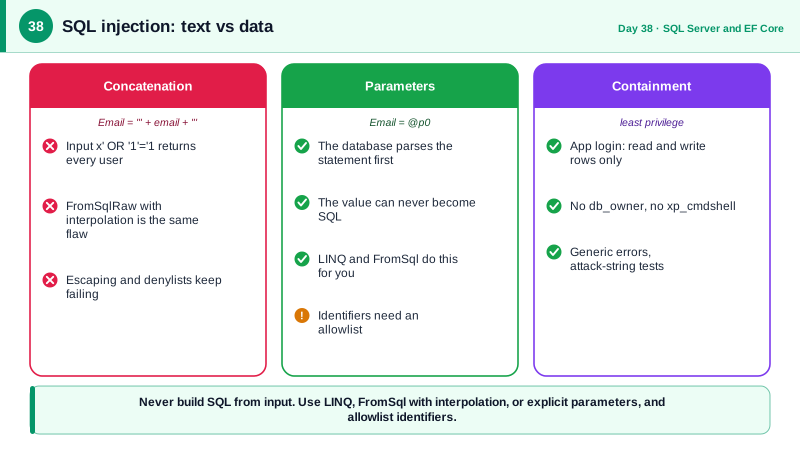
SQL injection occurs when untrusted input becomes part of the SQL text the database parses, instead of being passed as data. If code builds a query by concatenating a user-supplied string, such as SELECT * FROM Users WHERE Email = plus the value plus a closing quote, a caller who submits a value containing a quote and additional SQL changes the query's structure. They can bypass authentication, read other tables, modify data, or on misconfigured servers run system commands. It has been at or near the top of web vulnerability lists for over two decades, and it is entirely preventable with a rule with no exceptions: never construct SQL by string concatenation with input.
The prevention is parameterization. A parameterized query sends the SQL text with placeholders and the values separately, so the database compiles the statement first and only afterward binds the values, which can never be interpreted as SQL. ADO.NET, Dapper, and EF Core all support it. LINQ queries in EF Core are parameterized automatically, which is one reason it is a safe default. The danger returns whenever you drop down to raw SQL. In EF Core, FromSql and ExecuteSql with an interpolated string are safe, because the interpolation holes become parameters, while FromSqlRaw and ExecuteSqlRaw with a concatenated or interpolated string build text and are unsafe. The similar-looking names make it an easy mistake, and an analyzer warns about it.
Some parts of a query cannot be parameterized: table names, column names, sort directions, and keywords. When those must vary with client input, the client should choose among fixed options, and the server maps the choice to a known identifier through an allowlist, just as Day 24 did for sorting. Never pass the client's string through, and never try to escape or quote it as a defense, since that approach has repeatedly failed. Other subtle forms exist. Stored procedures are not automatically safe if they build dynamic SQL internally with concatenation. Second-order injection stores a malicious value safely on the way in and then uses it unsafely in a later query. And LIKE patterns with user input should escape wildcard characters so callers cannot force expensive scans.
Defense in depth limits the damage of any mistake. Connect with a dedicated database account holding only the permissions required, no ownership of the database, no access to system tables, and no ability to run system procedures such as xp_cmdshell. Keep error messages generic so failed queries do not reveal table or column names. Log and alert on database errors that indicate malformed queries. And test: automated tests that send classic payloads, such as a quote, or OR 1 equals 1, to every input, plus static analysis that flags raw SQL, catch regressions. A web application firewall may block some payloads but is not a fix, because determined attackers encode around it, and the vulnerability remains in your code.
| Technique | Safe? | Note |
|---|---|---|
| LINQ query in EF Core | Yes | Values become parameters automatically |
| FromSql and ExecuteSql with interpolation | Yes | Holes become parameters |
| FromSqlRaw or ExecuteSqlRaw with concatenation | No | Builds SQL text from input |
| ADO.NET SqlCommand with Parameters | Yes | Values sent separately from text |
| String concatenation into any query | No | The classic injection vulnerability |
| Dynamic column or table name from the client | Only via allowlist | Identifiers cannot be parameters |
Worked Example: Vulnerable, Fixed, Allowlisted and Tested
The first block is exploitable. The second shows safe alternatives. The third handles a dynamic sort column, and the last is a test with attack payloads.
// VULNERABLE: input becomes part of the SQL text.
var email = req.Query["email"];
var users = db.Users.FromSqlRaw($"SELECT * FROM Users WHERE Email = '{email}'").ToList();
// email = x' OR '1'='1   returns every user
// email = x'; DROP TABLE Users;--   is worse on an over-privileged account

// SAFE 1: LINQ, parameterized automatically.
var user = await db.Users.FirstOrDefaultAsync(u => u.Email == email, ct);

// SAFE 2: raw SQL with FromSql. The interpolated value becomes a parameter, not text.
var users2 = await db.Users
    .FromSql($"SELECT * FROM Users WHERE Email = {email}")
    .ToListAsync(ct);
// Sent as: SELECT * FROM Users WHERE Email = @p0   with @p0 = the literal input

// SAFE 3: ADO.NET or Dapper with explicit parameters.
var row = await conn.QuerySingleOrDefaultAsync<UserRow>(
"SELECT Id, DisplayName FROM dbo.Users WHERE Email = @Email", new { Email = email });// Identifiers cannot be parameters: map a client choice to a known column through an allowlist.
private static readonly Dictionary<string, string> SortColumns = new(StringComparer.OrdinalIgnoreCase)
{
["created"] = "CreatedAt",
["title"] = "Title",
["status"] = "Status",
};
static string? SortColumn(string? requested) =>
requested is not null && SortColumns.TryGetValue(requested, out var col) ? col : null;
var column = SortColumn(sort) ?? "CreatedAt"; // unknown values fall back to a safe default
var direction = descending ? "DESC" : "ASC"; // boolean from us, never a client string
var sql = $"SELECT Id, Title FROM dbo.Tasks WHERE ProjectId = @p ORDER BY {column} {direction}";-- Least privilege: the runtime login can use the data, not administer it.
CREATE USER notes_app FOR LOGIN notes_app;
GRANT SELECT, INSERT, UPDATE, DELETE ON SCHEMA::dbo TO notes_app;
DENY EXECUTE ON xp_cmdshell TO notes_app; -- disabled by default; make it explicit
DENY ALTER, CONTROL ON SCHEMA::dbo TO notes_app;// A regression test: hostile inputs must be treated as plain text.
[Theory]
[InlineData("x' OR '1'='1")]
[InlineData("x'; DROP TABLE Users;--")]
[InlineData("' UNION SELECT Id, Email FROM Users--")]
public async Task Search_treats_attack_strings_as_data(string payload)
{
var response = await _client.GetAsync($"/api/users?email={Uri.EscapeDataString(payload)}");
Assert.Equal(HttpStatusCode.NotFound, response.StatusCode); // no match, no error, no extra rows
Assert.True(await UsersTableStillExistsAsync());
}The analyzer rule EF1002 flags interpolated strings passed to the Raw methods, and treating it as a build error stops the unsafe form from being introduced by accident.
Real-World Examples
- In October 2015, the UK telecommunications company TalkTalk suffered a breach in which attackers used SQL injection against legacy web pages to extract customer records, affecting about 157,000 customers. The UK Information Commissioner's Office fined the company 400,000 pounds in 2016, citing failure to apply basic security measures to a known class of vulnerability in old code.
- The 2008 breach of Heartland Payment Systems, which exposed data on well over 100 million payment cards, began with SQL injection against a web application, according to the indictments in the prosecution of the attackers. The initial foothold came from an ordinary injectable form, showing how a single unparameterized query can be the entry point to an entire network.
Review Questions & Answers
With parameters, the database receives the SQL text and the values separately: it parses and plans the statement first and binds values afterward as data, so nothing in a value can change the structure of the statement. With concatenation, the input becomes part of the text that is parsed, so an attacker's quotes and keywords are interpreted as SQL syntax.
With FromSql, an interpolated string is converted so that each interpolation hole becomes a database parameter, which is safe. FromSqlRaw takes a plain string, so any concatenation or interpolation done before the call produces a query built from input. The names are close, so teams enforce the safe form with analyzers.
Accept only a short, known key from the client, such as created or title, map it through a server-side dictionary to a fixed column name, and reject or default anything not in the dictionary. Only strings from your own code enter the SQL, so the client cannot inject anything, and you also control which columns are indexed and safe to sort on.
The account cannot drop tables, alter permissions, read system objects, or execute dangerous procedures, so an attacker is limited to what the application legitimately could do. The flaw is still serious because data may be read or changed, but it does not escalate to full database or server compromise, and it makes recovery and forensics far easier.