Edge Security: WAF, DDoS Protection, Origin Lockdown
On this page
Learning Objective
Configure TLS and HSTS correctly, manage certificates so they never expire unnoticed, protect DNS against subdomain takeover, place a CDN and web application firewall in front of the app, lock the origin so it cannot be reached around the edge, and understand what DDoS protection does and does not cover.
Concept Explanation
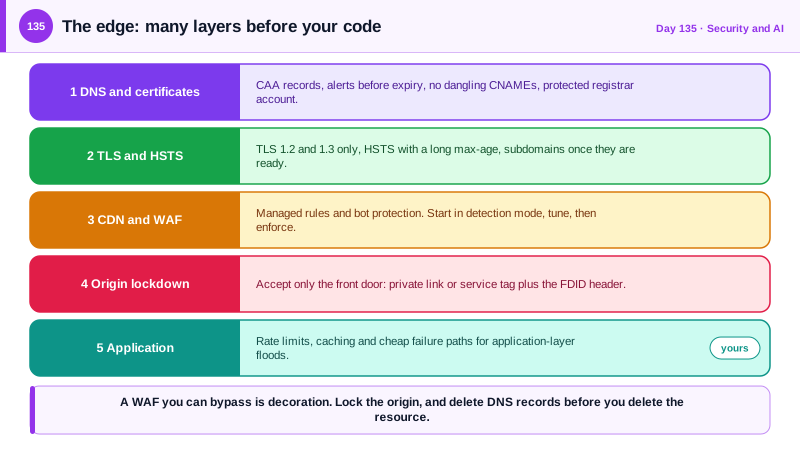
Everything in the earlier security lessons happens after a request arrives. The edge is what stands between the internet and your application, and it is where a large share of attacks can be stopped cheaply. The first layer is transport security. Serve everything over TLS, allow TLS 1.2 and 1.3 only, and prefer 1.3, which removes older weak options and has a faster handshake. Send the HTTP Strict Transport Security header so browsers refuse to use plain HTTP for your domain, adding subdomains once you are sure every one supports HTTPS, and consider preload only when you are ready for the commitment. Certificates are a recurring operational hazard: an expired certificate takes a service down, and an unmonitored one on a security appliance can blind you, as happened in the 2017 Equifax breach, where an expired certificate on a traffic inspection device had gone unnoticed for months. Use managed certificates with automatic renewal, such as those from Azure Front Door or Let's Encrypt, alert weeks before any expiry, and restrict which authorities may issue certificates for your domain with CAA DNS records.
DNS is part of your attack surface. The best-known problem is subdomain takeover: a DNS record such as a CNAME still points to a cloud resource that you deleted, and an attacker registers a resource with that name and now serves content on your domain, which can steal cookies scoped to the parent domain or run convincing phishing. The defense is process: remove DNS records when you decommission a resource, scan your zones regularly for dangling records, and prefer alias records or validation mechanisms that the platform ties to your subscription. Protect the registrar and DNS accounts with strong authentication, since control of DNS is control of the domain, and consider registry locks for important domains.
A content delivery network with a web application firewall gives you a global front door. The CDN caches static content near users, terminates TLS, and absorbs traffic, and the firewall inspects requests against rule sets, such as the OWASP Core Rule Set or Microsoft's managed rules, blocking common injection and scanning patterns, and against bot protection lists. It is a useful net, not a substitute for secure code: rules produce false positives that need tuning, so start in detection mode, review what would be blocked, and then enforce. Add custom rules for your specifics, such as blocking known bad paths, limiting request rates on login, and restricting countries you do not serve, when that suits your business.
The step teams most often skip is locking the origin. If the application server is reachable directly from the internet by its own address or default hostname, attackers can bypass the CDN and the firewall entirely. Restrict the origin so it accepts traffic only from the front door: use private connectivity where the platform supports it, or allow only the service's published address ranges and require the header that the front door adds, which identifies your specific instance so another customer's front door cannot be used to reach you. Distributed denial of service attacks come in layers: volumetric floods at the network level, protocol attacks, and application-layer floods of expensive requests. Cloud DDoS protection and the CDN handle the first two at scale, and the record volumes are large, with GitHub surviving a 1.35 terabit per second attack in 2018, but application-layer attacks need your own rate limits, caching, and cheap failure paths, as Day 128 described.
| Layer | Control | Watch for |
|---|---|---|
| Transport | TLS 1.2 and 1.3 only, HSTS | Adding includeSubDomains before every subdomain is ready |
| Certificates | Managed and auto-renewed, expiry alerts, CAA records | Certificates on forgotten devices and internal services |
| DNS | Remove records on decommission, scan for dangling names | Subdomain takeover, unprotected registrar accounts |
| CDN and WAF | Managed rules, bot protection, start in detection mode | False positives, treating it as the only defense |
| Origin | Accept traffic only from the front door, private link | Direct access by IP or default hostname |
| DDoS | Platform protection plus your own rate limits and caching | Application-layer floods of expensive requests |
Worked Example: A WAF Policy, Origin Lockdown, HSTS and a Dangling-DNS Check
The Bicep defines a firewall policy, the middleware verifies the front door identity header, and the script looks for takeover candidates.
// Front Door WAF policy: managed rules and bot protection. Start with mode 'Detection' and review before switching to 'Prevention'.
resource waf 'Microsoft.Network/FrontDoorWebApplicationFirewallPolicies@2022-05-01' = {
  name: 'wafTaskboard'
  location: 'global'
  sku: { name: 'Premium_AzureFrontDoor' }
  properties: {
    policySettings: { enabledState: 'Enabled', mode: 'Prevention', requestBodyCheck: 'Enabled' }
    managedRules: {
      managedRuleSets: [
        { ruleSetType: 'Microsoft_DefaultRuleSet', ruleSetVersion: '2.1', ruleSetAction: 'Block' }    // check the current versions when you deploy
        { ruleSetType: 'Microsoft_BotManagerRuleSet', ruleSetVersion: '1.1' }
      ]
    }
    customRules: {
      rules: [
        { name: 'LoginRateLimit', priority: 10, ruleType: 'RateLimitRule', rateLimitThreshold: 30, rateLimitDurationInMinutes: 1, action: 'Block',
          matchConditions: [ { matchVariable: 'RequestUri', operator: 'Contains', matchValue: ['/bff/login'] } ] }
      ]
    }
  }
}// Origin lockdown, second layer: only requests that came through OUR front door are served.
// The front door adds X-Azure-FDID with its own id, so another customer's front door cannot be used to reach this app.
app.Use(async (ctx, next) =>
{
var expected = builder.Configuration["FrontDoor:Id"];
if (!ctx.Request.Path.StartsWithSegments("/healthz") &&
!string.Equals(ctx.Request.Headers["X-Azure-FDID"], expected, StringComparison.OrdinalIgnoreCase))
{
ctx.Response.StatusCode = StatusCodes.Status403Forbidden;
return;
}
await next();
});
// HSTS and HTTPS redirection. Preload is a long-term commitment, so it is a deliberate later step.
builder.Services.AddHsts(o => { o.MaxAge = TimeSpan.FromDays(365); o.IncludeSubDomains = true; o.Preload = false; });
app.UseHsts();
app.UseHttpsRedirection();Network-level origin restriction (preferred over header checks alone):
App Service access restriction: allow only the AzureFrontDoor.Backend service tag, plus the X-Azure-FDID header filter.
Container Apps or App Service with Private Link: no public endpoint at all, the front door reaches it over a private connection.
DNS hygiene
CAA record: example.com. CAA 0 issue "letsencrypt.org" (only named authorities may issue certificates)
Registrar: hardware-key sign-in, registry lock on the primary domains
Decommissioning: the runbook step "delete DNS records" comes BEFORE "delete the cloud resource"# Weekly job: find CNAMEs pointing at cloud hostnames that no longer resolve to a resource of ours (subdomain takeover candidates).
for name in $(az network dns record-set cname list -g dns-rg -z example.com --query "[].name" -o tsv); do
target=$(az network dns record-set cname show -g dns-rg -z example.com -n "$name" --query cname -o tsv)
if ! host "$target" > /dev/null 2>&1; then echo "DANGLING: $name.example.com -> $target"; fi
done
# Also check that each target hostname is actually owned by one of our subscriptions, since a name can resolve to someone else's resource.Set a calendar alert for every certificate that is not fully automated, and include the ones that internal tools and inspection devices use. Expiry outages and blind spots are entirely preventable.
Real-World Examples
- In the 2017 Equifax breach, which exposed personal data of about 147 million people, the official investigation found that a certificate on a network traffic inspection device had expired about 19 months earlier, so encrypted traffic leaving the network was not being inspected, and the intrusion went undetected for 76 days. It is a reminder that certificate hygiene is a security control, and not only an availability concern.
- In February 2018 GitHub was hit by a memcached-based amplification attack that peaked at 1.35 terabits per second and was mitigated by routing traffic through its DDoS protection provider, with a short disruption. Days later a larger attack of about 1.7 terabits per second was reported against another target, and the events showed that volumetric attacks are beyond the capacity of a single origin and must be absorbed at the edge.
Review Questions & Answers
A DNS record still points to a cloud resource that was deleted, so an attacker creates a resource with that name and serves content on your subdomain. Deleting DNS records before decommissioning, scanning for dangling records, and protecting DNS accounts prevent it.
If the origin is reachable directly, an attacker can send requests to it and bypass the firewall completely. The origin must accept traffic only from your front door, using private connectivity or address restrictions and an identity header.
A redirect leaves the first request in plain text, which an attacker on the network can intercept, while HSTS tells the browser to use HTTPS directly for future visits. That removes the window in which a downgrade attack is possible.
Application-layer floods of legitimate-looking but expensive requests, such as searches or reports, can still exhaust your backend. Rate limits, caching, and cheap failure paths inside the application handle that layer.