Kubernetes and AKS for .NET Developers
On this page
Learning Objective
Explain the Kubernetes objects an application developer needs, write a deployment with probes, resource limits and a hardened security context, expose it through a service and ingress, scale and update it safely, and apply network policies and workload identity, while deciding honestly whether a simpler platform would do.
Concept Explanation
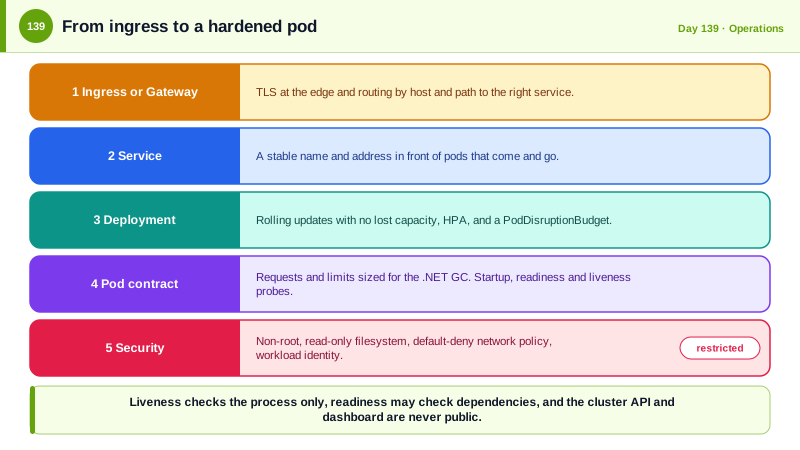
Docker packages an application; Kubernetes runs many containers across many machines and keeps them in the desired state. You describe what you want in YAML and controllers make reality match, restarting failed containers, replacing them during updates, and spreading load. The vocabulary is manageable. A pod is one or more containers that run together, and you rarely create them directly. A deployment declares how many replicas of a pod should exist and how to roll out a new version. A service gives a stable name and address to a changing set of pods. An ingress, or the newer Gateway API, routes external HTTP traffic to services. ConfigMaps and Secrets provide configuration, though a Secret is only base64-encoded unless the cluster encrypts it at rest, so a vault integration is preferable. A namespace divides a cluster into areas for teams or environments. Azure Kubernetes Service runs the control plane for you, and you manage the workloads and the node pools.
Whether to use it deserves a straight answer. Kubernetes gives control and portability, and it brings operational complexity: upgrades, networking, security configuration, and a lot of concepts. Azure Container Apps, which is built on Kubernetes and KEDA but hides the cluster, covers the needs of most teams with simpler operations, as Day 84 compared. Choose AKS when you need its control, when a platform team exists to run it, or when the organization already standardizes on it. Application developers should still understand it, because their code has to behave properly on it.
Three things in the pod specification decide whether your service is a good citizen. Resource requests and limits tell the scheduler how much CPU and memory the container needs and cap what it may use. Exceeding the memory limit gets the container killed, so set limits with the .NET garbage collector in mind, and leave headroom. Probes tell Kubernetes about health: the startup probe protects slow starts, the readiness probe decides whether the pod receives traffic, and the liveness probe restarts a stuck container. The common mistake is making liveness depend on external services, so that a database outage causes every pod to be restarted in a loop; liveness should check only that the process is alive, and readiness may check dependencies. Graceful shutdown completes the picture: on termination the pod receives SIGTERM, should stop accepting new work, finish in-flight requests, and exit within the grace period, and ASP.NET Core supports this with a configurable shutdown timeout.
Security settings are on by default in few clusters, so you set them. Run as a non-root user, disallow privilege escalation, drop Linux capabilities, and make the root filesystem read-only, which the Pod Security Standards call the restricted profile. By default any pod can talk to any other pod, so add a network policy that denies all traffic and then allow only the flows you need. Use role-based access control narrowly, and give pods an identity with AKS workload identity, so they reach Azure resources through federation without secrets, as in Day 131, with the Key Vault CSI driver mounting secrets when needed. Pull only from your own registry, pin images by digest, and use admission policies to block unsigned or privileged workloads. The dashboard and API server must never be exposed publicly without authentication, which is how attackers turned an unprotected Kubernetes console at Tesla into a cryptocurrency mining operation in 2018.
| Object | Purpose | Developer concern |
|---|---|---|
| Pod | Runs containers together | Ephemeral, never store state in it |
| Deployment | Desired replicas and rollout strategy | Rolling updates, rollback |
| Service and Ingress | Stable address and external routing | Health and TLS at the edge |
| Requests and limits | Scheduling and caps | Memory limit and GC, OOM kills |
| Probes | Startup, readiness, liveness | Liveness must not depend on external services |
| NetworkPolicy | Pod-to-pod traffic rules | Default deny, allow only needed flows |
Worked Example: A Hardened Deployment, Probes, Autoscaling, Network Policy and Graceful Shutdown
The manifests describe the workload. The C# provides the matching health endpoints and shutdown behavior.
apiVersion: apps/v1
kind: Deployment
metadata: { name: tasks-api, namespace: taskboard }
spec:
  replicas: 3
  strategy: { type: RollingUpdate, rollingUpdate: { maxUnavailable: 0, maxSurge: 1 } }   # no capacity loss during an update
  selector: { matchLabels: { app: tasks-api } }
  template:
    metadata: { labels: { app: tasks-api, azure.workload.identity/use: "true" } }        # workload identity: no secrets in the pod
    spec:
      serviceAccountName: tasks-api
      terminationGracePeriodSeconds: 40
      securityContext: { runAsNonRoot: true, runAsUser: 10001, seccompProfile: { type: RuntimeDefault } }
      containers:
        - name: api
          image: acrtaskboard.azurecr.io/tasks-api@sha256:<image-digest>                 # pinned by digest, not a mutable tag
          ports: [{ containerPort: 8080 }]
          resources: { requests: { cpu: 250m, memory: 256Mi }, limits: { memory: 512Mi } }
          securityContext: { allowPrivilegeEscalation: false, readOnlyRootFilesystem: true, capabilities: { drop: [ALL] } }
          startupProbe:   { httpGet: { path: /healthz/live,  port: 8080 }, failureThreshold: 30, periodSeconds: 2 }
          livenessProbe:  { httpGet: { path: /healthz/live,  port: 8080 }, periodSeconds: 10 }     # process only, no dependencies
          readinessProbe: { httpGet: { path: /healthz/ready, port: 8080 }, periodSeconds: 5 }      # may check the database
          lifecycle: { preStop: { exec: { command: ["sleep", "5"] } } }                    # lets the load balancer drop the pod first
          volumeMounts: [{ name: tmp, mountPath: /tmp }]
      volumes: [{ name: tmp, emptyDir: {} }]                                             # writable scratch space despite a read-only root
---
apiVersion: autoscaling/v2
kind: HorizontalPodAutoscaler
metadata: { name: tasks-api, namespace: taskboard }
spec:
  scaleTargetRef: { apiVersion: apps/v1, kind: Deployment, name: tasks-api }
  minReplicas: 3
  maxReplicas: 12
  metrics: [{ type: Resource, resource: { name: cpu, target: { type: Utilization, averageUtilization: 65 } } }]
---
apiVersion: policy/v1
kind: PodDisruptionBudget
metadata: { name: tasks-api, namespace: taskboard }
spec: { minAvailable: 2, selector: { matchLabels: { app: tasks-api } } } # node upgrades cannot take all replicas at once# Network policy: deny everything in the namespace, then allow only the ingress controller to reach the API and the API to reach the database.
apiVersion: networking.k8s.io/v1
kind: NetworkPolicy
metadata: { name: default-deny, namespace: taskboard }
spec: { podSelector: {}, policyTypes: [Ingress, Egress] }
---
apiVersion: networking.k8s.io/v1
kind: NetworkPolicy
metadata: { name: tasks-api-flows, namespace: taskboard }
spec:
podSelector: { matchLabels: { app: tasks-api } }
policyTypes: [Ingress, Egress]
ingress: [{ from: [{ namespaceSelector: { matchLabels: { name: ingress } } }], ports: [{ port: 8080 }] }]
egress:
- to: [{ ipBlock: { cidr: 10.20.5.0/24 } }] # the SQL private endpoint subnet
ports: [{ port: 1433 }]
- ports: [{ port: 53, protocol: UDP }] # DNS// Health endpoints that match the probes, and shutdown behavior that matches the grace period.
builder.Services.AddHealthChecks().AddSqlServer(cs, name: "db", tags: ["ready"]);
builder.Services.Configure<HostOptions>(o => o.ShutdownTimeout = TimeSpan.FromSeconds(30)); // finish in-flight requests before exit
app.MapHealthChecks("/healthz/live", new HealthCheckOptions { Predicate = _ => false }); // alive if it can answer at all
app.MapHealthChecks("/healthz/ready", new HealthCheckOptions { Predicate = r => r.Tags.Contains("ready") }); // ready only if the database is reachableA liveness check that touches the database turns a short database outage into a fleet-wide restart storm, which makes recovery slower. Keep the two separate, and remember that a memory limit set below the .NET runtime's needs causes silent restarts that look like random crashes.
Real-World Examples
- In 2018 researchers at RedLock found that the Kubernetes administration console of a Tesla cloud environment was exposed to the internet without a password, and attackers used the cluster to mine cryptocurrency and had access to credentials for cloud storage. The company fixed it after being notified. It is the classic example of a control plane left open, and of why cluster access must be authenticated and private.
- Google released Kubernetes as open source in 2014, based on lessons from its internal cluster manager Borg, and it later became the default platform for container orchestration under the Cloud Native Computing Foundation. Its scale and generality explain both its power and the operational complexity that leads many teams to choose a managed higher-level platform instead.
Review Questions & Answers
If the database is unavailable, every pod would fail liveness and be restarted repeatedly, making the outage worse and delaying recovery. Liveness should check only that the process is responsive, while readiness can reflect whether dependencies are reachable.
The container is killed by the kernel and restarted, which appears as unexplained crashes. Limits must leave headroom for the runtime, including the garbage collector, and should be verified under load.
By default any pod can reach any other, so a compromised pod can explore the whole cluster. Denying all traffic and allowing only the necessary flows contains a compromise to a small area.
When the team does not need direct control of Kubernetes and has no platform team to operate it. Container Apps provides scaling, revisions, and ingress with far less to manage, which suits most application teams.