Passkeys, MFA and Account Recovery with WebAuthn
On this page
Learning Objective
Explain how WebAuthn and passkeys resist phishing, implement registration and sign-in ceremonies with a .NET library and the browser API, add TOTP as a fallback, design account recovery that does not undermine strong authentication, and use step-up checks for sensitive actions.
Concept Explanation
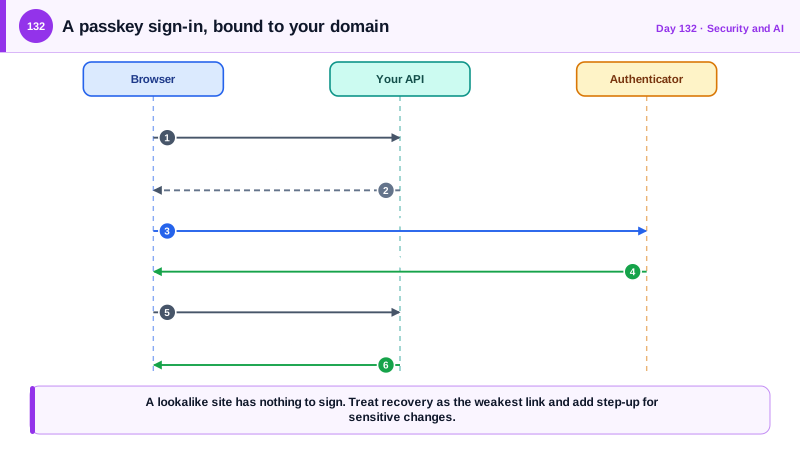
Passwords fail in predictable ways: they are reused, guessed, phished, and leaked. Multi-factor authentication improves things, but the common second factors are unequal. SMS codes can be intercepted or redirected through SIM swapping, and one-time codes from an authenticator app can still be typed into a fake site, while push approvals suffer from fatigue attacks in which the attacker floods a user with prompts until they accept. WebAuthn, part of the FIDO2 standards, replaces the shared secret with public key cryptography. At registration the user's device creates a key pair for your site, and you store the public key and a credential id. At sign-in the server sends a random challenge, the device signs it after the user confirms with a fingerprint, face, or PIN, and you verify the signature with the stored public key. The private key never leaves the device and nothing reusable ever crosses the network.
The property that makes this phishing resistant is that the credential is bound to your domain, called the relying party id. The browser refuses to use the key on any other origin, so a lookalike site gets nothing to sign, and the user cannot be tricked into handing over something replayable. Passkeys are WebAuthn credentials that can be synced across a user's devices through their platform account, which removes the earlier usability problem of losing a single hardware key, and they can also be device-bound on a hardware security key. For your application, this means offering passkeys as the primary or an optional method, and keeping password sign-in only as long as necessary.
Implementation involves two ceremonies. In registration, the server creates options containing a random challenge, the relying party id, and the user handle, the browser calls navigator.credentials.create, and the server verifies the response, including that the challenge matches, the origin is yours, and the attestation is acceptable, before storing the credential id and public key. In authentication, the server issues a new challenge, the browser calls navigator.credentials.get, and the server verifies the signature, the origin, and the relying party hash, and checks that user verification happened when required. Challenges must be random, single use, short lived, and bound to the session that requested them. A .NET library such as Fido2NetLib handles the cryptographic verification, which you should never write yourself. Allow several credentials per account, with names the user can recognize, and let them remove one.
Account recovery is the weak point that attackers target, since a phishing-resistant sign-in protects little if a help desk or an email link can bypass it. Provide recovery codes generated at enrollment, shown once, stored hashed, and single use, encourage a second registered passkey, and make recovery deliberately slow for high-value accounts, with notifications to all contact methods, a waiting period, and a review of recent changes. Treat adding a credential or changing recovery settings as sensitive, requiring recent authentication, which is called step-up authentication. TOTP, defined in RFC 6238 and supported by ASP.NET Core Identity, is a reasonable fallback for users without passkeys, with the secret stored encrypted, codes accepted once, and attempts rate limited. Finally, after any change in credentials, revoke other sessions, and log the events for the user to review.
| Method | Phishing resistant | Notes |
|---|---|---|
| Password alone | No | Reused, guessed, leaked |
| SMS one-time code | No | SIM swapping, interception, pumping fraud |
| TOTP authenticator app | No | Better than SMS, still enterable into a fake site |
| Push approval | No | Fatigue attacks, use number matching if used |
| Passkey or security key (WebAuthn) | Yes | Bound to the domain, private key never leaves the device |
| Recovery codes | Depends | Single use, hashed, and a common target for attackers |
Worked Example: Registration and Sign-In Endpoints, the Browser Calls and Recovery Codes
The server side uses a FIDO2 library for verification. The API shapes differ between library versions, so treat the calls as a pattern and check the version you install.
// Registration options: the server creates and remembers the challenge for this session.
app.MapPost("/api/auth/passkeys/register/options", async (ClaimsPrincipal user, IFido2 fido2, AppDb db, ISession session, CancellationToken ct) =>
{
    await RequireRecentAuthAsync(user, maxAge: TimeSpan.FromMinutes(10));               // step-up: adding a credential is sensitive
    var existing = await db.Passkeys.Where(p => p.UserId == user.GetUserId()).Select(p => new PublicKeyCredentialDescriptor(p.CredentialId)).ToListAsync(ct);
    var options = fido2.RequestNewCredential(new RequestNewCredentialParams
    {
        User = new Fido2User { Id = user.GetUserHandle(), Name = user.GetEmail(), DisplayName = user.GetDisplayName() },
        ExcludeCredentials = existing,                                                   // do not register the same authenticator twice
        AuthenticatorSelection = new AuthenticatorSelection { ResidentKey = ResidentKeyRequirement.Preferred, UserVerification = UserVerificationRequirement.Preferred },
    });
    session.SetString("fido2.create", options.ToJson());                                 // single use, expires with the session
    return Results.Content(options.ToJson(), "application/json");
}).RequireAuthorization();

app.MapPost("/api/auth/passkeys/register", async (AuthenticatorAttestationRawResponse attestation, ClaimsPrincipal user, IFido2 fido2, AppDb db, ISession session, CancellationToken ct) =>
{
    var options = CredentialCreateOptions.FromJson(session.GetString("fido2.create")!);
    session.Remove("fido2.create");                                                       // a challenge is never reused
    var result = await fido2.MakeNewCredentialAsync(new MakeNewCredentialParams
        { AttestationResponse = attestation, OriginalOptions = options, IsCredentialIdUniqueToUserCallback = (args, _) => Task.FromResult(!db.Passkeys.Any(p => p.CredentialId == args.CredentialId)) }, ct);
    db.Passkeys.Add(new Passkey { UserId = user.GetUserId(), CredentialId = result.Id, PublicKey = result.PublicKey, SignCount = result.SignCount, Name = "New passkey" });
    await db.SaveChangesAsync(ct);
    await sessions.RevokeOthersAsync(user, ct);                                           // credential changed: sign out other sessions
    await notifications.SendSecurityNoticeAsync(user, "A passkey was added to your account.", ct);
    return Results.NoContent();
}).RequireAuthorization();// Browser: the two ceremonies with the platform API, using a small helper library to handle base64url conversion.
import { startRegistration, startAuthentication } from '@simplewebauthn/browser';
export async function registerPasskey() {
const options = await request('/api/auth/passkeys/register/options', OptionsSchema, { method: 'POST' });
const attestation = await startRegistration({ optionsJSON: options }); // the OS asks for a fingerprint, face or PIN
await request('/api/auth/passkeys/register', z.unknown(), { method: 'POST', body: attestation });
}
export async function signInWithPasskey() {
const options = await request('/api/auth/passkeys/login/options', OptionsSchema, { method: 'POST' });
const assertion = await startAuthentication({ optionsJSON: options });
await request('/api/auth/passkeys/login', z.unknown(), { method: 'POST', body: assertion });
}// Recovery codes: generated once at enrollment, shown once, stored hashed, single use.
public static (string[] Plain, RecoveryCode[] Stored) CreateRecoveryCodes(Guid userId)
{
var plain = Enumerable.Range(0, 10).Select(_ => $"{Base32(RandomNumberGenerator.GetBytes(5))}-{Base32(RandomNumberGenerator.GetBytes(5))}").ToArray();
var stored = plain.Select(c => new RecoveryCode { UserId = userId, Hash = SHA256.HashData(Encoding.UTF8.GetBytes(c)), UsedAt = null }).ToArray();
return (plain, stored);
}
// Using a recovery code is a high-risk event: mark it used, notify every contact method, and force a review of credentials.
// Step-up before sensitive changes: passkey or password confirmed within the last 10 minutes.Test the failure paths as much as the happy path: an expired challenge, a challenge reused, a signature from a different origin, and an attempt to sign in with a credential belonging to another account should all fail.
Real-World Examples
- Google reported in 2018 that after it required physical security keys for its roughly 85,000 employees, it had no successful phishing of their accounts, in contrast with earlier experience with other second factors. The result is the most cited evidence for phishing-resistant authentication.
- In September 2022 an attacker who had the credentials of a contractor of Uber repeatedly triggered multi-factor approval prompts and then contacted the contractor pretending to be IT support until they approved one, gaining access to internal systems. Cloudflare reported in August 2022 that its employees, who used FIDO2 security keys, were not compromised by a phishing campaign that fooled staff at other companies, which contrasts the two kinds of second factor.
Review Questions & Answers
The credential is bound to your relying party id and the browser will only use it on your real origin, so a lookalike site has nothing to sign or capture. No shared secret or reusable code is ever typed or transmitted.
It must be random, single use, short lived, and tied to the session that requested it, and the server must reject a response for a different or reused challenge. This prevents replay of a captured response.
An attacker who cannot defeat a passkey may instead trick the recovery process, such as a help desk or an email link, to gain access. Recovery needs single-use hashed codes, notifications, delays for high-value accounts, and the same scrutiny as sign-in.
It requires the user to authenticate again, recently, before a sensitive action such as adding a credential or changing recovery settings. A stolen session then cannot be used to change how the account is protected.