Feature Flags, Blue-Green and Canary in .NET
On this page
Learning Objective
Separate deploying code from releasing features with feature flags, apply blue-green and canary strategies with slot swaps and traffic splitting, define automatic rollback criteria from service objectives, and keep flags from becoming a security weakness or unmanaged technical debt.
Concept Explanation
Deployment and release are different events. Deploying puts new code on servers; releasing makes its behavior visible to users. Coupling them forces big-bang launches and risky rollbacks, while separating them lets you deploy continuously and release deliberately. Feature flags are the mechanism: a conditional in the code that checks a configuration value, so a new behavior can ship dark, be enabled for the team, then for one percent of users, then for everyone, and be turned off within seconds if it misbehaves without any deployment. Pete Hodgson's widely read 2017 article on feature toggles organized them into types by lifespan and dynamism, from short-lived release toggles to long-lived operational kill switches and permission toggles.
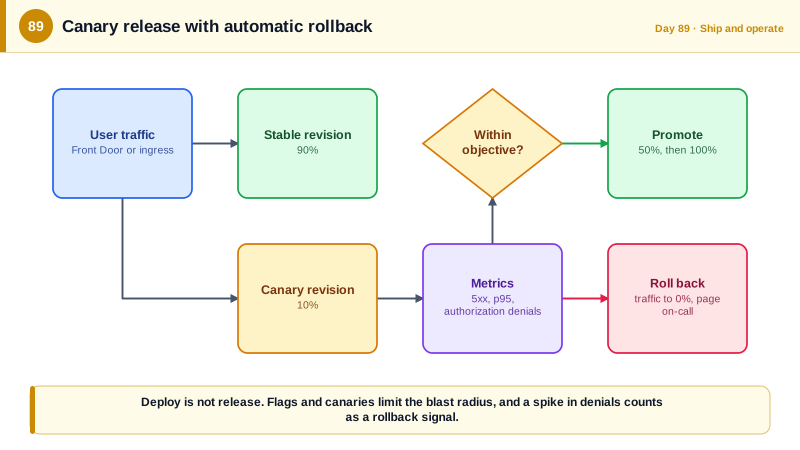
There are also strategies for rolling out the code itself. In a blue-green deployment you keep two identical environments, deploy the new version to the idle one, verify it with smoke tests, then switch traffic over, and keep the old one for instant rollback. On App Service this is the deployment slot with a swap, which warms up the new instance before switching. In a canary release you send a small share of real traffic to the new version, watch its error rate and latency against the old one, and increase the share only while the numbers stay healthy. Azure Container Apps supports this directly through revisions and traffic weights, and Front Door can split traffic between origins. These strategies limit the blast radius: a defect affects a fraction of users for a short time.
Automating the decision makes progressive delivery safe. Define promotion and rollback criteria from your service level objectives: the canary must keep its error rate within a small margin of the baseline and its p95 latency under the threshold for a set period, or traffic is shifted back automatically and an alert is raised. This removes both the hesitation to roll back and the temptation to keep going because the deadline is near. Remember that database changes constrain all of this: blue-green and canary only work if both versions run against the same schema, which is the compatibility discipline of Day 86.
Flags introduce their own risks. Flags evaluated in the browser are visible and modifiable by the user, so a client-side flag must never be what protects something sensitive: authorization for a feature must be enforced on the server regardless of the flag, and sensitive flag decisions should be evaluated server-side. Control who can change production flags and record changes in an audit log, since flipping a flag can enable a code path that bypasses normal review. Stale flags are technical debt with sharp edges: each flag doubles the code paths to test, and old flags for retired features can be accidentally re-enabled. The 2012 Knight Capital incident involved an old flag repurposed for new functionality, so that when the flag was turned on, one server still ran the old code it originally controlled. Give every release flag an owner and a removal date, and delete it soon after the rollout completes.
| Technique | What it separates | Notes |
|---|---|---|
| Feature flag | Deploy from release | Toggle behavior at runtime, kill switch on failure |
| Percentage or targeted rollout | Who sees a feature | Enable for staff, then a small share, then everyone |
| Blue-green with slots | Old and new environments | Warm up, swap, swap back to roll back |
| Canary with traffic weights | Small real-traffic test | Promote only while metrics stay healthy |
| Automated rollback criteria | Judgment from fear | Based on error rate and latency versus baseline |
| Flag lifecycle | Debt and risk | Owner, expiry, removal, audit of changes |
Worked Example: Feature Management, a Server-Evaluated Flag API, Traffic Weights and Rollback Rules
The code sets up flags with a percentage rollout, protects the feature on the server, and exposes evaluated flags to React. The commands shift canary traffic, and the rules describe automatic rollback.
// appsettings.json (or Azure App Configuration in production, so flags change without a deployment)
{
  "FeatureManagement": {
    "NewBoardLayout": {
      "EnabledFor": [
        { "Name": "Microsoft.Targeting", "Parameters": {
            "Audience": { "Users": ["alice@example.com"], "Groups": [{ "Name": "staff", "RolloutPercentage": 100 }], "DefaultRolloutPercentage": 5 } } }
      ]
    },
    "PaymentsV2": false,
    "DisableExports": false
  }
}// dotnet add package Microsoft.FeatureManagement.AspNetCore
builder.Services.AddSingleton<ITargetingContextAccessor, UserTargetingAccessor>(); // supplies the user and their groups
builder.Services.AddFeatureManagement().WithTargeting();
// A kill switch: operations can turn exports off in an emergency without a deployment.
app.MapGet("/api/reports/export", async (IFeatureManager flags, ExportService svc, CancellationToken ct) =>
{
if (await flags.IsEnabledAsync("DisableExports")) return Results.Problem("Exports are temporarily disabled.", statusCode: 503);
return Results.File(await svc.CreateAsync(ct), "text/csv");
}).RequireAuthorization("ReportsExport");
// A release flag gates NEW behavior, but authorization does NOT depend on the flag: it is enforced regardless.
app.MapPost("/api/payments/v2/charge", async (IFeatureManager flags, ChargeRequest req, PaymentsV2 svc) =>
await flags.IsEnabledAsync("PaymentsV2") ? Results.Ok(await svc.ChargeAsync(req)) : Results.NotFound())
.RequireAuthorization("PaymentsCharge"); // a flag never replaces this check
// Evaluated on the server and sent to the browser. The client renders differently but is never trusted.
app.MapGet("/api/flags", async (IFeatureManager flags) => Results.Ok(new
{
newBoardLayout = await flags.IsEnabledAsync("NewBoardLayout"),
})).RequireAuthorization();// React: flags are presentation hints only. The API enforces every rule.
const { data: flags } = useQuery({ queryKey: ['flags', userId], queryFn: () => request('/api/flags', FlagsSchema), staleTime: 60_000 });
return flags?.newBoardLayout ? <BoardV2 /> : <Board />;
// Never: if (flags.isAdmin) showDeleteButton() as the only protection. The button is cosmetic; DELETE is authorized on the server.# Blue-green on App Service: deploy to the staging slot, warm it, verify, swap, and swap back to roll back.
az webapp deployment slot create -g $RG -n $APP --slot staging --configuration-source $APP
az webapp config container set -g $RG -n $APP --slot staging --container-image-name acrexample.azurecr.io/taskboard:$GIT_SHA
curl -fsS "https://$APP-staging.azurewebsites.net/health/ready" && ./smoke-tests.sh "https://$APP-staging.azurewebsites.net"
az webapp deployment slot swap -g $RG -n $APP --slot staging --target-slot production # instant, with warm-up
az webapp deployment slot swap -g $RG -n $APP --slot staging --target-slot production # the same command again undoes it
# Canary on Container Apps: 10% of real traffic to the new revision, the rest to the stable one.
az containerapp update -g $RG -n taskboard --image acrexample.azurecr.io/taskboard:$GIT_SHA --revision-suffix $SHORT_SHA
az containerapp ingress traffic set -g $RG -n taskboard --revision-weight taskboard--$OLD=90 taskboard--$SHORT_SHA=10Automatic progression and rollback rules (evaluated every minute from the telemetry of Day 78)
Promote 10% -> 50% -> 100% in steps of 15 minutes ONLY IF, for the canary revision:
- 5xx rate <= baseline + 0.3 percentage points
- p95 latency <= 300 ms and <= baseline x 1.2
- no increase in authorization-denied or failed-login alerts beyond baseline
Roll back to 0% and page the on-call engineer IF any condition fails for 3 consecutive minutes.
Flag hygiene: every release flag has an owner and a removal date; a weekly job lists flags older than 30 days.Note that the canary rules include a security signal: a spike in authorization denials or failed logins after a release can indicate a broken permission check or a changed contract, so it counts as a reason to hold or roll back.
Real-World Examples
- Knight Capital's 2012 loss of about 440 million dollars stemmed partly from repurposing an old feature flag for new functionality: a new release reused a flag that had previously activated obsolete test code, and one of eight servers had not received the new deployment, so enabling the flag triggered the old behavior on that server. It is a vivid argument for deleting stale flags, for never reusing a flag name, and for verifying deployments uniformly.
- Pete Hodgson's 2017 article Feature Toggles, published on Martin Fowler's site, classified toggles as release, experiment, ops, and permission toggles by how long they live and how dynamic they are, and warned that toggles are inventory that carries cost. It is the standard reference for managing flags deliberately, including the advice to keep toggle points few and to retire release toggles quickly.
Review Questions & Answers
Deploying places new code on servers, while releasing exposes its behavior to users. When they are coupled, every deployment is a launch and every rollback requires another deployment. With flags, code can ship dark and be enabled gradually or disabled instantly, so problems affect fewer users for a shorter time.
Flags evaluated in the browser can be viewed and modified by users, and flags are configuration that can be changed by operators, so they are not a trustworthy security boundary. The server must enforce permissions on every request regardless of flag state, and flags should only control whether new behavior exists.
It exposes only a small share of traffic to the new version and compares its measured error rate and latency against the baseline, promoting or reverting on data instead of on hope or deadline pressure. Automation acts within minutes, so a defect affects fewer users and the rollback decision does not depend on someone noticing.
Each flag creates additional code paths that must be tested and maintained, old flags can be accidentally re-enabled or reused with a different meaning, and the accumulated conditions make the code hard to reason about. The Knight Capital incident involved a reused flag reactivating obsolete behavior, so flags need owners, expiry dates, and prompt removal.