Docker Compose for React, .NET and SQL Server
On this page
Learning Objective
Describe the whole development environment, SQL Server, Redis, the API and BFF, an email catcher, a storage emulator and an observability dashboard, in a single Compose file with health checks and dependency ordering, keep credentials and network exposure safe, and reproduce production topology closely enough to trust local results.
Concept Explanation
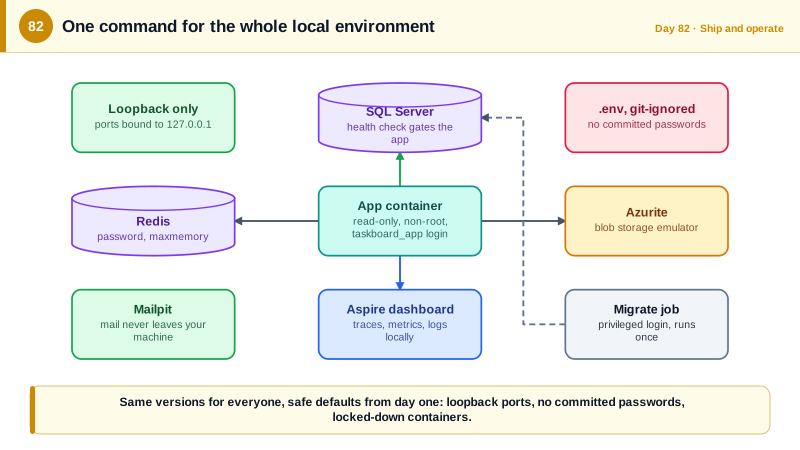
A new developer should be able to clone the repository, run one command, and have the full system running, with a database, a cache, a message broker emulator, and an email catcher, without installing anything but Docker. Docker Compose provides that by describing a set of services, their images, environment, networks, and volumes in a YAML file. It also solves the consistency problem for the team: everyone runs the same SQL Server version, the same Redis, and the same configuration, so a bug is reproducible and the it works on my machine excuse disappears. Compose is a development and test tool; production uses Azure services, but the topology should match closely enough that differences are known and small.
Composing a realistic environment needs attention to startup order and readiness. Containers start in parallel, but the API cannot run migrations until SQL Server accepts connections, and SQL Server takes several seconds to become ready. A depends_on entry with the condition service_healthy makes Compose wait until a service's health check passes, so you define health checks for the database and cache, and use them. The API image is built from the Dockerfile of Day 81 or, in a development profile, runs with dotnet watch against mounted source for hot reload. Compose profiles let you start subsets, such as only the dependencies while you run the API from your IDE, or the full stack including the end-to-end test runner.
Networking decisions carry security value even locally, because habits form here. Put backend services on an internal network with no route from outside and publish only the ports you need to your own machine, bound to 127.0.0.1 so that other devices on the coffee shop wifi cannot reach a development database. Do not commit credentials: reference variables from a git-ignored env file, and commit an example file listing the names. Avoid default or trivial passwords in the committed file, since development compose files have a way of being copied into shared environments. Do not mount the Docker socket into containers, which gives the container control of the host, and pin image tags to explicit versions so an update does not silently change your environment.
Local versions of the cloud services keep the environment faithful. Azurite emulates Azure Blob and Queue Storage, the Azure Service Bus emulator provides queues and topics for the messaging code of Day 66, Mailpit catches outgoing email and shows it in a web page so nothing real is ever sent, and the .NET Aspire dashboard collects OpenTelemetry traces, metrics, and logs from your services locally as you built in Day 78. Aspire also offers an orchestration approach, an AppHost project that describes the same topology in C#, as an alternative to Compose for .NET-centric teams. Whichever you use, add a seed step so the system has realistic data on first run, and a documented reset command that wipes volumes for a clean slate.
| Element | Purpose | Note |
|---|---|---|
| Compose file | Whole environment as code | One command starts everything |
| Health checks with depends_on | Correct startup order | Wait for SQL Server to be ready before the API |
| Profiles | Start subsets | Dependencies only, full stack, or with e2e runner |
| Internal network, ports on 127.0.0.1 | Limit exposure | Databases unreachable from the LAN |
| Env file, git-ignored | Keep credentials out of the repo | Commit only an example |
| Emulators and catchers | Faithful, safe local cloud | Azurite, Service Bus emulator, Mailpit, Aspire dashboard |
Worked Example: A Compose File for the Task Board
The file defines dependencies with health checks, an internal network, local emulators and the application, with commented security decisions.
# compose.yaml
name: taskboard

services:
  sql:
    image: mcr.microsoft.com/mssql/server:2022-CU16-ubuntu-22.04      # pinned, not latest
    environment:
      ACCEPT_EULA: "Y"
      MSSQL_SA_PASSWORD: ${SQL_PASSWORD:?Set SQL_PASSWORD in .env}     # required, no default committed
    ports: ["127.0.0.1:1433:1433"]                                    # reachable from this machine only
    volumes: [sqldata:/var/opt/mssql]
    networks: [backend]
    healthcheck:
      test: ["CMD-SHELL", "/opt/mssql-tools18/bin/sqlcmd -C -S localhost -U sa -P \"$$MSSQL_SA_PASSWORD\" -Q 'SELECT 1' || exit 1"]
      interval: 5s
      timeout: 5s
      retries: 20
      start_period: 20s

  redis:
    image: redis:7.4-alpine
    command: ["redis-server", "--requirepass", "${REDIS_PASSWORD:?Set REDIS_PASSWORD in .env}", "--maxmemory", "128mb", "--maxmemory-policy", "allkeys-lru"]
    ports: ["127.0.0.1:6379:6379"]
    networks: [backend]
    healthcheck:
      test: ["CMD-SHELL", "redis-cli -a \"$$REDIS_PASSWORD\" ping | grep PONG"]
      interval: 5s
      retries: 10
    environment: { REDIS_PASSWORD: "${REDIS_PASSWORD}" }

  azurite:
    image: mcr.microsoft.com/azure-storage/azurite:3.33.0
    ports: ["127.0.0.1:10000:10000"]                                  # blob emulator
    networks: [backend]

  mailpit:
    image: axllent/mailpit:v1.21
    ports: ["127.0.0.1:8025:8025"]                                    # web UI; SMTP stays on the internal network
    networks: [backend]

  otel:
    image: mcr.microsoft.com/dotnet/aspire-dashboard:9.0
    ports: ["127.0.0.1:18888:18888"]                                  # traces, metrics and logs UI
    environment: { DASHBOARD__OTLP__AUTHMODE: ApiKey, DASHBOARD__OTLP__PRIMARYAPIKEY: "${OTEL_KEY:?Set OTEL_KEY}" }
    networks: [backend]

  app:
    build: { context: ., secrets: [nuget_token] }
    depends_on:
      sql:   { condition: service_healthy }
      redis: { condition: service_healthy }
    environment:
      ConnectionStrings__Default: "Server=sql;Database=TaskBoard;User Id=taskboard_app;Password=${APP_DB_PASSWORD};TrustServerCertificate=True"
      Redis__Configuration: "redis:6379,password=${REDIS_PASSWORD}"
      Smtp__Host: mailpit
      OTEL_EXPORTER_OTLP_ENDPOINT: "http://otel:18889"
      OTEL_EXPORTER_OTLP_HEADERS: "x-otlp-api-key=${OTEL_KEY}"
    ports: ["127.0.0.1:8080:8080"]                                    # the only application port exposed
    read_only: true
    tmpfs: [/tmp]
    cap_drop: [ALL]
    security_opt: ["no-new-privileges:true"]
    networks: [backend]
    profiles: [full]                                                  # omit to run the app from your IDE against the dependencies

  migrate:
    build: { context: ., target: migrator }                           # a 'migrator' stage you add to the Dockerfile, holding the EF migration bundle
    depends_on: { sql: { condition: service_healthy } }
    environment: { MIGRATION_CONNECTION_STRING: "Server=sql;Database=TaskBoard;User Id=sa;Password=${SQL_PASSWORD};TrustServerCertificate=True" }
    networks: [backend]
    profiles: [full, deps]
    restart: "no"

networks:
  backend: { internal: false }                                        # set internal: true for services that need no host access

volumes:
  sqldata:

secrets:
nuget_token: { file: ./.secrets/nuget_token } # .secrets/ is git-ignored# .env.example (committed). Copy to .env, which is git-ignored, and fill in local-only values.
SQL_PASSWORD=
APP_DB_PASSWORD=
REDIS_PASSWORD=
OTEL_KEY=
# Everyday commands
docker compose --profile deps up -d # dependencies only; run the API from your IDE with dotnet watch
docker compose --profile full up --build # the whole system
docker compose down -v # reset: removes containers and volumes for a clean slate
docker compose logs -f app # follow the application logsNote the dedicated taskboard_app login in the application's connection string: even locally the application connects with the limited account from Day 34 while a separate migrator service uses the privileged one, so local development exercises the same permission model as production and surfaces missing grants early.
Real-World Examples
- Attackers have repeatedly found Docker daemons exposed on network port 2375 without authentication and used them to launch containers running cryptocurrency miners and to pivot into host systems. The incidents are the reason never to expose the Docker API or mount its socket into containers, and to bind development ports to loopback.
- Docker donated the Compose specification to an open governance model in 2020 so that the file format could be implemented by multiple tools, and Compose is now built into the Docker CLI as the docker compose command. That standardization is why the same YAML runs on developer laptops and on continuous integration systems.
Review Questions & Answers
A plain dependency only waits for the container to start, not for the service inside to be ready, so the application may start while SQL Server is still initializing and fail. A health check with the service_healthy condition makes Compose wait until the database actually accepts queries, giving reliable startup.
Publishing a port normally exposes it on all network interfaces, so on a shared or public network other machines could reach a database protected only by a development password. Binding to the loopback address restricts access to your own machine, at no cost to your workflow.
Using the same restricted permissions as production reveals missing grants during development rather than after deployment, and prevents habits and code that depend on administrative rights. Keeping a separate privileged login for the migration step mirrors the least-privilege split you use in the real pipeline.
Access to the socket lets the container control the Docker daemon, which effectively grants root on the host, since it can start privileged containers that mount the host filesystem. A compromise of that container becomes a compromise of the machine, so it should be avoided except in tightly controlled tooling.