React 19 Actions and useOptimistic with a .NET API
On this page
Learning Objective
Use React 19 form actions with useActionState, useFormStatus and useOptimistic to submit forms to a .NET API, map ProblemDetails errors into action state, decide between actions and React Hook Form, and keep validation, CSRF protection and idempotency on the server where they belong.
Concept Explanation
React 19, released as stable in December 2024, made asynchronous form handling a built-in feature. A form element can take a function as its action prop, and React runs it when the form is submitted, tracks its pending state, and resets uncontrolled fields on success. The function receives a FormData object, so it reads values by name instead of through controlled inputs. On top of that primitive sit several hooks. useActionState wraps an action and returns its latest result, such as validation errors, plus a wrapped action and a pending flag. useFormStatus lets a child component, such as a submit button, know whether its parent form is submitting. useOptimistic lets you show an expected result immediately while the action runs, and React reverts to the real state when it finishes.
In this course's architecture, the actions run in the browser and call your ASP.NET Core API through the BFF, so they change how forms are written, not where validation lives. The server remains the authority: the action sends the data, the API validates and returns ProblemDetails with an errors dictionary on failure, and the action returns that as its state so the form can display messages beside the fields, using the same key-normalization idea as Day 55. Because the action is just an async function, everything from earlier lessons still applies: the custom CSRF header on unsafe requests, an idempotency key for operations that must not repeat, the trace id in error messages, and no logging of field values.
Choosing between actions and React Hook Form comes down to the form. Actions shine for simple to moderate forms, progressive submission flows, and cases where pending state and optimistic updates are the main needs, and they need very little code. React Hook Form with a Zod resolver remains stronger for large forms with rich client-side validation, field arrays, dependent fields, and fine-grained control over when validation runs and what re-renders. They combine well: a form can validate with a schema on the client, then submit through an action. Whichever you choose, do not treat client validation as protection, since it exists for feedback only.
Optimistic updates deserve the same discipline as with TanStack Query. Show the expected result only for actions that almost always succeed, make sure a failure reverts the interface and shows why, and protect against double submission and retries with an idempotency key. In frameworks where actions run on the server, such as Next.js server actions, there is an additional and important rule: each action is a public HTTP endpoint that anyone can call directly with any input, so it must authenticate, authorize, and validate exactly as an API route would, and never rely on the form that happens to call it.
| Tool | Best for | Notes |
|---|---|---|
| form action prop | Submitting FormData to an async function | Pending state and reset handled by React |
| useActionState | Action result, errors and a pending flag | Return ProblemDetails errors as state |
| useFormStatus | A submit button that reads its form's status | Must be rendered inside the form |
| useOptimistic | Showing an expected result during the action | Reverts automatically when the action ends |
| React Hook Form + Zod | Large forms with rich client validation | Can be combined with an action for submission |
| Server actions (Next.js) | Server-side mutations | Public endpoints: authorize and validate every call |
Worked Example: A Note Form Action with Errors, Pending State and Optimistic Add
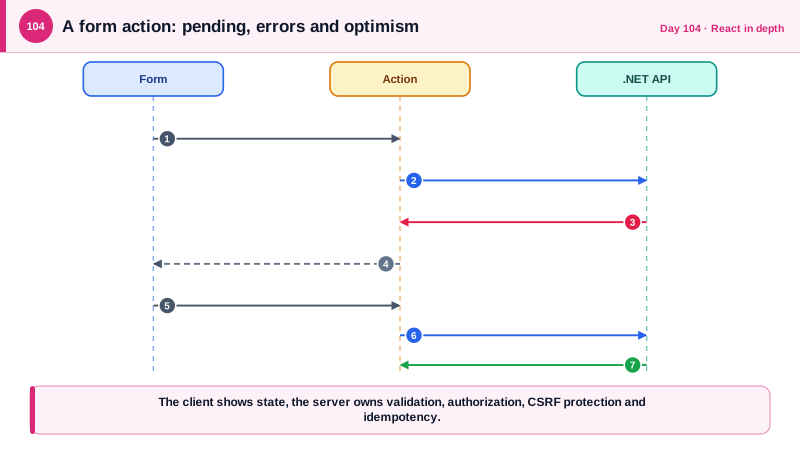
The action submits to the API with the CSRF header and an idempotency key, returns field errors, and the component shows pending and optimistic state.
type FormState = { ok: boolean; errors: Record<string, string[]>; message?: string };

async function createNoteAction(_prev: FormState, formData: FormData): Promise<FormState> {
  const body = { title: String(formData.get('title') ?? '').trim(), body: String(formData.get('body') ?? '') };

  const res = await fetch('/api/notes', {
    method: 'POST',
    credentials: 'include',
    headers: {
      'Content-Type': 'application/json',
      'X-CSRF': '1',                                              // custom header: cross-site forms cannot send it
      'Idempotency-Key': String(formData.get('requestId')),       // generated once per form instance
    },
    body: JSON.stringify(body),
  });

  if (res.ok) return { ok: true, errors: {} };

  const problem = ProblemSchema.safeParse(await res.json().catch(() => ({})));
  if (res.status === 400 && problem.success && problem.data.errors) {
    const errors = Object.fromEntries(Object.entries(problem.data.errors).map(([k, v]) => [k.charAt(0).toLowerCase() + k.slice(1), v]));
    return { ok: false, errors };                                 // camelCase keys match the field names
  }
  return { ok: false, errors: {}, message: `Something went wrong. Reference: ${res.headers.get('X-Correlation-Id') ?? 'unavailable'}` };
}

function SubmitButton() {
  const { pending } = useFormStatus();                            // reads the parent form's state
  return <button type="submit" disabled={pending}>{pending ? 'Saving...' : 'Save note'}</button>;
}

export function NoteForm({ notes }: { notes: Note[] }) {
  const [state, action] = useActionState(createNoteAction, { ok: false, errors: {} });
  const [optimistic, addOptimistic] = useOptimistic(notes, (current, pendingTitle: string) => [{ id: -1, title: pendingTitle, pending: true } as Note, ...current]);
  const requestId = useRef(crypto.randomUUID());                  // one key per user intent

  return (
    <>
      <form action={async (fd) => { addOptimistic(String(fd.get('title'))); await action(fd); }}>
        <input type="hidden" name="requestId" value={requestId.current} />
        <label htmlFor="title">Title</label>
        <input id="title" name="title" aria-invalid={!!state.errors.title} aria-describedby={state.errors.title ? 'title-error' : undefined} />
        {state.errors.title && <p id="title-error" role="alert">{state.errors.title[0]}</p>}
        {state.message && <p role="alert">{state.message}</p>}
        <SubmitButton />
      </form>
      <ul>{optimistic.map((n) => <li key={n.id} style={{ opacity: n.pending ? 0.6 : 1 }}>{n.title}</li>)}</ul>
    </>
  );
}// If this action ran on a Next.js server, it would be a PUBLIC endpoint. It must re-check everything itself.
'use server';
export async function createNote(formData: FormData) {
const user = await requireUser(); // authenticate inside the action
const input = CreateNoteSchema.parse({ title: formData.get('title') }); // validate inside the action
await assertCanCreateNote(user, input); // authorize inside the action
/* ... */
}The optimistic list item is shown at reduced opacity until the action completes, then React replaces it with the real state, which comes from the refreshed query. If the request fails, the item disappears and the error message explains why, so the interface never claims a save that did not happen.
Real-World Examples
- React 19 became stable on 5 December 2024 with Actions, the useActionState, useFormStatus and useOptimistic hooks, and the use API, consolidating patterns that libraries had provided for years into the core library. The release notes present actions as the new default for handling pending states, errors, and optimistic updates around mutations.
- The Next.js documentation states that server actions are reachable by direct POST requests and should be treated like public API endpoints, with authentication, authorization and input validation performed inside each action. The guidance exists because early adopters assumed that an action only reachable from their form was protected by that fact.
Review Questions & Answers
useActionState wraps an action and returns its latest result, such as validation errors, along with a wrapped action and a pending flag. useFormStatus lets a component inside a form, like a submit button, read whether that form is currently submitting, without passing props down.
An action is only the client's way of submitting data, and anyone can send requests to the API directly with any values. The API must validate and authorize every request, and the action's job is to display the resulting errors clearly.
It holds a temporary value that is shown while an action is in progress and is automatically discarded when the action finishes, so the interface returns to the real state whether the action succeeded or failed. Manual optimistic state requires you to remember to roll back.
Server actions are exposed as HTTP endpoints that can be called directly with arbitrary input, regardless of which form calls them in the interface. Any check placed only in the form or in a page component can be bypassed, so each action must check identity, permissions, and input as an API route would.