Angular to React: A Mental Model Map
On this page
Learning Objective
Map the Angular concepts you already know onto their React and ASP.NET Core equivalents for talking to an API, so you can move between the three ecosystems fluently, and identify the places where the security defaults differ and must be handled deliberately.
Concept Explanation
If you have built Angular applications, you already understand most of what a React application needs to do when it talks to a server; the vocabulary differs. Angular gives you an integrated framework: a module and dependency injection system, HttpClient built on RxJS observables, interceptors, route guards, reactive forms, and a template compiler. React is a rendering library plus a large ecosystem, so each concern is a library choice. That is why a React project needs a decision for data fetching, routing, forms, and state, while the same decisions in Angular are largely made for you. Neither is better; knowing the mapping stops you from feeling lost when the names change.
The single biggest conceptual shift concerns server data. In Angular, a service typically exposes an observable from HttpClient, components subscribe, often through the async pipe, and NgRx stores hold shared state. In modern React, server state, data that lives on the server and is cached in the browser, is handled by a dedicated library such as TanStack Query, which provides caching, deduplication, background refetching, and invalidation, so you rarely put fetched data in a global store at all. Client state, such as the open dialog or the selected tab, stays in local component state, context, or a small store like Zustand. Keeping the two kinds of state separate removes a large amount of hand-written loading and error plumbing.
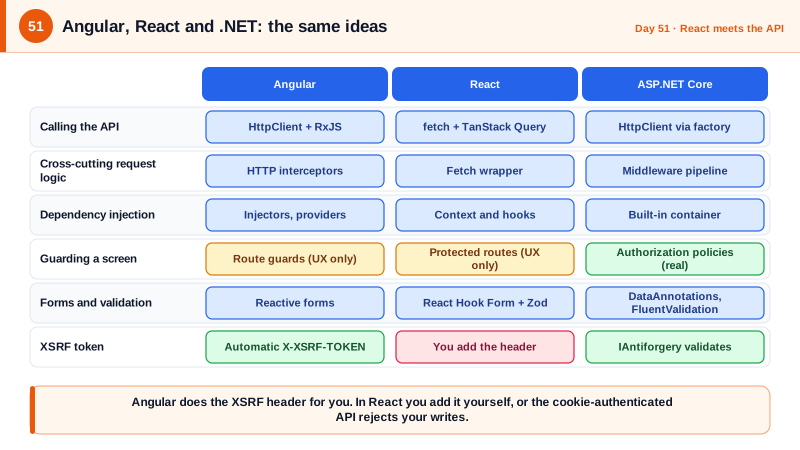
The .NET side has its own parallels that complete the picture. Angular's dependency injection and .NET's constructor injection follow the same principle, and Angular HTTP interceptors map onto both a client-side fetch wrapper and ASP.NET Core middleware. Route guards on the client are usability features, exactly as Day 1 warned, while authorization policies on the server are the real enforcement. Angular's reactive forms map to React Hook Form, and the validators you write in Angular map to Zod schemas on the client and DataAnnotations or FluentValidation on the server. Once you see the three columns side by side, most concepts collapse into the same five or six ideas.
Security defaults deserve their own comparison because they differ in ways that catch people out. Angular sanitizes values bound into templates and makes you opt out explicitly with the DomSanitizer bypass methods, while React escapes text by default but leaves dangerouslySetInnerHTML and URL attributes such as href with a javascript scheme in your hands. Angular's HttpClient automatically reads an XSRF-TOKEN cookie and sends its value in an X-XSRF-TOKEN header on unsafe requests, which pairs with ASP.NET Core anti-forgery from Day 48 with almost no code, while in React you write that step yourself. Moving from Angular to React means carrying these habits over on purpose instead of assuming the framework does them.
| Concern | Angular | React | ASP.NET Core |
|---|---|---|---|
| HTTP calls | HttpClient with observables | fetch with TanStack Query | HttpClient via IHttpClientFactory |
| Cross-cutting request logic | HTTP interceptors | Fetch wrapper or middleware | Middleware pipeline |
| Dependency injection | Injectors and providers | Context and hooks | Built-in DI container |
| Guarding a screen | Route guards (usability only) | Protected route components | Authorization policies (enforcement) |
| Forms and validation | Reactive forms and validators | React Hook Form and Zod | DataAnnotations or FluentValidation |
| Shared client state | NgRx or signals | Zustand, Redux Toolkit, context | Not applicable |
| XSS protection | Template sanitization by default | Text escaped, HTML and URLs manual | Output encoding in Razor, JSON safe by default |
| CSRF token handling | Automatic X-XSRF-TOKEN handling | You add the header yourself | IAntiforgery validation |
Worked Example: The Same Feature in Angular, React and .NET
The feature loads a note and lets the user rename it. The three snippets show equivalent structure so you can translate between them.
// Angular: service plus component using observables.
@Injectable({ providedIn: 'root' })
export class NotesService {
  private http = inject(HttpClient);                 // XSRF header is added automatically for unsafe methods
  get(id: number) { return this.http.get<Note>(`/api/notes/${id}`); }
  rename(id: number, title: string) { return this.http.put<Note>(`/api/notes/${id}`, { title }); }
}

@Component({
  selector: 'app-note',
  template: `
    @if (note$ | async; as note) {
      <h1>{{ note.title }}</h1>        <!-- interpolation is escaped and sanitized -->
      <button (click)="rename(note.id)">Rename</button>
    }`,
})
export class NoteComponent {
  private notes = inject(NotesService);
  note$ = this.notes.get(42);
  rename(id: number) { this.notes.rename(id, 'New title').subscribe(); }
}// React: TanStack Query hooks replace the service and the subscription plumbing.
function useNote(id: number) {
return useQuery({ queryKey: ['note', id], queryFn: () => api.get<Note>(`/api/notes/${id}`) });
}
function useRenameNote(id: number) {
const qc = useQueryClient();
return useMutation({
mutationFn: (title: string) => api.put<Note>(`/api/notes/${id}`, { title }), // wrapper adds the CSRF header itself
onSuccess: (note) => qc.setQueryData(['note', id], note),
});
}
export function NoteView({ id }: { id: number }) {
const { data: note, isPending } = useNote(id);
const rename = useRenameNote(id);
if (isPending) return <Spinner />;
return (
<>
<h1>{note.title}</h1> {/* text is escaped; never use dangerouslySetInnerHTML with user data */}
<button onClick={() => rename.mutate('New title')}>Rename</button>
</>
);
}// ASP.NET Core: the endpoint both clients call. Authorization is enforced here, not in either UI.
app.MapPut("/api/notes/{id:int}", async (int id, RenameNoteRequest body, ClaimsPrincipal user, INoteStore store, CancellationToken ct) =>
{
var note = await store.FindAsync(user.GetUserId(), id, ct); // owner filter in the query
if (note is null) return Results.NotFound();
note.Title = body.Title.Trim();
await store.SaveAsync(note, ct);
return Results.Ok(NoteDto.From(note));
}).RequireAuthorization();Notice where the differences sit. The Angular component gets its subscription cleanup and CSRF header for free. The React version replaces subscribe and unsubscribe with a hook that manages caching, and needs the CSRF header added in the wrapper. And the .NET endpoint is identical for both clients, because the real rules live there.
Real-World Examples
- Angular's HttpClient documentation describes built-in support for the XSRF cookie and header convention: it reads the XSRF-TOKEN cookie and sets X-XSRF-TOKEN on mutating requests to same-origin URLs, matching the defaults of frameworks such as ASP.NET Core and Laravel. Teams moving from Angular to React sometimes lose this protection unintentionally because nothing in React replaces it automatically.
- In February 2025 the React team announced that Create React App was being deprecated and recommended starting new projects with a framework or a build tool such as Vite, reflecting how much of what Angular bundles, routing, data loading and tooling, React has come to expect from the surrounding ecosystem. Understanding which library covers which Angular feature is now a core skill for full-stack developers.
Review Questions & Answers
A server-state library such as TanStack Query. Hooks like useQuery fetch, cache, deduplicate, and refetch data and expose loading and error states, so components do not manage subscriptions or store fetched data in global state by hand. It fills the role of both the service observable and the store for server data.
Both run in the browser, which the user controls, so anyone can bypass them by calling the API directly or modifying the client code. They hide screens from users who should not see them, which is good experience design, but real enforcement must happen in the ASP.NET Core authorization policies on the server for every request.
Angular's HttpClient automatically copies the XSRF-TOKEN cookie into an X-XSRF-TOKEN header on unsafe same-origin requests, which works with server anti-forgery validation. React's fetch does nothing of the kind, so the fetch wrapper must fetch or read the token and add the header, otherwise a cookie-authenticated API rejects the requests or, worse, lacks CSRF protection.
Both are explicit escape hatches from the framework's default safe rendering. Using either with untrusted data lets an attacker's markup run in your page, causing XSS. They should be used rarely, only with content sanitized by a vetted library, and flagged in code review as high risk in either framework.