Real-Time React with SignalR and Server-Sent Events
On this page
Learning Objective
Add live updates to the task board with ASP.NET Core SignalR, authenticate and authorize connections and group membership correctly, defend against cross-site WebSocket hijacking and message abuse, and connect real-time events to the TanStack Query cache in React.
Concept Explanation
Polling asks the server whether anything changed, again and again. Real-time transports let the server tell the client when something changes. SignalR is ASP.NET Core's library for this: it exposes a hub, a server class whose methods clients can call and which can call methods on connected clients, and it negotiates the best available transport, preferring WebSockets, falling back to Server-Sent Events and then long polling. The JavaScript client in the package @microsoft/signalr handles connection, reconnection, and message dispatch. For a task board, when one user moves a card, the server broadcasts an event to everyone viewing that project, and their screens update within a fraction of a second.
For simpler one-directional streams, such as progress updates or notifications from server to browser, Server-Sent Events over plain HTTP are enough, need no special protocol, and reconnect automatically in the browser through the EventSource API. .NET 10 added first-class support for returning event streams from minimal APIs, which makes this a lightweight option. Choose SignalR when you need bidirectional messaging, groups, and connection management, and SSE when you only need to push text events to the client. Both are long-lived connections, which changes capacity planning, since each connected user holds an open connection on a server instance.
Real-time features multiply the security surface, because a connection is established once and then trusted for a long time. The first question is authentication. Browsers cannot set an Authorization header on a WebSocket handshake, so token-based setups pass the access token in the query string, which risks it appearing in logs. With the cookie-based BFF from Day 46 the session cookie is sent automatically with the handshake, which is simpler and avoids that leak. The catch is that cookies make you vulnerable to cross-site WebSocket hijacking: a malicious page can open a WebSocket to your server from the victim's browser, and the cookie is attached. The defense is to validate the Origin header on the handshake, allowing only your own origins, and a browser cannot forge that header for a cross-origin page.
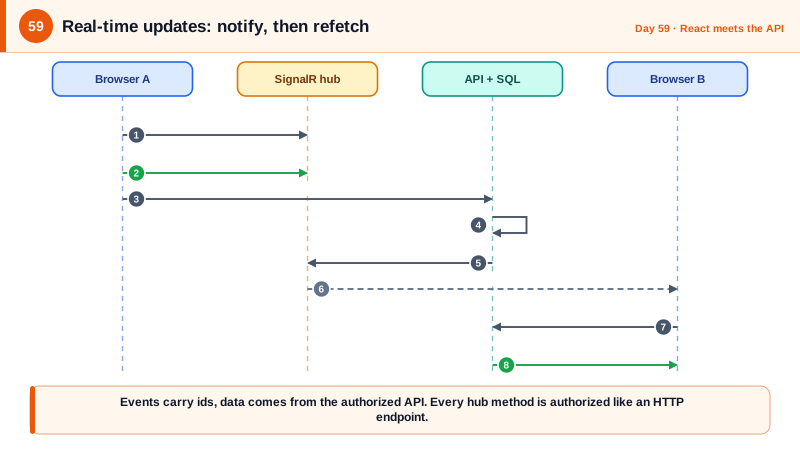
The second question is authorization, which real-time code tends to forget. A hub method that adds the caller to a group named for a project must first verify that the caller is a member of that project; otherwise anyone connected can subscribe to any project's events, which is the object-level authorization flaw of Day 47 in a new setting. Every hub method deserves the same checks as an HTTP endpoint. Add limits as well: a maximum message size, a cap on connections per user, and rate limiting on client-to-server calls, since a persistent connection is a cheap way to flood a server. And never trust event payloads sent from clients to be broadcast unmodified. Prefer sending small notifications, such as task 42 changed, and let the client refetch through the normal authorized API, which keeps a single authorization path and avoids leaking data through events.
| Choice | Use when | Notes |
|---|---|---|
| SignalR | Two-way messaging, groups, scale-out support | Auto-selects WebSockets, SSE or long polling |
| Server-Sent Events | Server-to-client stream only | Plain HTTP, auto-reconnect, simple |
| Polling | Infrequent updates, simplest infrastructure | Wasteful, but robust and easy to secure |
| Cookie-based hub auth | With the BFF | Requires Origin validation against hijacking |
| Group membership | Per-project updates | Verify membership before joining a group |
| Notify then refetch | Sensitive data | Events carry ids, data comes through the authorized API |
Worked Example: An Authorized Hub, Origin Checks and a React Hook
The hub verifies membership before joining a group and limits message size. The server registers Origin validation and connection limits. The React hook connects and invalidates queries on events.
[Authorize]
public sealed class BoardHub(AppDb db, ILogger<BoardHub> log) : Hub
{
    public async Task JoinProject(Guid projectId)
    {
        var userId = Context.User!.GetUserId();
        var isMember = await db.ProjectMembers.AnyAsync(m => m.ProjectId == projectId && m.UserId == userId);
        if (!isMember)
        {
            log.LogWarning("User {UserId} tried to join project {ProjectId} without membership", userId, projectId);
            throw new HubException("Not found");                 // do not confirm the project exists
        }
        await Groups.AddToGroupAsync(Context.ConnectionId, $"project:{projectId}");
    }

    public Task LeaveProject(Guid projectId) =>
        Groups.RemoveFromGroupAsync(Context.ConnectionId, $"project:{projectId}");
}

// Called from the normal, authorized HTTP endpoint after it saves a change.
public sealed class BoardNotifier(IHubContext<BoardHub> hub)
{
    public Task TaskChangedAsync(Guid projectId, Guid taskId) =>
        hub.Clients.Group($"project:{projectId}").SendAsync("taskChanged", new { taskId });   // ids only, no task data
}// Program.cs
builder.Services.AddSignalR(o =>
{
o.MaximumReceiveMessageSize = 16 * 1024; // default is 32 KB; smaller for this app
o.ClientTimeoutInterval = TimeSpan.FromSeconds(30);
o.MaximumParallelInvocationsPerClient = 1;
});
var allowedOrigins = new HashSet<string>(builder.Configuration.GetSection("Cors:Origins").Get<string[]>() ?? []);
app.Use(async (ctx, next) =>
{
if (ctx.Request.Path.StartsWithSegments("/hubs"))
{
var origin = ctx.Request.Headers.Origin.ToString();
// Browsers always send Origin on WebSocket handshakes and pages cannot forge it.
if (!string.IsNullOrEmpty(origin) && !allowedOrigins.Contains(origin))
{
ctx.Response.StatusCode = StatusCodes.Status403Forbidden;
return;
}
}
await next();
});
app.MapHub<BoardHub>("/hubs/board").RequireAuthorization().RequireRateLimiting("hub-connect");
// After a change is persisted by an authorized endpoint:
// await notifier.TaskChangedAsync(task.ProjectId, task.Id);// src/features/board/useBoardEvents.ts
import { HubConnectionBuilder, HubConnection, LogLevel } from '@microsoft/signalr';
export function useBoardEvents(projectId: string, userId: string) {
const qc = useQueryClient();
useEffect(() => {
const connection: HubConnection = new HubConnectionBuilder()
.withUrl('/hubs/board') // same origin: the session cookie is sent automatically
.withAutomaticReconnect([0, 2000, 5000, 15000])
.configureLogging(LogLevel.Warning)
.build();
connection.on('taskChanged', () => {
// Events are notifications. Data comes back through the authorized HTTP API.
qc.invalidateQueries({ queryKey: taskKeys.byProject(userId, projectId) });
});
connection.onreconnected(() => {
connection.invoke('JoinProject', projectId).catch(() => {}); // groups are lost on reconnect: rejoin
qc.invalidateQueries({ queryKey: taskKeys.byProject(userId, projectId) }); // catch anything missed while offline
});
connection.start().then(() => connection.invoke('JoinProject', projectId)).catch(console.warn);
return () => { void connection.stop(); }; // leaving the page closes the connection
}, [projectId, userId, qc]);
}Write a hub test that connects as a user who is not a member and asserts JoinProject fails and no events arrive, and an integration test that opens a handshake with a foreign Origin header and expects a 403. Those two tests cover the two most common real-time security failures.
Real-World Examples
- Cross-site WebSocket hijacking was documented by Christian Schneider in 2013: because the WebSocket handshake carries cookies and the protocol has no same-origin restriction, a malicious page can open an authenticated connection to a victim's session unless the server checks the Origin header. It has affected many products since, and origin validation is the standard fix.
- ASP.NET Core SignalR shipped with ASP.NET Core 2.1 in 2018 as a rewrite of the earlier ASP.NET SignalR, adding the hub protocol and a redesigned client. Azure SignalR Service, a managed offering that holds connections outside your servers, is the usual way to scale it beyond one instance, which Day 93 revisits in the chat system design.
Review Questions & Answers
The browser attaches cookies to any WebSocket handshake to your site, including one opened by a malicious page on another origin, and WebSockets are not blocked by the same-origin policy. The Origin header, which the browser sets truthfully and pages cannot forge, tells you which page initiated the connection, so rejecting unlisted origins stops hijacking.
Adding the caller to a group without checking they are entitled to it. Any authenticated user could then subscribe to any project's events by supplying its identifier, which is broken object level authorization in real time. The hub must verify membership, and should behave as if the group does not exist when the check fails.
It keeps one authorization path, the HTTP API, responsible for deciding what each user may see, instead of duplicating access logic in every event and risking leaking data to subscribers who should not have it. It also keeps events small and lets caching and validation work as usual.
Group membership belongs to a specific connection, so a new connection starts with no groups and the client will not receive events until it rejoins. Events that occurred while disconnected are also lost, so invalidating the queries after reconnecting synchronizes the interface with the server's current state.