EF Core Transactions and Concurrency Tokens
On this page
Learning Objective
Explain ACID and how SaveChanges and explicit transactions provide it, choose isolation levels in SQL Server, prevent lost updates and check-then-act races with rowversion tokens and atomic statements, and map concurrency exceptions to HTTP responses.
Concept Explanation
A transaction groups several operations so that they succeed or fail as a unit. The ACID properties describe what a real database guarantees: atomicity, all changes apply or none do; consistency, constraints hold before and after; isolation, concurrent transactions do not see each other's half-finished work in harmful ways; and durability, committed data survives a crash. EF Core's SaveChanges already wraps all pending changes in one transaction, so a single call that inserts an order and its lines is atomic. When you need atomicity across several SaveChanges calls or across raw SQL, you begin an explicit transaction and commit it yourself, keeping it as short as possible because open transactions hold locks that block other requests.
Isolation levels decide how much concurrent transactions can interfere. The problems they prevent have names: a dirty read sees uncommitted data, a non-repeatable read gets different values for the same row when read twice, and a phantom read sees new rows appear between two identical queries. SQL Server's default, READ COMMITTED, prevents dirty reads using locks, so readers can block writers. READ COMMITTED SNAPSHOT, which is the default in Azure SQL Database, uses row versioning so readers do not block writers and vice versa, and is often the best choice for web workloads. SNAPSHOT isolation gives a stable view for the whole transaction, and SERIALIZABLE is the strictest, at the cost of concurrency and deadlocks. Stronger isolation is not automatically better; choose the weakest level that keeps your invariants intact.
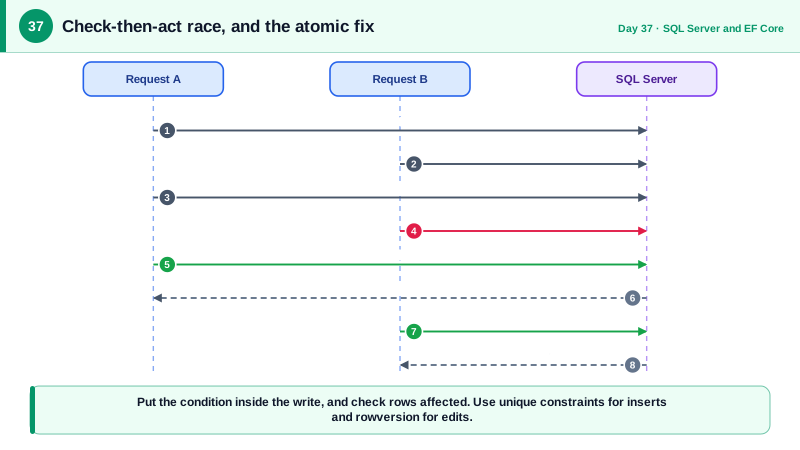
The most common concurrency bug in web applications is not one of those anomalies but the check-then-act race. Code reads a stock count of 1, checks it is positive, and then writes stock minus one; two simultaneous requests both read 1, both pass the check, and the product oversells. The remedies are to make the check and the change a single atomic statement, such as an UPDATE with a WHERE clause that requires enough stock and inspecting the number of rows affected, or to detect conflicts with a concurrency token. A unique constraint is the equivalent tool for insertions: rather than checking whether an email exists and then inserting, insert and let the constraint reject the duplicate.
For updates of records that people edit, use a rowversion column as a concurrency token. SQL Server changes it automatically on every write. When you configure it in EF Core with IsRowVersion, the UPDATE includes it in its WHERE clause, and if the row changed since it was read, no row matches, and EF throws DbUpdateConcurrencyException. That maps directly to the ETag protocol of Day 26: the rowversion, encoded as a string, is the ETag, and the exception becomes a 412 response. Deadlocks are a different failure, occurring when two transactions wait for each other's locks; SQL Server kills one as the victim with error 1205, and the correct response is to retry the whole transaction, which EF Core's execution strategy supports.
| Isolation level | Prevents | Notes |
|---|---|---|
| READ COMMITTED (locking) | Dirty reads | SQL Server default, readers may block writers |
| READ COMMITTED SNAPSHOT | Dirty reads, less blocking | Default in Azure SQL Database, good for web apps |
| SNAPSHOT | Also non-repeatable reads and phantoms | Stable view for the whole transaction |
| SERIALIZABLE | All anomalies | Most locking, highest deadlock risk |
| Rowversion token | Lost updates | Detected at UPDATE time |
| Atomic conditional UPDATE | Check-then-act races | One statement, verify rows affected |
Worked Example: Overselling, the Fix and a 412 from the Database Version
The first version has a race. The second uses an atomic conditional update inside a transaction with the order insert. The last block converts a concurrency exception to the response from Day 26.
// RACE: two requests can both read Stock = 1 and both succeed.
var product = await db.Products.FirstAsync(p => p.Id == productId, ct);
if (product.Stock < quantity) return Results.Conflict("Not enough stock.");
product.Stock -= quantity;
db.Orders.Add(new Order { ProductId = productId, Quantity = quantity, UserId = userId });
await db.SaveChangesAsync(ct);// FIXED: one atomic statement decides, and the order insert commits with it.
var strategy = db.Database.CreateExecutionStrategy(); // retries transient errors and deadlocks
return await strategy.ExecuteAsync(async () =>
{
await using var tx = await db.Database.BeginTransactionAsync(ct);
var updated = await db.Products
.Where(p => p.Id == productId && p.Stock >= quantity) // the condition is part of the write
.ExecuteUpdateAsync(s => s.SetProperty(p => p.Stock, p => p.Stock - quantity), ct);
if (updated == 0)
{
return Results.Conflict("Not enough stock."); // rows affected = 0 means we lost the race
}
db.Orders.Add(new Order { ProductId = productId, Quantity = quantity, UserId = userId });
await db.SaveChangesAsync(ct);
await tx.CommitAsync(ct);
return Results.Created($"/api/orders/{productId}", null);
});// Rowversion concurrency: EF adds "AND RowVer = @original" to the UPDATE.
app.MapPut("/api/tasks/{id:guid}", async (Guid id, UpdateTask body, AppDb db, HttpRequest req, CancellationToken ct) =>
{
var task = await db.Tasks.FindAsync([id], ct);
if (task is null) return Results.NotFound();
// The client sent the ETag it read earlier; tell EF that is the version it expects.
var expected = Convert.FromBase64String(req.Headers.IfMatch.ToString().Trim('"'));
db.Entry(task).Property(t => t.RowVer).OriginalValue = expected;
task.Title = body.Title.Trim();
try
{
await db.SaveChangesAsync(ct);
}
catch (DbUpdateConcurrencyException)
{
return Results.Problem("This task was changed by someone else. Reload and try again.",
statusCode: StatusCodes.Status412PreconditionFailed);
}
return Results.NoContent();
}).RequireAuthorization();
// Turn on row versioning so readers do not block writers (usually enabled by default in Azure SQL):
// ALTER DATABASE Notes SET READ_COMMITTED_SNAPSHOT ON;A cross-check test is worthwhile here: fire fifty concurrent purchases at a product with stock of ten and assert that exactly ten succeed and the stock is zero. That single test proves the transaction design, which no amount of code reading can.
Real-World Examples
- In 2015, researcher Egor Homakov reported a race condition in the Starbucks gift card system: by sending parallel requests to transfer balance between cards, he could make the check-then-debit logic pass several times against the same funds and create extra balance. Starbucks fixed it. The incident is a compact demonstration that concurrency flaws are security flaws whenever money or entitlements are involved.
- Azure SQL Database enables READ_COMMITTED_SNAPSHOT by default, which Microsoft's documentation describes as reducing blocking between readers and writers by using row versioning. On-premises SQL Server defaults to the locking form, so a database that behaves well in Azure can show blocking after a migration, or the reverse, unless the setting is checked explicitly.
Review Questions & Answers
Two requests can read the same value before either writes. Both see enough stock, both pass the check, and both subtract, so more units are sold than existed. The check and the write are separate steps with a gap between them. Making the condition part of one atomic UPDATE closes the gap, because the database serializes the row updates and only one can satisfy the condition.
SQL Server changes the rowversion value automatically on each write. EF Core includes the originally read value in the UPDATE's WHERE clause, so if another transaction changed the row in the meantime, the value no longer matches, zero rows are updated, and EF raises DbUpdateConcurrencyException, which the API can report as a 412 conflict.
A concurrency conflict means the row changed since you read it, which is resolved by reloading and asking the user or merging. A deadlock means two transactions wait on each other's locks, so the database aborts one as the victim, and the correct handling is to retry the whole transaction, ideally through EF's execution strategy. Keeping transactions short and locking in a consistent order reduces deadlocks.
It uses row versions instead of shared locks for reads, so readers do not block writers and writers do not block readers, which reduces waiting and deadlocks under mixed workloads. Reads see the last committed version of each row. The cost is extra storage in the version store, which is usually acceptable.