SQL Server Full-Text Search vs Azure AI Search
On this page
Learning Objective
Decide when database queries are enough and when a search engine is needed, build search with SQL Server Full-Text Search and Azure AI Search, keep the index in sync with the source of truth, enforce permissions in search results, and build a responsive search box in React.
Concept Explanation
A search feature begins innocently, with WHERE Title LIKE '%report%'. That works for small tables and fails as data grows, since a leading wildcard prevents index use and forces a scan of every row, and it also fails users, because it matches only exact substrings with no stemming, ranking, typo tolerance, or synonyms. The first upgrade is SQL Server's Full-Text Search, which builds an inverted index over text columns and supports CONTAINS and FREETEXT queries with word forms and ranking through CONTAINSTABLE. It runs inside the database you already operate, joins naturally with other tables, and honors transactions, which makes it a good default for moderate needs.
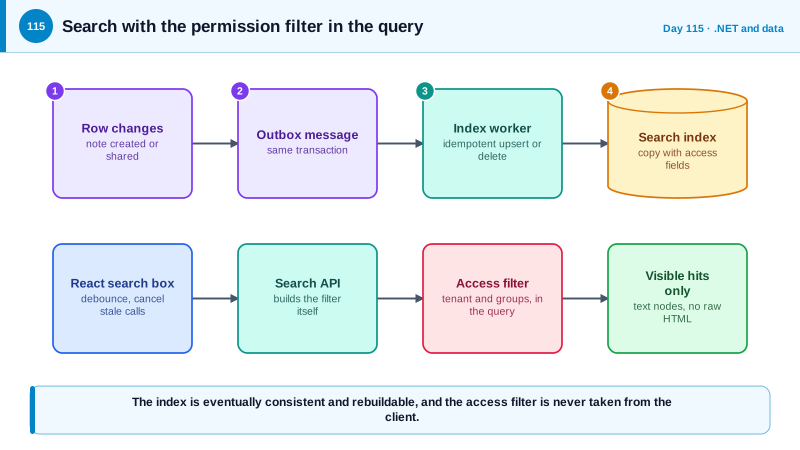
When you need better relevance, faceted filtering, typo tolerance, multilingual analyzers, large scale, or vector and hybrid search, a dedicated engine is appropriate, such as Azure AI Search, Elasticsearch or OpenSearch. These engines maintain their own index, a denormalized copy of the fields you search and filter on, and that introduces the central design problem: keeping the index consistent with the source of truth. The reliable pattern is the outbox from Day 66. A change to the record writes an outbox message in the same transaction, and a worker consumes it and upserts or deletes the document in the index, with retries and idempotency. Accept that the index is eventually consistent, show fresh writes from the database where the user expects them, and provide a way to rebuild the whole index from the database.
Security trimming is the requirement that search results contain only what the user may see, and it is where many search features leak data. Never fetch results and filter them in the client or after pagination, since counts, facets, and suggestions would already have revealed hidden items. Store the access information in each indexed document, such as a tenant id and a list of group or user ids allowed to read it, and add a filter for the current user's identity to every query on the server. The filter must be added by server code from the authenticated principal, never accepted from the client, and the index must be updated promptly when permissions change or documents are deleted, because stale access data is a leak. Indexes also hold copies of sensitive fields, so apply the same protections: network restrictions, authentication with managed identity instead of long-lived admin keys, and no sensitive fields in the index unless needed.
Injection applies to search too. Query syntaxes such as Lucene and OData filter expressions can be manipulated if user input is concatenated into them, so escape values, for example by doubling single quotes in OData string literals, or use the parameterization the client library provides, and restrict which fields users may filter or sort on. On the React side, treat search as a stream of requests where only the latest matters: debounce input, cancel superseded requests with the AbortSignal that TanStack Query provides, keep previous results visible while loading, and highlight matches by rendering text nodes and not by injecting HTML from the server.
| Need | Choice | Notes |
|---|---|---|
| Small data, simple matching | SQL query with an index, prefix search | Avoid leading wildcards |
| Word forms and ranking inside the database | SQL Server Full-Text Search | Transactional, joins with other tables |
| Relevance tuning, facets, typo tolerance | Azure AI Search or Elasticsearch | Separate index to keep in sync |
| Meaning-based queries | Vector or hybrid search | Embeddings and access filters both required |
| Keeping the index current | Outbox message and an indexing worker | Eventually consistent, rebuildable |
| Per-user visibility | Server-added access filter on every query | Never filter after retrieval |
Worked Example: Full-Text Query, Index Sync, a Security Filter and a React Search Box
The first block shows Full-Text Search with a parameter. The next shows the indexing worker and a trimmed query against Azure AI Search, followed by the React hook.
-- One-time setup
CREATE FULLTEXT CATALOG AppCatalog AS DEFAULT;
CREATE FULLTEXT INDEX ON dbo.Notes(Title, Body) KEY INDEX PK_Notes;

-- Query: parameterized, ranked. The search text is built safely (see the C# below).
SELECT TOP (20) n.Id, n.Title, k.RANK
FROM CONTAINSTABLE(dbo.Notes, (Title, Body), @query) AS k
JOIN dbo.Notes n ON n.Id = k.[KEY]
WHERE n.OwnerId = @userId                       -- the authorization filter stays in the SQL
ORDER BY k.RANK DESC;// Build a safe full-text condition from raw user words: quote each term, drop operators, cap the size.
static string ToContainsQuery(string raw)
{
var terms = Regex.Matches(raw ?? "", @"[\p{L}\p{N}]+").Select(m => m.Value).Take(8);
return string.Join(" AND ", terms.Select(t => $"\"{t}*\"")); // prefix match on each word
}// The indexing worker consumes outbox messages and keeps Azure AI Search in step with the database.
public async Task HandleAsync(NoteChanged msg, CancellationToken ct)
{
if (msg.Deleted) { await _index.DeleteDocumentsAsync("id", new[] { msg.Id.ToString() }, cancellationToken: ct); return; }
var note = await _db.Notes.AsNoTracking().SingleAsync(n => n.Id == msg.Id, ct);
var doc = new SearchDoc
{
Id = note.Id.ToString(), Title = note.Title, Body = note.Body,
TenantId = note.TenantId.ToString(),
AllowedGroups = note.SharedWithGroupIds.Select(g => g.ToString()).ToArray(), // access data lives in the document
};
await _index.MergeOrUploadDocumentsAsync(new[] { doc }, cancellationToken: ct); // idempotent: safe to retry
}
// The query: the access filter is built on the server from the authenticated principal.
public async Task<IReadOnlyList<SearchHit>> SearchAsync(string text, ClaimsPrincipal user, CancellationToken ct)
{
var groups = user.GetGroupIds();
var options = new SearchOptions
{
Size = 20,
Filter = $"tenantId eq '{Odata(user.GetTenantId())}' and (allowedGroups/any(g: search.in(g, '{string.Join(",", groups.Select(Odata))}')) or ownerId eq '{Odata(user.GetUserId())}')",
Select = { "id", "title" }, // return only what the list needs
};
var result = await _client.SearchAsync<SearchDoc>(text, options, ct);
return result.Value.GetResults().Select(r => new SearchHit(r.Document.Id, r.Document.Title)).ToList();
}
static string Odata(string v) => v.Replace("'", "''"); // OData string literal escaping// React: debounced input, cancelled stale requests, previous results kept, highlights rendered as text nodes.
function useSearch(text: string) {
const debounced = useDebouncedValue(text, 250);
return useQuery({
queryKey: ['search', userId, debounced],
queryFn: ({ signal }) => request(`/api/search?q=${encodeURIComponent(debounced)}`, SearchResultSchema, { signal }),
enabled: debounced.trim().length >= 2,
placeholderData: keepPreviousData,
});
}
function Highlight({ text, term }: { text: string; term: string }) {
const i = text.toLowerCase().indexOf(term.toLowerCase());
if (!term || i < 0) return <>{text}</>;
return <>{text.slice(0, i)}<mark>{text.slice(i, i + term.length)}</mark>{text.slice(i + term.length)}</>; // no dangerouslySetInnerHTML
}If a user loses access to a note, the permission change must enqueue an index update too. A regular test should search as user A for a document only user B may read, and assert that it appears in no result, count, or suggestion.
Real-World Examples
- Over the last several years, researchers and journalists have repeatedly found Elasticsearch clusters left open to the internet without authentication, exposing hundreds of millions of personal records in incidents across many companies. Elastic made its core security features available in the free tier in 2019, and the standing lesson is to keep search clusters off the public internet and require authentication.
- GitHub described in 2023 the design of its new code search engine, which indexes billions of documents and had to enforce repository permissions on results, showing that even a system built for scale treats access control as part of the query path. Its approach illustrates why permission filters belong inside the search engine's query, not after it.
Review Questions & Answers
A leading wildcard cannot use a normal index because the match can start anywhere, so the database must scan every row. It also gives no stemming, ranking, or typo tolerance, which is why full-text or dedicated search is used as data grows.
Write an outbox message in the same transaction as the change, and let a worker apply idempotent upserts and deletes to the index with retries. Because it is eventually consistent, provide a way to rebuild the index and keep authoritative reads on the database.
It means results contain only documents the current user may see. Filtering after retrieval would have already exposed hidden items through counts, facets, or suggestions, so the server adds an access filter, built from the authenticated user, to every search.
User text placed into an OData filter or query syntax can change the meaning of the expression, for example by closing a quote and adding conditions. Escaping literals, using the parameterization in the client library, and limiting which fields can be filtered keep input as data.