Migrate .NET Framework to .NET and AngularJS to React
On this page
Learning Objective
Plan and execute an incremental migration of a legacy .NET Framework and AngularJS application using the strangler fig pattern, characterization tests and a routing gateway, migrate authentication and data safely, and use modernization to remove security debt.
Concept Explanation
Many full-stack engineers will spend as much time changing existing systems as building new ones. A typical legacy stack is an ASP.NET application on .NET Framework, using MVC or Web Forms, Entity Framework 6, perhaps WCF services, with a front end in AngularJS or jQuery, deployed to Windows servers. It works, it earns money, and it is difficult to change and increasingly risky: AngularJS reached the end of its long-term support in January 2022, Microsoft ended support for several older .NET Framework versions in April 2022, and each unsupported component means unpatched vulnerabilities and a shrinking pool of people who know it. Modernization is therefore partly a security project.
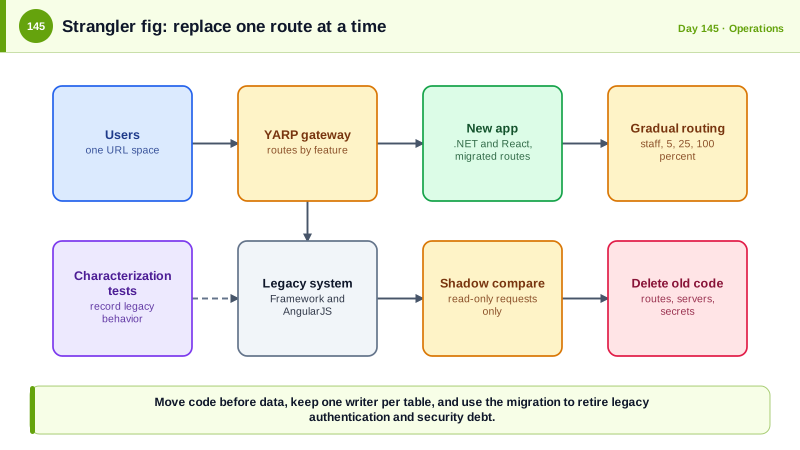
The wrong approach is the big-bang rewrite: stop the world, rebuild everything, and switch over. It takes far longer than expected, the old system keeps changing meanwhile, and the new one lacks years of accumulated behavior. The approach that works is incremental, named the strangler fig by Martin Fowler after the vine that grows around a tree until it replaces it. Place a routing layer, a reverse proxy such as YARP, in front of the legacy application. Build or migrate one feature at a time in the new system, and route just that feature's URLs to it while everything else continues to go to the old one. The old system shrinks until it can be retired. Microsoft's guidance for ASP.NET migration uses exactly this with YARP and the System.Web adapters library, which lets shared code run in both worlds while sessions, authentication, and other state are shared during the transition.
Safety nets make change possible. Before touching code, write characterization tests, tests that record what the system currently does, including its odd behaviors, so that you can tell whether the new implementation matches, an idea from Michael Feathers's book on working with legacy code. Compare the two systems directly with shadow traffic: send real requests to both, return only the old response, and record differences. Use feature flags to move users gradually to the new path and to roll back instantly, and use an anti-corruption layer where the new code has to talk to old services or databases, so legacy models do not spread. Data is the hardest part. Prefer to migrate the code first while both systems use the same database, then move ownership of tables to the new services one at a time with the outbox and event techniques of earlier lessons, and avoid running two writers on the same data.
Technology mappings need decisions. .NET Framework libraries can often be retargeted to .NET Standard or modern .NET with the upgrade tooling. Web Forms has no direct equivalent, so those pages are rewritten as React with an API. WCF services move to CoreWCF if clients cannot change, or to REST or gRPC if they can. EF6 moves to EF Core, with attention to behavior differences. Windows-integrated or forms authentication moves to OpenID Connect with the BFF pattern, and this is a good time to add multi-factor authentication and remove shared accounts. AngularJS moves to React screen by screen, hosted alongside each other through route-based switching at the gateway, so each URL is served by one framework, or embedded within the old shell while the migration proceeds. Use the migration to pay down security debt: inventory secrets in configuration files and move them to Key Vault, remove unmaintained dependencies, add the authorization tests that never existed, and turn on the headers, logging, and scanning of earlier lessons. Watch out for old code left behind: in 2012 Knight Capital lost about 440 million dollars in 45 minutes when an old, unused code path was reactivated on one of eight servers during a deployment.
| Legacy piece | Modern target | Notes |
|---|---|---|
| ASP.NET MVC on .NET Framework | ASP.NET Core on .NET | Incremental with YARP and System.Web adapters |
| Web Forms | React front end plus API | Rewrite by feature, no direct port |
| WCF services | CoreWCF, REST or gRPC | Depends on whether clients can change |
| Entity Framework 6 | EF Core | Verify query behavior with tests |
| Forms or Windows authentication | OpenID Connect with BFF | Add MFA, remove shared accounts |
| AngularJS | React | Route by route, gateway decides which app serves a URL |
Worked Example: A Strangler Gateway, Shadow Comparison, a Characterization Test and Cleanup
The YARP configuration routes migrated features. The C# compares responses in shadow mode, and the test records existing behavior.
// YARP in front of both systems: migrated routes go to the new app, everything else still goes to the legacy app.
{
  "ReverseProxy": {
    "Routes": {
      "new-tasks-api": { "ClusterId": "modern", "Order": 1, "Match": { "Path": "/api/tasks/{**rest}" } },
      "new-board-ui":  { "ClusterId": "modern", "Order": 1, "Match": { "Path": "/app/board/{**rest}" } },
      "legacy-catchall": { "ClusterId": "legacy", "Order": 100, "Match": { "Path": "/{**rest}" } }
    },
    "Clusters": {
      "modern": { "Destinations": { "d1": { "Address": "https://tasks-modern.internal/" } } },
      "legacy": { "Destinations": { "d1": { "Address": "https://legacy-webforms.internal/" } } }
    }
  }
}// The modern app shares authentication with the legacy app during the transition, using the System.Web adapters.
builder.Services.AddSystemWebAdapters()
.AddRemoteAppClient(o => { o.RemoteAppUrl = new Uri("https://legacy-webforms.internal"); o.ApiKey = builder.Configuration["RemoteApp:ApiKey"]!; }) // secret from Key Vault
.AddAuthenticationClient(isDefaultScheme: true); // sign-in state comes from the legacy app until OIDC replaces it
// Shadow traffic: call the new implementation with the same request, return the OLD response, and log differences.
app.Use(async (ctx, next) =>
{
if (!shadowRoutes.Matches(ctx.Request.Path) || Random.Shared.NextDouble() > 0.10) { await next(); return; } // 10 percent of matching requests
var legacyResponse = await proxy.ForwardAsync(ctx, legacyCluster); // the user gets this one
_ = Task.Run(async () =>
{
var modernResponse = await proxy.ReplayAsync(ctx.Request, modernCluster); // fire and forget, never affects the user
if (!ResponsesEquivalent(legacyResponse, modernResponse)) log.LogWarning("Shadow mismatch on {Path}: {Diff}", ctx.Request.Path, Diff(legacyResponse, modernResponse));
});
await legacyResponse.CopyToAsync(ctx.Response);
});
// Careful: only shadow safe, read-only requests. Replaying writes would duplicate side effects.// A characterization test records what the legacy system does today, including surprising rules. It is written BEFORE the migration.
[Fact]
public async Task Legacy_rounds_discounts_half_up_and_caps_them_at_thirty_percent()
{
var legacy = new LegacyClient(baseUrl);
Assert.Equal(90.00m, (await legacy.PriceAsync(sku: "A1", listPrice: 100m, discountPercent: 10)).Total);
Assert.Equal(70.00m, (await legacy.PriceAsync(sku: "A1", listPrice: 100m, discountPercent: 45)).Total); // capped at 30 percent, a rule nobody documented
Assert.Equal(66.67m, (await legacy.PriceAsync(sku: "A2", listPrice: 100m, discountPercent: 33.33m)).Total);
}
// The same test runs against the new implementation. A difference is either a bug in the new code or a deliberate, recorded change.Modernization checklist per feature
1. Characterization tests recorded against the legacy behavior.
2. New implementation behind a feature flag, with authorization tests that never existed before.
3. Shadow traffic (read-only) for two weeks, mismatches reviewed and resolved.
4. Gradual routing: staff, 5 percent, 25 percent, 100 percent, with rollback by flag.
5. Data ownership moved after code, with one writer per table at every moment.
6. Legacy code and its routes deleted, and the DNS, certificates, secrets and accounts that only it used removed.
Security debt paid along the way: secrets moved to Key Vault, unmaintained packages removed, OIDC and MFA replacing forms login, security headers and logging added.Step six is where teams get hurt. A dead route that still exists in the old application, and old servers that nobody remembers, are both attack surface, and the Knight Capital loss came from exactly such forgotten code.
Real-World Examples
- In August 2012 Knight Capital deployed new trading software to seven of its eight servers, and the eighth kept an old, unused feature that the new code repurposed a flag for, so it began sending unintended orders. The firm lost about 440 million dollars in roughly 45 minutes and was rescued through emergency funding, and the incident is widely cited as a warning about dead code, inconsistent deployments, and manual release steps.
- Martin Fowler described the strangler fig application in 2004, inspired by rainforest vines that gradually replace their host tree. Large organizations have since used the pattern to move off monoliths without a stop-the-world rewrite, and Microsoft's official guidance for migrating ASP.NET applications follows it using YARP and the System.Web adapters.
Review Questions & Answers
It takes longer than planned, the old system continues to change while the new one is built, and the new system lacks the behavior accumulated over years. Incremental replacement delivers value earlier and lets you roll back small steps.
It records what the existing system actually does, including undocumented rules, so you can verify that a replacement behaves the same or make differences deliberate. It is written before changing the code.
Replaying a request against the new system repeats its side effects, so a write would be performed twice. Read-only requests can be compared safely without changing data.
It replaces unsupported frameworks, moves secrets to a vault, introduces modern authentication with MFA, adds authorization tests and logging, and removes forgotten routes and servers. Deleting the legacy system removes attack surface entirely.