SQL Server T-SQL Tutorial: Queries and Joins
On this page
Learning Objective
Run SQL Server locally in Docker, write T-SQL queries with joins, grouping, common table expressions and window functions, understand NULL behavior, and think in sets instead of loops so the queries Entity Framework generates make sense.
Concept Explanation
SQL is declarative: you describe the result you want, and the database engine decides how to compute it. That is the opposite of the imperative loops a frontend developer writes by default. The closest analogy is the difference between writing a for loop that builds up an array and chaining filter, map, and reduce: you state what to keep and how to transform it, and the runtime chooses the execution. The mental habit to build is set thinking. Do not fetch all tasks and loop over them in C# to find the open ones; ask the database for the open ones, already filtered, joined, ordered, and limited.
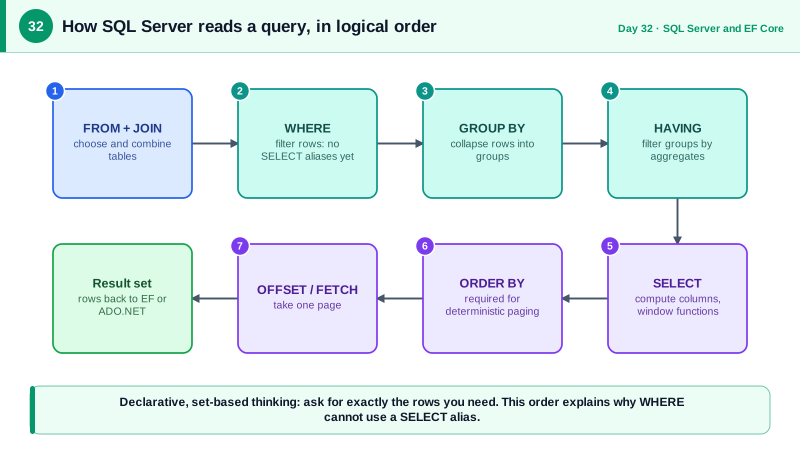
The core statement is SELECT, and its clauses run in a logical order that differs from how you write them: FROM and JOIN first, then WHERE filters rows, GROUP BY groups them, HAVING filters groups, SELECT computes columns, ORDER BY sorts, and OFFSET with FETCH pages. Understanding this explains why a column alias defined in SELECT cannot be used in WHERE. Joins combine tables: INNER JOIN keeps only matching rows, LEFT JOIN keeps every row from the left table and fills nulls where there is no match, and it is the correct tool for questions like which projects have no tasks. Common table expressions, introduced with WITH, name an intermediate result and make complex queries readable, and window functions such as ROW_NUMBER, RANK, and SUM with OVER compute per-group values without collapsing rows.
NULL needs special care because it means unknown, not empty or zero. Any comparison with NULL yields unknown, so WHERE Assignee = NULL never matches anything, and you must write IS NULL. NOT IN with a subquery that returns any NULL silently returns no rows, a notorious trap that NOT EXISTS avoids. Aggregates such as COUNT of a column ignore NULLs, while COUNT of star counts rows. These rules are the reason C# code that treats database values as ordinary nullables sometimes behaves differently from the equivalent SQL, and Entity Framework translates C# null checks into the correct SQL forms for you.
Security begins with how queries are written: never build SQL by concatenating strings that include user input. Always pass values as parameters, so the database treats them strictly as data and never as code. Also learn the difference between the administrative login and application logins. The sa account and other administrative identities are for setup only; your application connects with a dedicated login that has only the permissions it needs, which Day 38 develops. For local development, run SQL Server in a container bound to localhost, with a strong password that is not committed to the repository.
| Clause | Purpose | Note |
|---|---|---|
| FROM and JOIN | Choose and combine tables | Runs first logically |
| WHERE | Filter rows before grouping | Cannot use SELECT aliases |
| GROUP BY and HAVING | Aggregate, then filter groups | HAVING filters after aggregation |
| SELECT | Compute output columns | Runs after grouping |
| ORDER BY | Sort results | Required for deterministic paging |
| OFFSET and FETCH | Page through sorted results | Needs ORDER BY |
Worked Example: A Local Server and Five Useful Queries
The commands start SQL Server in Docker, bound only to the local machine. The queries run against the schema from Day 31 and show a left join, aggregation with HAVING, a common table expression with a window function, keyset-style paging, and a parameterized query issued from C#.
# Local development instance. The password comes from an environment variable, not the repo.
docker run -d --name sql-dev \
  -e ACCEPT_EULA=Y -e MSSQL_SA_PASSWORD="$SQL_DEV_PASSWORD" \
  -p 127.0.0.1:1433:1433 \
  mcr.microsoft.com/mssql/server:2022-latest
# Bound to 127.0.0.1 so other machines on the network cannot reach it.-- 1. Projects with no tasks: LEFT JOIN, then keep rows where the right side is NULL.
SELECT p.Id, p.Name
FROM dbo.Projects p
LEFT JOIN dbo.Tasks t ON t.ProjectId = p.Id
WHERE t.Id IS NULL;
-- 2. Open task counts per project, only for busy projects.
SELECT p.Name, COUNT(*) AS OpenTasks
FROM dbo.Projects p
JOIN dbo.Tasks t ON t.ProjectId = p.Id
WHERE t.Status IN (0, 1) -- 0 todo, 1 in progress
GROUP BY p.Name
HAVING COUNT(*) >= 10
ORDER BY OpenTasks DESC;
-- 3. The most recent task per assignee: CTE plus a window function.
WITH Ranked AS (
SELECT t.*, ROW_NUMBER() OVER (PARTITION BY t.AssigneeId ORDER BY t.CreatedAt DESC) AS rn
FROM dbo.Tasks t
WHERE t.AssigneeId IS NOT NULL
)
SELECT Id, AssigneeId, Title, CreatedAt FROM Ranked WHERE rn = 1;
-- 4. Deterministic paging: always ORDER BY a unique combination.
SELECT Id, Title, CreatedAt
FROM dbo.Tasks
WHERE ProjectId = @projectId
ORDER BY CreatedAt DESC, Id DESC
OFFSET @skip ROWS FETCH NEXT @take ROWS ONLY;
-- 5. The NULL trap: NOT IN returns nothing if the subquery contains a NULL.
SELECT Id FROM dbo.Users WHERE Id NOT IN (SELECT AssigneeId FROM dbo.Tasks); -- unsafe
SELECT u.Id FROM dbo.Users u
WHERE NOT EXISTS (SELECT 1 FROM dbo.Tasks t WHERE t.AssigneeId = u.Id); -- correct// Parameters carry data, never SQL text. The value cannot change the shape of the query.
await using var conn = new SqlConnection(connectionString);
await conn.OpenAsync(ct);
await using var cmd = new SqlCommand(
"SELECT Id, Title FROM dbo.Tasks WHERE ProjectId = @projectId AND Status = @status", conn);
cmd.Parameters.Add("@projectId", SqlDbType.UniqueIdentifier).Value = projectId;
cmd.Parameters.Add("@status", SqlDbType.TinyInt).Value = status;
await using var reader = await cmd.ExecuteReaderAsync(ct);Try the queries against a few rows of sample data and use the actual execution plan in your query tool. Seeing the plan for the paging query, and how an index changes it, prepares you for Day 39. For tooling, use SQL Server Management Studio or the MSSQL extension for Visual Studio Code, since Microsoft announced the retirement of Azure Data Studio, scheduled for February 2026.
Real-World Examples
- The Stack Exchange Data Explorer at data.stackexchange.com lets anyone write read-only T-SQL against a regularly updated copy of Stack Overflow's public data. It is an excellent free playground for practicing joins, window functions, and execution plans on a real, large, and messy dataset.
- The NOT IN with NULL behavior is one of the best-known SQL correctness traps, documented in the SQL standard's three-valued logic and repeated in database guidance for every vendor. Code reviewers routinely flag it, because it fails silently by returning an empty result instead of raising an error.
Review Questions & Answers
NULL means unknown, and comparing anything to an unknown value yields unknown rather than true, so no row satisfies the condition. The correct test is IS NULL, or IS NOT NULL for the opposite. Entity Framework generates this form when you write a null comparison in LINQ.
WHERE filters individual rows before grouping and aggregation happen, so it can use an index and reduce work. HAVING filters groups after aggregation, so it can refer to aggregate results such as COUNT. Conditions that do not depend on an aggregate belong in WHERE for efficiency.
Without ordering, SQL Server may return rows in any order, and that order can differ between executions, so pages could overlap or skip rows. Ordering by a unique combination, such as CreatedAt plus Id, makes the sequence deterministic so each page continues exactly where the previous one ended.
Binding to the loopback address stops other machines on the same network from reaching a database protected only by a development password. The sa account has unlimited power, so any injection flaw or leaked connection string would give an attacker complete control. A dedicated login with only needed permissions limits the damage of any compromise.