React Loading, Error and Optimistic UI States
On this page
Learning Objective
Design the states every data-driven screen must handle, map each class of API failure to an appropriate interface response, implement timeouts, cancellation and retries with backoff and jitter, and show helpful errors with a trace identifier without exposing internals.
Concept Explanation
A screen that fetches data has more states than the happy path. It is pending the first time it loads, refreshing in the background while showing older data, empty when there is nothing to show, failed when the request errors, and partially failed when one of several requests did. Each deserves a deliberate design, because these are exactly the moments when users decide whether an application feels trustworthy. Skeletons that match the final layout feel faster than spinners on content areas, an empty state should explain what to do next, and an error state should say what went wrong and offer a way forward. TanStack Query exposes these states directly, and Suspense with error boundaries lets you handle them declaratively.
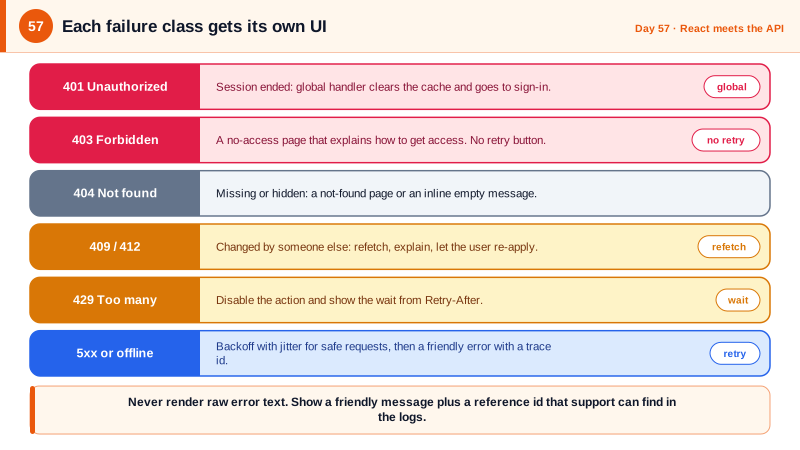
Errors are not one thing, and the API has already told you which kind you have through the status code. A 401 means the session is gone and belongs to the global handler. A 403 means the user is signed in but not allowed, which deserves a clear no-access page rather than a retry button. A 404 is a missing or hidden resource. A 409 or 412 means the data changed underneath the user, so refetch and explain. A 422 or 400 carries field errors for the form. A 429 means slow down, and the Retry-After header says for how long. A 5xx or a network failure is transient and worth a retry. Writing one component that switches on the failure class, instead of a generic something went wrong, is one of the highest-value pieces of UI you can build.
Time and cancellation need explicit handling. A request with no timeout can hang for minutes and leave a spinner up forever, so give every call a deadline with AbortSignal.timeout, and combine it with the cancellation signal TanStack Query provides so leaving a page cancels its requests. Retries should use exponential backoff with jitter, meaning a random component in the delay, so a thousand clients recovering from an outage do not retry in lockstep and take the service down again; this lesson from cloud architecture is described in a well-known AWS engineering article. Only retry safe or idempotent requests automatically, since retrying a payment POST without an idempotency key can double charge.
What the screen shows also has security consequences. Display the server's title and a friendly message for expected errors, but never render raw response bodies, exception text, or stack traces, which might contain internals if some layer misbehaved. Show the trace identifier from the response header or the problem body in a small, copyable line, so a user can quote it to support and a developer can find the server log entry within seconds. And do not swallow errors silently: log unexpected ones to your error tracker with the endpoint and status, since a rising rate of 4xx or 5xx responses is often the first sign of a broken deployment or an attack.
| Failure | Meaning | UI response |
|---|---|---|
| 401 | Session ended | Global handler: clear cache, sign in again |
| 403 | Signed in but not allowed | No-access page, no retry button |
| 404 | Missing or hidden | Not found page or an inline empty message |
| 409, 412 | Data changed by someone else | Refetch, explain, let the user re-apply |
| 429 | Rate limited | Disable the action, show the wait from Retry-After |
| 5xx, network | Transient | Automatic backoff retry, then an error with trace id |
| Contract error | Response shape mismatch | Friendly error, report to tracker |
Worked Example: A Failure-Aware Error Component, Timeouts and Backoff
The component maps failures to responses. The request helper adds a deadline, and the retry function implements backoff with jitter for safe requests.
// src/components/ErrorState.tsx
export function ErrorState({ error, onRetry }: { error: unknown; onRetry?: () => void }) {
  if (error instanceof ApiError) {
    switch (error.status) {
      case 403:
        return <Notice title="You do not have access to this" body="Ask a project admin to invite you." />;
      case 404:
        return <Notice title="We could not find that" body="It may have been moved or deleted." />;
      case 409:
      case 412:
        return <Notice title="This changed while you were working" body="We loaded the latest version." action={onRetry} actionLabel="Continue" />;
      case 429: {
        const seconds = error.retryAfterSeconds ?? 30;
        return <Notice title="Too many requests" body={`Please wait ${seconds} seconds and try again.`} />;
      }
    }
  }
  if (!navigator.onLine) return <Notice title="You appear to be offline" body="We will retry when you reconnect." />;

  const traceId = error instanceof ApiError ? error.traceId : undefined;
  return (
    <Notice
      title="Something went wrong on our side"
      body="This is usually temporary."                     // never render error.message or a response body here
      action={onRetry} actionLabel="Try again"
      footer={traceId && <small>Reference: <code>{traceId}</code></small>}
    />
  );
}

// Suspense plus an error boundary handles pending and failed states declaratively.
<ErrorBoundary FallbackComponent={({ error, resetErrorBoundary }) => <ErrorState error={error} onRetry={resetErrorBoundary} />}>
  <Suspense fallback={<BoardSkeleton />}>
    <Board projectId={projectId} />
  </Suspense>
</ErrorBoundary>// src/api/http.ts: a deadline, cancellation, and Retry-After parsing.
export async function http(url: string, init: RequestInit & { timeoutMs?: number } = {}) {
const { timeoutMs = 10_000, signal, ...rest } = init;
const timeout = AbortSignal.timeout(timeoutMs);
const combined = signal ? AbortSignal.any([signal, timeout]) : timeout; // caller cancel OR deadline
const res = await fetch(url, { credentials: 'include', ...rest, signal: combined });
if (res.status === 429) {
const retryAfter = Number(res.headers.get('Retry-After'));
throw new ApiError(429, {}, res.headers.get('X-Correlation-Id') ?? undefined, Number.isFinite(retryAfter) ? retryAfter : undefined);
}
return res;
}
// Exponential backoff with full jitter: delay is random between 0 and min(cap, base * 2^attempt).
export const backoffMs = (attempt: number, base = 500, cap = 15_000) =>
Math.random() * Math.min(cap, base * 2 ** attempt);
// Retry only when it is safe: idempotent methods, transient failures.
export function shouldRetry(method: string, error: unknown, attempt: number) {
const idempotent = ['GET', 'HEAD', 'PUT', 'DELETE'].includes(method.toUpperCase());
const transient = !(error instanceof ApiError) || error.status >= 500;
return idempotent && transient && attempt < 3;
}A test for this screen should exercise each row of the table using mocked responses and assert the message shown, plus one asserting that no response body text or stack trace appears in the rendered output, even when the mocked server includes one.
Real-World Examples
- Marc Brooker's AWS Architecture Blog article Exponential Backoff and Jitter, published in 2015, showed through simulation that adding randomness to retry delays dramatically reduces contention and total work when many clients retry after a failure. The AWS SDKs adopted jittered backoff by default, and it is now the standard advice for any client that retries.
- The HTTP 429 Too Many Requests status was defined in RFC 6585 in 2012 specifically so servers could tell clients to slow down, with the Retry-After header giving the delay. Well-behaved clients such as those for GitHub and Stripe honor it, and a frontend that shows the wait time instead of a generic error avoids users hammering a limited endpoint.
Review Questions & Answers
A 403 means the server understood the request and refuses it because of permissions, so repeating it produces the same result; the useful response is to explain and point to how to gain access. A 503 indicates a temporary condition, so trying again after a short delay may succeed.
Without randomness, all clients that failed at the same moment retry after the same delays and hit the recovering service simultaneously, creating waves of load that can knock it over again. Adding a random component spreads retries over time, so the service sees a smoother load and recovers faster.
The original request may have succeeded on the server even though the response never arrived, so a retry can create a duplicate order or a second charge. Automatic retries are safe for idempotent methods, or for POSTs that carry an idempotency key the server honors.
The identifier lets support and developers find the exact server log entry without exposing anything sensitive to the user. Raw error messages can contain internal details such as table names or stack frames that help an attacker, while the identifier is meaningless to anyone without log access.