ASP.NET Core HTTP Caching and Response Compression
On this page
Learning Objective
Control caching precisely with Cache-Control, ETag and conditional GET, decide what is safe to cache and where, use output caching and response compression in ASP.NET Core, and understand the security attacks that misconfigured caching and compression enable.
Concept Explanation
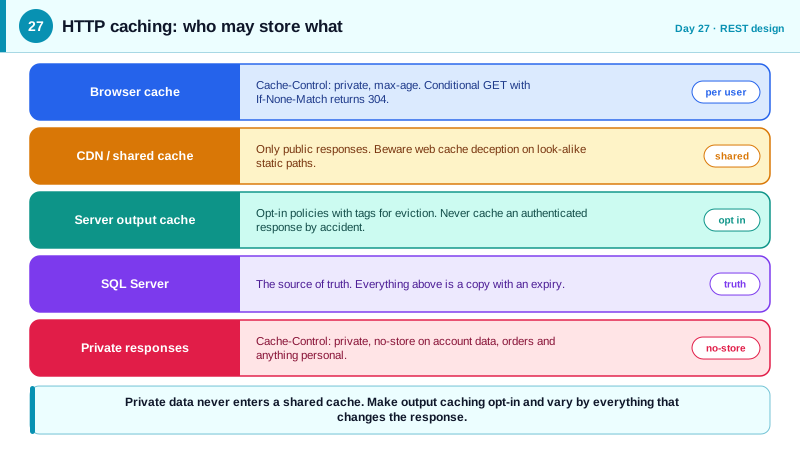
Caching is the cheapest performance feature on the web, and HTTP has a complete built-in model for it. A response can carry Cache-Control directives that tell browsers and shared intermediaries, such as CDNs and reverse proxies, whether and for how long they may reuse it. The directives that matter most are max-age, giving the number of seconds a stored copy is fresh, public and private, saying whether shared caches may store it or only the user's own browser, no-cache, meaning the copy must be revalidated before use, and no-store, meaning nothing may be kept at all. Immutable, static assets with content hashes in their filenames can be cached for a year, which is what your React build output does.
Revalidation makes caching efficient for data that changes occasionally. The server sends an ETag with the response. Later, the client sends the request again with If-None-Match set to that value. If the resource is unchanged, the server answers 304 Not Modified with no body, saving bandwidth and serialization time, although the server still did the work of deciding. This mirrors the If-Match mechanism of Day 26, applied to reads instead of writes. Server-side, ASP.NET Core offers output caching, which stores rendered responses in memory or in a distributed store such as Redis, keyed by the route and selected query values, with policies, tags for targeted invalidation, and the ability to vary by header.
The security rule for caching is stark: private data must never enter a shared cache. A response containing a user's account details should say Cache-Control private, no-store, or at minimum private, and must be varied on whatever identifies the user. If it is not, a CDN can store one user's page and serve it to the next visitor. The related attack, web cache deception, tricks a cache into storing a private page by appending a static-looking path, such as /account/profile/style.css, that the server ignores but the cache treats as a cacheable stylesheet. Defenses are to send explicit no-store on private responses, to make the server return 404 for path suffixes it does not recognize, and to configure caches to respect origin headers rather than guessing from file extensions.
Compression trades CPU for bandwidth. JSON compresses well, so enabling Brotli and gzip through the response compression middleware, or better at the reverse proxy, cuts payloads dramatically. By default ASP.NET Core does not compress HTTPS responses, and it is worth knowing why. The BREACH attack showed that when a response compresses attacker-influenced text together with a secret, such as a reflected value alongside a CSRF token, the compressed size leaks information about the secret. The mitigations are to not mix secrets with reflected input in the same compressed response, to use per-request masked tokens, and to leave compression off for the specific sensitive endpoints. For typical JSON APIs that do not reflect input next to secrets, compression at the edge is standard practice.
| Directive or header | Meaning | Typical use |
|---|---|---|
| Cache-Control: max-age=31536000, immutable | Fresh for a year, never revalidate | Hashed static assets |
| Cache-Control: private, max-age=60 | Browser only, fresh for a minute | Per-user data that can be slightly stale |
| Cache-Control: no-cache | Must revalidate every time | Data where freshness matters, with ETag |
| Cache-Control: no-store | Do not store anywhere | Sensitive or personal responses |
| ETag with If-None-Match | Conditional GET, 304 when unchanged | Bandwidth savings for medium-lived data |
| Vary: Accept-Encoding, Authorization | Cache key includes these headers | Prevents serving the wrong variant |
Worked Example: Conditional GET, Output Caching and Safe Defaults
The endpoints below return a public catalog with a conditional GET, a private endpoint with no-store, and a global output caching policy that excludes authenticated requests. The compression block shows the safe defaults.
// Public, slow-changing data: short freshness plus validation.
app.MapGet("/api/catalog", (HttpContext ctx, ICatalog catalog) =>
{
    var (items, version) = catalog.Snapshot();
    var etag = $"\"{version}\"";
    ctx.Response.Headers.CacheControl = "public, max-age=60";
    ctx.Response.Headers.ETag = etag;

    if (ctx.Request.Headers.IfNoneMatch == etag)         // client already has this version
        return Results.StatusCode(StatusCodes.Status304NotModified);

    return Results.Ok(items);
}).AllowAnonymous();

// Personal data: never stored by shared caches, never kept on disk by the browser.
app.MapGet("/api/me/orders", (ClaimsPrincipal user, IOrders orders, HttpContext ctx) =>
{
    ctx.Response.Headers.CacheControl = "private, no-store";
    return Results.Ok(orders.ForUser(user.GetUserId()));
}).RequireAuthorization();

// Output caching: server-side, tagged so writes can evict related entries.
builder.Services.AddOutputCache(o =>
{
    o.AddBasePolicy(b => b.NoCache());                   // nothing cached unless an endpoint opts in
    o.AddPolicy("catalog", b => b.Expire(TimeSpan.FromMinutes(1)).Tag("catalog"));
});
app.UseOutputCache();
app.MapGet("/api/catalog/featured", GetFeatured).CacheOutput("catalog");

// After a catalog write: await cache.EvictByTagAsync("catalog", ct); // IOutputCacheStore// Compression: on for JSON, off for HTTPS unless you have decided it is safe.
builder.Services.AddResponseCompression(o =>
{
o.EnableForHttps = false; // the default; enabling it accepts BREACH-style risk
o.Providers.Add<BrotliCompressionProvider>();
o.Providers.Add<GzipCompressionProvider>();
});
// In production, prefer compressing at the CDN or reverse proxy, and exclude pages
// that reflect user input next to secrets such as anti-forgery tokens.The base output caching policy that caches nothing is the cache-safe posture: endpoints must opt in, which prevents accidentally caching an authenticated response. And the personal endpoint is explicit, so even if a future proxy applies heuristic caching, the origin has said no.
Real-World Examples
- In 2017, researcher Omer Gil described the web cache deception attack and demonstrated it against PayPal: a victim visiting a crafted URL ending in a fake static file name caused the CDN to cache the victim's private account page, which the attacker could then fetch. PayPal fixed it, and the finding is why responses containing private data should always carry explicit no-store directives.
- The BREACH attack, presented at Black Hat in 2013 by Angelo Prado, Neal Harris, and Yoel Gluck, showed that HTTP-level compression over TLS could reveal secrets such as CSRF tokens through response size differences. This is the reason ASP.NET Core leaves compression off for HTTPS responses by default and why edge compression is configured carefully.
Review Questions & Answers
No-cache allows a cache to store the response but requires it to revalidate with the server before reusing it, which can save bandwidth via 304 responses. No-store forbids storing the response at all, which is required for sensitive data that should not persist in any cache or on disk. Despite its name, no-cache is not the strict setting.
The client sends the ETag it holds, and if the resource is unchanged the server replies 304 with no body, so the payload does not need to be serialized or sent again. It saves bandwidth and client parsing work, although the server still performs the check. Combined with a short max-age it keeps data fresh cheaply.
The attacker gets a victim to visit a URL like /account/profile/x.css. The application ignores the trailing segment and returns the victim's private profile, while a CDN sees the .css extension, assumes a static file, and caches the response. The attacker then requests the same URL and receives the cached private page. Explicit no-store headers and strict route matching prevent it.
When a compressed response contains both a secret and text an attacker can influence, changes in compressed size reveal whether guessed values match the secret, letting the attacker recover tokens byte by byte. Avoiding reflected input next to secrets, masking tokens, or disabling compression on sensitive responses removes the leak.