ASP.NET Core Identity and Password Hashing
On this page
Learning Objective
Explain why passwords must be stored using slow salted key derivation, configure ASP.NET Core Identity with modern password, lockout and confirmation policies, prevent user enumeration and timing leaks, and decide when to use Identity itself versus an external identity provider.
Concept Explanation
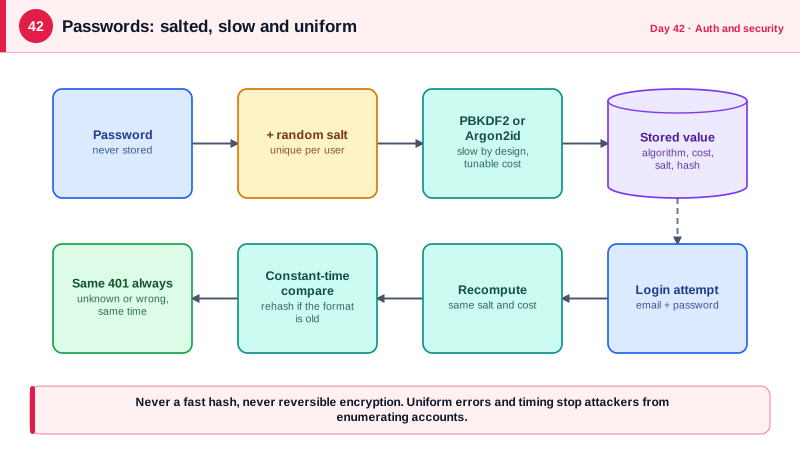
When a user signs up with a password, your system must be able to verify it later without being able to reveal it. Storing the password itself, or an encrypted copy that the system can decrypt, means any database leak exposes every user's password, and users reuse passwords across sites so the damage spreads beyond your product. Hashing is one-way: you store a value derived from the password and compare derived values at login. But an ordinary fast hash such as SHA-256 is the wrong tool, because attackers can compute billions of guesses per second on graphics hardware. Password storage needs a deliberately slow, salted key derivation function.
The salt is a random value generated per user and stored beside the hash, so identical passwords produce different hashes and precomputed tables become useless. The work factor controls how slow each guess is. Modern choices are Argon2id, which OWASP recommends first, scrypt, bcrypt, and PBKDF2 with a high iteration count. ASP.NET Core Identity's default PasswordHasher uses PBKDF2 with HMAC-SHA512 and 100,000 iterations in its current format, embeds the salt and parameters in the stored string, and transparently rehashes on login if the stored format is weaker than the current one. It is a sound default, and you should not write your own hashing code.
Policy matters as much as the algorithm. Current NIST guidance in SP 800-63B favors length over composition rules: require a reasonable minimum such as 12 characters, allow long passphrases and all characters, do not force periodic rotation, and reject passwords found in known breach corpuses. The Have I Been Pwned range API supports this without revealing the password: you send only the first five characters of the password's SHA-1 hash and compare the returned suffixes locally, a technique called k-anonymity. Add account lockout or throttling to slow guessing, encourage or require multi-factor authentication using TOTP apps or passkeys, and require email confirmation before granting access to sensitive functions.
Authentication endpoints leak information through their behavior, so design them to say the same thing in every failure case. A login that answers no such user for an unknown email and wrong password for a known one lets attackers enumerate valid accounts. Return one generic message, and keep the response time similar in both cases, because verifying a hash for a real user takes far longer than returning early for an unknown one. Registration and password reset flows have the same issue: respond identically whether or not the email exists, and send the real information by email. And decide honestly whether you should store passwords at all. Running your own credential store makes you responsible for breaches, resets, MFA, and abuse, so many products delegate sign-in to an identity provider, which the next lessons cover.
| Approach | Verdict | Reason |
|---|---|---|
| Plain text or reversible encryption | Never | A leak exposes every password |
| Fast hash such as MD5, SHA-1 or SHA-256 | Never | Billions of guesses per second on GPUs |
| Unsalted hash | Never | Identical passwords match, rainbow tables work |
| PBKDF2, bcrypt, scrypt with proper cost | Acceptable | Slow and salted; tune the work factor |
| Argon2id | Preferred | Memory-hard, resists GPU and ASIC attacks |
| Delegate to an identity provider | Often best | Offloads storage, MFA, resets and abuse handling |
Worked Example: Identity Configuration, a Breach Check and Uniform Login Errors
The setup configures Identity with sensible policy, lockout, and a custom validator that checks the breach corpus using k-anonymity. The login endpoint returns identical failures and performs comparable work for unknown users.
builder.Services
    .AddIdentityCore<AppUser>(o =>
    {
        o.Password.RequiredLength = 12;
        o.Password.RequireDigit = false;                 // NIST: length beats composition rules
        o.Password.RequireUppercase = false;
        o.Password.RequireNonAlphanumeric = false;
        o.Lockout.MaxFailedAccessAttempts = 5;
        o.Lockout.DefaultLockoutTimeSpan = TimeSpan.FromMinutes(15);
        o.Lockout.AllowedForNewUsers = true;
        o.User.RequireUniqueEmail = true;
        o.SignIn.RequireConfirmedEmail = true;
    })
    .AddEntityFrameworkStores<AppDb>()
    .AddSignInManager()
    .AddDefaultTokenProviders()
    .AddPasswordValidator<BreachedPasswordValidator>();
builder.Services.AddHttpClient<BreachedPasswordValidator>();      // gives the validator its HttpClient

public sealed class BreachedPasswordValidator(HttpClient http) : IPasswordValidator<AppUser>
{
    public async Task<IdentityResult> ValidateAsync(UserManager<AppUser> manager, AppUser user, string? password)
    {
        if (string.IsNullOrEmpty(password)) return IdentityResult.Success;

        var sha1 = Convert.ToHexString(SHA1.HashData(Encoding.UTF8.GetBytes(password)));
        var prefix = sha1[..5]; var suffix = sha1[5..];             // only the prefix ever leaves our server

        try
        {
            var body = await http.GetStringAsync($"https://api.pwnedpasswords.com/range/{prefix}");
            var found = body.Split('\n').Any(l => l.StartsWith(suffix, StringComparison.OrdinalIgnoreCase));
            return found
                ? IdentityResult.Failed(new IdentityError { Code = "Breached", Description = "This password appears in known data breaches. Choose another." })
                : IdentityResult.Success;
        }
        catch (HttpRequestException)
        {
            return IdentityResult.Success;                           // fail open on outage; other controls still apply
        }
    }
}// Uniform failure: same status, same message, similar work whether or not the account exists.
app.MapPost("/auth/login", async (LoginRequest req, UserManager<AppUser> users, SignInManager<AppUser> signIn) =>
{
var generic = Results.Problem("Email or password is incorrect.", statusCode: 401);
var user = await users.FindByEmailAsync(req.Email);
if (user is null)
{
// Spend comparable time so response timing does not reveal whether the email exists.
users.PasswordHasher.HashPassword(new AppUser(), req.Password);
return generic;
}
var result = await signIn.PasswordSignInAsync(user, req.Password, isPersistent: false, lockoutOnFailure: true);
if (result.IsLockedOut) return generic; // do not reveal the lockout state either
return result.Succeeded ? Results.NoContent() : generic;
}).RequireRateLimiting("login").AllowAnonymous();Two design choices deserve attention. The validator fails open if the breach service is down, because blocking all registrations during a third-party outage would be a worse trade-off, and the other controls remain. And lockout is reported with the same generic answer, since telling an attacker that an account is locked confirms that it exists. Note that a lockout can be used against a real user, so throttling by IP and account together and offering unlock through email confirmation keeps the feature from becoming a denial-of-service tool.
Real-World Examples
- LinkedIn's 2012 breach exposed password hashes for roughly 117 million accounts, which became widely available in 2016. The passwords had been stored with unsalted SHA-1, so attackers cracked a large share of them quickly, and the incident is the standard example of why fast unsalted hashes are unacceptable for password storage.
- Adobe's 2013 breach exposed about 150 million records in which passwords were encrypted with 3DES in ECB mode rather than hashed, with password hints stored in plain text. Identical passwords produced identical ciphertext, so analysts could group users by password and use the hints to deduce many of them, showing that reversible encryption is the wrong primitive for passwords.
Review Questions & Answers
It is designed to be fast, so an attacker with a leaked database can test enormous numbers of guesses per second using GPUs. Password storage needs an intentionally slow, salted function with a tunable work factor, so each guess costs real time and memory. Speed is a virtue for integrity checking and a vulnerability for passwords.
A per-user random salt ensures that two users with the same password get different hashes, which defeats precomputed rainbow tables and prevents cracking many accounts with one guess. It is not secret, so it is stored alongside the hash, and modern formats embed it in the same string together with the algorithm parameters.
You compute the SHA-1 hash locally and send only its first five hex characters. The service returns all hash suffixes that share that prefix, and your code checks locally whether the remainder matches. The service never sees the full hash or the password, and many passwords share each prefix, so it cannot tell which one you were checking.
Different messages or noticeably different response times let an attacker enumerate which email addresses have accounts, which supports targeted phishing and credential stuffing. A uniform response, plus doing comparable hashing work for unknown users, removes that signal. The same principle applies to registration and password reset flows.