ASP.NET Core Validation: FluentValidation vs DataAnnotations
On this page
Learning Objective
Validate request data at the API boundary using DataAnnotations and FluentValidation, apply the allowlist approach to input rules, return validation failures in a standard shape the React client can map to form fields, and avoid regular expressions that can be exploited for denial of service.
Concept Explanation
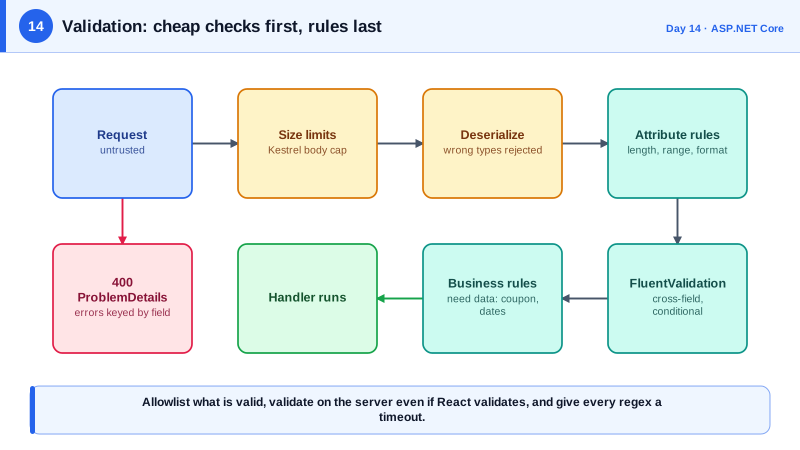
Validation answers the question: is this data acceptable to process? Four kinds of checks are worth separating. Structural checks confirm that required fields exist and have the right type. Range and length checks bound sizes, which is a defense against resource abuse as much as a business rule. Format checks confirm shapes like email addresses or postal codes. Semantic checks apply business rules, such as a due date not being in the past or a coupon being unexpired. The first three can run without touching the database, so run them first and cheaply, then do semantic checks that need data.
The guiding philosophy is allowlisting: define exactly what is valid and reject everything else, rather than trying to list bad inputs to block. A denylist of dangerous characters will always miss something clever, while a rule like a title must be 1 to 200 characters of normal text is precise. Normalize before validating, for example by trimming whitespace and applying Unicode normalization, because validating one form and then using another creates gaps. And validate on the server even though the React form validates too: client validation is a courtesy, and the server rule is the contract.
.NET gives you several tools. DataAnnotations attributes such as Required, StringLength, Range, and EmailAddress declare rules directly on a request type. In .NET 10, minimal APIs can validate parameters automatically when you register the validation services, returning a standard 400 response, whereas earlier versions needed you to run the validator yourself. FluentValidation is a popular library that expresses rules in code, which handles conditional and cross-field rules more readably than attributes and allows injecting services into validators. Whichever you pick, the output should be uniform: a 400 response using the problem details format with an errors dictionary keyed by field name, which a React form library can map straight onto inputs.
One trap deserves a warning: regular expressions. A pattern with nested repetition can take exponential time on crafted input, a flaw called ReDoS, and one such input can pin a CPU core for seconds. Keep patterns simple, prefer built-in validators such as the EmailAddress attribute over homemade email regexes, set a match timeout, and consider the NonBacktracking option available in modern .NET, which guarantees linear time. Also cap the size of the whole request, not only individual fields, because a valid-looking field inside a ten-megabyte body is still an attack.
| Check type | Example rule | Tool |
|---|---|---|
| Structural | Title is present and a string | Required, non-nullable types |
| Length and range | Title 1 to 200 characters, quantity 1 to 100 | StringLength, Range |
| Format | Valid email, valid GUID | EmailAddress, route constraints |
| Cross-field or conditional | End date must be after start date | FluentValidation, IValidatableObject |
| Semantic, needs data | Coupon must exist and be unexpired | Service layer using the database |
| Resource abuse | Maximum body and array sizes | Kestrel limits, collection length rules |
Worked Example: Two Validation Styles with a Uniform 400
The first block uses DataAnnotations with the built-in minimal API validation. The second uses FluentValidation with an endpoint filter for rules attributes cannot express. Both return the same problem details shape.
// Option 1: DataAnnotations plus built-in validation (.NET 10).
public record CreateNoteRequest(
    [property: Required, StringLength(200, MinimumLength = 1)] string Title,
    [property: StringLength(10_000)] string? Body,
    [property: MaxLength(10)] List<string>? Tags);

builder.Services.AddValidation();

app.MapPost("/api/notes", (CreateNoteRequest req) => TypedResults.Created("/api/notes/1"));
// An invalid body produces HTTP 400 with an errors dictionary keyed by property name.// Option 2: FluentValidation for cross-field and conditional rules.
public record CreateEventRequest(string Name, DateTimeOffset Start, DateTimeOffset End);
public sealed class CreateEventValidator : AbstractValidator<CreateEventRequest>
{
public CreateEventValidator(TimeProvider clock)
{
RuleFor(x => x.Name).NotEmpty().MaximumLength(100);
RuleFor(x => x.Start).GreaterThan(_ => clock.GetUtcNow());
RuleFor(x => x.End).GreaterThan(x => x.Start).WithMessage("End must be after start.");
}
}
// A reusable endpoint filter that runs the matching validator.
public static class ValidationFilter
{
public static RouteHandlerBuilder Validate<T>(this RouteHandlerBuilder builder) =>
builder.AddEndpointFilter(async (ctx, next) =>
{
var validator = ctx.HttpContext.RequestServices.GetRequiredService<IValidator<T>>();
var arg = ctx.Arguments.OfType<T>().First();
var result = await validator.ValidateAsync(arg);
return result.IsValid ? await next(ctx) : Results.ValidationProblem(result.ToDictionary());
});
}
app.MapPost("/api/events", (CreateEventRequest req) => TypedResults.Created("/api/events/1"))
.Validate<CreateEventRequest>();// A regular expression with a timeout, and the linear-time engine when patterns are complex.
var slug = new Regex("^[a-z0-9]+(?:-[a-z0-9]+)*$", RegexOptions.CultureInvariant, TimeSpan.FromMilliseconds(100));
var safe = new Regex(@"^(\w+\s?)*$", RegexOptions.NonBacktracking); // never backtracks catastrophicallyThe 400 response body follows the problem details standard with a status, a title, and an errors object such as title mapped to an array of messages. Day 55 shows how React Hook Form consumes exactly that shape to place each message beside its field.
Real-World Examples
- On 2 July 2019, Cloudflare suffered a global outage of about half an hour when a new firewall rule deployed to its network contained a regular expression that backtracked catastrophically, consuming all CPU on its edge servers. Its postmortem describes the pattern and the change to move to a regular expression engine with guaranteed running time, a direct illustration of why unbounded regex is a production risk.
- The 2017 Equifax breach exploited CVE-2017-5638, a flaw in Apache Struts where a crafted Content-Type header was evaluated as an expression, executing attacker commands on the server. The root failure was trusting a piece of input the developers did not think of as user input, and the breach exposed personal data of roughly 147 million people.
Review Questions & Answers
A denylist tries to enumerate everything harmful, and attackers only need to find one variant you missed, such as another encoding of a character. An allowlist defines the small set of acceptable forms, for example letters and digits up to a length, and rejects all else by default. It is easier to reason about, easier to test, and fails safe when unexpected input appears.
Length and format checks are cheap and stateless, so they belong at the boundary, in attributes or a validator that runs before any real work. Semantic rules need data, such as looking up the coupon and comparing dates, so they belong in the service layer where that data is available. Running cheap checks first also avoids wasting database calls on obviously invalid requests.
Regular expression denial of service happens when a pattern with nested or overlapping repetition takes exponential time on a specially crafted string, tying up a CPU core. You defend by keeping patterns simple, using built-in validators, setting a match timeout so a runaway match is cancelled, and using RegexOptions.NonBacktracking, which guarantees linear time at the cost of a few unsupported features.
Because the client is not under your control: a script, another client, or an attacker with curl can send anything, bypassing the form completely. The server rule is the actual guarantee that stored data is well formed and bounded. The client rule only improves the experience by giving instant feedback, and the two should be kept consistent, which Phase 3 addresses through a shared contract.