Azure App Service vs Container Apps vs Static Web Apps
On this page
Learning Objective
Compare the main Azure compute options for a React and .NET application, select one based on operational needs and security posture, and describe a reference architecture with edge protection, private networking, managed identity and a managed SQL database.
Concept Explanation
Azure offers several places to run this application, and the right choice depends on how much you want to operate. Azure App Service is a platform-as-a-service for web apps and APIs: you deploy code or a container, and Azure manages the operating system, patching, load balancing, and scaling. It has deployment slots for staging and instant swaps, built-in TLS, custom domains, and managed identity, and it is the lowest-effort route for a conventional web application. Azure Container Apps runs containers on a serverless platform built on Kubernetes, with automatic scaling based on HTTP load or events including scale to zero, revisions with traffic splitting for gradual rollouts, and built-in support for Dapr and KEDA, without exposing the Kubernetes API. Azure Kubernetes Service gives you full Kubernetes with all its power and operational cost, which is justified when you need that control across many services.
Azure Static Web Apps, generally available since 2021, hosts static front ends on a global CDN with integrated managed APIs through Azure Functions and built-in authentication. It is an excellent fit for a SPA with a light or serverless backend. For this course's architecture, where a backend-for-frontend holds the session and proxies to the API, the BFF needs a server process, so the natural homes are App Service or Container Apps, serving the SPA from the same container. Static Web Apps can still host a purely public marketing site or documentation. Azure Functions suit event-driven and scheduled work such as processing queue messages, complementing the main application instead of replacing it.
Choose by asking a few questions. How many services will you run, and do you need scale to zero or event-driven scaling? Container Apps fit multiple small services and variable load. Do you want the simplest possible operations for one or two web apps with slots and a familiar model? App Service fits. Do you need custom networking, service mesh, or operators, and do you have the people to run them? Then consider AKS. Cost follows the same shape: App Service plans charge for reserved capacity, while Container Apps can charge per use. For most products at this scale, either App Service or Container Apps is the sensible default, and because the application is already a container from Day 81, moving between them is straightforward.
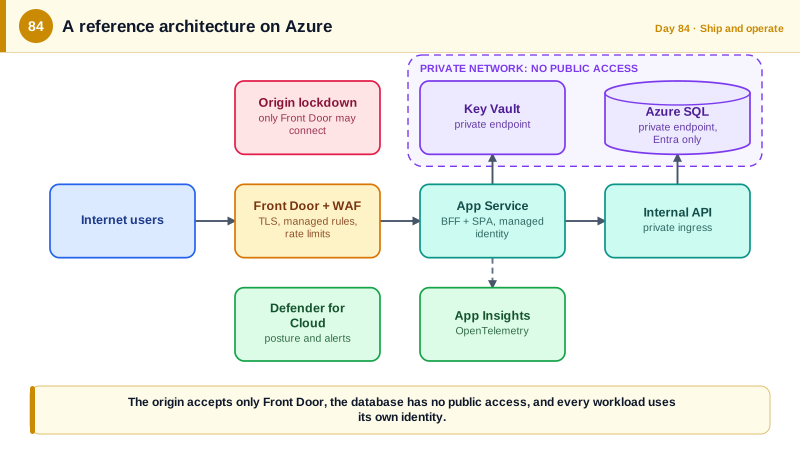
The platform choice matters less than the surrounding security architecture. Put a global entry point such as Azure Front Door with a web application firewall in front, which terminates TLS, absorbs volumetric attacks, applies managed rule sets against common exploits, and rate limits. Restrict the app so that it only accepts traffic from Front Door. Keep the database off the public internet with a private endpoint on a virtual network, and connect the app through virtual network integration, so the only path to SQL is from your application. Give the app a managed identity for Key Vault, SQL, and Storage. Enable diagnostic logs to a central workspace, and turn on Microsoft Defender for Cloud recommendations. Also decide the region and any data residency requirements early, since moving data later is hard.
| Service | Model | Fits | Consider |
|---|---|---|---|
| App Service | PaaS for web apps, slots, managed identity | One or two web apps, simple operations | Reserved capacity pricing, less event-driven scaling |
| Container Apps | Serverless containers on Kubernetes | Several services, event-driven scale, scale to zero | Networking and revisions model to learn |
| AKS | Full managed Kubernetes | Many services and custom platform needs | Highest operational cost |
| Static Web Apps | Static hosting on a CDN with managed APIs | Public SPAs and documentation | Not a fit for a BFF that needs a server process |
| Functions | Event-driven serverless code | Queue processing, timers, webhooks | Cold starts, per-execution limits |
| Front Door with WAF | Global edge, TLS, filtering | All public web traffic | Configure rules and origin lockdown |
Worked Example: A Reference Architecture and the Commands to Lock It Down
The diagram shows how the pieces fit for the Task Board. The commands apply the key hardening settings to an App Service instance.
                          Internet
                             |
                 +-----------v-----------+
                 |  Azure Front Door     |  TLS, WAF managed rules, rate limits, caching of static assets
                 +-----------+-----------+
                             |  only Front Door's identifier is accepted by the origin
                 +-----------v-----------+
                 | App Service / Container App (BFF + SPA, one origin)
                 |  - system-assigned managed identity
                 |  - HTTPS only, TLS 1.2+, FTP disabled
                 +-----+-----------+-----+
                       |           |            (VNet integration, private DNS)
        +--------------v--+   +----v-----------+   +------------------+
        | Internal API    |   | Azure Key Vault|   | Storage, Service |
        | (private ingress)|  | (private endpt)|   | Bus (private ep.)|
        +--------+--------+   +----------------+   +------------------+
                 |
        +--------v----------+
        | Azure SQL Database |   private endpoint only; public access disabled
        +-------------------+
Observability: OpenTelemetry -> Application Insights / Log Analytics; Defender for Cloud on the subscriptionRG=rg-taskboard-prod; APP=taskboard-web; PLAN=plan-taskboard
# Create the plan and app from the container image built in CI.
az appservice plan create -g $RG -n $PLAN --is-linux --sku P1v3
az webapp create -g $RG -p $PLAN -n $APP --deployment-container-image-name acrexample.azurecr.io/taskboard:$GIT_SHA
# Identity and transport hardening.
az webapp identity assign -g $RG -n $APP # system-assigned managed identity
az webapp update -g $RG -n $APP --https-only true # no plain HTTP
az webapp config set -g $RG -n $APP --min-tls-version 1.2 --ftps-state Disabled --http20-enabled true --always-on true
az webapp config set -g $RG -n $APP --generic-configurations '{"healthCheckPath": "/health/ready"}'
# Only Azure Front Door may reach the origin (check the Front Door ID header, service tag as the network rule).
az webapp config access-restriction add -g $RG -n $APP --rule-name AllowFrontDoor --priority 100 \
--service-tag AzureFrontDoor.Backend --http-header x-azure-fdid=$FRONT_DOOR_ID
# Reach private resources through the virtual network, not the internet.
az webapp vnet-integration add -g $RG -n $APP --vnet vnet-taskboard --subnet snet-app
az sql server update -g $RG -n sql-taskboard --enable-public-network false # database reachable only via private endpointThe access restriction is the step people forget. Without it, the App Service has its own public hostname that bypasses the firewall, and an attacker who discovers that name can send traffic straight to the origin, skipping every edge protection you configured.
Real-World Examples
- Azure Container Apps became generally available in May 2022, built on Kubernetes with KEDA for event-driven autoscaling, Dapr for service-to-service building blocks, and Envoy for ingress. Microsoft positioned it for teams that want container-based microservices and scale to zero without managing Kubernetes clusters, which is the middle ground between App Service and AKS.
- Azure Static Web Apps reached general availability in 2021 with global distribution, integrated GitHub Actions deployment, staging environments for pull requests, and managed authentication and Functions APIs. It removed most of the operational work of hosting single-page applications, which is why it suits front ends that do not need a BFF process.
Review Questions & Answers
The BFF is a server process that performs the OIDC flow, holds tokens, and proxies API calls with session cookies, so it needs a normal server runtime. Static Web Apps is designed for static content with managed serverless APIs, so a BFF-style stateful proxy is better served by App Service or Container Apps.
The origin has its own public hostname, and if it accepts traffic from anywhere an attacker can bypass Front Door's WAF, rate limits, and TLS policy by sending requests directly to it. Restricting access to Front Door's service tag and validating its identifier header makes the edge the only entry point.
The database has no address reachable from the internet, so credential guessing, vulnerability scanning, and injection attempts cannot reach it directly. Only resources inside your virtual network, such as the application through VNet integration, can connect, which sharply reduces the attack surface.
Consider scaling and service count. If you have one or two conventional web apps and want the simplest operations with deployment slots, App Service fits. If you have multiple small services, variable or event-driven load, or want scale to zero and revision-based traffic splitting, Container Apps fits better. The container image works on both, so the decision is reversible.