Chaos Engineering for .NET and Azure Apps
On this page
Learning Objective
Run safe, hypothesis-driven experiments that inject latency, faults and dependency failures, use Polly chaos strategies and Playwright to verify graceful degradation in code and UI, and extend the practice to security detection while controlling blast radius.
Concept Explanation
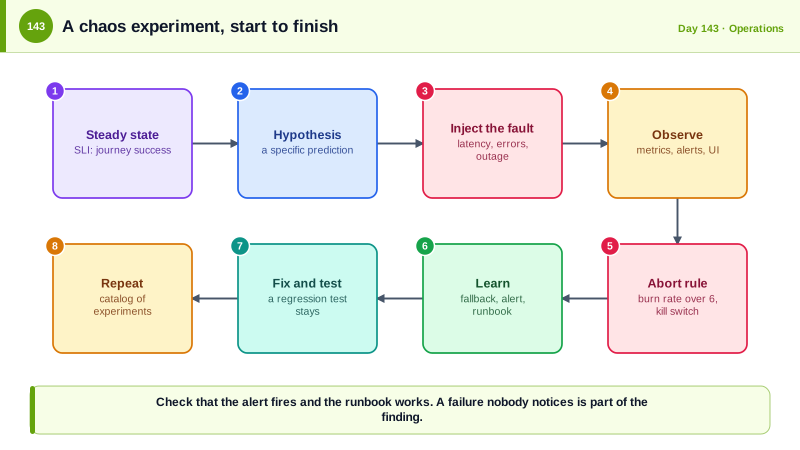
Day 69 taught resilience patterns: timeouts, retries, and circuit breakers. Writing them does not prove they work, and production has a way of exposing the untested one. Chaos engineering is the discipline of deliberately introducing failure, under control, to learn how the system behaves before a real incident does. It is not random destruction. Each experiment is a scientific test: define the steady state, a measurable normal such as the success rate of the create-task journey from Day 141; state a hypothesis, such as when the search index is unavailable, the task list still loads and shows a notice; inject the fault; observe; and compare. If the hypothesis is wrong, you have found a weakness cheaply and can fix it, and if it is right, you have evidence that your design does what you claim.
The safety rules distinguish chaos engineering from carelessness. Start small: a single instance, a small percentage of requests, or a test environment, and grow the blast radius as confidence grows. Define abort conditions in advance, for example stop if the error budget burn rate exceeds a threshold, keep a kill switch that ends the experiment immediately, run during business hours with the team watching, and notify the people who could be affected. Do not run experiments in production until the same experiment passes in staging and monitoring can detect problems quickly. Netflix popularized the approach with Chaos Monkey, which terminated instances at random, and Google runs its annual DiRT exercises that test disaster recovery across the company.
The techniques form a spectrum. In code, Polly v8 includes chaos strategies that inject latency, exceptions, or modified results into a resilience pipeline at a configured rate, ideal for tests and for controlled experiments behind a feature flag. At the infrastructure level, Azure Chaos Studio can stop virtual machines, add network delay, or exhaust CPU and memory on targets, and Kubernetes tools can kill pods or partition networks. At the edge of the browser, Playwright can abort or delay routes to check how the interface handles a failing API. The interesting hypotheses are about degradation: does the system fail fast, show the user something useful, keep the rest of the page working, recover automatically when the dependency returns, and raise the alert that people would need. Check that the alert fires and the runbook works, since a failure that nobody notices is part of the finding.
The same idea applies to security. Security chaos engineering injects the symptoms of attacks to test detection and response: revoke a credential used by a service to see what breaks and how quickly people notice, simulate a leaked API key and time how fast it is revoked, disable a component of the logging pipeline and see who is alerted, or run a controlled phishing or red team exercise. Design these with the same care and approval, and never involve real customer data or real attacks that could cause harm. Record what you learn as actions: fix the fallback, tune the alert, update the runbook, and repeat the experiment to confirm the fix.
| Element | Guidance |
|---|---|
| Steady state | A measurable SLI such as journey success rate and latency |
| Hypothesis | A specific prediction about behavior under a named fault |
| Fault | Latency, errors, dependency outage, instance loss, expired credential |
| Blast radius | Start with one instance or a small percentage, expand gradually |
| Safety | Abort conditions, kill switch, staffed, staging first |
| Follow-up | Fix the weakness, add tests, update runbook, rerun the experiment |
Worked Example: A Chaos Pipeline in Code, a Test of the Fallback and a Browser Fault Test
The Polly chaos strategies are active only when enabled. The tests verify degradation, and the experiment template records the hypothesis.
// A resilience pipeline for the search dependency, with chaos strategies that are on only in test or an approved experiment.
builder.Services.AddResiliencePipeline("search", (pipeline, ctx) =>
{
    var chaos = ctx.ServiceProvider.GetRequiredService<IOptionsMonitor<ChaosOptions>>().CurrentValue;

    pipeline
        .AddFallback(new FallbackStrategyOptions<SearchResult>
        {
            ShouldHandle = new PredicateBuilder<SearchResult>().Handle<Exception>(),
            FallbackAction = _ => Outcome.FromResultAsValueTask(SearchResult.Unavailable),       // degrade: an empty result flagged as unavailable
        })
        .AddCircuitBreaker(new CircuitBreakerStrategyOptions<SearchResult> { FailureRatio = 0.5, SamplingDuration = TimeSpan.FromSeconds(20), MinimumThroughput = 10, BreakDuration = TimeSpan.FromSeconds(15) })
        .AddTimeout(TimeSpan.FromSeconds(2));

    if (chaos.Enabled)                                                                             // never enabled by default
    {
        pipeline.AddChaosLatency(chaos.LatencyRate, TimeSpan.FromMilliseconds(chaos.LatencyMs))
                .AddChaosFault(chaos.FaultRate, () => new HttpRequestException("Injected fault"));
    }
});

// The endpoint tells the client honestly that results are degraded.
app.MapGet("/api/search", async (string q, ISearchService search) =>
{
    var result = await search.SearchAsync(q);
    return result.IsUnavailable ? Results.Ok(new { items = Array.Empty<object>(), degraded = true }) : Results.Ok(new { items = result.Items, degraded = false });
});// Test: with the dependency failing every time, the API still answers and reports degradation, and the circuit opens.
[Fact]
public async Task Search_degrades_gracefully_when_the_index_is_down()
{
await using var app = new TestApp(chaos: new ChaosOptions { Enabled = true, FaultRate = 1.0 }); // every call fails
var client = app.CreateClient();
for (var i = 0; i < 15; i++)
{
var res = await client.GetAsync("/api/search?q=report");
Assert.Equal(HttpStatusCode.OK, res.StatusCode); // never a 500 for the user
var body = await res.Content.ReadFromJsonAsync<SearchResponse>();
Assert.True(body!.Degraded);
}
Assert.True(app.Metrics.CircuitOpened("search")); // and the alert signal exists
}// Playwright: the same hypothesis in the browser. The API fails, and the UI must still be usable and honest.
test('task list shows a helpful notice when search is down', async ({ page }) => {
await page.route('**/api/search*', (route) => route.abort('failed'));
await page.goto('/board');
await expect(page.getByRole('heading', { name: 'Task board' })).toBeVisible(); // the rest of the page still works
await page.getByRole('searchbox').fill('report');
await expect(page.getByRole('status')).toContainText('Search is temporarily unavailable');
await expect(page.getByRole('button', { name: 'Retry' })).toBeVisible();
});
test('slow API shows a loading state and then recovers', async ({ page }) => {
await page.route('**/api/tasks*', async (route) => { await new Promise((r) => setTimeout(r, 4000)); await route.continue(); });
await page.goto('/board');
await expect(page.getByText('Loading tasks')).toBeVisible();
await expect(page.getByRole('list', { name: 'Tasks' })).toBeVisible({ timeout: 8000 });
});# Experiment: search dependency outage (staging first, then 5 percent of production during business hours)
**Steady state:** create-task and list-tasks journeys at or above 99.9 percent good, p95 under 500 ms.
**Hypothesis:** if the search service returns errors, task lists and creation are unaffected, search shows a degraded notice within 3 seconds, the circuit opens, and the "search-degraded" alert fires within 5 minutes.
**Fault:** 100 percent errors from the search client for 10 minutes, on one instance.
**Abort if:** burn rate above 6 on any journey, or any 500 responses on non-search endpoints. Kill switch: set Chaos:Enabled to false.
**Result and follow-up:** (fill in) alert fired after 9 minutes, threshold too slow. Action: shorten the evaluation window, rerun.
**Security variant, run separately:** revoke the search service's managed identity role for 5 minutes and confirm the failure is visible in logs and alerts.Schedule experiments regularly and keep a catalog of them. The value compounds: each one turns an assumption about failure into a tested property, and a regression test protects it afterward.
Real-World Examples
- Netflix created Chaos Monkey around 2011 while moving to Amazon Web Services, randomly terminating production instances during business hours to force engineers to build services that tolerate instance loss. The practice grew into the Simian Army and the discipline of chaos engineering, which the company later described in a set of principles.
- Google has run its Disaster Recovery Testing program, DiRT, since 2006, in which teams simulate large failures such as losing a data center or the availability of key staff, and Kripa Krishnan described it in a 2012 article. Its findings routinely reveal hidden dependencies and outdated procedures, which is the same benefit that smaller teams gain from game days.
Review Questions & Answers
It is hypothesis driven, with a measurable steady state, a defined fault, a limited blast radius, abort conditions, and a plan to act on the results. The aim is learning, not disruption.
Verify that the alert fires within the expected time, the dashboards show the problem, the runbook steps work, and the system recovers automatically when the fault ends. A failure that nobody notices is itself a finding.
Staging shows whether the experiment and the monitoring behave as expected without risking customers. Production runs start small and only after the same fault has been handled safely elsewhere.
Experiments can simulate a revoked credential, a leaked key, or a disabled log pipeline to test how quickly the system and the people detect and respond. They are designed with approval and never use real attacks or customer data.