Design a File Storage and Sharing Service
On this page
Learning Objective
Design a file storage and sharing service with resumable direct-to-blob uploads, metadata in SQL Server, scanning and thumbnails through asynchronous processing, permission-checked sharing links, and protections against path traversal, archive bombs and script execution from user content.
Concept Explanation
Apply the framework of Day 91. Requirements: users upload and download files of up to several gigabytes, organize them in folders, share with people or by link, and expect uploads to survive a flaky connection. Non-functional needs include durability, security, and cost. The core architectural decision is to keep the file bytes out of your application servers. Blob storage is built for large objects and scales far beyond an API tier, so the API issues a short-lived, narrowly scoped upload authorization, the client sends bytes directly to storage, and your server records metadata in SQL Server: owner, name, size, content hash, blob path, status, and permissions. This protects your servers from long transfers and moves bandwidth cost to the service designed for it.
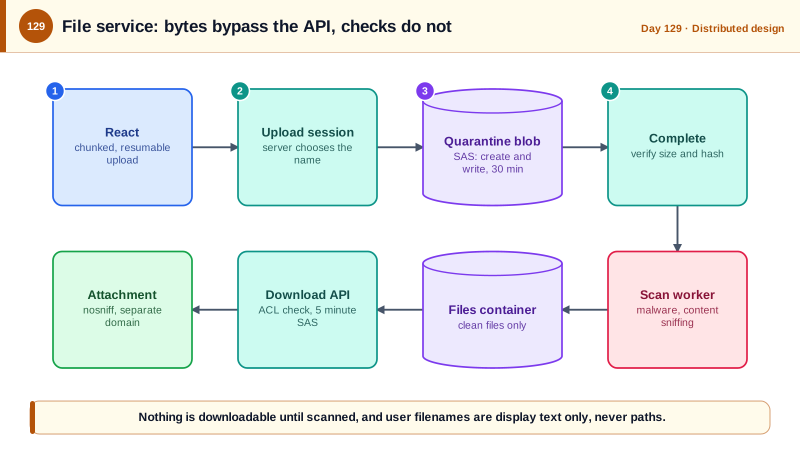
Large uploads need to be resumable. Blob storage supports uploading a file as blocks that are committed at the end, so a client can upload blocks in parallel, retry any that fail, and resume after a disconnection by asking which blocks exist. The server creates an upload session, the client uploads with a scoped shared access signature, and then calls a completion endpoint, where the server verifies the result, such as the size and hash, before marking the file available. Nothing should be visible or downloadable until the file has been verified and scanned. After completion, asynchronous workers, fed by an event on blob creation, run malware scanning, extract metadata, and generate thumbnails, and the status field moves from uploaded to scanned to available. Content hashing enables deduplication and integrity checks, though cross-user deduplication has privacy implications, since it can reveal whether someone else has uploaded the same file.
Sharing needs a permission model. Store an access control list per file or folder, with roles such as viewer and editor, inherited from parents unless overridden, and check permissions on the server at every read, in the same query that fetches the metadata, as Day 95 did for the feed. Share by link creates a random, unguessable token stored hashed, with optional expiry, password, and download limits, revocable by the owner. Downloads should authorize first and then hand out a short-lived signed URL to the blob, so the API does not proxy the bytes, and the download response should be sent as an attachment. Old versions and deletions need thought: keep versions for a period, use soft delete with retention, and make permanent deletion a real deletion that reaches backups on a schedule.
User-uploaded files are dangerous content. Never use a user-supplied file name as a path on disk or as a blob name; generate the storage key yourself and keep the original name only as display metadata, or a name like ../../etc can escape a directory, a flaw class called path traversal. Archives can contain such paths too: the Zip Slip vulnerability, reported in 2018, affected many libraries that extracted entries without checking that their final path stayed inside the target directory. Compressed files can also be decompression bombs, small files that expand to enormous sizes, so limit extracted size, entry counts, and nesting. Serving user content from your main domain lets an uploaded HTML or SVG file run script in your origin, so serve downloads from a separate domain or with Content-Disposition attachment and X-Content-Type-Options nosniff, and set a restrictive sandbox policy for previews. Validate the content type by inspecting the bytes, not trusting the extension or header, and limit sizes and quotas per user.
| Concern | Design | Reason |
|---|---|---|
| Bytes | Direct to and from blob storage with short-lived scoped SAS | Keeps large transfers off the API servers |
| Resumability | Block uploads, upload session, completion verification | Survives failures, parallel and resumable |
| Metadata and permissions | SQL Server with an ACL model | Consistent, queryable, authorizable |
| Safety | Scan, verify, then make available | Never serve unscanned files |
| Sharing links | Random token stored hashed, expiry and revocation | Unguessable, controllable access |
| User content | Generated storage keys, separate domain, attachment, nosniff | Blocks traversal and script execution |
Worked Example: Upload Sessions with Scoped SAS, Completion Checks and Guarded Downloads
The endpoints create an upload session, verify the finished blob, and authorize downloads. The last block shows safe archive extraction.
// 1. Create an upload session: we choose the blob name, the client only supplies the display name and size.
app.MapPost("/api/files/uploads", async (CreateUpload req, AppDb db, ClaimsPrincipal user, BlobServiceClient blobs, ITenantContext tenant, CancellationToken ct) =>
{
    if (req.Size is <= 0 or > 5L * 1024 * 1024 * 1024) return Results.Problem("File size not allowed.", statusCode: 400);
    if (!await db.Quotas.HasRoomAsync(user.GetUserId(), req.Size, ct)) return Results.Problem("Storage quota exceeded.", statusCode: 413);

    var fileId = Guid.NewGuid();
    var blobName = $"{tenant.TenantId}/{fileId:N}";                              // generated, never derived from the file name
    db.Files.Add(new FileRecord { Id = fileId, OwnerId = user.GetUserId(), DisplayName = SafeDisplayName(req.Name), DeclaredSize = req.Size, BlobName = blobName, Status = FileStatus.Uploading });
    await db.SaveChangesAsync(ct);

    // A user delegation SAS (signed with Entra credentials, not an account key): create and write only, on this one blob, for 30 minutes.
    var key = await blobs.GetUserDelegationKeyAsync(DateTimeOffset.UtcNow, DateTimeOffset.UtcNow.AddMinutes(30), ct);
    var sas = new BlobSasBuilder(BlobSasPermissions.Create | BlobSasPermissions.Write, DateTimeOffset.UtcNow.AddMinutes(30))
        { BlobContainerName = "uploads-quarantine", BlobName = blobName, Resource = "b" };
    var uri = new BlobUriBuilder(blobs.GetBlobContainerClient("uploads-quarantine").GetBlobClient(blobName).Uri)
        { Sas = sas.ToSasQueryParameters(key.Value, blobs.AccountName) }.ToUri();

    return Results.Ok(new { fileId, uploadUrl = uri });                          // the client uploads blocks straight to storage
}).RequireAuthorization();

// 2. Completion: verify what actually arrived, then queue scanning. Nothing is downloadable yet.
app.MapPost("/api/files/{id:guid}/complete", async (Guid id, AppDb db, ClaimsPrincipal user, BlobServiceClient blobs, IPublisher bus, CancellationToken ct) =>
{
    var f = await db.Files.SingleOrDefaultAsync(x => x.Id == id && x.OwnerId == user.GetUserId() && x.Status == FileStatus.Uploading, ct);
    if (f is null) return Results.NotFound();

    var props = (await blobs.GetBlobContainerClient("uploads-quarantine").GetBlobClient(f.BlobName).GetPropertiesAsync(cancellationToken: ct)).Value;
    if (props.ContentLength != f.DeclaredSize) return Results.Problem("Uploaded size does not match.", statusCode: 400);

    f.Status = FileStatus.Scanning;
    db.Outbox.Add(OutboxMessage.From(new ScanFile(f.Id)));                       // the worker scans, sniffs the type, makes thumbnails
    await db.SaveChangesAsync(ct);
    return Results.Accepted($"/api/files/{id}");
}).RequireAuthorization();// 3. Download: authorize with the permission query, then give a short-lived read URL that forces download.
app.MapGet("/api/files/{id:guid}/download", async (Guid id, AppDb db, ClaimsPrincipal user, BlobServiceClient blobs, CancellationToken ct) =>
{
var f = await db.Files.AsNoTracking().Where(x => x.Id == id && x.Status == FileStatus.Available && x.Acl.Any(a => a.PrincipalId == user.GetUserId() && a.CanRead))
.SingleOrDefaultAsync(ct);
if (f is null) return Results.NotFound(); // same answer for missing and forbidden
var key = await blobs.GetUserDelegationKeyAsync(DateTimeOffset.UtcNow, DateTimeOffset.UtcNow.AddMinutes(10), ct);
var sas = new BlobSasBuilder(BlobSasPermissions.Read, DateTimeOffset.UtcNow.AddMinutes(5))
{
BlobContainerName = "files", BlobName = f.BlobName, Resource = "b",
ContentDisposition = $"attachment; filename*=UTF-8''{Uri.EscapeDataString(f.DisplayName)}",
ContentType = "application/octet-stream", // never trust or echo the uploaded content type
};
return Results.Redirect(new BlobUriBuilder(blobs.GetBlobContainerClient("files").GetBlobClient(f.BlobName).Uri)
{ Sas = sas.ToSasQueryParameters(key.Value, blobs.AccountName) }.ToUri().ToString());
}).RequireAuthorization();
// Share links: random token, only the hash is stored, with expiry and revocation.
var token = Base64Url.EncodeToString(RandomNumberGenerator.GetBytes(32));
db.ShareLinks.Add(new ShareLink { FileId = id, TokenHash = SHA256.HashData(Encoding.UTF8.GetBytes(token)), ExpiresAt = DateTimeOffset.UtcNow.AddDays(7), MaxDownloads = 20 });// Safe archive extraction: every entry's final path must stay inside the target, and totals are capped (zip slip and bombs).
static void ExtractSafely(ZipArchive zip, string targetDir, long maxTotal = 500L * 1024 * 1024, int maxEntries = 5000)
{
var root = Path.GetFullPath(targetDir) + Path.DirectorySeparatorChar;
long total = 0;
if (zip.Entries.Count > maxEntries) throw new InvalidDataException("Too many entries.");
foreach (var entry in zip.Entries)
{
var dest = Path.GetFullPath(Path.Combine(targetDir, entry.FullName));
if (!dest.StartsWith(root, StringComparison.Ordinal)) throw new InvalidDataException("Entry escapes the target directory.");
total += entry.Length;
if (total > maxTotal) throw new InvalidDataException("Archive expands beyond the allowed size.");
if (!entry.FullName.EndsWith('/')) { Directory.CreateDirectory(Path.GetDirectoryName(dest)!); entry.ExtractToFile(dest, overwrite: false); }
}
}Two containers matter here: uploads land in a quarantine container that no user can read from, and only the scanning worker copies a clean file to the container that download links point at.
Real-World Examples
- In June 2011 Dropbox disclosed that a code update briefly caused a fault in its authentication check, so accounts could be accessed with any password for a period of a few hours. The company published an account of the incident and tightened its testing and controls, and it is often cited as a reminder that authentication and permission checks on file services need automated tests that fail loudly.
- The Zip Slip vulnerability, published by the security company Snyk in 2018, affected thousands of projects across multiple languages and libraries that extracted archive entries without checking their destination paths, allowing files to be written outside the intended directory. The fix is a few lines of path validation, and the lesson is that any code that turns user-supplied names into file paths needs that check.
Review Questions & Answers
Large transfers would tie up API servers and bandwidth for a long time, while blob storage is designed to handle them at scale. The API issues a short-lived, narrowly scoped signature and records metadata, then verifies the result on completion.
Names such as ones containing parent directory segments can escape the intended folder, overwrite other files, or collide with other users' files. The service generates the storage key and keeps the original name only as display text.
Until scanned, it may contain malware or exploit content, and making it downloadable would let it spread to other users. A status and a quarantine location ensure only verified files can be served.
The browser runs script in those files with your origin's privileges, so an attacker could act as a signed-in user. Serving downloads as attachments, from a separate domain, with nosniff and a restrictive policy prevents execution.