Outbox Pattern in .NET with Messaging
On this page
Learning Objective
Explain why writing to a database and publishing a message cannot be made atomic directly, implement the transactional outbox pattern with a publisher and idempotent consumers, choose sensible broker features on Azure Service Bus, and secure messaging with identity-based access, minimal payloads and validation of what you consume.
Concept Explanation
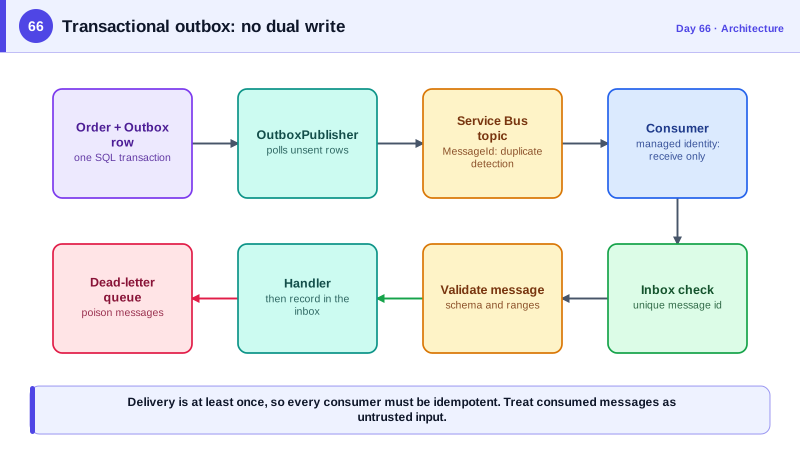
Many features need to do two things at once: save something to the database and tell the rest of the system about it. An order is placed, so the order row is written and an event is published so that email, inventory, and analytics can react. The naive code saves, then publishes. If the process crashes between the two, the order exists but nobody is told. Reverse the order and a crash leaves an announced order that does not exist. The database and the broker are separate systems with no shared transaction, so any sequence of two independent writes has a window in which one can succeed and the other fail. This is the dual write problem, and a retry loop does not fix it if the process itself dies.
The transactional outbox pattern solves it by writing the message to the same database as the business data, in the same transaction. Alongside the order row, the code inserts a row into an Outbox table containing the event type and payload. Both commit or neither does. A separate publisher process, a hosted service from Day 65, reads unsent outbox rows, sends them to the broker, and marks them sent. If it crashes after sending but before marking, it will send again, so delivery is at least once. That leads to the second half of the pattern: consumers must be idempotent, tolerating a message they have already processed, usually by recording processed message identifiers in an inbox table with a unique constraint.
The broker gives you the transport and its guarantees. Azure Service Bus offers queues for point-to-point work and topics with subscriptions for publish-subscribe fan-out, with features that matter in practice: dead-letter queues that quarantine messages that repeatedly fail, duplicate detection over a time window based on the message identifier, sessions for ordered processing of related messages, scheduled delivery, and time-to-live. Setting the MessageId to the outbox row's identifier lets the broker itself discard duplicate sends within the window, which reduces, but does not remove, the need for idempotent consumers. Choose messages for reliable asynchronous work between components, and remember that the trade-off is eventual consistency: other parts of the system see the change a moment later, and the interface should be designed for that.
Messaging has its own security surface. Authenticate to the broker using a managed identity with narrow role assignments, sender on the specific queue or topic, receiver on the specific subscription, never a connection string with manage rights. Keep messages small, containing identifiers and the facts needed, not secrets or full personal data, since messages are stored, may be logged, and are visible to operators. Carry the tenant and correlation identifiers in headers so consumers apply the right scope. And treat every consumed message as untrusted input, validating it against a schema, because a compromised producer or a misconfigured topic can deliver malformed or malicious content; this is the unsafe consumption of APIs risk from the OWASP list applied to messaging. Libraries such as MassTransit and Wolverine add conventions, retries, and outbox support, though MassTransit's newest major version moved to commercial licensing, so weigh that against using the Azure SDK directly.
| Piece | Responsibility | Note |
|---|---|---|
| Outbox table | Stores events in the business transaction | Same commit as the data, no dual write |
| Publisher | Reads unsent rows, sends to the broker, marks sent | At-least-once delivery |
| Broker features | Dead-letter queue, duplicate detection, sessions | Configure per queue or topic |
| Idempotent consumer | Ignores messages it has already handled | Inbox table with a unique message id |
| Managed identity roles | Send only, receive only, per entity | No connection strings with manage rights |
| Message validation | Schema check on every consumed message | Do not trust producers blindly |
Worked Example: Writing the Outbox, Publishing It and Consuming Idempotently
The first block writes an event with the business change. The second publishes with Service Bus using the outbox id for duplicate detection. The third consumes with an inbox check and schema validation.
public sealed class OutboxMessage
{
    public Guid Id { get; init; } = Guid.CreateVersion7();
    public string Type { get; init; } = "";
    public string Payload { get; init; } = "";               // small JSON: ids and facts, no secrets
    public string? TenantId { get; init; }
    public string? CorrelationId { get; init; }
    public DateTimeOffset CreatedAt { get; init; }
    public DateTimeOffset? SentAt { get; set; }
}

// Business change and event commit together, or not at all.
public async Task<Guid> PlaceOrderAsync(PlaceOrder cmd, CancellationToken ct)
{
    var order = Order.Create(cmd.UserId, cmd.Lines);
    db.Orders.Add(order);
    db.Outbox.Add(new OutboxMessage
    {
        Type = "order.placed.v1",
        Payload = JsonSerializer.Serialize(new OrderPlaced(order.Id, order.UserId, order.Total)),
        TenantId = tenant.Id, CorrelationId = correlation.Id, CreatedAt = clock.GetUtcNow(),
    });
    await db.SaveChangesAsync(ct);                            // one transaction
    return order.Id;
}public sealed class OutboxPublisher(IServiceScopeFactory scopes, ServiceBusClient bus, ILogger<OutboxPublisher> log) : BackgroundService
{
protected override async Task ExecuteAsync(CancellationToken stop)
{
var sender = bus.CreateSender("orders"); // identity has Send on this entity only
using var timer = new PeriodicTimer(TimeSpan.FromSeconds(2));
while (await timer.WaitForNextTickAsync(stop))
{
using var scope = scopes.CreateScope();
var db = scope.ServiceProvider.GetRequiredService<AppDb>();
var batch = await db.Outbox.Where(m => m.SentAt == null).OrderBy(m => m.Id).Take(50).ToListAsync(stop);
foreach (var m in batch)
{
var msg = new ServiceBusMessage(m.Payload)
{
MessageId = m.Id.ToString(), // broker-side duplicate detection
Subject = m.Type, ContentType = "application/json",
CorrelationId = m.CorrelationId,
ApplicationProperties = { ["tenantId"] = m.TenantId },
};
await sender.SendMessageAsync(msg, stop);
m.SentAt = DateTimeOffset.UtcNow; // a crash before this line just means a re-send
}
await db.SaveChangesAsync(stop);
}
}
}public sealed class OrderPlacedConsumer(ServiceBusProcessor processor, IServiceScopeFactory scopes, ILogger<OrderPlacedConsumer> log)
{
public async Task StartAsync(CancellationToken ct)
{
processor.ProcessMessageAsync += HandleAsync;
processor.ProcessErrorAsync += args => { log.LogError(args.Exception, "Service Bus error in {Source}", args.ErrorSource); return Task.CompletedTask; };
await processor.StartProcessingAsync(ct);
}
private async Task HandleAsync(ProcessMessageEventArgs args)
{
using var scope = scopes.CreateScope();
var db = scope.ServiceProvider.GetRequiredService<AppDb>();
var id = args.Message.MessageId;
// Idempotency: the unique index on InboxMessages.MessageId means a duplicate delivery is a no-op.
if (await db.Inbox.AnyAsync(i => i.MessageId == id)) { await args.CompleteMessageAsync(args.Message); return; }
// Never trust a message just because it came from our own topic: validate its shape.
var evt = JsonSerializer.Deserialize<OrderPlaced>(args.Message.Body);
if (evt is null || evt.OrderId == Guid.Empty || evt.Total < 0)
{
await args.DeadLetterMessageAsync(args.Message, "invalid-payload", "Failed schema validation");
return;
}
// Apply the tenant from the message header before any data access (Day 68).
scope.ServiceProvider.GetRequiredService<ICurrentTenant>().Set(args.Message.ApplicationProperties["tenantId"] as string);
await SendReceiptAsync(evt);
db.Inbox.Add(new InboxMessage(id, DateTimeOffset.UtcNow));
await db.SaveChangesAsync();
await args.CompleteMessageAsync(args.Message);
}
}The React interface should reflect eventual consistency: after placing an order the confirmation says it is being processed and the receipt appears when the event has been handled, arriving perhaps through the SignalR notification of Day 59.
Real-World Examples
- The transactional outbox is a documented pattern in Chris Richardson's Microservices Patterns and on microservices.io, and Microsoft's Azure Architecture Center describes it as the standard way to publish events reliably alongside database changes. Change data capture tools such as Debezium implement the publisher side by reading the database's transaction log instead of polling the table.
- Azure Service Bus's duplicate detection feature, when enabled on a queue or topic, discards messages whose MessageId has already been seen within a configurable time window of up to seven days. It is designed for exactly the at-least-once senders described here, and works best when the identifier is derived from the business operation and not generated fresh on every send attempt.
Review Questions & Answers
Saving to the database and publishing to a broker are two separate operations without a shared transaction, so a crash between them leaves the two systems inconsistent: either a saved change that was never announced or an announcement of something that was not saved. Retrying does not help if the process dies before it can retry. The outbox removes the second write from the critical path.
Duplicate detection only covers duplicates within a time window and identical message identifiers, and a message can be redelivered for other reasons, such as a consumer crashing before it acknowledges. At-least-once delivery means repeats are part of normal operation, so the handler itself must tolerate them, typically through an inbox with a unique message identifier.
There is no connection string to leak, and each component can do only what it needs: a publisher can send to one topic and a consumer can receive from one subscription. A compromised service therefore cannot read other queues, delete messages, or reconfigure the namespace, which limits the blast radius.
A producer can have a bug, be compromised, or be an older version sending a different shape, and a topic may accept messages from more senders than expected. Treating the message as untrusted input, checking required fields and ranges, and dead-lettering invalid ones prevents bad data from corrupting state and turns problems into visible, recoverable failures.