React Rendering and Hooks Pitfalls for Angular Devs
On this page
Learning Objective
Explain how React re-renders components as plain function calls, avoid the classic hook bugs of stale closures, effect misuse and duplicated state, and translate Angular lifecycle and change detection habits into React ones.
Concept Explanation
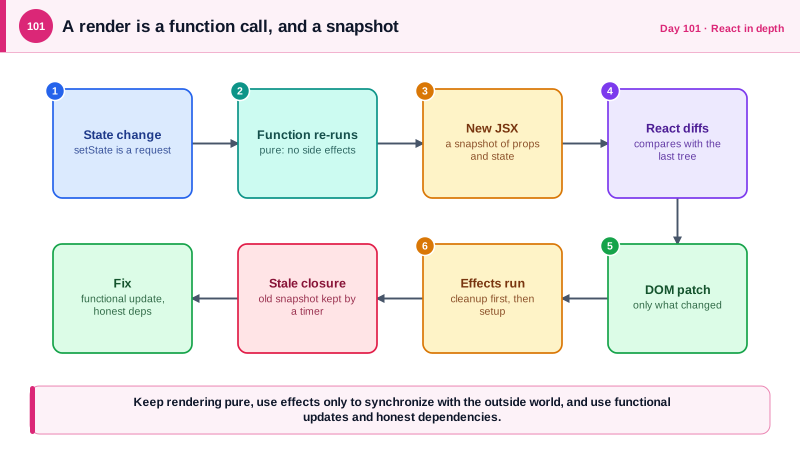
Angular tracks changes and updates the parts of the template that depend on them. React does something simpler to describe and easier to misuse: when state changes, it calls your component function again, from the top, and compares the JSX it returns with the previous result. Rendering is just calling the function, and it must be pure: the same props and state should produce the same output, with no side effects such as network calls, writes to storage, or mutation of outside variables. Each call to the function is a snapshot in which every variable, including state, has one fixed value, and the event handlers created in that call see that snapshot for as long as they live.
That snapshot behavior explains the most common bug Angular developers hit, the stale closure. A timer or event listener created in one render keeps referring to that render's state, so a counter incremented inside setInterval appears stuck. The fix is to use the functional form of the setter, which receives the latest value, or to include the value in the effect's dependencies so the effect is recreated. A related rule is that state updates are requests, not assignments: after calling the setter, the variable in the current render is unchanged, and the new value appears in the next render.
Effects deserve suspicion. useEffect is for synchronizing with something outside React, such as a subscription, a timer, or the document title. It is not the place to compute values from props and state, which you should simply calculate during rendering, and it is no longer the right place to fetch data, where a query library handles caching, cancellation, and races. Every effect that starts something must return a cleanup function that stops it. Every value from the component that the effect reads belongs in the dependency array, and the linter rule for exhaustive dependencies is telling you about real bugs, not being pedantic. In development, StrictMode runs effects twice on mount to expose missing cleanup, the way Angular's dev mode checks for changed-after-checked errors.
Two more habits prevent trouble. Do not copy props into state, or store data in state that can be derived from other state, because the copies drift; keep one source of truth and compute the rest. And give list items a stable key from the data, such as an identifier, never the array index for lists that reorder, because the key is how React decides which item is which and therefore which input keeps its typed text. Recent React versions add useEffectEvent for reading the latest values inside an effect without re-running it, and the React Compiler, which reached 1.0 in 2025, automates memoization, but the rules of pure rendering remain your responsibility.
| Angular habit | React equivalent | Pitfall to avoid |
|---|---|---|
| Change detection updates the template | The function re-runs on state change | Side effects during render |
| ngOnInit and ngOnDestroy | useEffect and its cleanup function | Missing cleanup, missing dependencies |
| computed signals and getters | Values calculated during render | Copying derived data into state |
| Input properties | Props, treated as read-only | Copying props into state |
| async pipe and services | Query hooks and hooks in general | Fetching in effects without cancellation |
| ngFor with trackBy | The key prop on list items | Array index as a key on reordering lists |
Worked Example: Three Bugs and Their Fixes
The first component has a stale closure, an effect that fetches without cancellation, and duplicated state. The corrected version follows.
// BUGGY: three classic mistakes in one component.
function NoteView({ noteId }: { noteId: number }) {
  const [count, setCount] = useState(0);
  const [note, setNote] = useState<Note | null>(null);
  const [title, setTitle] = useState('');                 // 3. duplicates note.title

  useEffect(() => {
    const id = setInterval(() => setCount(count + 1), 1000);   // 1. stale closure: count is always 0 here
    return () => clearInterval(id);
  }, []);

  useEffect(() => {
    fetch(`/api/notes/${noteId}`)                              // 2. no cancellation: a slow old response can win
      .then((r) => r.json()).then((n) => { setNote(n); setTitle(n.title); });
  }, [noteId]);

  return <h1>{title} ({count})</h1>;
}// FIXED
function NoteView({ noteId }: { noteId: number }) {
const [count, setCount] = useState(0);
useEffect(() => {
const id = setInterval(() => setCount((c) => c + 1), 1000); // functional update sees the latest value
return () => clearInterval(id); // cleanup stops the timer
}, []);
// Data fetching belongs to a query hook: it cancels, caches, dedupes and handles races.
const { data: note } = useQuery({
queryKey: ['note', noteId],
queryFn: ({ signal }) => request(`/api/notes/${noteId}`, NoteSchema, { signal }),
});
const title = note?.title ?? ''; // derived during render, never copied into state
return <h1>{title} ({count})</h1>;
}
// Keys: identity comes from the data, so typed text stays with the right row after a reorder.
{notes.map((n) => <NoteRow key={n.id} note={n} />)}The effect-based version has a security flavor too. A slow response for note 7 that arrives after the user navigated to note 8 would render the wrong note's data under the wrong heading, and with per-user data behind the API, races like that can display information in a context the user did not intend. Cancellation and keyed queries remove the class of bug.
Real-World Examples
- React 18, released in March 2022, made StrictMode run every effect twice on mount in development so that missing cleanup logic shows up immediately. Many teams first met the change as a confusing double network request in development, and the recommended answer was to fix the effect by adding cancellation and cleanup, not to remove StrictMode.
- Dan Abramov's 2019 essay A Complete Guide to useEffect popularized the mental model that each render has its own props, state, and event handlers, which is the explanation behind stale closures. It remains the reference most developers are pointed to when a hook seems to see old values.
Review Questions & Answers
The interval callback was created during the first render and closes over that render's count, which is zero, so every tick computes zero plus one. Using the functional setter form, which receives the latest state, or recreating the effect when the value changes, fixes it.
It leaves you to handle cancellation, race conditions between responses, caching, deduplication, and error and loading states by hand. A query library does all of that, and using it removes a common source of bugs where a slow old response overwrites a newer one.
The copy is initialized once and then drifts when the prop changes, so the component shows stale data. Keeping a single source of truth and deriving other values during render ensures the interface always reflects the current props and state.
React uses keys to match items between renders, so an index ties state, such as a typed input value, to a position instead of to the item. After a reorder, the state stays at the position and appears on the wrong item. A stable identifier from the data keeps state attached to the correct row.