Internationalization and Time Zones in React and .NET
On this page
Learning Objective
Store and transmit dates as UTC instants, format them for the user with Intl, model recurring events with time zone identifiers, handle culture-sensitive text and numbers safely on both sides, and add translations with plural rules and safe interpolation.
Concept Explanation
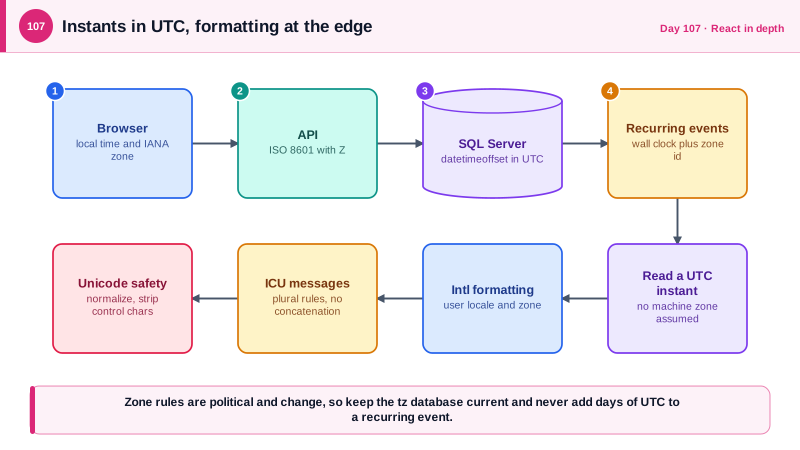
Time is the most frequent source of internationalization bugs, and the rule that prevents most of them is simple: store instants in UTC and convert only at the edges. In SQL Server use datetimeoffset or datetime2 with UTC values, in .NET prefer DateTimeOffset, which carries its offset and does not silently depend on the machine's local zone, and in JSON send ISO 8601 strings ending in Z. The browser then formats the instant for the user's locale and time zone with Intl.DateTimeFormat. The trap is that a UTC instant is not enough for future local events: a meeting at 9:00 in London every Monday must be stored as local time plus the IANA zone name, such as Europe/London, because a fixed UTC offset would be wrong after a daylight saving change, and governments change these rules with little notice. On the .NET side the NodaTime library models these concepts precisely, and since .NET 8 the TimeProvider abstraction lets you control the clock in tests.
Numbers, currencies, and text follow similar rules. Format numbers and currencies in the browser with Intl.NumberFormat, and store money as a decimal amount plus an ISO 4217 currency code, never as a floating-point number, because of rounding error and because currencies differ in their decimal places. On the server, parse and format machine-readable values with the invariant culture, since the current culture may use a comma as a decimal separator and turn a valid number into a bug or a parsing failure. Culture also changes string behavior: uppercasing the letter i in Turkish culture produces a dotted capital I, which has broken identifier comparisons and security checks in real systems. Compare identifiers and keys with ordinal comparison, and remember that SQL Server collations decide how comparisons and sorting behave in queries.
For user-facing translations, use a library based on ICU message format, such as FormatJS with react-intl or i18next, so that plurals, gender, and word order are handled by rules and not by string concatenation. Languages have different plural categories, and Arabic, for example, has six, so a message like one file or many files must be a single message with plural rules. Keep messages in files loaded per locale, lazy load the ones not needed, and design layouts for text that is 30 to 40 percent longer than English and for right-to-left scripts using logical CSS properties. Choose the locale from an explicit user setting first, then the Accept-Language header, and let ASP.NET Core's request localization middleware apply the culture for server-generated messages such as emails.
There are safety points as well. Translation strings that include HTML or user-provided values must still be escaped, so do not pass user input to a formatter that renders raw markup. Unicode gives attackers tools: visually identical characters from different scripts, called homoglyphs, can impersonate usernames or domains, and invisible bidirectional control characters can reorder displayed text, the technique behind the Trojan Source research on source code, CVE-2021-42574. Normalize user-visible identifiers to a consistent Unicode form, restrict or flag mixed-script names where impersonation matters, and strip control characters from displayed file names.
| Data | Store as | Display with |
|---|---|---|
| A past or present event | UTC instant (datetimeoffset, ISO 8601 with Z) | Intl.DateTimeFormat in the user's zone |
| A recurring or future local event | Local date and time plus IANA zone id | Compute occurrences with the zone rules |
| Money | Decimal amount plus ISO 4217 currency code | Intl.NumberFormat with style currency |
| Plurals and word order | ICU message with plural rules | react-intl or i18next |
| Machine-readable numbers and dates | Invariant culture on the server | Never the current culture |
| Identifiers and keys | Ordinal comparison, normalized Unicode | Escape and strip control characters |
Worked Example: UTC Storage, Zone-Aware Recurrence, ICU Plurals and Culture-Safe Code
The C# shows the recurring-event model and culture-safe handling. The TypeScript formats values and translates a plural message.
public sealed class Meeting
{
    public int Id { get; set; }
    public required string Title { get; set; }
    public DateTimeOffset CreatedAtUtc { get; set; }        // an instant: UTC
    public LocalDateTime StartsLocal { get; set; }          // NodaTime: what the wall clock says
    public required string TimeZoneId { get; set; }         // IANA id, for example "Europe/London"
}

public static class MeetingSchedule
{
    // The same local time every week, correct across daylight saving changes.
    public static Instant NextOccurrence(Meeting m, Instant now)
    {
        var zone = DateTimeZoneProviders.Tzdb[m.TimeZoneId];
        var local = m.StartsLocal;
        var candidate = zone.AtLeniently(local).ToInstant();
        while (candidate <= now)
        {
            local = local.PlusWeeks(1);
            candidate = zone.AtLeniently(local).ToInstant();      // recomputed from the wall clock each time, not by adding 7 days of UTC
        }
        return candidate;
    }
}

// Culture safety: machine formats always use the invariant culture.
var amount = decimal.Parse(input, NumberStyles.Number, CultureInfo.InvariantCulture);
var key = name.ToUpperInvariant();                                   // not ToUpper(): Turkish culture changes the result for the letter i
bool same = string.Equals(a, b, StringComparison.OrdinalIgnoreCase);

// Emails and other server-generated text use the user's stored culture explicitly.
using (CultureInfo.CurrentUICulture.Swap(new CultureInfo(user.Locale))) { /* render the email */ }// Formatting at the edge, with the user's locale and zone.
const when = new Intl.DateTimeFormat(locale, { dateStyle: 'medium', timeStyle: 'short', timeZone: user.timeZone }).format(new Date(task.createdAtUtc));
const price = new Intl.NumberFormat(locale, { style: 'currency', currency: invoice.currencyCode }).format(invoice.amount);
// ICU message with plural categories: one message, not string concatenation.
// en.json: { "tasks.count": "{count, plural, =0 {No tasks} one {# task} other {# tasks}}" }
// de.json: { "tasks.count": "{count, plural, =0 {Keine Aufgaben} one {# Aufgabe} other {# Aufgaben}}" }
<FormattedMessage id="tasks.count" values={{ count: tasks.length }} />// Logical CSS properties keep layouts correct in right-to-left languages.
// margin-inline-start instead of margin-left, padding-inline-end instead of padding-right.
<html lang={locale} dir={isRtl(locale) ? 'rtl' : 'ltr'}>The important detail in the recurrence code is that it recomputes each occurrence from the wall clock time and the zone, which is why the meeting stays at 9:00 local after the clocks change, while adding seven days worth of UTC time would drift by an hour.
Real-World Examples
- Samoa moved to the other side of the International Date Line at the end of December 2011, so the country skipped 30 December entirely, and systems that assumed every calendar day exists had to handle a day that never happened. It is a vivid reminder that time zone rules are political decisions that change, which is why zone data should come from a maintained database such as the IANA tz database and be updated regularly.
- The Trojan Source research, published in 2021 as CVE-2021-42574, showed that bidirectional control characters can make source code display differently from how a compiler reads it. The same characters in file names or user-supplied text can disguise content, which is the reason to strip control characters from anything shown as an identifier.
Review Questions & Answers
The UTC time of 9:00 London changes when daylight saving begins or ends, so a fixed UTC value would show the wrong local time for half the year. Storing the wall-clock time and the zone lets the system recompute each occurrence correctly, even if the zone rules change.
A machine that uses a comma as the decimal separator would read or reject values that other machines format with a period, causing wrong amounts or parsing errors that only appear in certain deployments. Invariant culture makes machine formats behave identically everywhere.
Languages have different numbers of plural categories and different word orders, which cannot be built by appending a suffix to a translated word. An ICU message keeps the whole sentence together so translators can express each plural form correctly.
Characters from other scripts can look identical to Latin letters, allowing a user to impersonate someone, and invisible control characters can reorder or hide displayed text. Normalizing names, flagging mixed scripts where impersonation matters, and stripping control characters reduces the risk.