ASP.NET Core Data Protection API and Key Management
On this page
Learning Objective
Manage secrets with Azure Key Vault and managed identities instead of connection strings and passwords, configure the ASP.NET Core Data Protection system correctly for multiple instances, protect sensitive fields and tokens with purpose-bound protectors, and plan rotation and leak response.
Concept Explanation
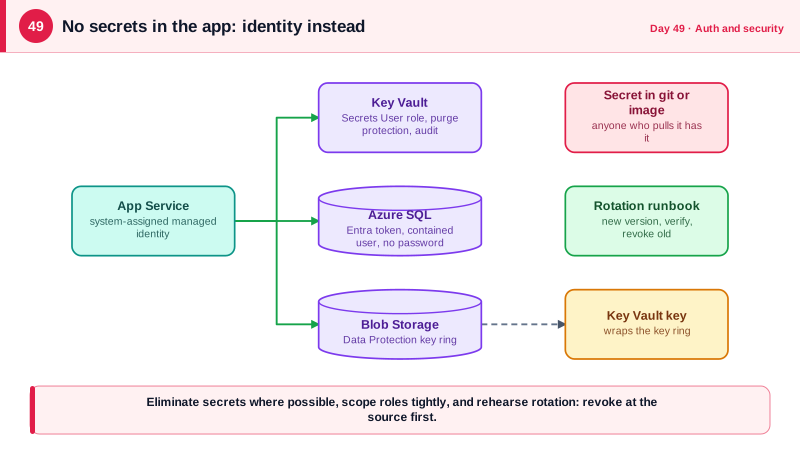
Day 9 established that secrets stay out of source control. This lesson finishes the job for production. The strongest position is not to have a secret to protect at all. A managed identity is an identity that Azure assigns to your running application, and the platform issues it short-lived tokens automatically. The application uses those tokens to authenticate to Key Vault, Azure SQL, Storage, and Service Bus, so there is no password in configuration, no secret to rotate, and nothing for an attacker to steal from a repository or environment. DefaultAzureCredential in the Azure SDK picks up the managed identity in the cloud and your developer login locally, so the same code works in both.
Some secrets remain, such as third-party API keys and OIDC client secrets. Azure Key Vault stores them with access control, auditing, versioning, and hardware-backed protection options. The configuration provider for Key Vault loads secrets into IConfiguration at startup, so application code reads them like any setting, and Key Vault access is granted to the application's managed identity by role assignment, ideally with the read-only Key Vault Secrets User role. Design for rotation from the start: applications should tolerate a secret changing, use versioned references or reload on a schedule, and where a provider supports it, accept two valid credentials at once during a switchover.
ASP.NET Core also has its own cryptographic subsystem, Data Protection, which encrypts and signs things like authentication cookies, anti-forgery tokens, and temporary data. It uses a key ring stored on disk by default, which fails in production in a specific way: when the app runs on several instances or restarts in a container, each instance has different keys, so cookies issued by one cannot be read by another, and users are randomly signed out or requests fail. The fix is to persist the key ring in shared storage such as Azure Blob Storage and protect the keys at rest with a Key Vault key, set an application name so instances share keys, and let it rotate automatically. Treat the key ring as sensitive, because whoever holds it can forge cookies.
You can also use Data Protection directly for your own needs. IDataProtector creates protectors scoped to a purpose string, so a token protected for invitations cannot be unprotected by code expecting password reset tokens, which prevents cross-purpose confusion. ITimeLimitedDataProtector adds expiry. This is the right tool for opaque tokens, encrypted cursors, and short-lived links. For sensitive data at rest, defense comes in layers: transparent data encryption, on by default in Azure SQL, protects database files and backups; Always Encrypted or application-level encryption protects specific columns even from administrators; and hashing, not encryption, is right for values you only need to compare. Encrypt with keys separated from the data, and log access to keys.
| Need | Mechanism | Why |
|---|---|---|
| App to Azure service authentication | Managed identity with DefaultAzureCredential | No secret to store, rotate or leak |
| Third-party API keys, client secrets | Azure Key Vault plus configuration provider | Central control, auditing, rotation |
| Cookie and token protection across instances | Data Protection key ring in Blob plus Key Vault key | Shared, persistent, protected keys |
| Opaque tokens and links | IDataProtector with a purpose string | Authenticated encryption, purpose-bound |
| Column-level protection | Always Encrypted or app-level encryption | Protects data from database administrators |
| Values only compared, never read | Hashing | No need to be able to recover them |
Worked Example: Key Vault, a Shared Key Ring and a Purpose-Bound Token
The configuration below loads secrets with a managed identity, persists the Data Protection keys to Blob Storage protected by a Key Vault key, and uses a time-limited protector for an invitation token.
// Program.cs: identity-based access, no passwords anywhere in configuration.
var credential = new DefaultAzureCredential();          // managed identity in Azure, developer login locally

builder.Configuration.AddAzureKeyVault(
    new Uri(builder.Configuration["KeyVault:Uri"]!), credential);   // e.g. Entra--ClientSecret becomes Entra:ClientSecret

// SQL with Entra authentication instead of a password:
// Server=tcp:notes-sql.database.windows.net;Database=Notes;Authentication=Active Directory Default;Encrypt=True;

// Data Protection key ring shared by every instance and protected by a Key Vault key.
builder.Services.AddDataProtection()
    .SetApplicationName("notes-app")                                   // same name = shared keys
    .PersistKeysToAzureBlobStorage(new Uri(builder.Configuration["DataProtection:BlobUri"]!), credential)
    .ProtectKeysWithAzureKeyVault(new Uri(builder.Configuration["DataProtection:KeyUri"]!), credential)
    .SetDefaultKeyLifetime(TimeSpan.FromDays(90));

// Fail fast at startup if a required secret is missing (Day 9 pattern).
builder.Services.AddOptions<EntraOptions>().Bind(builder.Configuration.GetSection("Entra"))
.ValidateDataAnnotations().ValidateOnStart();// Purpose-bound, expiring tokens for invitations.
public sealed class InvitationTokens(IDataProtectionProvider provider)
{
private readonly ITimeLimitedDataProtector _protector =
provider.CreateProtector("Notes.Invitations.v1").ToTimeLimitedDataProtector();
public string Create(Guid invitationId, string email) =>
_protector.Protect($"{invitationId}|{email.ToLowerInvariant()}", TimeSpan.FromDays(7));
public (Guid Id, string Email)? TryRead(string token)
{
try
{
var parts = _protector.Unprotect(token).Split('|'); // throws if tampered, expired or wrong purpose
return (Guid.Parse(parts[0]), parts[1]);
}
catch (CryptographicException) { return null; } // one generic failure, no oracle for attackers
}
}
// A token created for invitations cannot be opened by a protector with a different purpose string.# Leak response and prevention, kept next to the code.
# 1. Enable GitHub secret scanning with push protection so committed secrets are blocked.
# 2. Runbook when a secret leaks:
# - Revoke or rotate at the source FIRST (deleting the commit does not help).
# - Search logs for use of the credential between exposure and rotation.
# - Replace in Key Vault, restart or reload dependents, confirm old value fails.
# - Record the incident and how detection could be faster.Grant the application's identity only what it needs: for example Key Vault Secrets User on a single vault, Storage Blob Data Contributor on one container, and a database role with limited permissions. Treat any broadening of those role assignments as a security change requiring review.
Real-World Examples
- In September 2023, security firm Wiz reported that Microsoft AI researchers had accidentally exposed about 38 terabytes of internal data by publishing a storage access URL in a public GitHub repository, using a shared access signature token that was overly permissive and had a very long expiry. Microsoft revoked the token and described improvements to secret scanning; the case shows why credentials must be narrowly scoped and short-lived.
- In July 2023, Microsoft disclosed that a threat actor tracked as Storm-0558 had used an acquired consumer signing key to forge tokens that gained access to email at about 25 organizations, including government agencies. The key had been valid far longer than intended and was accepted in a context it should not have been, an example of how a signing key is the most sensitive secret in an identity system and why scope and rotation matter.
Review Questions & Answers
With a managed identity there is no long-lived secret at all: the platform issues short-lived tokens to the running application, so there is nothing to leak from configuration, logs, or a repository and nothing to rotate manually. A password in Key Vault is better than one in source control, but it is still a static credential that must be protected and rotated.
Data Protection stores its keys locally by default, so each instance generates its own key ring. A cookie encrypted by one instance cannot be decrypted by another, so users appear signed out or requests fail depending on which instance handles them. Persisting the key ring to shared storage and using a common application name gives all instances the same keys.
It scopes the cryptographic keys derived for that protector, so data protected for one purpose cannot be unprotected using another purpose string. That prevents a token issued for one feature, like invitations, from being replayed as a different kind of token, like a password reset, even though both use the same underlying key ring.
The value remains in repository history, forks, clones, caches, and build logs, and automated scanners find exposed credentials within minutes. The credential must be treated as compromised: revoke or rotate it at the provider, check logs for misuse, and replace it everywhere. Only then is the exposure over.