Dockerize a .NET API and React App
On this page
Learning Objective
Package the React app and the ASP.NET Core backend-for-frontend into one small, secure container image using a multi-stage Dockerfile, run as a non-root user with a minimal runtime image, keep secrets out of image layers, and scan and harden the result.
Concept Explanation
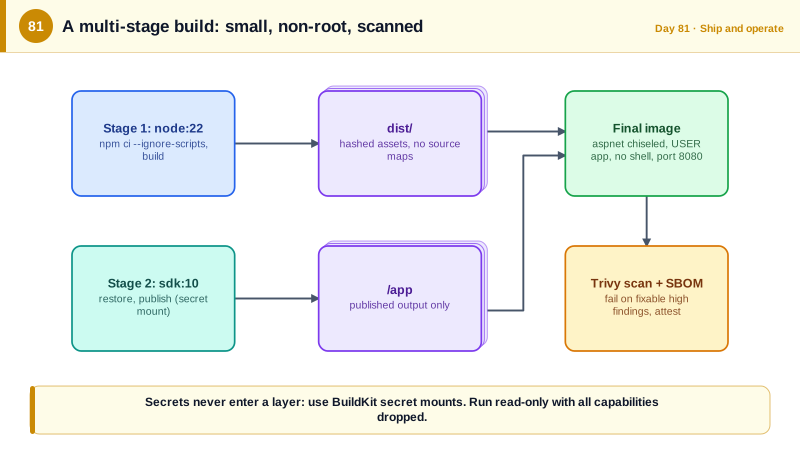
A container image is a filesystem snapshot plus metadata describing how to start a process, and it runs the same way on your laptop, in the build server, and in Azure. That consistency removes a whole category of it works on my machine problems. For this course the deployable unit is a single image containing the ASP.NET Core BFF and the static files of the built React application, since the BFF serves both, matching the single-origin design from Day 46. Building it takes three steps that would be awkward to do on one machine but are natural in a multi-stage Dockerfile: build the React bundle with Node, publish the .NET app with the SDK, and assemble a final image from the small ASP.NET runtime image plus the outputs of those two stages.
Multi-stage builds matter for both size and security. The SDK image contains compilers, package managers, and tools that a running service never needs, and every extra component is more attack surface and more vulnerabilities to patch. The final stage copies only the published output onto the runtime image. Microsoft also publishes chiseled images, minimal Ubuntu-based images with no shell or package manager, which shrink the image and remove tools an attacker would use after a compromise. Order the Dockerfile steps so that Docker's layer cache works for you: copy the project files and restore packages first, then copy the source, so changing a line of code does not redownload every dependency.
Run the container as a non-root user. The current .NET images ship with a non-root user named app and listen on port 8080 by default, so a single USER instruction is enough. Beyond the image, the runtime flags harden it: a read-only root filesystem, dropping all Linux capabilities, and disabling privilege escalation, which limit what a process can do even if it is compromised. Never put secrets in an image. Anything in a layer, including build arguments and files copied then deleted, can be extracted by anyone who can pull the image. Pass runtime secrets through environment variables or, better, managed identity and Key Vault, and if the build itself needs a credential, such as a private NuGet feed, use a BuildKit secret mount, which is available to one build step and never stored in a layer.
Finally, treat the image as an artifact that needs checking. Add a dockerignore file so that node_modules, build outputs, git history, and local secret files never enter the build context. Pin base images to a specific version and update them regularly, since a base image is another dependency. Scan every image in the pipeline with a tool such as Trivy, Docker Scout, or Microsoft Defender for Containers, and fail the build on high-severity findings that have fixes. Generate a software bill of materials, and sign or attest the image so what runs in production is provably what your pipeline built. The .NET SDK can also build container images directly with dotnet publish and the PublishContainer target, without a Dockerfile, which is convenient for simple services, while a Dockerfile remains the right tool when you need the Node stage as well.
| Practice | Benefit | How |
|---|---|---|
| Multi-stage build | Small image with no build tools | SDK and Node stages, runtime final stage |
| Chiseled runtime image | No shell or package manager for an attacker | mcr.microsoft.com/dotnet/aspnet with the chiseled tag |
| Non-root user | Limits damage of a compromise | USER app, port 8080 |
| Layer cache ordering | Fast rebuilds | Restore dependencies before copying source |
| No secrets in layers | Nothing extractable from the image | BuildKit secret mounts, runtime injection |
| Scan, SBOM, attest | Known-vulnerability and provenance checks | Trivy or Scout in CI, provenance attestation |
Worked Example: A Multi-Stage Dockerfile, a dockerignore and Hardened Runtime Flags
The Dockerfile builds the frontend, publishes the backend, and produces a small non-root image. The commands show a secret mount, scanning, and a locked-down run.
# syntax=docker/dockerfile:1.7

# ---- Stage 1: build the React app ----
FROM node:22-alpine AS web
WORKDIR /web
COPY web/package.json web/package-lock.json ./
RUN npm ci --ignore-scripts                     # reproducible, and install scripts of dependencies do not run
COPY web/ .
RUN npm run build                               # outputs /web/dist with hashed filenames, no source maps

# ---- Stage 2: restore and publish the .NET app ----
FROM mcr.microsoft.com/dotnet/sdk:10.0 AS build
WORKDIR /src
COPY global.json Directory.Build.props nuget.config ./
COPY src/TaskBoard.Host/TaskBoard.Host.csproj src/TaskBoard.Host/
COPY src/TaskBoard.Application/TaskBoard.Application.csproj src/TaskBoard.Application/
COPY src/TaskBoard.Domain/TaskBoard.Domain.csproj src/TaskBoard.Domain/
# A private feed credential is mounted for this one command and never stored in a layer.
RUN --mount=type=secret,id=nuget_token \
    dotnet restore src/TaskBoard.Host/TaskBoard.Host.csproj --locked-mode
COPY src/ src/
RUN dotnet publish src/TaskBoard.Host/TaskBoard.Host.csproj -c Release -o /app --no-restore /p:UseAppHost=false

# ---- Stage 3: the final, minimal runtime image ----
FROM mcr.microsoft.com/dotnet/aspnet:10.0-noble-chiseled AS final
WORKDIR /app
COPY --from=build /app .
COPY --from=web /web/dist ./wwwroot              # the SPA is served by the BFF from one origin
USER $APP_UID                                    # non-root; the chiseled image has no shell to escape into
EXPOSE 8080
ENV ASPNETCORE_URLS=http://+:8080 DOTNET_EnableDiagnostics=0
ENTRYPOINT ["dotnet", "TaskBoard.Host.dll"]
# Health probing is done by the platform against /health/live (no curl inside a chiseled image).# .dockerignore: keep the build context small and secrets out of it.
**/node_modules
**/bin
**/obj
**/dist
.git
.github
**/.env
**/.env.*
**/appsettings.Development.json
**/*.user
**/secrets.json
tests/# Build with a BuildKit secret (file, not an argument: arguments are visible in image history).
DOCKER_BUILDKIT=1 docker build \
--secret id=nuget_token,src=$HOME/.nuget-token \
-t taskboard:local .
# Inspect what an attacker who pulls the image could see. There should be nothing sensitive here.
docker history --no-trunc taskboard:local
docker image inspect taskboard:local --format '{{.Config.User}} {{.Config.ExposedPorts}}'
# Scan for known vulnerabilities and fail on high severity findings that have a fix available.
trivy image --severity HIGH,CRITICAL --ignore-unfixed --exit-code 1 taskboard:local
# Run with the container locked down: read-only filesystem, no capabilities, no privilege escalation.
docker run --rm -p 127.0.0.1:8080:8080 \
--read-only --tmpfs /tmp \
--cap-drop ALL --security-opt no-new-privileges:true \
--memory 512m --pids-limit 200 \
-e ConnectionStrings__Default="$LOCAL_CONNECTION_STRING" \
taskboard:local<!-- Alternative for a service with no frontend stage: build the image straight from the SDK, no Dockerfile. -->
<PropertyGroup>
<ContainerFamily>noble-chiseled</ContainerFamily>
<ContainerRuntimeIdentifier>linux-x64</ContainerRuntimeIdentifier>
</PropertyGroup>
<!-- dotnet publish -t:PublishContainer -->The image ends up containing only the published .NET output, the static files, and the minimal runtime. There is no npm, no SDK, no shell, and no source code, which is both smaller and harder to abuse. Confirm this by trying to run a shell inside it; the failure is the desired result.
Real-World Examples
- In June 2018, security firm Kromtech reported that 17 malicious images published on Docker Hub under a single account had been downloaded more than five million times and were used to run cryptocurrency mining on victims' infrastructure. It is a standard reminder to pin base images, prefer official and verified publishers, and scan what you run rather than trusting a public registry by default.
- Microsoft introduced chiseled Ubuntu containers for .NET 8 in partnership with Canonical, describing them as ultra-small images with no package manager, no shell, and a non-root default user, aimed at reducing both size and attack surface. They use the same approach as distroless images, shipping only what the application needs at runtime.
Review Questions & Answers
Each instruction creates an immutable layer, and build arguments appear in the image history, so anyone who pulls the image can inspect layers and history to recover the value even after a later step deletes the file. BuildKit secret mounts expose the secret to one command only and never write it to a layer.
It contains only the runtime and its minimal dependencies, with no shell, package manager, or common utilities, so there is far less software to keep patched and an attacker who gains code execution has few tools to work with. It also runs as a non-root user by default and is smaller, pulling and starting faster.
Docker caches each layer and reuses it if its inputs are unchanged. Package references change rarely while source changes constantly, so restoring first means a code change only invalidates the later layers and the dependency download is reused, making rebuilds much faster.
They restrict what a compromised process can do: a read-only filesystem prevents writing malware or modifying the application, dropping capabilities removes special kernel privileges, and no-new-privileges blocks privilege escalation through setuid binaries. Together they turn a breach into a much more contained event.