C# Project: Command-Line Task Tracker with Tests
On this page
Learning Objective
Combine records, LINQ, async, the Result pattern, dependency injection, options and JSON persistence into one small tested application, and practice designing a program as a thin entry point over testable services.
Concept Explanation
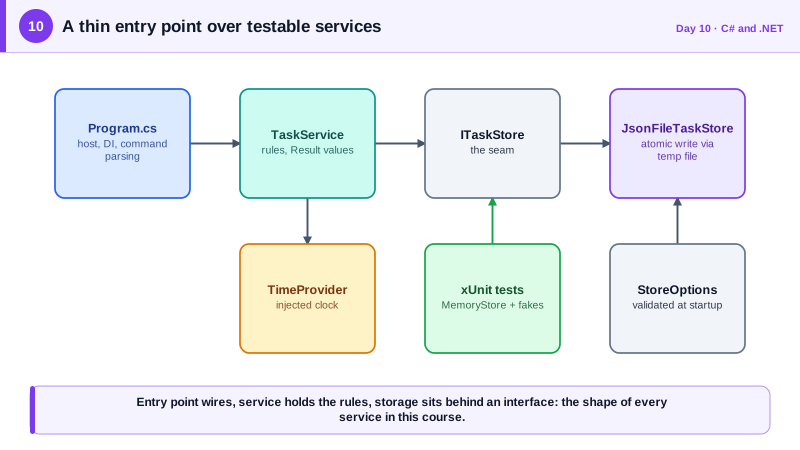
This project consolidates the first ten days into something you can run and test. The application is a command-line task tracker with three commands: add a task, list open tasks, and complete a task by its number. It stores tasks in a JSON file. The functionality is intentionally modest, because the goal is not features but the shape of the code. You will see the same structure again in every service in the course: a thin entry point that wires dependencies, a service class that holds the rules, and a storage abstraction behind an interface so the rules can be tested without touching the disk.
Start by separating responsibilities. A TaskItem record describes the data. An ITaskStore interface describes loading and saving, and a JsonFileTaskStore implements it with System.Text.Json. A TaskService enforces the rules: titles are required and length-limited, a task cannot be completed twice, and results are returned as Result values rather than exceptions for expected problems. Program.cs only builds the host, registers services, parses the command, and prints output. Because the service depends on ITaskStore and TimeProvider, a unit test can pass in an in-memory store and a fake clock and exercise every rule in milliseconds.
Persistence deserves a few defensive decisions even in a toy. Write to a temporary file and then move it over the original, so a crash in the middle of a write cannot leave a half-written, corrupt data file. Read with System.Text.Json, which by default deserializes only into the exact type you request and does not honor type names embedded in the data, unlike older serializer configurations that have been a source of serious remote code execution vulnerabilities. Enforce a maximum title length so a malicious or accidental huge input cannot bloat storage. And take the file path from validated configuration rather than command-line arguments the user can freely vary.
Finally, treat the tests as part of the deliverable. xUnit tests here should cover the happy path, each rejection rule, and the edge cases: completing a task that does not exist, adding a blank title, adding a very long title. Writing the tests first for a rule, watching them fail, and then implementing it is a good habit to start now, because in later phases the same approach will be applied to authorization rules, where a missing test often means a missing check.
| Requirement | Design choice | Skill from |
|---|---|---|
| Model a task | Immutable record | Day 3 |
| Swap storage for tests | ITaskStore interface with DI | Days 4 and 8 |
| Filter and order results | LINQ pipeline | Day 5 |
| Never block on file I/O | async methods with CancellationToken | Day 6 |
| Report expected failures | Result type, no exceptions for input errors | Day 7 |
| Configurable, validated file path | Options with ValidateOnStart | Day 9 |
Worked Example: The Service, the Store and the Tests
The listing shows the core pieces. The Result type is the one from Day 7, and the options class follows the Day 9 pattern with a single FilePath setting.
public sealed record TaskItem(int Id, string Title, bool Done, DateTimeOffset CreatedAt);

public interface ITaskStore
{
    Task<IReadOnlyList<TaskItem>> LoadAsync(CancellationToken ct);
    Task SaveAsync(IReadOnlyList<TaskItem> tasks, CancellationToken ct);
}

public sealed class JsonFileTaskStore(IOptions<StoreOptions> options) : ITaskStore
{
    private readonly string _path = Path.GetFullPath(options.Value.FilePath);

    public async Task<IReadOnlyList<TaskItem>> LoadAsync(CancellationToken ct)
    {
        if (!File.Exists(_path)) return [];
        await using var stream = File.OpenRead(_path);
        return await JsonSerializer.DeserializeAsync<List<TaskItem>>(stream, cancellationToken: ct) ?? [];
    }

    public async Task SaveAsync(IReadOnlyList<TaskItem> tasks, CancellationToken ct)
    {
        var temp = _path + ".tmp";
        await using (var stream = File.Create(temp))
            await JsonSerializer.SerializeAsync(stream, tasks, cancellationToken: ct);
        File.Move(temp, _path, overwrite: true);   // replace atomically
    }
}

public sealed class TaskService(ITaskStore store, TimeProvider clock)
{
    private const int MaxTitleLength = 200;

    public async Task<Result<TaskItem>> AddAsync(string? title, CancellationToken ct)
    {
        title = title?.Trim();
        if (string.IsNullOrEmpty(title))
            return Result<TaskItem>.Fail("title.required", "A title is required.");
        if (title.Length > MaxTitleLength)
            return Result<TaskItem>.Fail("title.length", $"Titles are limited to {MaxTitleLength} characters.");

        var tasks = (await store.LoadAsync(ct)).ToList();
        var next = new TaskItem(tasks.Count == 0 ? 1 : tasks.Max(t => t.Id) + 1, title, false, clock.GetUtcNow());
        tasks.Add(next);
        await store.SaveAsync(tasks, ct);
        return Result<TaskItem>.Ok(next);
    }

    public async Task<IReadOnlyList<TaskItem>> ListOpenAsync(CancellationToken ct) =>
        (await store.LoadAsync(ct)).Where(t => !t.Done).OrderBy(t => t.CreatedAt).ToList();

    public async Task<Result<TaskItem>> CompleteAsync(int id, CancellationToken ct)
    {
        var tasks = (await store.LoadAsync(ct)).ToList();
        var index = tasks.FindIndex(t => t.Id == id);
        if (index < 0) return Result<TaskItem>.Fail("task.notfound", $"No task with id {id}.");
        if (tasks[index].Done) return Result<TaskItem>.Fail("task.done", "That task is already complete.");

        tasks[index] = tasks[index] with { Done = true };
        await store.SaveAsync(tasks, ct);
        return Result<TaskItem>.Ok(tasks[index]);
    }
}public class TaskServiceTests
{
private sealed class MemoryStore : ITaskStore
{
private IReadOnlyList<TaskItem> _tasks = [];
public Task<IReadOnlyList<TaskItem>> LoadAsync(CancellationToken ct) => Task.FromResult(_tasks);
public Task SaveAsync(IReadOnlyList<TaskItem> tasks, CancellationToken ct) { _tasks = tasks; return Task.CompletedTask; }
}
private static TaskService NewService() => new(new MemoryStore(), TimeProvider.System);
[Fact]
public async Task Blank_title_is_rejected()
{
var result = await NewService().AddAsync(" ", default);
Assert.False(result.IsSuccess);
Assert.Equal("title.required", result.Error!.Code);
}
[Fact]
public async Task Overlong_title_is_rejected()
{
var result = await NewService().AddAsync(new string('x', 201), default);
Assert.Equal("title.length", result.Error!.Code);
}
[Fact]
public async Task Completing_twice_fails_the_second_time()
{
var service = NewService();
var added = await service.AddAsync("Write tests", default);
Assert.True((await service.CompleteAsync(added.Value!.Id, default)).IsSuccess);
Assert.Equal("task.done", (await service.CompleteAsync(added.Value.Id, default)).Error!.Code);
}
}Program.cs then builds a host with Host.CreateApplicationBuilder, registers ITaskStore, TaskService and TimeProvider, and uses a switch expression on the first argument to call the service and print either the value or the error message. As an extension, try adding a due date, a delete command, and a test that proves the file is not left half written if saving is cancelled.
Real-World Examples
- Many tools developers use daily, including the dotnet CLI extensions, dotnet-ef for migrations and various DevOps utilities, are ordinary .NET console applications structured this way: a small entry point over services and an abstraction for the file system or network so they can be tested without either.
- System.Text.Json, the serializer built into .NET since .NET Core 3.0, was designed to be secure by default and does not read type names from the data. The widely used Newtonsoft.Json library allows this behavior through its TypeNameHandling setting, and research presented at Black Hat in 2017 showed how enabling it on untrusted data leads to remote code execution, which is why it is treated as a dangerous option.
Review Questions & Answers
Writing directly to the data file means a crash or cancellation midway leaves it truncated and unreadable, losing all previous tasks. Writing a complete new file first and then replacing the old one in a single operation means the file is always either the old valid version or the new valid version. It is the same principle databases use with write-ahead logs, in miniature.
The rules can be tested quickly and deterministically with an in-memory store and a fake clock, with no files to clean up and no dependence on real time. It also separates the business rules from storage details, so the JSON file can later be replaced by a database without changing the service. The constructor documents exactly what the service needs.
A blank title is an ordinary, expected user input problem, not a system fault. Returning a result keeps the outcome explicit in the method's signature, avoids the cost and noise of exceptions for normal flow, and lets the entry point choose how to present the message. Reserving exceptions for real failures keeps logs meaningful.
Input length limits and validation, since untrusted callers would supply the titles and could send huge or malicious values. The safe deserialization defaults also carry over, because untrusted JSON would arrive at the same code. Both are the same habits, just applied at a network boundary, which is why building them in from the start pays off.