CORS and CSRF for a React SPA and ASP.NET Core API
On this page
Learning Objective
Explain precisely what CORS does and does not protect, configure it safely in ASP.NET Core with exact origins, explain how CSRF works against cookie-based authentication and layer defenses using SameSite, Fetch Metadata and anti-forgery tokens, and know when each defense applies.
Concept Explanation
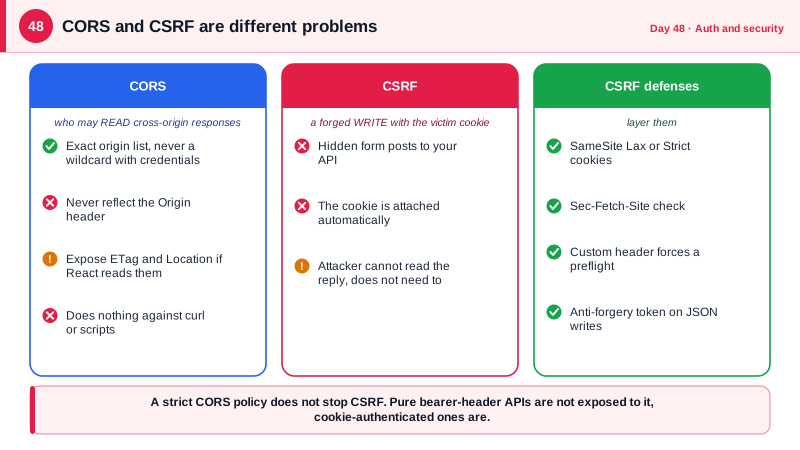
The same-origin policy is a browser rule that stops a page on one origin from reading responses from another origin. CORS, Cross-Origin Resource Sharing, is the mechanism by which a server relaxes that rule for specific origins. It is widely misunderstood as a security feature of the API. It is not: it protects users' browsers from other websites reading their data, it does nothing against curl, scripts, or attackers, and a misconfigured CORS policy weakens protection rather than adding it. When your React app at app.example.com calls api.example.com, the browser sends an Origin header, and the API answers with Access-Control-Allow-Origin naming the allowed origin. For requests with custom headers or methods such as PUT or JSON content, the browser first sends an OPTIONS preflight asking permission.
The rules of safe configuration are few. List exact origins, including scheme and port, and never reflect whatever Origin the request carries, which turns the policy into allow everyone. Never combine a wildcard with credentials; browsers forbid it, and code that dynamically echoes the origin to work around that restriction reintroduces the hole. Allow only the methods and headers you need, expose only headers your client must read, as Day 26 showed for ETag, and set Vary Origin when the value depends on the request. In ASP.NET Core, place UseCors after routing and before authentication and authorization, so that preflights are answered without needing credentials. If your architecture is a BFF on one origin, you need no CORS at all, which is one reason to prefer it.
CSRF, cross-site request forgery, is a different attack that CORS does not stop. If your API authenticates with a cookie, the browser attaches it to any request to your site, including ones initiated by a form or image on a malicious page. The attacker cannot read the response, but does not need to: a POST that changes an email address or transfers funds happens on the server regardless. The classic proof is a hidden form on the attacker's page that submits itself. The defenses are layered. SameSite Lax or Strict cookies stop the cookie from being sent on most cross-site requests. Checking the Origin or Sec-Fetch-Site request header, which browsers set and pages cannot forge, lets the server reject cross-site state-changing requests directly. Requiring a custom header, as in Day 46, forces a preflight. And anti-forgery tokens add a per-session secret that a cross-site page cannot know.
Match the defense to the authentication method. APIs that authenticate solely with an Authorization header bearing a token are not exposed to CSRF, because the browser does not attach that header automatically. Cookie-authenticated APIs are, and for a SPA the recommended anti-forgery pattern is the double-submit or synchronizer token: the server issues a token readable by JavaScript in a separate cookie or endpoint response, and the React code echoes it in a request header, which the server verifies against the encrypted value tied to the session. ASP.NET Core's IAntiforgery service implements this, and since .NET 8 it is integrated with minimal APIs. The full theory of these browser mechanisms, including preflight rules and SameSite in detail, is covered in the Browser Security course elsewhere in this hub.
| Topic | Key rule | Common mistake |
|---|---|---|
| CORS allowed origins | Exact list of origins | Reflecting the request Origin, or using a wildcard with credentials |
| CORS purpose | Lets specific sites read responses | Treating it as API access control |
| Preflight | Server must answer OPTIONS with allowed methods and headers | Blocking OPTIONS with authentication |
| CSRF exposure | Cookie-authenticated, state-changing requests | Assuming CORS blocks it |
| SameSite cookie | Lax or Strict blocks most cross-site sends | Relying on it alone for old browsers or same-site attackers |
| Anti-forgery token | Per-session secret echoed in a header | Not validating it on every unsafe method |
Worked Example: A Tight CORS Policy, a Fetch Metadata Check and an Anti-Forgery Header
The first block configures CORS for a split-origin deployment. The second adds a Fetch Metadata guard against CSRF. The third uses ASP.NET Core anti-forgery for a cookie-authenticated SPA, with the React side.
// CORS: exact origins from configuration, only what the client needs.
var allowed = builder.Configuration.GetSection("Cors:Origins").Get<string[]>() ?? [];   // e.g. https://app.example.com
builder.Services.AddCors(o => o.AddPolicy("spa", p => p
    .WithOrigins(allowed)                                  // never AllowAnyOrigin together with credentials
    .WithMethods("GET", "POST", "PUT", "PATCH", "DELETE")
    .WithHeaders("Content-Type", "If-Match", "X-XSRF-TOKEN")
    .WithExposedHeaders("ETag", "Location")
    .AllowCredentials()
    .SetPreflightMaxAge(TimeSpan.FromMinutes(10))));

var app = builder.Build();
app.UseRouting();
app.UseCors("spa");                                        // before authentication so preflights succeed
app.UseAuthentication();
app.UseAuthorization();// Fetch Metadata: browsers set Sec-Fetch-Site and pages cannot forge it. Reject cross-site unsafe requests.
app.Use(async (ctx, next) =>
{
var unsafeMethod = !HttpMethods.IsGet(ctx.Request.Method) && !HttpMethods.IsHead(ctx.Request.Method)
&& !HttpMethods.IsOptions(ctx.Request.Method);
var site = ctx.Request.Headers["Sec-Fetch-Site"].ToString();
// "same-origin" and "none" (user-initiated) are fine. Reject "cross-site" for cookie-auth writes.
// Behind a BFF on one origin you can be stricter and also reject "same-site", which would include
// sibling subdomains you may not control. In a split-origin setup, legitimate calls are same-site.
if (unsafeMethod && site == "cross-site")
{
ctx.Response.StatusCode = StatusCodes.Status403Forbidden;
return;
}
await next();
});// Anti-forgery for a cookie-authenticated SPA.
builder.Services.AddAntiforgery(o =>
{
o.HeaderName = "X-XSRF-TOKEN";
o.Cookie.Name = "__Host-xsrf"; o.Cookie.SecurePolicy = CookieSecurePolicy.Always;
});
app.UseAntiforgery();
// The SPA calls this once after sign-in and on 400s to obtain a request token.
app.MapGet("/api/antiforgery", (IAntiforgery af, HttpContext ctx) =>
{
var tokens = af.GetAndStoreTokens(ctx);
return Results.Ok(new { token = tokens.RequestToken });
}).RequireAuthorization();
// Minimal APIs validate tokens automatically only for form-bound endpoints, not JSON ones.
// For JSON APIs, validate explicitly on every unsafe method with a filter on the group.
var api = app.MapGroup("/api").RequireAuthorization().AddEndpointFilter(async (ctx, next) =>
{
var http = ctx.HttpContext;
if (!HttpMethods.IsGet(http.Request.Method) && !HttpMethods.IsHead(http.Request.Method))
{
try { await http.RequestServices.GetRequiredService<IAntiforgery>().ValidateRequestAsync(http); }
catch (AntiforgeryValidationException) { return Results.Problem("Invalid anti-forgery token.", statusCode: 400); }
}
return await next(ctx);
});
api.MapPost("/notes", CreateNote);// React: fetch the token once, send it on every unsafe request.
let csrfToken: string | undefined;
async function csrf() {
csrfToken ??= (await (await fetch('/api/antiforgery', { credentials: 'include' })).json()).token;
return csrfToken;
}
export async function apiFetch(url: string, init: RequestInit = {}) {
const method = (init.method ?? 'GET').toUpperCase();
const headers = new Headers(init.headers);
if (method !== 'GET' && method !== 'HEAD') headers.set('X-XSRF-TOKEN', await csrf());
return fetch(url, { ...init, headers, credentials: 'include' });
}To prove the defenses work, write a test that sends a POST with the session cookie but with Sec-Fetch-Site set to cross-site and asserts a 403, and another that omits the anti-forgery header on a JSON POST and asserts a 400. Also test CORS directly with curl using a fabricated Origin header and check that the response carries no Access-Control-Allow-Origin for an origin outside the list.
Real-World Examples
- In 2008, Princeton researchers William Zeller and Edward Felten published Cross-Site Request Forgeries: Exploitation and Prevention, demonstrating working CSRF attacks against ING Direct, YouTube, MetaFilter, and the New York Times website, including one that could transfer money out of a bank account. The paper helped drive the adoption of anti-forgery tokens as a default in web frameworks.
- Fetch Metadata request headers, including Sec-Fetch-Site, shipped in Chrome 76 in 2019 and have since been adopted by other major browsers. Google's own engineers advocate a resource isolation policy built on them, rejecting cross-site requests to endpoints that are not meant to be embedded, which is the check implemented above.
Review Questions & Answers
No. CORS controls whether a page on another origin may read the response, but the browser still sends the request, including cookies for simple requests like a form post, and the server still executes it. CSRF is the state-changing effect, which needs its own defenses such as SameSite cookies, header checks, and anti-forgery tokens.
It effectively allows every website to make credentialed cross-origin requests and read the responses, so a malicious page can fetch a logged-in user's private data from your API using their cookies. A wildcard is forbidden with credentials precisely because that would be unsafe, and echoing the origin is the same hole in disguise. Only origins on an explicit list should ever be allowed.
The browser attaches cookies automatically to any request to a site, but it never attaches an Authorization header on its own, so a malicious page cannot make the victim's browser send one. The attacker would need the token itself, which is a different attack, such as XSS or theft. Cookie-authenticated APIs therefore need CSRF defenses, and header-token APIs generally do not.
The server issues a per-session secret value that legitimate JavaScript on your origin can read and send in a request header, while an attacker's page on another origin cannot read it because of the same-origin policy and cannot add custom headers without a preflight. The server rejects unsafe requests lacking a valid matching token, so a forged request fails.